August 2026

AI model routing for businesses choosing the right AI model for every task
Artificial Intelligence

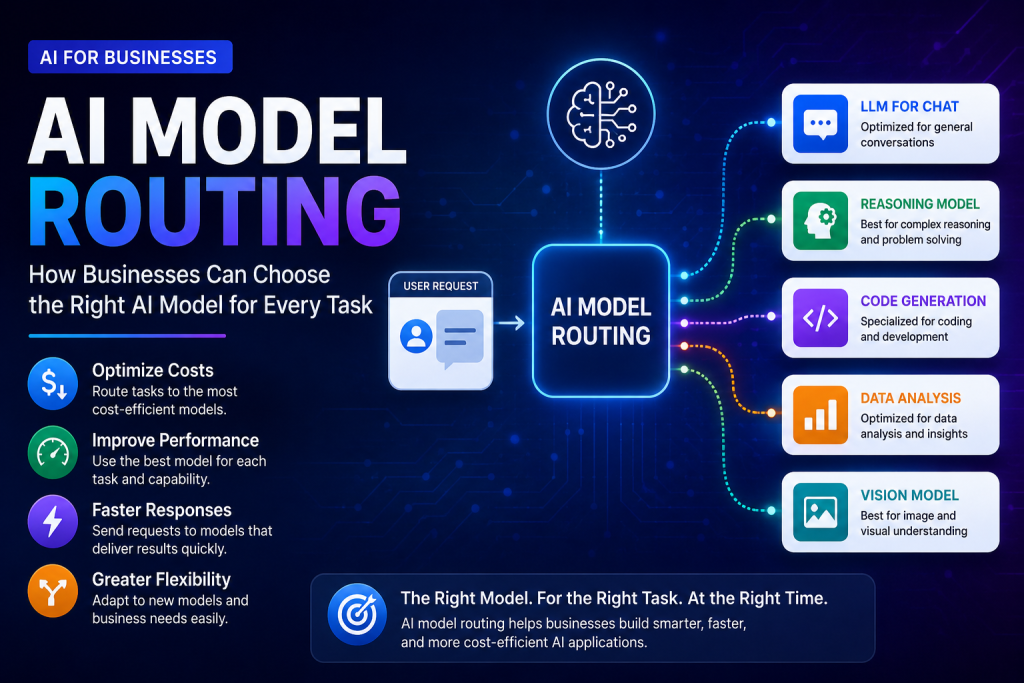
AI Model Routing: How Businesses Can Choose the Right AI Model for Every Task

Introduction Businesses are increasingly using artificial intelligence for customer support, content creation, data analysis, software development, and decision-making. However, not every AI task requires the same type of model. Different AI models can vary in capability, speed, cost, and specialization. Using a single AI model for every task can increase costs and may not always provide the best balance between performance and efficiency. As organizations adopt multiple AI models, they need a smarter way to decide which model should handle each request. AI model routing helps businesses direct AI tasks to the most suitable model based on factors such as complexity, cost, speed, capability, and business requirements. This approach can help organizations improve performance while using AI resources more efficiently. What Is AI Model Routing? AI model routing is the process of directing an AI request to the most suitable model based on the requirements of a specific task. Instead of sending every request to the same model, an AI system can evaluate factors such as task complexity, required accuracy, response speed, cost, and model capabilities. Why One AI Model Is Not Always Enough AI models are designed with different strengths. Some models may be better for complex reasoning, while others may provide faster responses, lower costs, coding capabilities, or multimodal features. Using one model for every situation can therefore be inefficient. How AI Model Routing Works An AI model routing system analyzes the requirements of an incoming request and selects an appropriate model. Simple tasks may be directed to efficient models, while more complex tasks can be routed to advanced models with stronger reasoning or specialized capabilities. Key Factors Used in Model Selection AI model routing can consider factors such as task type, complexity, expected output quality, response time, cost, available models, and specific business requirements. These factors help determine which model is the most suitable for a particular request. By matching AI workloads with appropriate models, businesses can create more flexible AI systems that balance performance, speed, and cost. Why AI Model Routing Is Becoming Important for Businesses As businesses adopt more AI tools and models, managing which model is used for each task is becoming increasingly important. Organizations may use different models for language processing, reasoning, coding, data analysis, and multimodal applications, creating a need for more efficient AI model management. Growing Number of Available AI Models Businesses now have access to a growing range of AI models with different capabilities, performance levels, and pricing structures. Choosing the same model for every workload can limit flexibility and increase unnecessary costs. Balancing Performance and Cost More advanced AI models can provide stronger capabilities for complex tasks, but they may also require more computing resources or have higher usage costs. AI model routing can help businesses balance performance requirements with the cost of AI operations. Improving Response Speed Some AI applications require fast responses, such as customer support systems and real-time business tools. Routing suitable requests to faster models can help improve responsiveness while reserving more powerful models for tasks that require advanced capabilities. Supporting Multiple AI Use Cases A single organization may use AI for many different purposes, including content processing, software development, analytics, customer service, and internal automation. AI model routing can help manage these diverse workloads more effectively. How AI Model Routing Works in Practice In practice, AI model routing works by evaluating an incoming request and determining which available model is most suitable for handling it. The routing decision can be based on predefined rules, performance requirements, cost limits, or automated evaluation systems. Step 1: Understanding the Request The AI system first analyzes the incoming request to understand its type and requirements. For example, a request may involve summarization, reasoning, coding, data analysis, image understanding, or another specialized task. Step 2: Evaluating Task Requirements The routing system can evaluate factors such as task complexity, required response speed, expected accuracy, available budget, and security or privacy requirements. These factors help determine the level of AI capability needed. Step 3: Selecting the Appropriate Model Based on the evaluation, the system selects a suitable AI model. Simple or repetitive tasks may be handled by smaller and more efficient models, while complex reasoning or specialized tasks may be directed to more advanced models. Step 4: Processing the Request The selected AI model processes the request and generates a response. The result can then be returned directly to the user or passed to another application, workflow, or business system. Step 5: Monitoring Results and Performance Businesses can monitor response quality, processing time, model usage, and cost after requests are completed. This information can help organizations improve routing decisions and optimize their AI systems over time. By continuously evaluating AI workloads and model performance, businesses can make AI model routing more accurate, efficient, and aligned with changing business requirements. Key Benefits of AI Model Routing for Businesses AI model routing can help businesses build more flexible and efficient AI systems. By selecting models based on the requirements of each task, organizations can improve how they use AI resources while maintaining the level of performance required for different business applications. 1. Better Cost Optimization Not every request requires the most advanced or expensive AI model. AI model routing can direct simpler tasks to efficient models and reserve more powerful models for complex workloads, helping businesses reduce unnecessary AI spending. 2. Improved Performance Different AI models have different strengths. Routing tasks to models that are better suited for specific capabilities, such as reasoning, coding, language processing, or multimodal analysis, can help improve overall application performance. 3. Faster Response Times Businesses can route time-sensitive requests to models that provide faster responses. This can improve the user experience for applications such as customer support, internal tools, and real-time AI services. 4. Greater Flexibility A multi-model approach allows organizations to adapt as AI technologies change. Businesses can add, replace, or evaluate models without redesigning their entire AI strategy around a single provider or model. 5. Better AI Resource Management AI model routing provides greater control

AI cost management for enterprises to monitor and optimize AI spending
Artificial Intelligence

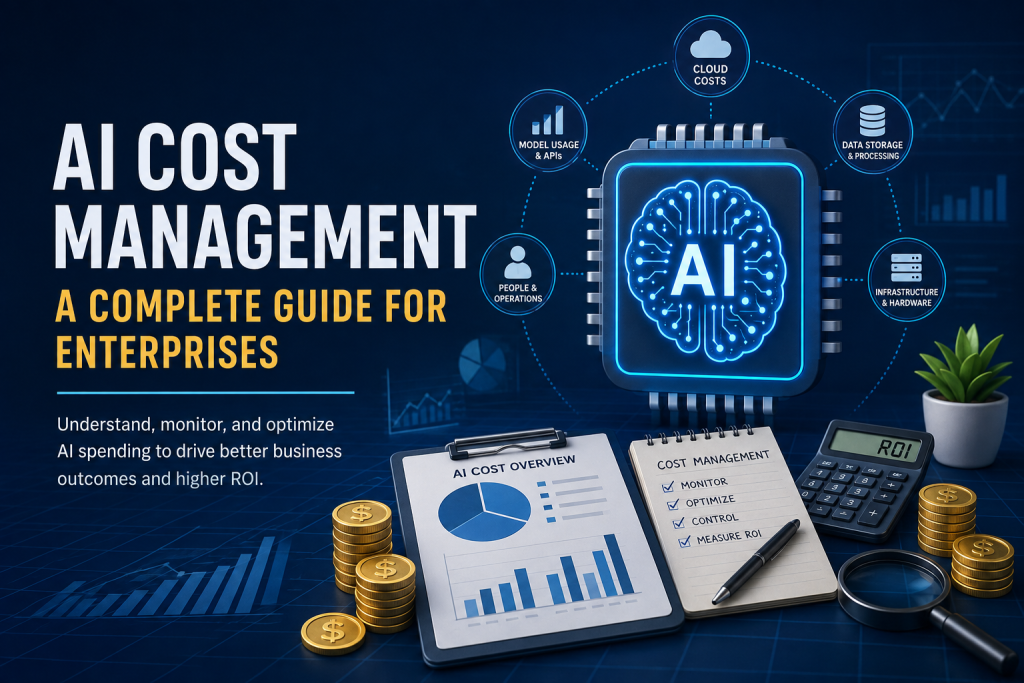
The Hidden Cost of AI: How Businesses Can Control AI Spending in 2026

Introduction Artificial intelligence is becoming an increasingly important part of modern business operations. Companies are using AI for automation, data analysis, customer support, software development, content creation, and decision-making. However, as AI adoption grows, so does the cost of running and scaling AI systems. The cost of AI is not always limited to purchasing a software subscription. Businesses may also need to consider AI model usage, token consumption, API requests, inference infrastructure, data processing, specialized hardware, and the cost of managing AI systems at scale. AI cost management helps organizations understand where their AI spending is coming from and how efficiently their resources are being used. By monitoring costs, optimizing AI workloads, and connecting spending with business outcomes, companies can work toward improving the return on their AI investments. What Is AI Cost Management? AI cost management is the process of tracking, understanding, and controlling the expenses associated with developing, deploying, and using artificial intelligence systems. It helps businesses identify where AI spending occurs and make informed decisions about how AI resources are used. Understanding AI Spending AI spending can come from several sources, including AI software subscriptions, API usage, model inference, data storage, cloud infrastructure, specialized hardware, and the people required to manage AI systems. As usage increases, these costs can become more difficult to monitor. Why Traditional Cost Management Is Not Enough Traditional IT and cloud cost management focuses mainly on infrastructure and software resources. AI systems can introduce additional cost factors because usage may depend on model complexity, the amount of data processed, the number of requests, and how frequently AI services are used. The Role of AI FinOps AI FinOps applies financial management principles to AI operations. It encourages teams to monitor AI spending, improve visibility, optimize resource usage, and connect technology costs with measurable business value. By understanding how and where AI resources are consumed, businesses can build a more effective AI cost management strategy and reduce unnecessary spending as their AI adoption grows. The Hidden Costs of Enterprise AI The cost of enterprise AI can increase in ways that are not always visible at the beginning of an AI project. A company may start with a small number of users or limited workloads, but expenses can grow as more employees, applications, data, and AI models are added. 1. AI Model and API Costs Many businesses access AI capabilities through APIs or hosted AI platforms. Costs can depend on the number of requests, the amount of information processed, and the type of AI model being used. High-volume workloads can therefore create significant expenses over time. 2. AI Inference Costs Every time an AI model processes a request and generates an output, computing resources are required. As AI applications scale, inference can become a major operational expense, particularly for systems that require frequent or real-time responses. 3. Data Processing and Storage AI systems often require large amounts of data for training, testing, retrieval, and ongoing operations. Collecting, processing, storing, and transferring data can add additional costs that may not be obvious when an AI project first begins. 4. Infrastructure and Hardware Organizations that run AI workloads on dedicated infrastructure may need specialized computing resources. Cloud computing charges, GPUs, AI accelerators, networking, and supporting infrastructure can all contribute to the total cost of AI operations. 5. Integration and Maintenance AI systems also require integration with existing business applications, regular monitoring, updates, testing, security controls, and ongoing maintenance. These operational requirements can create costs beyond the initial implementation of an AI solution. Why AI Spending Can Grow So Quickly AI spending can grow rapidly because the cost of an AI system often increases with usage. A small pilot project may appear affordable, but expenses can rise as more users, applications, requests, and workloads are added across the organization. Increasing AI Usage As employees begin using AI tools more frequently, the number of requests and the amount of data processed can increase significantly. Without clear visibility into usage patterns, businesses may not immediately notice how quickly these costs are growing. Using More Expensive Models Than Necessary Not every AI task requires the most advanced or expensive model. Using high-cost models for simple tasks can increase AI spending without providing a proportional improvement in business results. Uncontrolled AI Experiments Different teams may independently test AI tools, models, and platforms. While experimentation can encourage innovation, uncoordinated usage can create duplicate subscriptions, overlapping tools, and unnecessary spending. Rapid Growth in AI Applications Organizations may gradually add AI capabilities to customer support, internal operations, software development, analytics, marketing, and other business functions. Each new application can introduce additional infrastructure, integration, and operational costs. Lack of Cost Visibility AI costs can be spread across cloud services, APIs, software platforms, infrastructure, and different business teams. Without centralized visibility, it can be difficult to understand the total cost of AI and identify opportunities for optimization. How Businesses Can Control AI Spending Controlling AI spending does not necessarily mean reducing AI adoption. The goal of AI cost management is to help businesses use artificial intelligence efficiently while ensuring that technology investments continue to support meaningful business outcomes. 1. Monitor AI Usage and Costs Businesses should track how AI tools, models, APIs, and infrastructure are being used. Monitoring usage patterns can help organizations identify unexpected increases in spending and understand which workloads are generating the highest costs. 2. Choose the Right AI Model for Each Task Different AI models have different capabilities and costs. Organizations can evaluate whether a task requires an advanced model or whether a smaller and more efficient model can provide an acceptable result at a lower cost. 3. Set Budgets and Usage Limits Setting budgets, spending alerts, and usage limits can help prevent unexpected AI expenses. Teams can define appropriate limits for specific projects and review spending regularly as AI workloads grow. 4. Reduce Unnecessary AI Requests Optimizing how applications interact with AI systems can reduce unnecessary requests and repeated processing. Techniques such as improving workflows, reusing appropriate results, and avoiding duplicate requests

Cloud computing technology helping businesses with scalability, flexibility and digital transformation
Technology

How Cloud Computing Is Transforming Businesses

Introduction Cloud computing is transforming the way businesses store data, manage applications, and access technology. Instead of relying only on physical servers and local infrastructure, organizations can use cloud-based services to access computing resources through the internet. Cloud computing for businesses can provide greater flexibility, scalability, and accessibility. Companies can use cloud services to support remote work, improve collaboration, manage data, and adapt technology resources according to changing business needs. As digital transformation continues to influence modern industries, cloud computing has become an important technology for businesses of different sizes. When implemented effectively, cloud solutions can help organizations improve efficiency while supporting innovation and future growth. What Is Cloud Computing? Cloud computing refers to the delivery of computing services through the internet. Instead of owning and maintaining all technology infrastructure locally, businesses can access services such as storage, servers, databases, software, and computing power through cloud providers. Cloud Storage Cloud storage allows businesses to store and access data through online services rather than relying only on local devices or physical storage systems. This can make important files and information easier to access from different locations. Cloud-Based Software Cloud-based software allows users to access applications through the internet. Businesses can use these tools for communication, project management, customer relationships, accounting, and many other daily operations. Cloud Infrastructure Cloud infrastructure provides computing resources such as servers, networking, and processing power through online services. Businesses can use these resources without managing all physical hardware themselves. By providing technology resources on demand, cloud computing can give businesses more flexibility in how they use, manage, and scale their digital systems. How Cloud Computing Benefits Businesses Cloud computing can provide businesses with greater flexibility and access to technology resources without requiring every system to be managed through local infrastructure. Cloud-based services can support changing business needs and make digital tools more accessible. 1. Scalability and Flexibility Cloud computing allows businesses to adjust technology resources according to their needs. Organizations can increase or reduce storage, computing power, and other services as their requirements change. 2. Improved Collaboration Cloud-based tools can help employees access shared files, communicate, and work together from different locations. This can support collaboration between teams and make remote or hybrid work more flexible. 3. Easier Access to Data Cloud services can allow authorized users to access important files and business information through the internet. This can make data more accessible while supporting employees who work from different locations. 4. Reduced Infrastructure Management Using cloud services can reduce the need for businesses to manage every physical server and technology resource internally. This can allow organizations to focus more on their business operations and strategic technology goals. Key Business Uses of Cloud Computing Cloud computing supports many different business activities by providing access to digital tools, storage, computing resources, and online services. Organizations can use cloud technology to improve daily operations and support long-term digital transformation. Cloud Storage and Data Management Businesses can use cloud storage to organize, store, and access important files and information. Centralized cloud-based systems can make it easier for authorized teams to work with shared business data. Remote and Hybrid Work Cloud-based applications can support employees who work from different locations. Teams can access shared documents, communication tools, and business systems through secure online platforms. Business Software and Applications Many organizations use cloud-based software for activities such as customer management, accounting, communication, project management, and data analysis. Online software services can provide businesses with flexible access to important tools. Backup and Disaster Recovery Cloud services can support data backup and recovery planning by storing copies of important information in separate digital environments. Effective backup strategies can help businesses recover information after certain technical problems or unexpected disruptions. Supporting Business Growth Cloud computing can help businesses scale their technology resources as their operations grow. Instead of making major infrastructure changes for every increase in demand, organizations can often adjust cloud services according to changing requirements. Challenges of Cloud Computing for Businesses Although cloud computing offers many advantages, businesses should also understand the challenges involved in moving systems and data to cloud-based environments. Successful cloud adoption requires careful planning, security practices, and effective management. Data Security and Privacy Businesses need to protect sensitive information when using cloud services. Strong access controls, secure configurations, and responsible data management can help reduce security and privacy risks. Internet Dependency Many cloud-based services depend on reliable internet access. Connectivity problems can affect access to important applications, files, and business systems. Managing Cloud Costs Cloud services can provide flexible pricing, but costs may increase if resources are not monitored and managed carefully. Businesses should understand how they use cloud services and review their technology expenses regularly. Migration and Integration Challenges Moving existing applications, data, and business processes to the cloud can require careful planning. Organizations may need to ensure that cloud services work effectively with their existing systems and workflows. Vendor Dependence Businesses can become dependent on specific cloud providers and their services. Understanding service agreements, data portability, and backup options can help organizations make more informed technology decisions. The Future of Cloud Computing in Business Cloud computing is expected to remain an important part of digital transformation as businesses continue to adopt more flexible and connected technologies. Future cloud services may provide greater automation, improved scalability, and more advanced tools for managing business operations. Technologies such as artificial intelligence, data analytics, automation, and edge computing may become more closely connected with cloud platforms. This can help businesses process information more efficiently and develop new digital services. Smarter Cloud Services Future cloud platforms may use artificial intelligence and automation to help businesses manage resources, analyze data, and identify opportunities for improving operations. These technologies could make cloud environments more intelligent and responsive. Greater Flexibility and Innovation Cloud computing can continue to support innovation by giving businesses access to technology resources without requiring every organization to build and manage complex infrastructure. This flexibility can help companies experiment with new ideas and adapt to changing market needs. Conclusion Cloud computing

Technology

The Importance of Cybersecurity Awareness in the Digital Age

Introduction Cybersecurity awareness has become increasingly important as people rely more on the internet for communication, education, banking, shopping, and work. Personal information and digital accounts can be exposed to risks when users are unaware of common cyber threats and unsafe online practices. Cyber threats can include phishing attempts, fraudulent websites, weak passwords, social engineering, and other methods used to trick users or gain unauthorized access to information. Understanding these risks can help individuals recognize suspicious activity and make safer decisions online. Cybersecurity awareness is not only important for technology professionals. Every internet user can benefit from learning basic digital safety practices, protecting personal information, and staying alert to potential online threats. What Is Cybersecurity Awareness? Cybersecurity awareness refers to understanding common online threats and knowing how to follow safe digital practices. It helps individuals recognize potential risks and take appropriate steps to protect their personal information, devices, and online accounts. Understanding Common Cyber Threats Common cyber threats can include phishing messages, fake websites, suspicious links, weak passwords, and social engineering attempts. Awareness helps users identify warning signs and avoid actions that could expose their information. The Role of Safe Online Behavior Safe online behavior includes using strong passwords, protecting personal information, verifying suspicious messages, and being careful when clicking links or downloading files. Small security habits can reduce the risk of many common online problems. Why Awareness Matters Technology alone cannot prevent every cybersecurity risk. Users also play an important role in protecting themselves because many cyber threats rely on deception or mistakes that encourage people to share information or take unsafe actions. By understanding common cyber risks and following responsible digital practices, individuals can make more informed decisions and improve their overall online security. Common Cyber Threats in the Digital Age As digital technology becomes a larger part of everyday life, internet users may encounter different types of cyber threats. Understanding these common risks is an important part of cybersecurity awareness and can help people recognize suspicious situations before making unsafe decisions. 1. Phishing Scams Phishing scams often use emails, messages, or websites that appear trustworthy to trick users into sharing sensitive information. Cybercriminals may impersonate banks, companies, or other organizations to create a sense of urgency and encourage users to act quickly. 2. Weak Passwords and Account Security Weak or reused passwords can increase the risk of unauthorized access to online accounts. Using unique, strong passwords and enabling additional account security features can help protect important personal and professional information. 3. Suspicious Links and Websites Some websites and links are designed to mislead users or collect personal information. Before entering passwords, payment details, or other sensitive data, users should carefully check whether a website is legitimate and trustworthy. 4. Social Engineering Social engineering involves manipulating people into sharing information or taking actions that may create security risks. These attempts often rely on trust, fear, urgency, or curiosity rather than technical methods alone. 5. Unsafe Downloads Downloading files or applications from untrusted sources can expose devices to security risks. Users should download software and files only from reliable sources and remain cautious about unexpected attachments or unfamiliar downloads. How Cybersecurity Awareness Improves Digital Safety Cybersecurity awareness helps people make safer decisions while using the internet and digital devices. By understanding common threats and warning signs, users can reduce the chances of becoming victims of scams, account theft, or other online security problems. 1. Helps Users Recognize Suspicious Activity Awareness helps users identify unusual emails, messages, links, and websites before interacting with them. Recognizing warning signs can prevent users from sharing sensitive information with untrusted sources. 2. Encourages Stronger Account Protection Cybersecurity awareness encourages people to use stronger and unique passwords for important accounts. It also promotes the use of additional security features, such as multi-factor authentication, to provide better protection. 3. Protects Personal Information Understanding digital privacy helps users think carefully before sharing personal information online. Awareness can encourage people to review privacy settings and avoid sharing sensitive details unnecessarily. 4. Reduces the Risk of Online Scams People who understand common scam techniques are more likely to question unexpected requests, urgent messages, and offers that seem too good to be true. Taking time to verify information can reduce the risk of falling for online scams. 5. Promotes Responsible Digital Habits Cybersecurity awareness encourages regular software updates, safe browsing, careful downloading, and responsible use of online services. These habits can contribute to better long-term digital safety. Best Practices for Cybersecurity Awareness Developing good cybersecurity habits can help individuals reduce common online risks. Simple and consistent security practices are often an important part of protecting digital accounts, personal information, and devices. Use Strong and Unique Passwords Use a different password for each important account and avoid easily guessed information. Strong passwords can help reduce the risk that one compromised account will affect multiple services. Enable Multi-Factor Authentication Multi-factor authentication adds an extra layer of account protection by requiring an additional verification step. This can help protect accounts even if a password becomes known to someone else. Verify Messages and Links Be cautious when receiving unexpected emails, messages, or links. Before responding or entering personal information, verify the sender and check whether the request is legitimate. Keep Software Updated Regular software updates can improve security and fix known issues. Keeping operating systems, browsers, and important applications updated is an important part of maintaining digital safety. Protect Personal Information Share personal and sensitive information only when necessary and through trusted services. Reviewing privacy settings can also help users understand how their information is collected and shared online. Challenges of Building Cybersecurity Awareness Although cybersecurity awareness is important, developing safe digital habits can be challenging. Cyber threats continue to change, and users may not always recognize new scams or understand the risks associated with everyday online activities. Rapidly Changing Cyber Threats Cybercriminals continuously change their methods and may use new technologies or techniques to make scams appear more convincing. Staying informed about common threats can help users recognize changing risks. Lack of

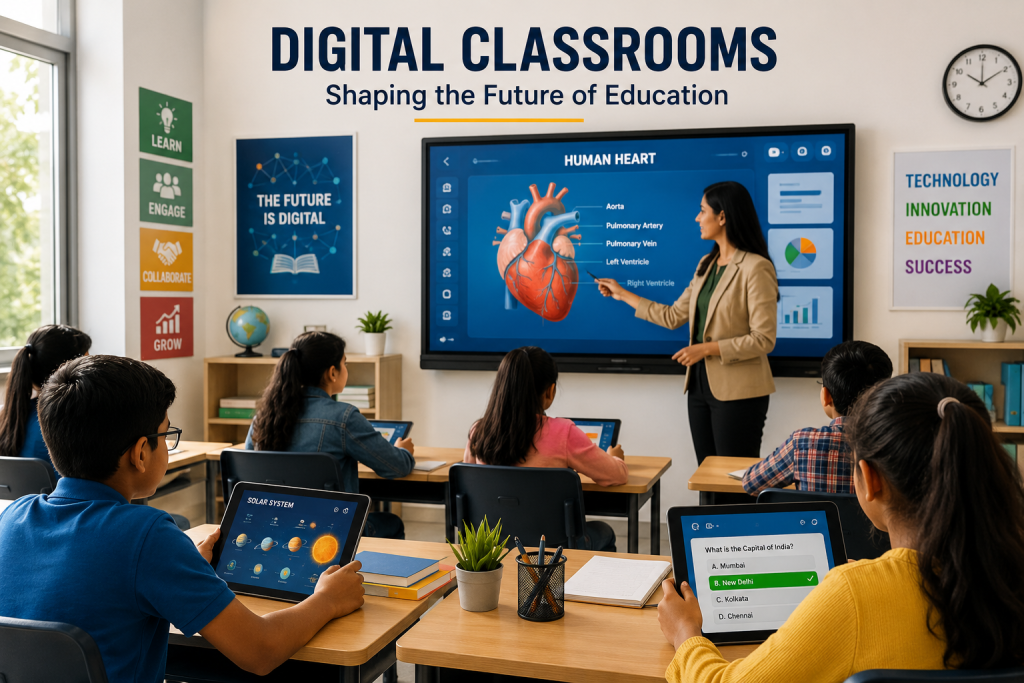
Students learning in a modern digital classroom using interactive technology
Education

How Digital Classrooms Are Changing Modern Education

Introduction Digital classrooms are changing the way students and teachers interact with educational content. By combining digital devices, online platforms, interactive tools, and multimedia resources, modern classrooms can create more flexible and engaging learning experiences. Digital classrooms allow students to access lessons, assignments, videos, presentations, and learning materials more easily. Teachers can also use technology to encourage collaboration, provide feedback, and adapt learning activities to different student needs. As educational technology continues to develop, digital classrooms are becoming an important part of modern education. When used effectively, they can support interactive learning, improve access to educational resources, and prepare students for an increasingly digital world. What Are Digital Classrooms? Digital classrooms are learning environments that use technology to support teaching, communication, collaboration, and access to educational resources. They may include computers, tablets, interactive displays, learning management systems, online platforms, and digital content. Digital Learning Tools Digital classrooms use a variety of learning tools to make educational content more accessible and interactive. These tools can include presentation software, educational applications, online quizzes, videos, simulations, and digital assignments. Interactive Classroom Technology Interactive technologies can help students participate more actively in lessons. Smart boards, shared digital displays, polls, quizzes, and collaborative platforms can make classroom activities more engaging and encourage greater student involvement. Access to Online Learning Resources Digital classrooms can provide students with easier access to online educational resources. Learners may be able to review lessons, download study materials, watch educational videos, and access assignments from different locations. By combining traditional teaching methods with digital tools, classrooms can become more flexible and responsive to the learning needs of modern students. How Digital Classrooms Improve Learning Digital classrooms can improve learning by making educational content more interactive, accessible, and flexible. Technology allows students to explore information through different formats while giving teachers additional ways to explain concepts and support learning. 1. Interactive Learning Experiences Digital tools can make lessons more interactive through videos, quizzes, simulations, presentations, and collaborative activities. Instead of only listening to lectures, students can actively participate and engage with educational content. 2. Personalized Learning Support Digital platforms can provide students with learning materials and activities based on their progress and individual needs. Teachers can also use digital tools to provide additional resources and support for students who require more practice. 3. Improved Collaboration Online collaboration tools can help students work together on assignments, projects, and discussions. Shared documents and digital platforms allow learners to communicate and contribute even when they are not sitting in the same physical location. 4. Easy Access to Learning Resources Digital classrooms can give students access to educational resources beyond traditional textbooks. Videos, articles, online libraries, presentations, and interactive activities can be available whenever students need additional support. Benefits of Digital Classrooms in Modern Education Digital classrooms can provide several benefits for students and teachers by making education more flexible, interactive, and accessible. When technology is used effectively, it can support both classroom learning and independent study. Greater Flexibility in Learning Digital learning tools allow students to access educational materials and complete certain learning activities from different locations. Recorded lessons and online resources can also help learners review important concepts at their own pace. Better Student Engagement Interactive tools such as quizzes, videos, simulations, and digital activities can encourage students to participate actively in lessons. Different content formats can also make learning more interesting and engaging. Faster Communication and Feedback Digital platforms can make it easier for teachers and students to communicate, share assignments, and provide feedback. Students may receive updates and guidance more quickly, helping them understand what they need to improve. Support for Personalized Learning Technology can provide students with additional resources and activities based on their learning needs. Learners who need extra practice can access supporting materials, while others can explore more advanced content. Preparation for a Digital Future Using digital tools in education can help students develop important technology and communication skills. These skills can prepare learners for future academic opportunities and workplaces where digital systems are increasingly common. Challenges of Digital Classrooms Although digital classrooms offer many advantages, their implementation can also create challenges. Schools and educators need to consider access to technology, internet connectivity, teacher training, digital distractions, and the effective use of online learning tools. Digital Access and Inequality Not every student has equal access to reliable internet connections, computers, tablets, or other digital devices. Limited access can create unequal learning opportunities and make it difficult for some students to participate fully in digital education. Teacher Training and Digital Skills Teachers need appropriate training and confidence to use digital tools effectively. Technology can support learning best when educators understand how to connect digital resources with clear teaching objectives. Digital Distractions Digital devices can provide access to useful educational resources, but they can also create distractions. Students may need guidance and effective learning routines to stay focused while using technology. Technical Problems Internet issues, software errors, device problems, and compatibility challenges can interrupt digital learning activities. Schools need reliable technical support and suitable infrastructure to reduce these difficulties. Balancing Digital and Traditional Learning Technology should support education rather than completely replace effective teaching methods. Digital classrooms work best when technology is combined with teacher guidance, discussions, reading, practical activities, and meaningful human interaction. The Future of Digital Classrooms The role of digital classrooms is likely to continue growing as educational technology becomes more advanced and accessible. Future classrooms may combine digital tools, artificial intelligence, interactive content, and online platforms to create more flexible and personalized learning experiences. Technologies such as AI, virtual reality, augmented reality, and adaptive learning platforms may become more integrated into modern classrooms. These tools could help teachers provide interactive lessons while giving students more opportunities to explore content in different ways. Smarter and More Personalized Learning Future digital classrooms may use technology to better understand student progress and learning needs. Digital platforms could provide personalized resources, adaptive activities, and additional support based on individual performance. Greater Collaboration and Connectivity Digital technology can make it easier

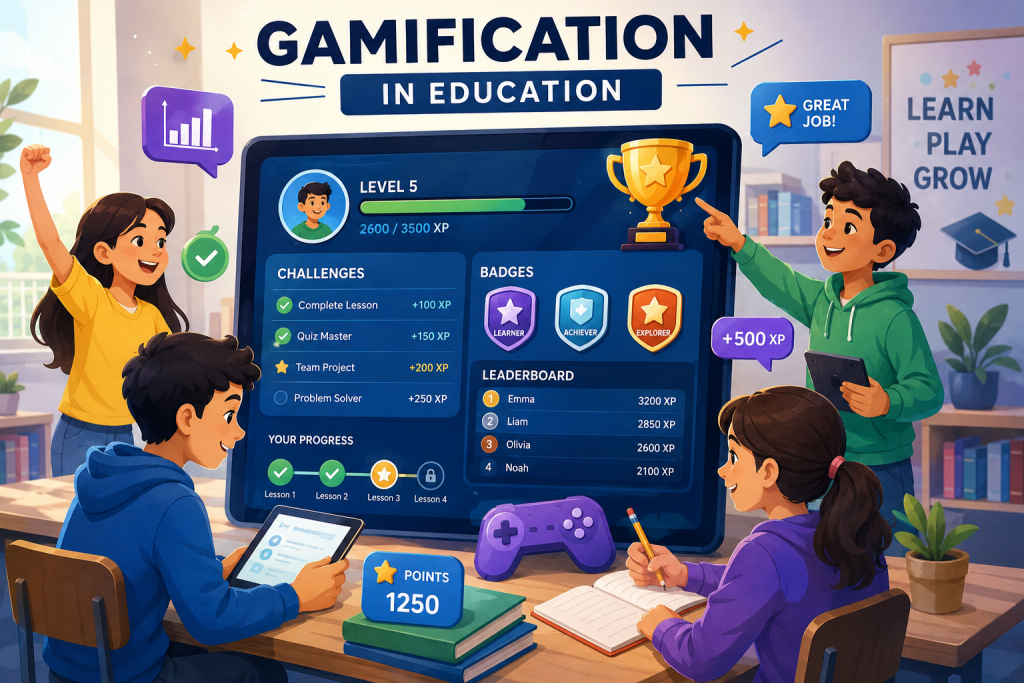
Students using gamification and interactive learning tools in education
Education

The Benefits of Gamification in Education

Introduction Gamification is becoming an increasingly popular approach in education because it can make learning more interactive and engaging. By using game-like elements such as points, badges, levels, challenges, and rewards, educators can encourage students to participate more actively in the learning process. Gamification in education does not mean turning every lesson into a video game. Instead, it involves applying selected game mechanics to educational activities in order to improve motivation, participation, and engagement. When designed effectively, gamified learning can help students stay interested in their educational goals while encouraging problem-solving, collaboration, and continuous progress. However, successful gamification requires meaningful learning objectives and should support education rather than distract students from it. What Is Gamification in Education? Gamification in education refers to the use of game-like elements and mechanics in learning activities. These elements can include points, badges, levels, challenges, rewards, leaderboards, and progress tracking to encourage students to participate and stay motivated. Game Elements Used in Learning Educational gamification can include different game elements depending on the learning goals. Points can reward progress, badges can recognize achievements, and levels can help students see their advancement through a course or learning activity. Challenges and Rewards Challenges can encourage students to apply their knowledge and complete specific learning tasks. Rewards and recognition can provide positive reinforcement when students achieve goals, complete activities, or demonstrate improvement. Progress and Achievement Tracking Gamified learning systems can show students how they are progressing through lessons and activities. Clear progress tracking can help learners understand their goals and encourage them to continue working toward the next level or achievement. By combining educational objectives with selected game mechanics, gamification can create a more interactive learning experience while keeping the focus on meaningful knowledge and skill development. How Gamification Improves Student Engagement Gamification can improve student engagement by making learning activities more interactive, goal-oriented, and rewarding. When students can see their progress and work toward clear achievements, they may feel more motivated to participate actively in the learning process. 1. Increases Motivation Points, rewards, badges, and achievements can provide students with additional motivation to complete learning activities. Clear goals and visible progress can encourage learners to continue working and improving their performance. 2. Encourages Active Participation Gamified activities can encourage students to participate instead of remaining passive learners. Challenges, quizzes, interactive tasks, and team activities can create opportunities for students to engage directly with educational content. 3. Makes Learning More Enjoyable Game-like elements can make educational activities feel more interesting and enjoyable. When learning experiences are engaging, students may be more willing to explore topics and spend time practicing new skills. 4. Provides Immediate Feedback Gamified learning platforms can provide immediate feedback when students complete quizzes, challenges, or activities. Quick feedback helps learners understand their performance and identify areas where they need additional practice. Benefits of Gamification in Education When used effectively, gamification can provide several benefits for students and educators. It can make learning more engaging while encouraging motivation, participation, collaboration, and continuous improvement. Improved Student Motivation Gamified learning can give students clear goals and rewards for completing educational activities. Progress indicators and achievements can encourage learners to stay focused and continue working toward their objectives. Better Learning Engagement Interactive challenges and activities can encourage students to become more involved in lessons. Instead of only listening or reading, learners can actively participate and apply their knowledge. Development of Problem-Solving Skills Educational challenges and game-based activities can encourage students to think critically and solve problems. Learners may need to analyze situations, make decisions, and test different approaches to achieve their goals. Encourages Collaboration Team-based challenges and cooperative activities can help students work together toward shared goals. These experiences can support communication, teamwork, and collaboration skills. Supports Continuous Learning Levels, progress systems, and achievement tracking can encourage students to continue learning over time. Breaking larger educational goals into smaller challenges can make progress feel more manageable and rewarding. Challenges of Gamification in Education Although gamification can make learning more engaging, it also has certain limitations. Educational activities should be designed carefully so that game elements support meaningful learning instead of becoming distractions. Overemphasis on Rewards If students focus only on points, badges, or prizes, they may become more interested in rewards than in understanding the subject. Gamification should encourage genuine learning rather than only competition. Competition and Pressure Leaderboards and competitive activities may motivate some students but create pressure for others. Educators should use competition carefully and provide different ways for students to participate and succeed. Poorly Designed Activities Gamification is most effective when game elements are connected to clear learning objectives. Adding points or badges without meaningful educational activities may not improve student learning. Technology and Accessibility Digital gamification may require devices, internet access, and suitable learning platforms. Limited access to technology can create unequal opportunities for students. Balancing Fun and Learning The main purpose of educational gamification should remain learning and skill development. Game elements should make lessons more engaging without distracting students from important educational goals. The Future of Gamification in Education The use of gamification in education is likely to continue growing as digital learning platforms become more interactive and personalized. Future educational experiences may combine game mechanics with artificial intelligence, adaptive learning, virtual environments, and real-time feedback. Technology can help educators create gamified learning experiences that respond to student progress and learning needs. Instead of using the same activities for every learner, future platforms may provide personalized challenges and learning paths. Personalized Gamified Learning Future gamified learning systems may use student progress and performance data to provide challenges that match individual learning levels. This could help students receive activities that are neither too easy nor unnecessarily difficult. More Interactive Digital Learning Advances in educational technology may introduce more immersive and interactive gamified experiences. Virtual environments, simulations, and collaborative challenges could create new ways for students to explore educational concepts. Conclusion Gamification in education can make learning more engaging, interactive, and motivating by using elements such as challenges, points, badges, progress tracking, and rewards.

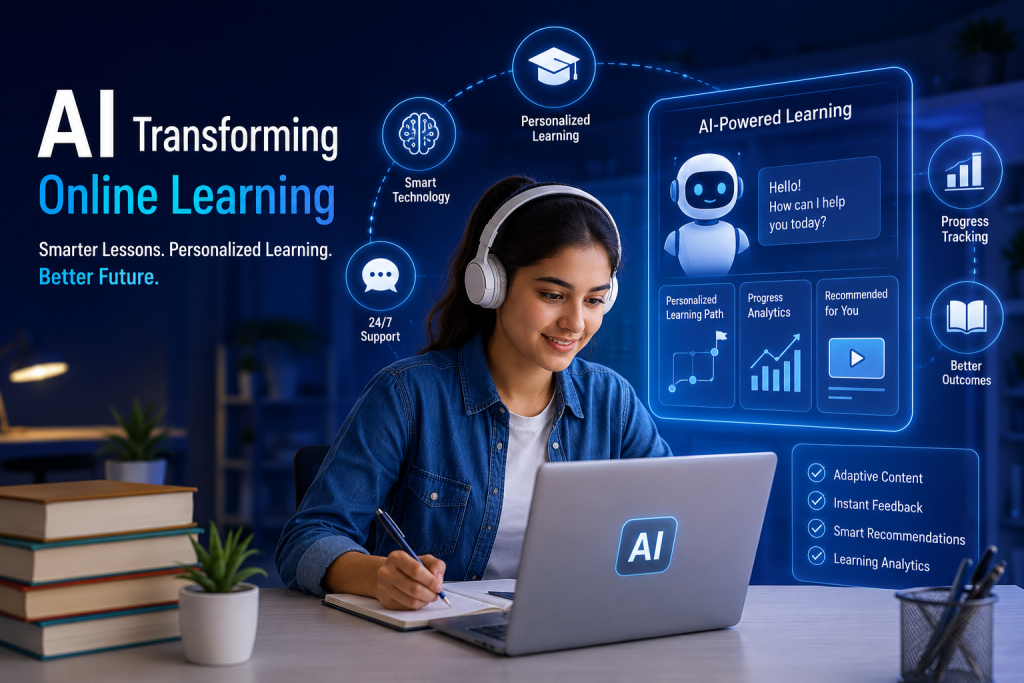
Student using AI-powered tools for personalized online learning
Education

How Artificial Intelligence Is Transforming Online Learning

Introduction Artificial Intelligence is becoming an important part of online education, changing how students access content, receive feedback, and progress through digital courses. AI-powered tools can analyze learning patterns and provide support that is more responsive to individual student needs. AI in online learning can help create personalized learning experiences by recommending relevant lessons, adjusting content difficulty, and identifying areas where students may need additional practice. This can make digital education more flexible and adaptive. As online learning continues to grow, artificial intelligence is creating new opportunities for smarter learning platforms, automated support, adaptive assessments, and personalized educational experiences. However, effective use of AI also requires responsible implementation, reliable data, and meaningful human guidance. What Is AI in Online Learning? AI in online learning refers to the use of artificial intelligence technologies to improve digital education and support students throughout their learning journey. AI-powered systems can analyze student interactions, learning progress, and performance to provide more relevant educational experiences. AI-Powered Learning Platforms AI-powered learning platforms can organize educational content and provide recommendations based on student activity. These systems can help learners discover relevant lessons, practice materials, and resources according to their progress and learning needs. Adaptive Learning Adaptive learning uses technology to adjust educational content according to a student’s performance and progress. If a learner finds a topic difficult, the platform can provide additional explanations, practice activities, or supporting resources. AI-Based Student Support AI-based tools can provide automated support through chatbots, virtual assistants, and intelligent help systems. These tools can answer common questions, guide students toward relevant resources, and provide assistance outside regular classroom hours. By combining data analysis, automation, and personalized recommendations, AI can help online learning platforms create more flexible and responsive learning experiences. How AI Personalizes Online Learning AI can personalize online learning by analyzing how students interact with educational content and identifying their learning patterns, strengths, and areas that may require additional support. This allows digital learning platforms to provide more relevant experiences for individual learners. 1. Personalized Learning Paths AI-powered platforms can recommend lessons and learning activities based on a student’s progress and performance. Instead of following exactly the same path as every other learner, students can receive content that is better suited to their current level and learning needs. 2. Adaptive Content and Difficulty AI systems can adjust the difficulty of learning materials based on student performance. Learners who understand a topic quickly may move forward, while students who need more support can receive additional explanations, examples, and practice activities. 3. Personalized Recommendations AI can recommend relevant videos, articles, exercises, and other learning resources based on a student’s interests and previous activity. These recommendations can help learners discover useful content without spending excessive time searching for it. 4. Identifying Learning Gaps By analyzing assessment results and learning activity, AI can help identify areas where students may be struggling. Teachers and learners can then use this information to focus on specific topics that require additional attention. Benefits of AI in Online Learning AI can provide several benefits for online learners and educators by making digital education more personalized, responsive, and efficient. When used effectively, AI tools can support learning without replacing the important role of teachers and human guidance. Personalized Learning Experiences AI can adapt learning experiences according to student progress, performance, and learning needs. This can help learners receive more relevant content and avoid spending unnecessary time on material they have already mastered. Instant Feedback AI-powered assessment tools can provide quick feedback on quizzes, exercises, and learning activities. Immediate feedback can help students identify mistakes and understand which areas need additional practice. 24/7 Learning Support AI-based chatbots and virtual assistants can provide basic support outside traditional classroom hours. Students can receive answers to common questions and guidance toward relevant learning resources whenever they need assistance. Improved Learning Efficiency AI can automate certain tasks such as organizing content, recommending resources, and analyzing learning progress. This can help students spend more time learning while giving educators useful information about student performance. Support for Teachers and Educators AI tools can help educators analyze learning data, identify students who may need additional support, and reduce repetitive administrative tasks. This can give teachers more time to focus on teaching, mentoring, and meaningful student interaction. Challenges and Limitations of AI in Online Learning Although AI can improve online learning in many ways, its use also creates important challenges. Educational institutions and online learning platforms need to consider privacy, data security, accuracy, accessibility, and the continued importance of human guidance. Data Privacy and Security AI-powered learning platforms may collect information about student activity, performance, and learning behavior. This data should be handled responsibly and protected through appropriate privacy and security practices. Accuracy and Reliability AI-generated recommendations and responses may not always be completely accurate or appropriate. Students and educators should evaluate AI-generated information carefully and avoid relying on automated systems without human review when accuracy is important. Overdependence on Technology Students may become overly dependent on AI tools if technology replaces independent thinking and problem-solving. AI should support learning rather than discourage students from developing their own understanding and critical thinking skills. Digital Access and Inequality Not every student has equal access to reliable internet connections, modern devices, or advanced AI-powered learning platforms. Equal access remains an important challenge for making AI-supported online education more inclusive. Maintaining Human Interaction AI can provide useful automated support, but it cannot fully replace teachers, mentors, and meaningful human interaction. Educators continue to play an important role in providing guidance, motivation, emotional understanding, and personalized support. The Future of AI in Online Learning The role of AI in online learning is likely to continue growing as artificial intelligence technologies become more advanced and accessible. Future learning platforms may provide smarter recommendations, more adaptive content, improved learning analytics, and increasingly personalized educational experiences. AI may also become more integrated with other technologies such as virtual reality, augmented reality, interactive simulations, and intelligent digital assistants. This combination could create more immersive and flexible online learning environments.

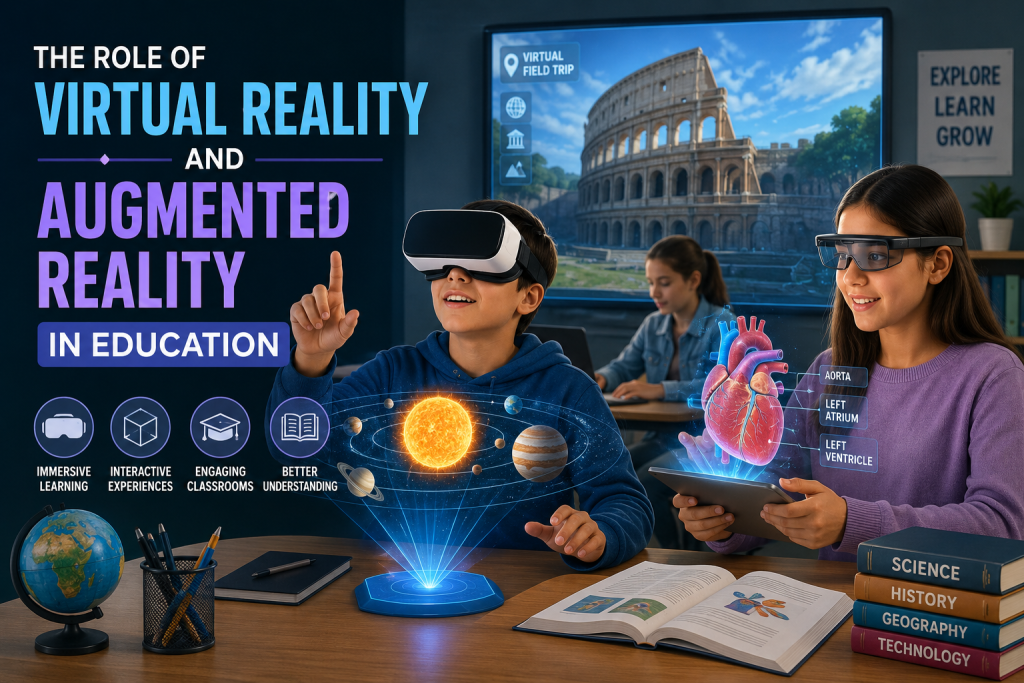
Students using virtual reality and augmented reality for immersive learning
Education

The Role of Virtual Reality and Augmented Reality in Education

Introduction Virtual reality in education and Augmented Reality (AR) are changing the way students experience learning.Instead of learning only through textbooks, lectures, and traditional visual materials, students can now explore immersive digital environments and interact with educational content in new ways. Virtual reality can place learners inside simulated environments, while augmented reality can add digital information and interactive elements to the real world. These technologies can help students visualize complex concepts and make learning more engaging. As educational institutions continue to adopt new technologies, VR and AR are creating opportunities for immersive learning, practical simulations, interactive lessons, and improved student engagement. However, their effective use depends on accessibility, appropriate content, teacher training, and clear educational goals. What Are Virtual Reality and Augmented Reality? Virtual Reality (VR) is a technology that creates a fully digital and immersive environment. Using devices such as VR headsets, students can explore simulated places, objects, and situations that may be difficult, expensive, or impossible to experience in a traditional classroom. Virtual Reality in Education In education, VR can be used to create virtual field trips, science simulations, historical experiences, and practical training environments. For example, students can explore the solar system, visit historical locations, or practice complex procedures in a safe virtual environment. Augmented Reality in Education Augmented Reality (AR) adds digital elements to the real-world environment through smartphones, tablets, or other devices. Students can use AR applications to view 3D models, interactive objects, animations, and additional information while looking at real-world materials. Unlike VR, which creates a completely digital environment, AR combines digital content with the physical world. Both technologies can support immersive learning by helping students interact with educational content in more visual and practical ways. How VR and AR Improve Learning Experiences VR and AR can improve learning experiences by making educational content more interactive, visual, and practical. Instead of only reading about a topic, students can explore concepts through simulations, three-dimensional models, and immersive digital environments. 1. Immersive Learning Experiences VR can create realistic environments that allow students to experience situations beyond the traditional classroom. Virtual field trips, historical simulations, and scientific environments can help learners explore subjects in a more engaging way. 2. Better Visualization of Complex Concepts AR and VR can help students understand difficult concepts by presenting them as interactive 3D models and visual simulations. This can be especially useful for subjects such as science, medicine, engineering, geography, and history. 3. Safe Practical Training Virtual simulations can allow students to practice skills and procedures in a controlled environment before applying them in real situations. This can be useful for medical training, laboratory experiments, technical education, and other practical subjects. 4. Increased Student Engagement Interactive and immersive learning experiences can encourage students to participate more actively in lessons. By allowing learners to explore and interact with educational content, VR and AR can make learning experiences more engaging and memorable. Benefits of VR and AR in Education VR and AR can provide several benefits by making learning more interactive, accessible, and experience-based. These technologies can support students and teachers by creating opportunities to explore concepts in ways that traditional learning materials may not always provide. Improved Understanding and Retention Interactive experiences can help students understand concepts by allowing them to see, explore, and interact with information. Learning through practical and visual experiences may also help students remember important concepts more effectively. Learning Through Experience VR and AR can support experiential learning by allowing students to explore virtual environments and interact with digital objects. This approach can make abstract topics more practical and easier to understand. Access to Difficult-to-Reach Experiences Virtual environments can give students access to places and situations that may be difficult to visit in real life. Students can explore historical sites, scientific environments, museums, or distant locations without physically traveling there. Support for Different Learning Styles Visual, interactive, and practical learning experiences can support students with different learning preferences. VR and AR can provide additional ways for learners to engage with the same educational content. Increased Motivation and Participation Immersive and interactive lessons can encourage students to participate actively. When learning activities feel more engaging and relevant, students may be more motivated to explore and practice new concepts. Challenges of VR and AR in Education Although VR and AR offer exciting possibilities for education, their implementation can also create challenges. Educational institutions need to consider technology costs, accessibility, technical requirements, teacher training, and the quality of educational content. High Technology Costs VR headsets, AR-compatible devices, software, and supporting infrastructure can require significant investment. These costs may make it difficult for some schools and institutions to adopt immersive learning technologies on a large scale. Limited Access to Devices Not every student or educational institution has access to modern devices capable of supporting VR and AR applications. Equal access to technology remains an important consideration when using immersive learning tools. Teacher Training and Support Teachers need appropriate training to understand how VR and AR tools can be used effectively in lessons. Technology is most useful when educators know how to connect immersive experiences with clear learning objectives. Technical Issues VR and AR applications may require reliable internet connections, compatible devices, software updates, and technical support. Technical problems can interrupt learning activities and create challenges for teachers and students. Balancing Technology With Traditional Learning Immersive technology should support education rather than become a distraction. VR and AR are most effective when they are combined with discussions, practical activities, reading, and teacher guidance. The Future of VR and AR in Education As VR and AR technologies become more accessible and advanced, their role in education is likely to grow. Future learning environments may use immersive technology to create more realistic simulations, interactive lessons, virtual classrooms, and practical training experiences. Improvements in hardware, software, and digital content may make VR and AR easier to use in schools and other educational institutions. These technologies could also become more integrated with online learning platforms, artificial intelligence, and other educational tools. More Immersive and Personalized Learning

Technology improving student learning and engagement
Education

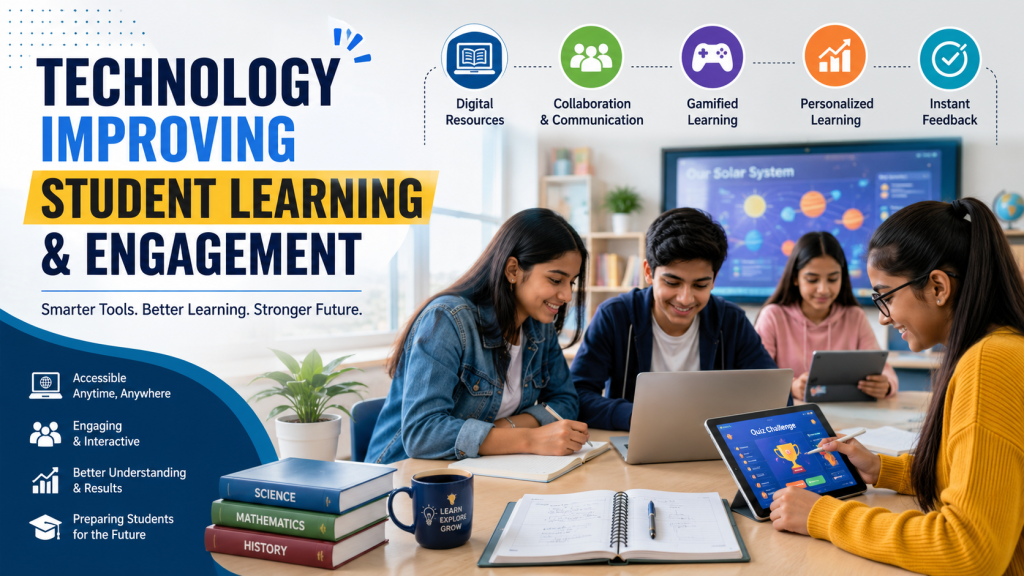
How Technology Is Improving Student Learning and Engagement

Introduction Technology has become an important part of modern education, changing how students access information, communicate with teachers, and participate in learning activities. Digital classrooms, educational applications, online resources, and interactive tools are making learning more accessible and engaging. Today, students can learn through videos, simulations, virtual classrooms, digital assignments, and collaborative platforms. These technologies can support different learning styles and give students more opportunities to explore subjects beyond the traditional classroom. However, technology is most effective when it is used with a clear educational purpose. The goal should not simply be to add more devices or applications, but to use technology to improve understanding, participation, collaboration, and overall learning outcomes. What Is Technology-Enhanced Learning? Technology-enhanced learning refers to the use of digital tools and technologies to support and improve the learning process. It can include online learning platforms, educational applications, digital textbooks, interactive simulations, virtual classrooms, multimedia resources, and collaboration tools. These technologies can give students access to educational content from different locations and allow them to learn through multiple formats. Instead of relying only on printed materials and traditional lectures, students can combine videos, interactive activities, digital resources, and practical exercises to develop a deeper understanding of different subjects. Examples of Technology in Learning Common examples include learning management systems, online courses, educational videos, virtual laboratories, digital quizzes, collaborative documents, and interactive learning applications. The right combination of these tools can make lessons more engaging while supporting different learning needs. How Technology Improves Student Learning Technology can improve student learning by making educational content easier to access, more interactive, and better suited to different learning needs. Digital tools can help students explore concepts through visual demonstrations, practical activities, simulations, and immediate feedback. 1. Easy Access to Learning Resources Students can access digital textbooks, videos, research materials, online courses, and educational websites from different locations. This gives learners more opportunities to review lessons, explore additional resources, and study outside traditional classroom hours. 2. Interactive Learning Experiences Interactive applications, simulations, quizzes, and multimedia content can make lessons more engaging. Instead of only reading or listening, students can interact with concepts and receive feedback while learning. 3. Personalized Learning Support Digital learning platforms can provide resources based on student progress, interests, and learning needs. Personalized recommendations can help students spend more time on difficult topics and move forward when they are ready. 4. Instant Feedback Online quizzes and digital assessment tools can provide immediate feedback on student performance. Quick feedback helps learners identify mistakes, review difficult concepts, and understand where they need additional practice. How Technology Improves Student Engagement Student engagement is an important part of effective learning. Technology can make lessons more interactive by giving students opportunities to participate, explore ideas, solve problems, and receive immediate responses to their activities. Interactive and Multimedia Content Videos, animations, presentations, simulations, and interactive graphics can present information in different ways. These formats can help students visualize complex concepts and maintain interest during lessons. Gamification in Learning Educational games, challenges, points, badges, and progress systems can introduce game-like elements into learning activities. When used appropriately, gamification can encourage participation and make practice activities more engaging. Collaborative Learning Digital collaboration tools allow students to work together on projects, share ideas, communicate with classmates, and create content. These activities can help develop teamwork, communication, and problem-solving skills. Learning Beyond the Classroom Technology allows students to continue learning outside traditional classroom hours. Online courses, educational videos, digital libraries, and learning applications can provide additional opportunities for exploration and practice. Benefits of Technology in Education When used effectively, technology can provide several benefits for students, teachers, and educational institutions. It can make learning more flexible, accessible, interactive, and connected while giving educators additional tools to support student progress. Greater Accessibility Digital resources can make educational content available to students who may not always be able to attend traditional classroom sessions. Online materials can also support learners in different locations and with different learning requirements. Flexible Learning Technology allows students to access lessons and resources according to their schedules and learning pace. Recorded lectures, online courses, and digital materials give learners greater flexibility in deciding when and how they study. Improved Collaboration Digital communication and collaboration platforms make it easier for students and teachers to share information and work together. Students can collaborate on projects even when they are not physically in the same classroom. Development of Digital Skills Regular use of technology can help students develop digital literacy, communication, research, collaboration, and problem-solving skills. These skills can be valuable for higher education and future workplaces. Support for Teachers Technology can help teachers organize learning materials, create assessments, communicate with students, and track progress. These tools can reduce repetitive work and give educators more time to focus on teaching and student support. Challenges of Using Technology in Education Although technology can improve learning and engagement, its use in education also creates certain challenges. Schools and educational institutions need to consider access, privacy, security, screen time, costs, and teacher training when introducing digital tools. Digital Divide Not every student has equal access to reliable internet, computers, smartphones, or other digital devices. Differences in access can create unequal learning opportunities, particularly when important educational resources are available mainly online. Privacy and Security Educational platforms may collect student information and learning data. Schools and technology providers need appropriate privacy and security practices to protect this information and ensure that digital resources are used responsibly. Excessive Screen Time Excessive use of digital devices can affect concentration and reduce opportunities for physical activity and face-to-face interaction. Technology should be balanced with discussions, practical activities, reading, and other forms of learning. Technology Costs Implementing digital learning systems may require investment in devices, software, internet infrastructure, maintenance, and training. Educational institutions need to consider these costs when planning technology adoption. Teacher Training Teachers need appropriate training to use educational technologies effectively. Without sufficient support, even useful digital tools may not deliver their intended educational benefits. The Future of Technology in Education The role of technology

AI-powered personalized learning for students
Education

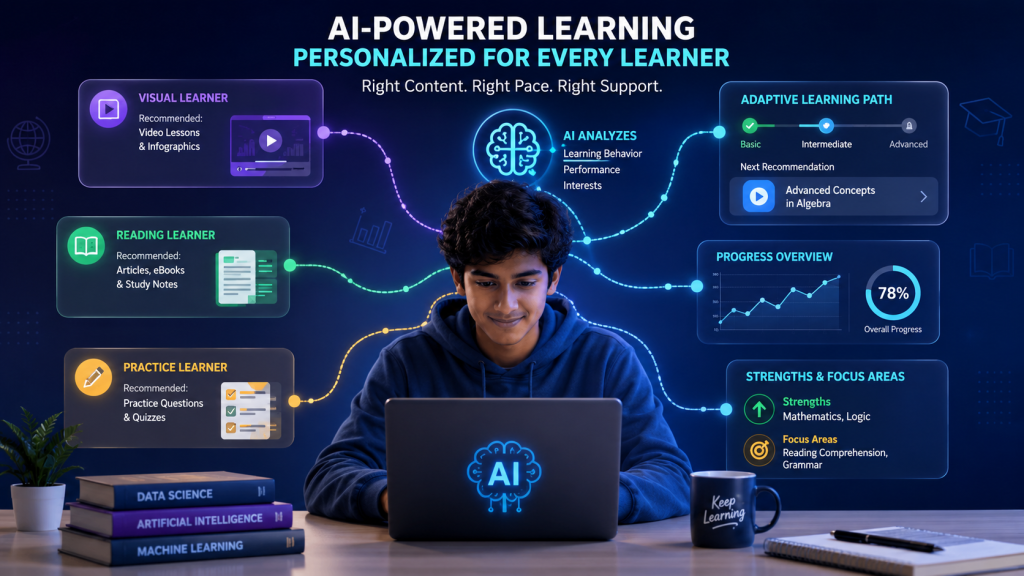
How AI-Powered Learning Is Personalizing Education

Introduction Every student learns differently. Some understand concepts quickly through visual content, while others need more practice, examples, or additional explanations. Traditional education often follows a common learning path, but artificial intelligence is making it possible to create more personalized learning experiences. AI-powered learning platforms can analyze student interactions, learning progress, and performance to recommend content and activities that match individual needs. This approach can help students learn at their own pace while giving educators better insights into where additional support may be required. As educational technology continues to evolve, personalized learning is becoming an important part of modern education. AI is not simply changing what students learn; it is also changing how learning content is delivered, practiced, and evaluated. What Is Personalized Learning? Personalized learning is an educational approach in which learning experiences are adapted to the individual needs, abilities, interests, and progress of each student. Instead of providing exactly the same content and activities to every learner, personalized learning aims to provide appropriate resources and support based on how each student learns. AI can make personalized learning more effective by analyzing information such as quiz results, learning activity, completed lessons, and areas where a student may be struggling. Based on these patterns, an AI-powered system can recommend suitable content, practice exercises, or additional explanations. Traditional Learning vs. Personalized Learning In a traditional learning environment, students often follow the same syllabus, lessons, and assessment schedule. Personalized learning allows the learning experience to become more flexible by adjusting content, difficulty, and pace according to individual progress. How AI-Powered Learning Personalizes Education AI-powered learning systems can use data and intelligent algorithms to understand how students interact with educational content. This allows learning platforms to make recommendations and adjust learning experiences based on individual progress. 1. Adaptive Learning Paths AI can adjust the difficulty and sequence of learning materials based on a student’s performance. If a learner understands a concept quickly, the system can provide more advanced material. If a learner struggles, it can recommend additional explanations and practice. 2. Personalized Content Recommendations AI can recommend videos, articles, exercises, quizzes, and other educational resources based on a student’s learning history and interests. This can help learners find relevant material without having to search through large amounts of content. 3. Individualized Feedback AI-powered systems can provide immediate feedback on quizzes, assignments, and practice activities. Quick feedback can help students identify mistakes, understand concepts, and make improvements while they are still actively learning. 4. Learning at an Individual Pace Students do not always need the same amount of time to understand a concept. Personalized learning allows students to spend more time on difficult topics and move ahead when they are ready, creating a more flexible learning experience. Benefits of AI-Powered Personalized Learning AI-powered personalized learning can provide benefits for students, teachers, and educational institutions. By adapting learning experiences to individual needs, it can make education more flexible, engaging, and focused on student progress. Better Learning Engagement When students receive content that matches their interests and learning levels, they may find lessons more relevant and engaging. Personalized recommendations can also help students discover learning resources that are appropriate for their current level. Improved Learning Outcomes Personalized learning can help students spend more time on topics they find difficult while moving faster through concepts they already understand. This targeted approach can support better understanding and continuous progress. Early Identification of Learning Gaps AI can analyze learning patterns and performance to identify areas where students may need additional support. Teachers can use these insights to provide targeted assistance before learning gaps become larger. More Efficient Teaching AI-powered platforms can provide teachers with information about student progress and learning needs. These insights can help educators plan additional activities and provide more focused support to individual learners. Greater Learning Flexibility Personalized learning allows students to access educational content at different times and progress at a pace that suits their needs. This flexibility can make learning more convenient for students with different schedules and learning preferences. Challenges of AI-Powered Personalized Learning Although AI-powered personalized learning offers many advantages, it also comes with challenges. Educational institutions need to consider data privacy, accuracy, accessibility, technology costs, and the importance of maintaining human involvement in education. Data Privacy and Security Personalized learning systems may collect information about student performance, learning behavior, preferences, and progress. Educational institutions need strong privacy and security practices to protect this information and ensure that student data is used responsibly. Accuracy of Recommendations AI recommendations depend on the quality of the data and algorithms being used. If a system incorrectly understands a student’s needs, it may recommend unsuitable content or learning activities. Human oversight can help identify and correct such issues. Digital Access and Inequality Not every student has access to reliable internet connections, modern devices, or advanced learning platforms. Differences in access can make it difficult to provide personalized technology-based learning equally to all students. Teacher Training Teachers need appropriate training to understand how AI-powered learning systems work and how to use their recommendations effectively. Technology should support teachers’ expertise rather than replace their judgment. Technology Costs Implementing AI-powered learning platforms may require investment in software, infrastructure, devices, training, and maintenance. Educational institutions need to consider these costs carefully when adopting personalized learning technologies. The Role of Teachers in Personalized Learning AI can provide useful information and recommendations, but teachers remain an essential part of personalized education. Teachers can use AI-generated insights to understand student needs, provide guidance, and make informed decisions about learning activities. AI as a Support Tool for Teachers AI should be viewed as a support tool rather than a replacement for teachers. It can help identify learning gaps, organize information, and suggest resources, while teachers provide context, judgment, encouragement, and personal support. Human Interaction Still Matters Learning is not only about receiving information. Communication, collaboration, creativity, emotional support, and classroom relationships are also important parts of education. Teachers play a central role in creating these human learning experiences. Combining AI With Human Expertise

Scroll to Top