Artificial Intelligence

AI scams in 2026 using deepfakes, voice cloning, phishing, and fake identities
Artificial Intelligence

AI Scams in 2026: How Technology Is Making Scams Harder to Detect

Artificial intelligence is changing the way we work, communicate, and do business. But the same technology is also giving scammers powerful new ways to deceive people. From AI-generated phishing messages and cloned voices to deepfake videos and highly personalized fraud, scams are becoming harder to recognize than ever. In 2026, AI scams are no longer limited to obvious fake messages. Attackers can use AI to imitate trusted people, create convincing websites, generate realistic audio and video, and personalize scams at scale. This makes traditional warning signs less reliable and increases the need for smarter prevention. The good news is that AI can also be used to fight back. AI-powered fraud detection, behavioral analysis, deepfake detection, and real-time scam monitoring can help individuals and businesses identify suspicious activity before it causes serious damage. In this article, we’ll explore how AI-powered scams work, why they are becoming harder to detect, and how technology and practical security habits can help prevent them. What Are AI-Powered Scams? AI-powered scams are fraudulent activities that use artificial intelligence to make scams more convincing, personalized, or difficult to detect. Instead of relying only on traditional scripts and fake messages, scammers can now use AI to generate realistic text, images, audio, video, and even fake identities. For example, a scammer can use AI to create a convincing phishing email that looks like it came from a bank, generate a voice that sounds like a family member, or create a deepfake video of a trusted person. These technologies allow criminals to make their attacks appear much more legitimate. The biggest change is the scale and speed of these attacks. AI allows scammers to create personalized content for thousands of targets with far less effort than before. This makes AI-powered fraud a growing challenge for individuals, businesses, financial institutions, and online platforms. How Scammers Are Using AI 1. AI-Generated Phishing Messages AI can generate highly convincing phishing emails, text messages, and social media messages within seconds. Scammers can customize these messages using information about a person’s job, interests, recent activities, or relationships, making fraudulent communication appear more legitimate. 2. Voice Cloning and Impersonation Voice cloning technology can reproduce a person’s voice from a relatively short audio sample. Scammers can use cloned voices to impersonate family members, company executives, customer support agents, or other trusted individuals and create urgent requests for money or sensitive information. 3. Deepfake Videos and Images AI-generated images and deepfake videos can make it appear as though a real person said or did something they never actually did. Scammers may use this technology to impersonate public figures, business leaders, or people known to the victim. 4. Fake Websites and AI-Generated Content Generative AI can help scammers create professional-looking websites, advertisements, product descriptions, and fake customer support conversations. When combined with stolen logos and copied branding, these websites can be difficult to distinguish from legitimate services. 5. Personalized Scams at Scale One of AI’s biggest advantages for scammers is automation. Instead of sending the same message to everyone, criminals can generate different messages for different targets. This makes scams more personalized while allowing attackers to reach a much larger number of people. Most Common AI Scams in 2026 AI-powered scams can take many forms, depending on the technology being used and the information available to the attacker. Some scams target individuals directly, while others are designed to manipulate employees, customers, or entire organizations. AI Voice Scams Scammers can use AI voice cloning to imitate someone the victim knows or trusts. A fake emergency call from a family member or an urgent payment request from a senior executive can create pressure to act without verification. Deepfake Investment Scams Deepfake videos and AI-generated content can be used to make fake investment opportunities appear credible. Scammers may impersonate business leaders, financial experts, or public figures to encourage victims to send money or share financial information. AI-Powered Phishing Scams AI makes it easier for scammers to create phishing messages that look professional and contain fewer obvious spelling or grammar mistakes. These messages may imitate banks, delivery companies, employers, government services, or popular online platforms. Fake Customer Support Scams Scammers can use AI-generated websites, chatbots, and social media profiles to imitate legitimate customer support services. Victims may be tricked into revealing passwords, verification codes, payment details, or other sensitive information. Romance and Social Engineering Scams AI can help scammers maintain convincing conversations for longer periods and personalize their communication based on information gathered from social media. This can make fake relationships, investment requests, or emotional manipulation much more difficult to recognize. Why AI Scams Are Harder to Detect Traditional scams often contain obvious warning signs such as poor grammar, generic messages, suspicious links, or unrealistic offers. AI can remove many of these clues by generating polished, natural-sounding, and highly targeted content. AI also makes impersonation more convincing. A cloned voice can sound like someone the victim knows, while a deepfake video can create the appearance of a real person speaking or appearing on camera. When a scam uses familiar identities and realistic communication, people may be more likely to trust it. Another challenge is speed. Scammers can use AI to create and modify fraudulent content quickly, test different approaches, and target large numbers of people. As AI-generated content becomes more realistic, relying only on visual or grammatical clues is no longer enough to identify every scam. How AI Can Help Prevent Scams While criminals are using AI to make scams more convincing, the same technology can also help detect and prevent fraud. AI systems can analyze large amounts of data, identify unusual patterns, and detect suspicious behavior much faster than traditional rule-based systems. Real-Time Scam Detection AI-powered security systems can analyze messages, websites, emails, and online interactions in real time. By identifying suspicious patterns and known indicators of fraud, these systems can warn users before they click a malicious link or share sensitive information. Behavioral Fraud Detection AI can learn normal user behavior and identify unusual activity. For example, an unexpected login, unusual transaction,

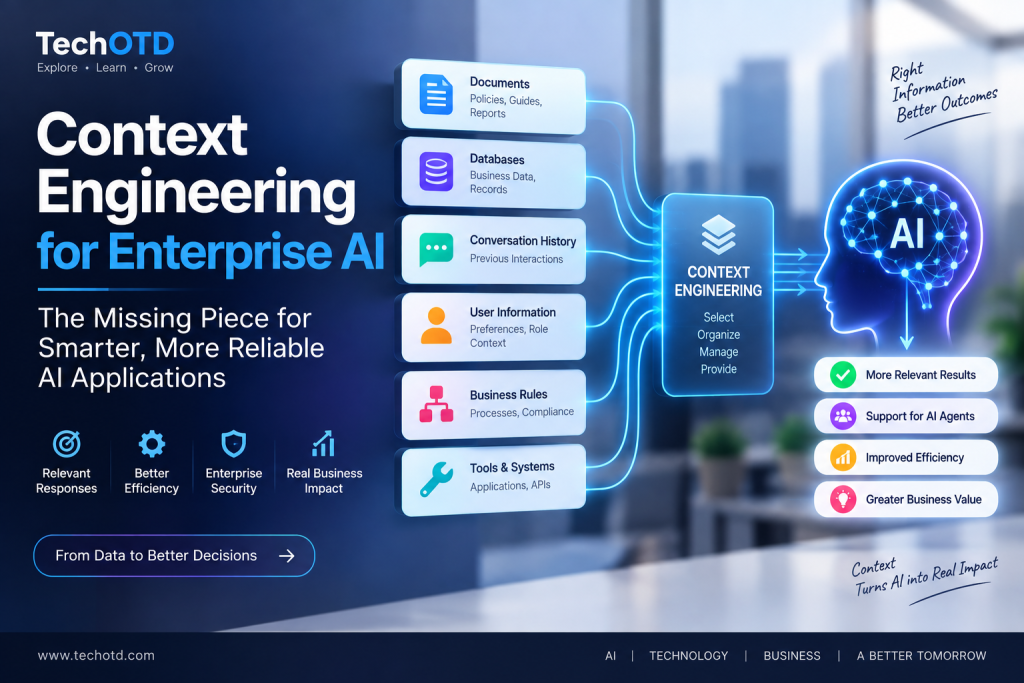
Context engineering for enterprise AI using business data and relevant information
Artificial Intelligence

Context Engineering: Why It Is Becoming Essential for Enterprise AI

Introduction As artificial intelligence becomes more deeply integrated into business applications, the quality of AI responses depends on more than the prompt alone. AI systems often need access to relevant information, instructions, user history, business data, and task-specific context to produce useful and reliable results. Prompt engineering focuses on designing effective instructions for AI models, but enterprise AI applications often require a broader approach. Businesses need to determine what information should be provided to an AI system, how that information should be structured, and when it should be included in the AI workflow. Context engineering is the process of designing and managing the information available to an AI system so it can better understand a task and generate more relevant responses. As organizations build AI agents and complex AI applications, effective context management is becoming increasingly important for performance, reliability, and scalability. What Is Context Engineering? Context engineering is the process of selecting, organizing, and providing the right information to an AI system so it can better understand a task and generate relevant, accurate, and useful responses. This information can include instructions, user preferences, conversation history, business data, documents, retrieved knowledge, and details about the current task. More Than Writing Better Prompts Prompt engineering focuses primarily on how instructions are written, while context engineering takes a broader approach. It considers everything the AI system needs to know before generating a response, including relevant background information, data, rules, and the current situation. Providing the Right Information at the Right Time An AI system does not always need access to every available piece of information. Context engineering helps determine which information is relevant to a specific task and when that information should be provided to the model. Managing Different Types of Context Enterprise AI applications may use multiple types of context, including system instructions, conversation history, customer information, company documents, database records, retrieved knowledge, and outputs from other AI tools or workflows. Why Context Quality Matters The quality and relevance of the information provided to an AI model can directly influence the usefulness of its output. Too little context may lead to incomplete responses, while irrelevant or excessive information can make it harder for the AI system to focus on the task. By carefully managing what information an AI system receives, businesses can build applications that produce more relevant and consistent results while using AI resources more efficiently. Context Engineering vs Prompt Engineering Context engineering and prompt engineering are closely related, but they focus on different parts of an AI interaction. Prompt engineering focuses on designing effective instructions, while context engineering focuses on managing the broader set of information that an AI system receives before generating a response. The Role of Prompt Engineering Prompt engineering focuses on how instructions are written and structured to guide an AI model toward a desired response. A well-designed prompt can clarify the task, define the expected output, and provide instructions about tone, format, or constraints. The Role of Context Engineering Context engineering considers the wider information environment around the prompt. This can include conversation history, user preferences, business rules, retrieved documents, database information, previous actions, and other task-specific data. Why Enterprise AI Needs Both Enterprise AI applications often require both effective prompts and well-managed context. Clear instructions help the AI understand what it should do, while relevant context helps the model understand the information and situation required to complete the task effectively. A Simple Example A customer support AI may receive an instruction to answer a customer’s question, but it may also need access to the customer’s recent interactions, product information, account details, company policies, and relevant support documents. Context engineering helps determine which of this information should be available for that specific request. Prompt engineering helps define the task, while context engineering helps provide the information needed to complete that task. Together, they can support more useful and reliable AI applications. Why Context Engineering Is Important for Enterprise AI Enterprise AI applications often operate in complex environments where a simple prompt is not enough to produce reliable results. AI systems may need access to business knowledge, user information, current data, previous interactions, and specific organizational rules to understand and complete a task effectively. Enterprise Information Is Often Distributed Business information may be stored across documents, databases, internal applications, knowledge bases, and communication systems. Context engineering helps determine how relevant information can be selected and provided to AI applications when it is needed. Better Context Can Improve AI Output Quality AI models can generate more useful responses when they receive relevant and accurate information about the task. Providing appropriate context can help reduce incomplete responses and improve the relevance of AI-generated outputs. Supporting AI Agents and Complex Workflows AI agents often perform tasks across multiple steps and may interact with different tools, systems, and sources of information. Context engineering can help ensure that an AI agent has access to the relevant information required at each stage of a workflow. Reducing Unnecessary Information Providing every available document or data source to an AI model can create unnecessary complexity and increase resource usage. Context engineering helps focus the AI system on information that is relevant to the current task. Supporting More Consistent AI Applications Enterprise AI applications may be used by many employees, customers, or automated systems. Well-managed context can help create more consistent behavior by ensuring that AI systems receive relevant instructions and information across different interactions. As enterprise AI systems become more connected to business data and workflows, context engineering can play an important role in improving AI performance, reliability, efficiency, and scalability. Key Components of Context Engineering Effective context engineering involves managing different types of information that can influence how an AI system understands and completes a task. Businesses need to decide what information should be included, how it should be organized, and when it should be provided to the AI model. System Instructions System instructions define the overall role, rules, priorities, and behavior expected from an AI system. They can provide consistent guidance

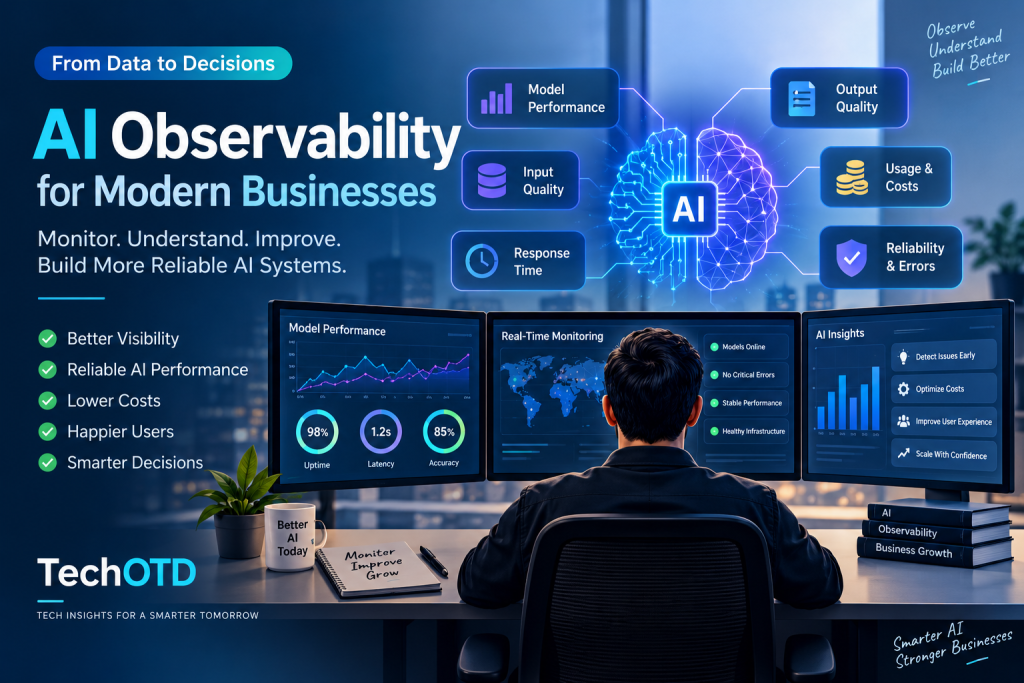
AI observability dashboard monitoring AI performance and system reliability
Artificial Intelligence

AI Observability: Why Businesses Need to Monitor AI Systems

Introduction Businesses are increasingly using artificial intelligence in customer support, software development, data analysis, automation, and decision-making. As AI systems become more important to daily business operations, organizations need better visibility into how these systems perform in real-world environments. Traditional monitoring tools can track infrastructure, applications, and system availability, but AI systems introduce additional challenges. AI outputs can vary, model performance can change over time, and factors such as data quality, response time, cost, and reliability can directly affect business outcomes. AI observability helps organizations understand what is happening inside their AI systems by monitoring model behavior, performance, inputs, outputs, and operational metrics. This visibility can help businesses identify problems, improve reliability, and manage AI systems more effectively as they scale. What Is AI Observability? AI observability is the ability to understand, monitor, and analyze how an AI system behaves in real-world operation. It provides visibility into factors such as model inputs, outputs, performance, response times, reliability, and resource usage. Beyond Traditional System Monitoring Traditional monitoring focuses primarily on infrastructure health, application availability, and technical metrics. AI observability goes further by helping organizations understand how AI models behave, whether their outputs remain useful and reliable, and how changes in data or usage affect overall performance. Understanding AI System Behavior AI systems can produce different outputs depending on the input, context, model configuration, and data available at the time of a request. AI observability helps businesses analyze these behaviors and identify unexpected patterns or performance issues. Monitoring Inputs and Outputs Monitoring AI inputs and outputs can help organizations understand how users and applications interact with AI systems. This visibility can support the detection of poor-quality inputs, unexpected responses, and patterns that may affect business performance. Supporting Reliable AI Operations As AI systems become part of important business workflows, reliability becomes increasingly important. AI observability can help teams identify potential issues earlier and maintain better visibility into how AI applications perform over time. By combining operational monitoring with visibility into model behavior, inputs, outputs, and performance, AI observability helps organizations manage increasingly complex AI systems more effectively. Why AI Observability Is Important for Businesses As businesses move AI systems from experimentation into real-world applications, understanding how those systems perform becomes increasingly important. Without clear visibility, organizations may struggle to identify why AI outputs change, performance declines, costs increase, or user experiences become inconsistent. AI Systems Can Change Over Time AI performance can change as user behavior, data patterns, workloads, and business requirements evolve. AI observability helps organizations identify these changes and understand whether they are affecting the quality or reliability of AI applications. AI Problems Are Not Always Infrastructure Problems An AI application can appear technically available while still producing poor or unreliable results. Infrastructure monitoring may show that servers and APIs are working correctly, but AI observability can provide additional visibility into model outputs and application behavior. Better Visibility for Business and Technical Teams AI systems often involve technical teams, business teams, and end users. AI observability can provide useful information that helps different stakeholders understand system performance and identify areas that may require improvement. Supporting AI at Scale As AI applications handle more users, requests, models, and workflows, identifying problems manually becomes increasingly difficult. AI observability can help organizations maintain visibility as their AI environments become larger and more complex. By providing a clearer view of how AI systems behave in production, AI observability can help businesses make more informed decisions about reliability, performance, cost, and future AI improvements. What Businesses Should Monitor in AI Systems AI observability involves monitoring more than whether an application is online or offline. Businesses need visibility into different aspects of AI system behavior to understand whether their models and AI-powered applications are delivering reliable and useful results. Model Performance Businesses should monitor whether AI models continue to perform effectively for their intended tasks. Changes in model behavior or output quality can affect the reliability and usefulness of AI applications. Input Quality and Data Patterns The quality and characteristics of inputs can significantly influence AI outputs. Monitoring data patterns can help organizations identify unusual inputs, changing user behavior, or data issues that may affect model performance. Output Quality AI-generated outputs should be monitored to determine whether they remain accurate, relevant, consistent, and useful for the intended business use case. Unexpected output patterns may indicate a need for further investigation or improvement. Response Time and Latency Response speed can directly affect the user experience of AI applications. Monitoring latency helps businesses identify whether delays are caused by models, APIs, infrastructure, or other parts of the AI workflow. AI Usage and Costs Businesses should monitor how AI resources are being used and how costs change as workloads grow. Tracking model usage, requests, and resource consumption can support better AI cost management and help identify unexpected spending. Errors and Reliability Monitoring errors, failures, and system reliability can help organizations identify technical issues that affect AI applications. Reliable AI operations require visibility into both traditional system health and AI-specific performance. By monitoring these areas together, businesses can develop a more complete understanding of how their AI systems perform and identify opportunities to improve reliability, efficiency, and business outcomes. AI Observability vs Traditional Monitoring Traditional monitoring and AI observability both help organizations understand how technology systems perform, but they focus on different types of information. Traditional monitoring primarily tracks infrastructure and application health, while AI observability provides additional visibility into model behavior, inputs, outputs, and AI-specific performance. Traditional Monitoring Traditional monitoring focuses on technical metrics such as server availability, CPU usage, memory consumption, application uptime, network performance, and error rates. These metrics help technical teams determine whether the underlying infrastructure and applications are operating correctly. AI Observability AI observability expands monitoring by examining how AI systems behave. It can provide visibility into model inputs, generated outputs, response quality, latency, usage patterns, and other factors that affect the performance of AI-powered applications. Why Businesses May Need Both An AI application depends on both reliable technical infrastructure and reliable AI behavior.

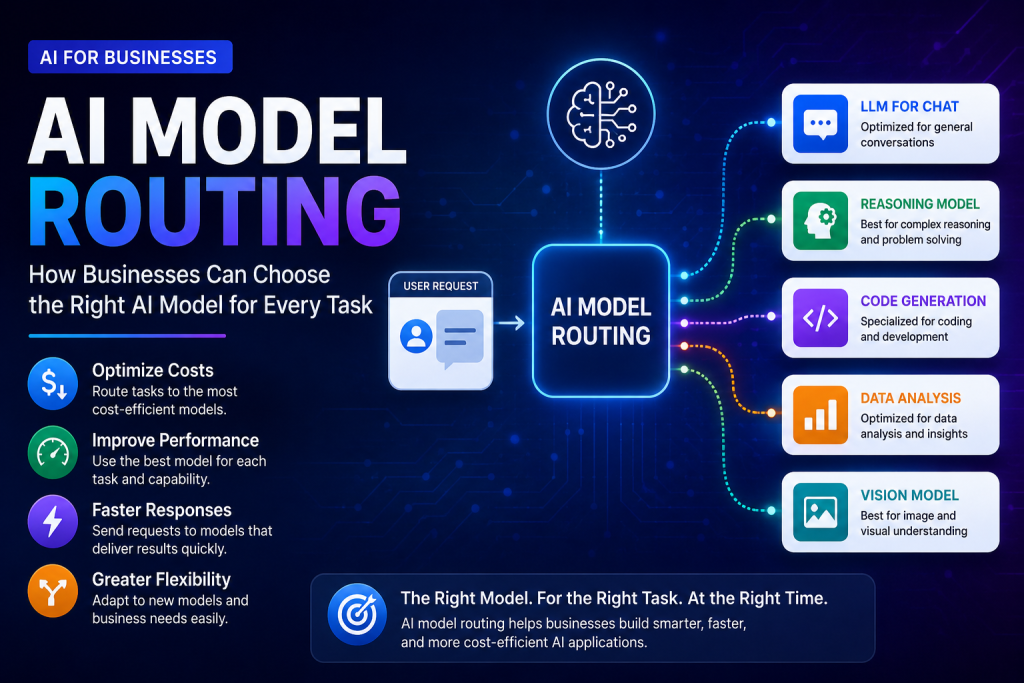
AI model routing for businesses choosing the right AI model for every task
Artificial Intelligence

AI Model Routing: How Businesses Can Choose the Right AI Model for Every Task

Introduction Businesses are increasingly using artificial intelligence for customer support, content creation, data analysis, software development, and decision-making. However, not every AI task requires the same type of model. Different AI models can vary in capability, speed, cost, and specialization. Using a single AI model for every task can increase costs and may not always provide the best balance between performance and efficiency. As organizations adopt multiple AI models, they need a smarter way to decide which model should handle each request. AI model routing helps businesses direct AI tasks to the most suitable model based on factors such as complexity, cost, speed, capability, and business requirements. This approach can help organizations improve performance while using AI resources more efficiently. What Is AI Model Routing? AI model routing is the process of directing an AI request to the most suitable model based on the requirements of a specific task. Instead of sending every request to the same model, an AI system can evaluate factors such as task complexity, required accuracy, response speed, cost, and model capabilities. Why One AI Model Is Not Always Enough AI models are designed with different strengths. Some models may be better for complex reasoning, while others may provide faster responses, lower costs, coding capabilities, or multimodal features. Using one model for every situation can therefore be inefficient. How AI Model Routing Works An AI model routing system analyzes the requirements of an incoming request and selects an appropriate model. Simple tasks may be directed to efficient models, while more complex tasks can be routed to advanced models with stronger reasoning or specialized capabilities. Key Factors Used in Model Selection AI model routing can consider factors such as task type, complexity, expected output quality, response time, cost, available models, and specific business requirements. These factors help determine which model is the most suitable for a particular request. By matching AI workloads with appropriate models, businesses can create more flexible AI systems that balance performance, speed, and cost. Why AI Model Routing Is Becoming Important for Businesses As businesses adopt more AI tools and models, managing which model is used for each task is becoming increasingly important. Organizations may use different models for language processing, reasoning, coding, data analysis, and multimodal applications, creating a need for more efficient AI model management. Growing Number of Available AI Models Businesses now have access to a growing range of AI models with different capabilities, performance levels, and pricing structures. Choosing the same model for every workload can limit flexibility and increase unnecessary costs. Balancing Performance and Cost More advanced AI models can provide stronger capabilities for complex tasks, but they may also require more computing resources or have higher usage costs. AI model routing can help businesses balance performance requirements with the cost of AI operations. Improving Response Speed Some AI applications require fast responses, such as customer support systems and real-time business tools. Routing suitable requests to faster models can help improve responsiveness while reserving more powerful models for tasks that require advanced capabilities. Supporting Multiple AI Use Cases A single organization may use AI for many different purposes, including content processing, software development, analytics, customer service, and internal automation. AI model routing can help manage these diverse workloads more effectively. How AI Model Routing Works in Practice In practice, AI model routing works by evaluating an incoming request and determining which available model is most suitable for handling it. The routing decision can be based on predefined rules, performance requirements, cost limits, or automated evaluation systems. Step 1: Understanding the Request The AI system first analyzes the incoming request to understand its type and requirements. For example, a request may involve summarization, reasoning, coding, data analysis, image understanding, or another specialized task. Step 2: Evaluating Task Requirements The routing system can evaluate factors such as task complexity, required response speed, expected accuracy, available budget, and security or privacy requirements. These factors help determine the level of AI capability needed. Step 3: Selecting the Appropriate Model Based on the evaluation, the system selects a suitable AI model. Simple or repetitive tasks may be handled by smaller and more efficient models, while complex reasoning or specialized tasks may be directed to more advanced models. Step 4: Processing the Request The selected AI model processes the request and generates a response. The result can then be returned directly to the user or passed to another application, workflow, or business system. Step 5: Monitoring Results and Performance Businesses can monitor response quality, processing time, model usage, and cost after requests are completed. This information can help organizations improve routing decisions and optimize their AI systems over time. By continuously evaluating AI workloads and model performance, businesses can make AI model routing more accurate, efficient, and aligned with changing business requirements. Key Benefits of AI Model Routing for Businesses AI model routing can help businesses build more flexible and efficient AI systems. By selecting models based on the requirements of each task, organizations can improve how they use AI resources while maintaining the level of performance required for different business applications. 1. Better Cost Optimization Not every request requires the most advanced or expensive AI model. AI model routing can direct simpler tasks to efficient models and reserve more powerful models for complex workloads, helping businesses reduce unnecessary AI spending. 2. Improved Performance Different AI models have different strengths. Routing tasks to models that are better suited for specific capabilities, such as reasoning, coding, language processing, or multimodal analysis, can help improve overall application performance. 3. Faster Response Times Businesses can route time-sensitive requests to models that provide faster responses. This can improve the user experience for applications such as customer support, internal tools, and real-time AI services. 4. Greater Flexibility A multi-model approach allows organizations to adapt as AI technologies change. Businesses can add, replace, or evaluate models without redesigning their entire AI strategy around a single provider or model. 5. Better AI Resource Management AI model routing provides greater control

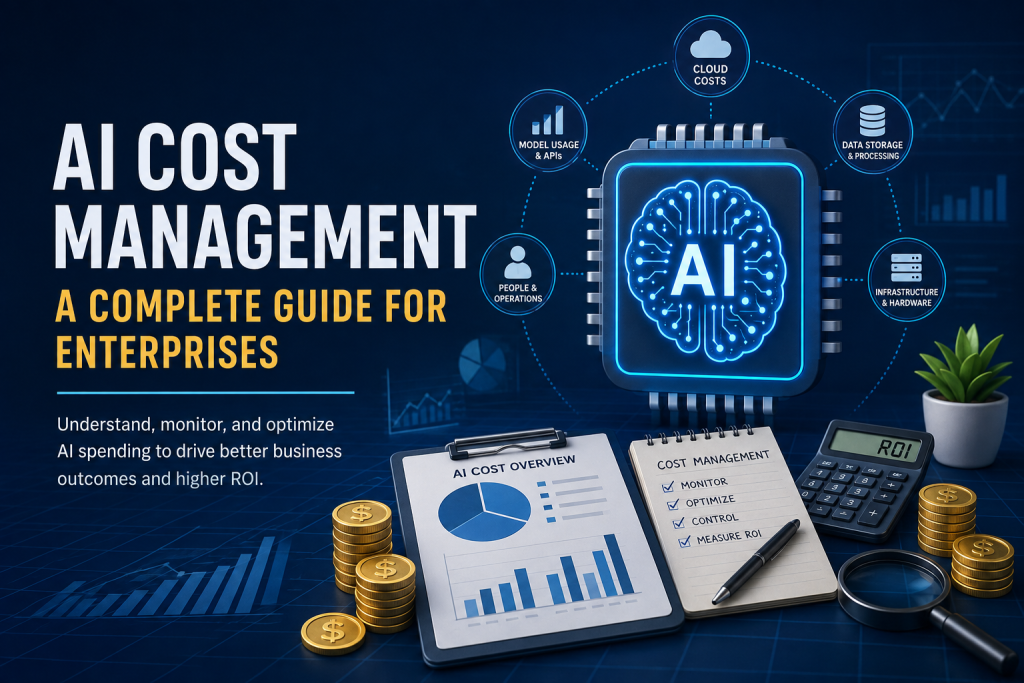
AI cost management for enterprises to monitor and optimize AI spending
Artificial Intelligence

The Hidden Cost of AI: How Businesses Can Control AI Spending in 2026

Introduction Artificial intelligence is becoming an increasingly important part of modern business operations. Companies are using AI for automation, data analysis, customer support, software development, content creation, and decision-making. However, as AI adoption grows, so does the cost of running and scaling AI systems. The cost of AI is not always limited to purchasing a software subscription. Businesses may also need to consider AI model usage, token consumption, API requests, inference infrastructure, data processing, specialized hardware, and the cost of managing AI systems at scale. AI cost management helps organizations understand where their AI spending is coming from and how efficiently their resources are being used. By monitoring costs, optimizing AI workloads, and connecting spending with business outcomes, companies can work toward improving the return on their AI investments. What Is AI Cost Management? AI cost management is the process of tracking, understanding, and controlling the expenses associated with developing, deploying, and using artificial intelligence systems. It helps businesses identify where AI spending occurs and make informed decisions about how AI resources are used. Understanding AI Spending AI spending can come from several sources, including AI software subscriptions, API usage, model inference, data storage, cloud infrastructure, specialized hardware, and the people required to manage AI systems. As usage increases, these costs can become more difficult to monitor. Why Traditional Cost Management Is Not Enough Traditional IT and cloud cost management focuses mainly on infrastructure and software resources. AI systems can introduce additional cost factors because usage may depend on model complexity, the amount of data processed, the number of requests, and how frequently AI services are used. The Role of AI FinOps AI FinOps applies financial management principles to AI operations. It encourages teams to monitor AI spending, improve visibility, optimize resource usage, and connect technology costs with measurable business value. By understanding how and where AI resources are consumed, businesses can build a more effective AI cost management strategy and reduce unnecessary spending as their AI adoption grows. The Hidden Costs of Enterprise AI The cost of enterprise AI can increase in ways that are not always visible at the beginning of an AI project. A company may start with a small number of users or limited workloads, but expenses can grow as more employees, applications, data, and AI models are added. 1. AI Model and API Costs Many businesses access AI capabilities through APIs or hosted AI platforms. Costs can depend on the number of requests, the amount of information processed, and the type of AI model being used. High-volume workloads can therefore create significant expenses over time. 2. AI Inference Costs Every time an AI model processes a request and generates an output, computing resources are required. As AI applications scale, inference can become a major operational expense, particularly for systems that require frequent or real-time responses. 3. Data Processing and Storage AI systems often require large amounts of data for training, testing, retrieval, and ongoing operations. Collecting, processing, storing, and transferring data can add additional costs that may not be obvious when an AI project first begins. 4. Infrastructure and Hardware Organizations that run AI workloads on dedicated infrastructure may need specialized computing resources. Cloud computing charges, GPUs, AI accelerators, networking, and supporting infrastructure can all contribute to the total cost of AI operations. 5. Integration and Maintenance AI systems also require integration with existing business applications, regular monitoring, updates, testing, security controls, and ongoing maintenance. These operational requirements can create costs beyond the initial implementation of an AI solution. Why AI Spending Can Grow So Quickly AI spending can grow rapidly because the cost of an AI system often increases with usage. A small pilot project may appear affordable, but expenses can rise as more users, applications, requests, and workloads are added across the organization. Increasing AI Usage As employees begin using AI tools more frequently, the number of requests and the amount of data processed can increase significantly. Without clear visibility into usage patterns, businesses may not immediately notice how quickly these costs are growing. Using More Expensive Models Than Necessary Not every AI task requires the most advanced or expensive model. Using high-cost models for simple tasks can increase AI spending without providing a proportional improvement in business results. Uncontrolled AI Experiments Different teams may independently test AI tools, models, and platforms. While experimentation can encourage innovation, uncoordinated usage can create duplicate subscriptions, overlapping tools, and unnecessary spending. Rapid Growth in AI Applications Organizations may gradually add AI capabilities to customer support, internal operations, software development, analytics, marketing, and other business functions. Each new application can introduce additional infrastructure, integration, and operational costs. Lack of Cost Visibility AI costs can be spread across cloud services, APIs, software platforms, infrastructure, and different business teams. Without centralized visibility, it can be difficult to understand the total cost of AI and identify opportunities for optimization. How Businesses Can Control AI Spending Controlling AI spending does not necessarily mean reducing AI adoption. The goal of AI cost management is to help businesses use artificial intelligence efficiently while ensuring that technology investments continue to support meaningful business outcomes. 1. Monitor AI Usage and Costs Businesses should track how AI tools, models, APIs, and infrastructure are being used. Monitoring usage patterns can help organizations identify unexpected increases in spending and understand which workloads are generating the highest costs. 2. Choose the Right AI Model for Each Task Different AI models have different capabilities and costs. Organizations can evaluate whether a task requires an advanced model or whether a smaller and more efficient model can provide an acceptable result at a lower cost. 3. Set Budgets and Usage Limits Setting budgets, spending alerts, and usage limits can help prevent unexpected AI expenses. Teams can define appropriate limits for specific projects and review spending regularly as AI workloads grow. 4. Reduce Unnecessary AI Requests Optimizing how applications interact with AI systems can reduce unnecessary requests and repeated processing. Techniques such as improving workflows, reusing appropriate results, and avoiding duplicate requests

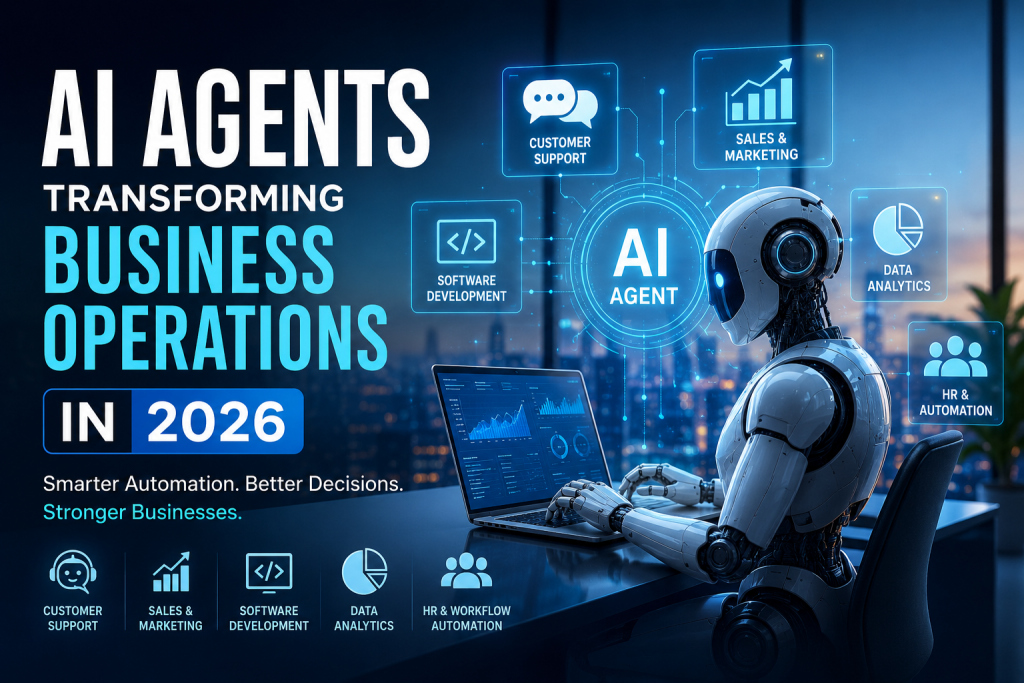
AI Agents Transforming Business Operations in 2026
Artificial Intelligence

How AI Agents Are Transforming Business Operations in 2026

Artificial Intelligence has moved far beyond chatbots and simple automation. In 2026, businesses are increasingly adopting AI agents that can understand goals, make decisions, use digital tools, and complete multi-step tasks with minimal human intervention. Unlike traditional software automation, which generally follows predefined rules, AI agents can analyze information, determine the next action, interact with different systems, and adapt their approach based on the situation. From customer service and sales to software development, finance, human resources, and data analysis, AI agents are changing how organizations operate and make decisions. For businesses looking to improve productivity, reduce operational costs, and deliver better customer experiences, AI agents are becoming an important part of the modern digital transformation strategy. What Are AI Agents? AI agents are intelligent software systems designed to achieve specific goals by combining artificial intelligence with reasoning, decision-making, and tool usage. Traditional automation generally follows a fixed sequence: Input → Rule → Action → Result AI agents can operate more dynamically: Goal → Analyze → Plan → Use Tools → Take Action → Evaluate → Adapt For example, instead of simply responding to a customer’s question, an AI-powered customer service agent could: Understand the customer’s request. Retrieve relevant customer information. Check an order or account status. Determine the appropriate solution. Update the required system. Respond to the customer. Escalate the issue to a human when necessary. This ability to perform multiple connected tasks makes AI agents particularly valuable for modern businesses. Why AI Agents Matter for Businesses in 2026 Businesses generate enormous amounts of data and perform thousands of repetitive processes every day. Employees often spend valuable time searching for information, updating systems, preparing reports, responding to routine queries, and managing repetitive workflows. AI agents can help automate many of these processes while allowing employees to focus on more strategic and creative work. Some of the biggest advantages include: Higher productivity Faster business processes Reduced repetitive work 24/7 operational support Improved customer experiences Faster decision-making Better utilization of business data Scalable automation The biggest shift is that businesses are moving from simply using AI as an assistant to using AI as an active participant in business workflows. AI Agents in Customer Support Customer support is one of the most practical applications of AI agents. Traditional chatbots usually provide answers based on predefined flows or a limited knowledge base. Modern AI agents can understand context and interact with business systems to resolve more complex requests. An AI customer service agent can: Answer product-related questions Track orders Check account information Handle appointment scheduling Create support tickets Recommend relevant solutions Escalate complex issues to human agents This allows businesses to provide faster support without requiring employees to manually handle every routine request. AI Agents for Sales and Marketing Sales teams spend significant amounts of time researching prospects, updating CRM records, writing emails, and following up with leads. AI agents can automate many of these activities. A sales AI agent can help: Identify potential leads Analyze customer information Qualify prospects Generate personalized outreach Schedule meetings Update CRM systems Track follow-ups Analyze sales performance Marketing teams can also use AI agents to analyze campaigns, generate content ideas, segment audiences, and identify trends. Instead of replacing sales and marketing professionals, AI agents can act as intelligent assistants that reduce administrative work and allow teams to focus on relationships and strategy. AI Agents in Software Development Software development is another area experiencing rapid AI adoption. AI coding assistants are already helping developers generate code, explain existing code, identify bugs, write tests, and improve documentation. AI agents take this concept further by supporting multi-step development workflows. For example, an AI development agent could: Analyze a development requirement. Create an implementation plan. Generate or modify code. Run tests. Identify errors. Suggest fixes. Update documentation. This does not eliminate the need for developers. Instead, it allows development teams to spend more time on architecture, product decisions, security, and complex engineering problems. AI Agents for Data Analysis and Business Intelligence Modern businesses collect data from websites, applications, CRM platforms, financial systems, marketing platforms, and other sources. The challenge is turning this data into actionable insights. AI agents can help business teams interact with their data using natural language. For example, a business manager could ask: “Why did our sales decrease this month?” An AI-powered system could analyze sales data, compare it with previous periods, identify unusual patterns, and present possible reasons. AI agents can support: Automated reporting Data exploration Trend detection Forecasting KPI monitoring Anomaly detection Business recommendations This can make data-driven decision-making more accessible to non-technical teams. AI Agents in Human Resources HR departments handle many repetitive processes, including employee queries, onboarding, documentation, scheduling, and internal requests. AI agents can provide employees with instant access to company information and automate administrative workflows. Common applications include: Employee onboarding Leave and policy queries Internal knowledge management Interview scheduling Candidate screening assistance HR document management Employee support With appropriate security and human oversight, AI agents can help HR teams reduce administrative workloads while improving employee experiences. AI Agents for Business Process Automation One of the most important applications of AI agents is connecting different business systems. A business may use separate platforms for CRM, accounting, email, customer support, project management, inventory, and analytics. AI agents can potentially coordinate workflows across these systems. For example, when a new customer signs up, an automated workflow could: Create CRM record → Send welcome email → Create onboarding task → Notify sales team → Update analytics This type of intelligent workflow automation can reduce manual data entry and improve operational efficiency. AI Agents vs Traditional Automation Traditional automation remains extremely useful, especially when processes are predictable and rules are clearly defined. However, AI agents provide additional flexibility when workflows involve changing information or require reasoning. Traditional Automation AI Agents Rule-based Goal-oriented Fixed workflows Dynamic workflows Predictable inputs Can handle variable inputs Limited decision-making AI-assisted reasoning Usually predefined actions Can select tools and actions Best for repetitive rules Best for complex workflows The two approaches are not

AI Is Eating Software: Why "Writing Code" Is Being Replaced by "Expressing Intent"
Artificial Intelligence

AI Is Eating Software: Why “Writing Code” Is Being Replaced by “Expressing Intent”

AI Is Eating Software: Why “Writing Code” Is Being Replaced by “Expressing Intent” For decades, the mark of a elite software engineer was syntax fluency. We valued the developer who memorized standard library calls, mastered complex language idioms, and typed out hundreds of lines of clean boilerplate before lunch. Code was the ultimate currency of software creation, and the developer’s primary tool was the keyboard. That era is quietly coming to an end. Marc Andreessen famously declared over a decade ago that “software is eating the world.” Today, artificial intelligence is eating software itself. But AI is not merely automating mechanical keystrokes or making code auto-complete faster; it is fundamentally altering the abstraction layer of technology. The primary unit of software engineering is shifting from writing code to expressing intent. When developers spend less time typing out function bodies and more time orchestrating autonomous multi-agent systems, the entire discipline undergoes a tectonic shift. We are witnessing the birth of Intent-Driven Development (IDD)—where human genius focuses on architecture, context, and validation, while machine intelligence handles the mechanical translation into working software. Part 1: The Death of the Syntax Artisan To understand where software engineering is heading, we must examine where it has been. Computer science is a relentless history of ascending abstraction layers. We evolved from toggling physical switches on punch cards to assembly language, from assembly to procedural C, and from C to garbage-collected, expressive languages like Python, Rust, and TypeScript. Every leap in abstraction was initially met with fierce skepticism. Compiler pioneers were told that high-level languages would make programmers lazy or yield inefficient machine code. Yet, higher abstractions allowed engineers to build distributed cloud platforms, global real-time networks, and complex operating systems that would have been mathematically impossible if everyone still manually managed memory pointers. ┌─────────────────────────────────────────────────────────────────────────┐ │ The Evolution of Code Abstraction │ ├─────────────────────────────────────────────────────────────────────────┤ │ Era 1: Hardware Ops ──> Physical Switches & Punch Cards │ │ Era 2: Low-Level ──> Assembly & Direct Memory Management │ │ Era 3: High-Level ──> C, Java, Python (Manual Syntax Mechanics) │ │ Era 4: Intent-Driven ──> Natural Language Specs & AI Agent Execution │ └─────────────────────────────────────────────────────────────────────────┘ Generating code syntax is no longer an engineering bottleneck. Modern Large Language Models (LLMs) and autonomous agent networks do not just assist with line completion; they synthesize entire microservices, draft comprehensive unit tests, and refactor monolithic codebases in seconds. When the marginal cost of writing syntax approaches zero, syntax loses its status as a competitive moat. The artisan who takes pride solely in typing out boilerplate REST endpoints or standard UI components faces an existential realization: typing syntax was always just a low-fidelity medium for communicating human thought to machines. Part 2: The Three Pillars of Intent-Driven Development If syntax generation is delegated to autonomous AI agents, what constitutes the core workflow of the modern software team? Intent-Driven Development replaces manual implementation with three foundational pillars: Capability Dimension Traditional Development Intent-Driven Development Primary Skill Memorizing syntax & API methods Context engineering & system architecture Execution Medium Manual code writing in an IDE Declarative specifications & prompt design Quality Control Manual code reviews & PR checks Automated verification loops & guardrails Output Metric Lines of Code (LOC) committed Speed & accuracy of verified feature delivery 1. Context Engineering AI models are only as effective as the context fed into them. Instead of writing raw logic, engineers focus on building rich, structured context architectures. This includes maintaining clear repository maps, dependency graphs, domain schemas, and historical design records so that AI agents possess deep, accurate domain knowledge before executing a single task. 2. High-Precision Specification (Declarative Architecture) Expressing intent is not about throwing vague, lazy English prompts at a chatbot. It demands declarative precision. Engineers define exact API contracts, state machine transitions, edge-case boundaries, and performance budgets using formal specs, system prompts, and structured schemas. 3. Automated Guardrails and Verification Because probabilistic AI models can hallucinate or introduce subtle edge-case bugs, Intent-Driven Development relies on non-negotiable verification loops. Human engineers construct automated environments—combining static analysis, property-based testing, fuzzing, and sandbox security constraints—that continuously test machine-generated code before it touches production. Part 3: The New Role of the Developer: System Orchestrator In an intent-driven ecosystem, the developer’s day-to-day identity shifts from a code builder to a system orchestrator. ┌────────────────────────────────────────────────────────┐ │ Intent-Driven Orchestration Flow │ ├────────────────────────────────────────────────────────┤ │ 1. Human Architect defines Intent & Context Specs │ │ │ │ │ ▼ │ │ 2. Specialized AI Agents assemble code & test suites │ │ │ │ │ ▼ │ │ 3. Automated Guardrails run security & stress tests │ │ │ │ │ ▼ │ │ 4. Human Specialist audits diff & authorizes release │ └────────────────────────────────────────────────────────┘ Instead of grinding through sprint tickets line by line, the modern engineer manages a team of specialized AI agents: The Architectural Agent: Scaffolds modular file structures based on system specifications. The Implementation Agent: Writes concrete, production-ready code aligned with existing codebase patterns. The Red-Teaming Agent: Intentionally attempts to break the newly generated code with security exploits and edge-case inputs. The Documentation Agent: Keeps API documentation and system diagrams continuously synchronized in real-time. The human engineer remains elevated at the top of this chain, making high-leverage decisions: evaluating trade-offs between latency and infrastructure cost, enforcing compliance and security boundaries, and aligning software capabilities with real business goals. Part 4: The Engineering Manager’s Playbook: Re-tooling Teams for the AI Era For technology leaders, the transition to Intent-Driven Development presents an organizational challenge. Traditional engineering management metrics—like Lines of Code (LOC) written, PR volume, or commit frequency—become useless when a developer can generate thousands of lines of functional code in minutes. To successfully lead engineering teams through this transformation, managers must execute three strategic pivots: 1. Measure “Velocity of Intent” Shift performance evaluations away from raw output toward Velocity of Intent—how effectively an engineer converts a complex business requirement into an airtight specification, orchestrates its machine generation, and verifies its safe deployment. 2. Treat Context as a First-Class Code Asset System prompts, architectural decision records

Artificial Intelligence, Software development

Beyond the Chatbot: How Agentic AI and Multi-Agent Workflows Are Quietly Replacing Software Rules

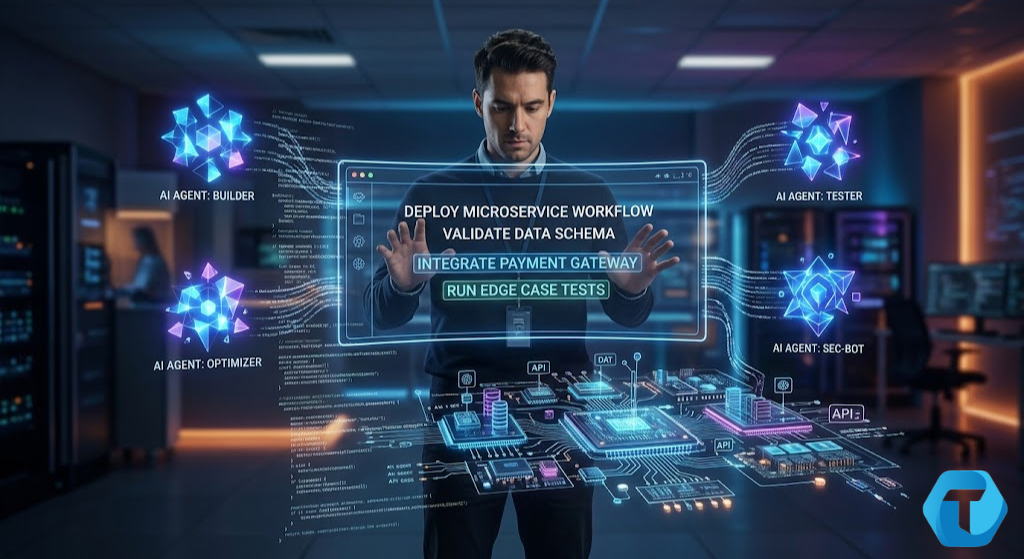
Beyond the Chatbot: How Agentic AI and Multi-Agent Workflows Are Quietly Replacing Software Rules For the past few years, our relationship with Artificial Intelligence has felt like a very advanced game of text tennis. You type a prompt, the AI spits out an answer. You ask it to write an email, it gives you a draft. You ask it to find a bug in your Python script, it points it out. But at the end of the day, you are still the project manager. You have to copy the email, paste it into your Outlook, fill in the recipient’s name, and hit send. You have to take that fixed code, paste it back into your development environment, run the test suite, and deploy it to the server. The AI is just an advisor trapped inside a browser tab. That era is officially ending. We are living through a massive, silent paradigm shift in technology. The industry is moving away from conversational AI and sprinting toward Agentic AI. Instead of waiting around for your next prompt, Agentic AI systems are designed to think, plan, use digital tools, and execute complex, multi-step workflows completely on their own. They don’t just answer your questions; they accomplish your goals. Let’s pull back the curtain on this next evolutionary leap of software. We will explore what Agentic AI actually is, how “multi-agent networks” work under the hood, and how this technology is completely rewriting the rules of software development, business operations, and the future of human productivity. Part 1: What Exactly is Agentic AI? To understand Agentic AI, it helps to look at the short history of how we got here. Early AI systems were predictive—they looked at data and told you what might happen next (like your Netflix recommendations). Then came Generative AI, which took the world by storm by creating new content based on user prompts. Agentic AI takes that underlying generative power and gives it agency—the ability to act autonomously within an environment to achieve a specific objective. If traditional generative AI is an exceptionally smart textbook, an Agentic AI is an autonomous intern. The Core Pillars of an AI Agent A true AI agent isn’t just an LLM wrapped in a sleek user interface. To be truly “agentic,” a system must possess four distinct characteristics: Autonomy: Once you give it a high-level goal, it determines the necessary steps to achieve it without requiring constant human “next” commands. Goal-Orientation: It understands the desired final state and can measure its own progress toward that target. Tool Utilization: It knows how to interface with the digital world. It can read and write to databases, make API calls, browse the web, open software applications, and even modify files on a server. Reflection and Adaptation: If an agent encounters an error (like an API returning a 404 error), it doesn’t just crash. It looks at the failure, changes its strategy, and tries an alternative path to finish the job. A Simple Real-World Comparison: Generative AI: You ask, “Write an itinerary for a 5-day trip to Tokyo.” The AI lists popular tourist spots. Agentic AI: You say, “Book me a 5-day trip to Tokyo under $2,000 that aligns with my Google Calendar, favors boutique hotels, and uses my airline miles.” The agent checks your calendar, logs into flight portals via APIs, compares hotel locations against transit maps, filters for your budget, presents you with the optimal choice, and books it when approved. Part 2: The Magic of Multi-Agent Workflows While a single autonomous AI agent is powerful, the real magic happens when you bring multiple agents together into a coordinated ecosystem. This is known as a Multi-Agent System (MAS) or a multi-agent workflow. Think about how human organizations operate. You don’t have one single person who handles product design, backend engineering, sales, legal compliance, and customer support. If they tried, they would be incredibly mediocre at all of them. Instead, you break complex problems down and assign them to specialized roles. Multi-agent architecture does the exact same thing with software. ┌────────────────────────────────────────────────────────┐ │ Multi-Agent Dev Workflow │ ├────────────────────────────────────────────────────────┤ │ [Product Manager Agent] ──> Outlines requirements │ │ │ │ │ ▼ │ │ [Software Engineer Agent] ──> Writes the code │ │ │ │ │ ▼ │ │ [QA Tester Agent] ──> Finds bugs & sends back │ │ │ │ │ ▼ │ │ [DevOps Agent] ──> Deploys to live server │ └────────────────────────────────────────────────────────┘ In a multi-agent system, a single prompt kicks off a chain reaction of specialized agents talking to one another: The Coordinator Agent: Receives the user request, breaks it into smaller sub-tasks, and assigns them to specialized agents. The Research Agent: Scours internal databases, documentation, and the internet to collect factual context. The Execution Agent: Takes the research and actually builds the asset, whether that’s writing a chunk of Java backend code or creating a marketing campaign. The Critic/QA Agent: Acts as an internal quality filter. It reviews the work of the Execution Agent, checks for security vulnerabilities or syntax errors, and sends it back for revisions if it doesn’t meet the project benchmarks. By separating concerns, these systems reduce the “hallucination” rates that plague single LLMs. Because each agent has a narrow focus and a dedicated set of rules, the entire system becomes drastically more reliable, precise, and scalable. Part 3: How It Redefines Software Development For developers, students, and engineers, Agentic AI is radically shifting the day-to-day experience of writing code. For decades, software development has been explicitly imperative. You write strict, line-by-line logical instructions: If X happens, do Y. If Z happens, loop through this array. If you miss a semicolon, the whole house of cards falls down. With Agentic systems, we are moving toward declarative engineering. You describe the what, and the agentic system figures out the how. Automated Code Maintenance and Refactoring Imagine a large enterprise codebase with thousands of legacy components written years ago. Upgrading that system to use modern frameworks is usually a miserable, months-long chore for

Artificial Intelligence, cybersecurity, Technology & Innovation

The Double-Edged Sword: How Artificial Intelligence is Rewriting the Rules of Cybersecurity

The Double-Edged Sword: How Artificial Intelligence is Rewriting the Rules of Cybersecurity We live in a world where our lives are fundamentally digital. From the photos of our kids stored in the cloud to the banking apps that hold our hard-earned savings, our digital footprints are massive. But behind the convenience of this connected world lies a chaotic, hidden battleground. Every single day, millions of cyberattacks are launched across the globe. Sneaky phishing emails, devastating ransomware, and massive corporate data breaches have become a regular part of our daily news cycle. For years, human security analysts were the primary defense line against these threats. But the sheer scale of the digital universe has outgrown human capacity. It’s like trying to drink from a firehose while playing a high-stakes game of Whack-A-Mole. Enter Artificial Intelligence (AI). AI has burst onto the scene as the ultimate savior for digital defense. It promises to analyze billions of data points in milliseconds, predict attacks before they happen, and patch vulnerabilities instantly. But there is a dark side to this story. The very same technology that shields us is also being weaponized by cybercriminals. Let’s dive deep into the fascinating, slightly terrifying, and incredibly fast-moving world of Artificial Intelligence in cybersecurity. We will explore how it works, how the bad guys are abusing it, and what the future holds for human defense teams. Part 1: Why Traditional Cybersecurity is Failing To truly appreciate why AI is a game-changer, we first have to understand why our old ways of doing things are falling apart. Traditionally, cybersecurity relied on something called signature-based detection. Think of it like a digital “Most Wanted” poster. When a security company discovered a new virus, they isolated its unique digital signature (a specific piece of code) and added it to a database. Your antivirus software would scan your computer, look for that specific signature, and block it if found. For a long time, this worked decently well. But it has two massive, fatal flaws: The “Zero-Day” Problem: Signature-based systems can only catch threats that have been seen before. If a hacker writes a brand-new piece of malware that isn’t in the database yet—known as a “Zero-Day” attack—the traditional software is completely blind to it. Alert Fatigue: Modern companies generate millions of security logs every day. Traditional software flags anything even slightly unusual, drowning human IT managers in a sea of alerts. When everything is a warning, nothing is a warning. Exhausted analysts inevitably miss the real, dangerous threats buried in the noise. The reality is that hackers have evolved. They move at lightning speed, changing their code dynamically to bypass traditional filters. Human beings simply cannot type, think, or react fast enough to keep up. We needed a system that doesn’t just look backward at past threats, but one that can think, adapt, and predict in real-time. Part 2: How AI Transforms Cyber Defense AI doesn’t sleep, it doesn’t get tired, and it doesn’t suffer from alert fatigue. By leveraging machine learning models, modern cybersecurity systems have shifted from a reactive stance to a proactive one. Here is exactly how AI is changing the defensive landscape. 1. Behavioral Analysis (Anomalous Activity Detection) Instead of looking for specific bad code, AI looks at behavior. It starts by learning what “normal” looks like for a specific network or user. For instance, it learns that Sarah from Accounting typically logs in from Chicago at 9:00 AM, uses Microsoft Excel, and downloads about 50 megabytes of data a day. If Sarah suddenly logs in at 3:00 AM from an IP address in eastern Europe and attempts to download 40 gigabytes of sensitive source code, the AI immediately flags it. Even if the hacker has Sarah’s valid username and password, the AI recognizes the behavior as highly anomalous and locks down the account instantly. 2. Automated Incident Response When a cyberattack hits, seconds matter. If a ransomware strain begins encrypting files on a company server at 2:00 AM on a Sunday, waiting for a human technician to wake up, check their email, drive to the office, and pull the plug could mean total devastation. AI-driven security systems can execute SOAR (Security Orchestration, Automation, and Response) playbooks. The moment an attack is detected, the AI can automatically isolate the infected computer from the rest of the network, block the malicious IP address, and preserve the data logs for investigation. It mitigates the damage in milliseconds, long before a human can even open their eyes. 3. Predictive Threat Intelligence AI excels at finding patterns in chaos. By scraping data from global security feeds, forums, and even the dark web, AI can predict where hackers are likely to strike next. It scans an organization’s public-facing infrastructure, identifies weak spots (like unpatched software), and tells the IT team precisely what they need to fix before malicious actors find it. Part 3: The Dark Side — When Hackers Use AI Technology is inherently neutral; it is defined by the intent of the person using it. Unfortunately, the exact same AI capabilities that make defenses stronger are giving cybercriminals unprecedented superpowers. We have officially entered the era of AI vs. AI warfare. Here is how the bad guys are exploiting Artificial Intelligence. 1. Hyper-Realistic Phishing and Social Engineering We all know the classic phishing email: full of terrible grammar, weird fonts, and a glaringly obvious fake link from a “Nigerian Prince” or a “bank manager” asking you to update your details. They were relatively easy to spot. Not anymore. Generative AI tools like ChatGPT have made it incredibly easy for hackers—even those who don’t speak English well—to write flawless, highly persuasive, and professionally phrased emails. Worse yet, hackers can use AI to crawl an individual’s public social media profiles (LinkedIn, Twitter, Facebook) to gather personal details. The AI can then automatically generate a highly tailored, deeply convincing email customized just for them. This is called Spear Phishing, and when powered by AI, its success rate skyrockets. 2. Deepfakes: The Next Frontier of

Artificial Intelligence, Cloud Computing and Technology, Software development

The Shift to Autonomous Ecosystems: Why Static Software is Dying in 2026

The Shift to Autonomous Ecosystems: Why Static Software is Dying in 2026 Remember when we used to log into an application, click five different buttons to generate a report, download a CSV file, and then manually upload it into another software system? For decades, human-computer interaction followed a strict, predictable script. Software was a passive tool. It sat there, waiting for a human to input data, trigger a command, or click a button. If you wanted to automate something, you had to build rigid, brittle API connections or rely on brittle Robotic Process Automation (RPA) scripts that broke the second a user interface changed by a single pixel. Welcome to 2026. The era of the static, passive software application is officially drawing to a close. We are currently living through the most profound shift in computer science since the migration from desktop mainframes to the cloud. We are moving away from traditional software applications and moving toward Autonomous Ecosystems—self-healing, self-optimizing networks of cognitive AI agents, decentralized edge nodes, and fluid data architectures that adapt to human intent in real time. In this deep dive, we will unpack exactly what this paradigm shift looks like, how it’s rewriting the rules of software development, the infrastructure powering it, and what it means for businesses striving to stay relevant. 1. The Anatomy of Static vs. Autonomous Software To understand where we are going, we must first look at where we’ve been. Traditional software is inherently deterministic. You write code that says: If User Executes Action A, Trigger Event B. Autonomous software, by contrast, is probabilistic and goal-oriented. You don’t tell the software how to do a task; you tell it what goal to achieve, establish the boundaries (guardrails), and let the system determine the optimal path to get there. A Side-by-Side Comparison Feature Traditional (Static) Software Autonomous Ecosystems Logic Execution Hardcoded, deterministic rules and conditional branches. Probabilistic reasoning via Cognitive Architectures & LLMs. Integration Rigid, pre-built API integrations or webhook chains. Dynamic, on-the-fly tool discovery and negotiation. User Interface Fixed graphical user interfaces (GUIs) with static dashboards. Generative User Interfaces (GUIs) that adapt to the user’s immediate context. Maintenance Requires manual debugging, patching, and code updates. Self-healing codebases with automated telemetry-driven optimization. Data Interaction Structured relational databases or rigid NoSQL storage. Vector spaces, semantic graphs, and streaming real-time memory. When software transitions from a tool you use to a partner that collaborates with you, the entire friction point of enterprise operations disappears. 2. The Rise of Agentic Workflows: Beyond the Chatbot When Large Language Models (LLMs) exploded onto the scene a few years ago, everyone thought the future of tech was a simple text box. You ask a question, you get an answer. It was impressive, but it was still fundamentally a static interaction model: Prompt $\rightarrow$ Response. Today, we have moved squarely into the era of Agentic Workflows. An AI Agent isn’t just a chatbot; it’s an autonomous software entity equipped with reasoning capabilities, long-term memory, access to external tools, and the ability to execute multi-step plans without human intervention. [User Goal Input] │ ▼ ┌────────────────────────────────────────┐ │ Cognitive Planning Layer │ │ (Breaks goal into sequential tasks) │ └──────────────────┬─────────────────────┘ │ ▼ ┌────────────────────────────────────────┐ │ Execution & Tool Discovery │ │ (APIs, Web Browsing, Databases) │ └──────────────────┬─────────────────────┘ │ ▼ ┌────────────────────────────────────────┐ │ Self-Reflection & Audit │ │ (Evaluates if results match the goal) │ └──────────────────┬─────────────────────┘ │ ▼ [Final Achieved Outcome] The Three Pillars of Modern Agentic Systems Reasoning and Planning (The Brain): Instead of executing code line by line, modern systems leverage advanced cognitive architectures like Tree-of-Thoughts (ToT) or Graph-of-Thoughts (GoT). This allows software to simulate multiple paths to a solution, evaluate the drawbacks of each, and pick the path with the highest probability of success. Dynamic Tool Utilization: If an autonomous system needs information it doesn’t possess, it doesn’t throw an error. It searches for available web APIs, reads the documentation documentation dynamically, authenticates itself, and pulls the required data payload. Reflection and Self-Correction: When a human software engineer writes code, they test it. Autonomous agents do the same. If an action fails or returns a bad payload, the agent reflects on the failure, adjusts its strategy, and tries an alternative route. 3. Deconstructing the Architecture: How it Works Under the Hood Building an autonomous ecosystem requires a fundamentally different tech stack than building a traditional React-Node-PostgreSQL application. Let’s break down the core components driving modern autonomous architectures. The Semantic Memory Layer In traditional apps, memory is state management (like Redux) or a fast cache database (like Redis). In autonomous ecosystems, memory is divided into three tiers: Sensory Memory: Immediate, in-context information processing (the current token window). Short-Term Memory: The trace logs of the current session or task workflow sequence. Long-Term Memory: A vector database combined with a Knowledge Graph. This allows the system to store embeddings of past interactions, organizational policies, and historical context that can be fetched via semantic similarity searches. Dynamic API Generation and Graph Orchestration Instead of hardcoding an integration between your CRM (like Salesforce) and your marketing tool (like Hubspot), autonomous ecosystems treat external software suites as nodes in a dynamic graph. Using protocols like JSON-RPC or semantic OpenAPI schemas, an orchestrator evaluates the capabilities of different platforms on the fly. If you migrate from one vendor to another, you no longer need to spend months rewriting your integration pipeline. The autonomous system auto-discovers the new endpoints, maps the data schemas, and continues operation seamless. 4. Real-World Applications: Where the Paradigm Shift is Happening Now This isn’t theoretical science fiction. Businesses across sectors are actively dismantling their legacy, static software suites to make room for fluid ecosystems. Supply Chain and Logistics Autonomy In traditional supply chain software, an alert flags a delay in shipping. A human manager logs in, views the delay, calls alternative suppliers, creates a new purchase order, updates the inventory tracker, and emails the logistics coordinator. In an autonomous supply chain ecosystem: The system monitors global weather patterns, port telemetry, and shipping data streams. The

Scroll to Top