React native doveploment

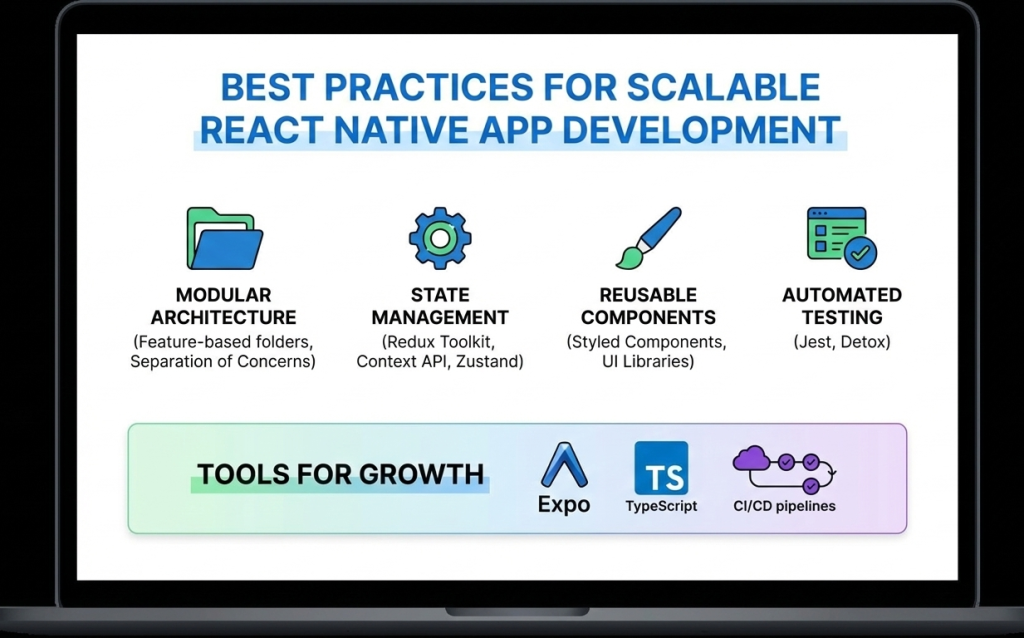
Best practices for scalable React Native app development
React native doveploment

Best Practices for Scalable and High-Performance React Native App Development

Introduction As mobile applications continue to grow in complexity and scale, developers must focus not only on building features but also on maintaining performance, scalability, and code quality. React Native development makes cross-platform mobile app creation faster and more efficient, but long-term success depends heavily on following proven best practices. Without proper architecture and optimization, React Native apps can become difficult to maintain, slow to scale, and prone to performance issues. On the other hand, applications built with best practices in mind remain stable, secure, and adaptable to future requirements. In this blog, we’ll explore the best practices for scalable and high-performance React Native app development, covering architecture, performance optimization, state management, security, and maintainability. 1. Use a Clean and Scalable Project Architecture A well-structured architecture is the foundation of any successful React Native application. Best practices include: Organizing code by features instead of file types Separating UI, business logic, and services Keeping reusable components in a shared directory A clean architecture improves collaboration, simplifies debugging, and makes scaling easier. 2. Break UI into Reusable Components React Native is built around a component-based architecture. Reusable components: Reduce code duplication Improve readability Speed up development Components should be small, focused, and reusable across the application. 3. Optimize Performance from the Start Performance optimization should not be an afterthought. Key techniques include: Using FlatList instead of ScrollView for long lists Avoiding unnecessary re-renders with React.memo Minimizing heavy computations on the UI thread Optimizing images and assets Using the Hermes engine also improves startup time and memory usage. 4. Choose the Right State Management Strategy State management plays a crucial role in scalability. Options include: Context API for small apps Redux for large and complex applications Zustand for lightweight and modern state handling Choosing the right approach prevents unnecessary complexity. 5. Handle API Calls and Data Caching Efficiently Efficient data handling improves performance and user experience. Best practices: Use Axios or Fetch consistently Implement error handling and retries Cache data when possible Avoid unnecessary API calls Libraries like React Query can simplify data fetching and caching. 6. Follow Platform-Specific Design Guidelines While React Native is cross-platform, Android and iOS users have different design expectations. Best practices include: Using platform-specific components when needed Handling gestures and navigation appropriately Testing UI on multiple screen sizes Respecting platform guidelines improves user satisfaction. 7. Secure Your React Native Application Security is critical in mobile app development. Best practices include: Avoid storing sensitive data in plain text Use secure storage solutions Implement authentication and authorization properly Use HTTPS and encrypted APIs Security should be integrated into every stage of development. 8. Write Tests and Automate Quality Assurance Testing ensures long-term stability. Important testing methods: Unit testing with Jest Component testing with React Native Testing Library End-to-end testing for critical flows Automated testing reduces bugs and improves release confidence. 9. Monitor Performance and Errors Monitoring helps identify issues before they affect users. Tools such as: Flipper Sentry Firebase Performance Monitoring These tools provide insights into crashes, performance bottlenecks, and user behavior. 10. Keep Dependencies Updated Outdated dependencies can cause security vulnerabilities and compatibility issues. Best practices: Regularly update React Native versions Remove unused libraries Review changelogs before upgrades Keeping dependencies updated ensures stability and security. Future-Ready React Native Development React Native continues to evolve with improved architecture, better performance, and stronger community support. Following best practices ensures your application remains adaptable to future updates and scaling requirements. Conclusion React Native development offers immense potential for building scalable and high-performance mobile applications. However, success depends on following best practices related to architecture, performance, security, and maintainability. By implementing these best practices from the beginning, developers can build robust React Native apps that deliver excellent user experiences and stand the test of time. Frequently Asked Questions (FAQs) 1. Why are best practices important in React Native development? Best practices ensure scalability, performance, maintainability, and long-term success of React Native applications. 2. How can I improve React Native app performance? Optimizing lists, avoiding unnecessary re-renders, using Hermes, and monitoring performance tools can significantly improve performance. 3. Which state management is best for React Native apps? It depends on app complexity. Context API works for small apps, while Redux or Zustand suits larger applications. 4. Is React Native secure for enterprise apps? Yes, when proper security measures like encrypted storage, secure APIs, and authentication are implemented. 5. How do I scale a React Native app efficiently? Using clean architecture, modular components, proper state management, and performance optimization ensures smooth scalability. 6. Are React Native apps future-proof? Yes, with continuous updates, strong community support, and best practices, React Native apps are future-ready. Connect with us: https://www.facebook.com/profile.php?id=61555452386126  
Essential tools and libraries for React Native development
React native doveploment

Essential Tools and Libraries for React Native Development

Introduction React Native development has gained massive popularity due to its ability to build cross-platform mobile applications using a single JavaScript codebase. However, the real strength of React Native lies not only in the framework itself but also in its rich ecosystem of tools and libraries that enhance productivity, performance, and scalability. From UI components and navigation to state management and testing, React Native offers a wide range of tools that help developers build high-quality applications efficiently. Choosing the right tools and libraries is crucial for maintaining clean code, improving performance, and ensuring long-term scalability. In this blog, we’ll explore the essential tools and libraries for React Native development, explain their use cases, and help you select the best stack for your next mobile app project. Why Tools and Libraries Matter in React Native React Native provides the foundation for building mobile apps, but real-world applications require much more than basic components. Tools and libraries help developers: Speed up development Maintain clean and modular code Improve UI and user experience Handle complex state and data flow Debug and test applications efficiently Using well-maintained and community-supported tools reduces technical debt and ensures better app stability. Core Development Tools for React Native 1. Node.js and Package Managers Node.js is required to run React Native projects. Developers typically use: npm Yarn These package managers help install dependencies, manage versions, and run scripts efficiently. 2. React Native CLI The React Native CLI provides full control over native code and project configuration. It is ideal for developers building production-ready apps that require custom native modules or advanced configurations. 3. Expo Expo simplifies React Native development by providing preconfigured tools and APIs. It is excellent for beginners and rapid prototyping. Key benefits of Expo include: Minimal setup Built-in APIs for camera, sensors, and notifications Fast development and testing UI Component Libraries UI libraries save time by offering ready-made, customizable components. 1. React Native Paper A Material Design-based UI library that provides consistent and visually appealing components. 2. NativeBase A flexible UI library that supports both Android and iOS with customizable components. 3. React Native Elements A cross-platform UI toolkit with reusable components and simple theming. Navigation Libraries Navigation is a core feature of mobile applications. React Navigation The most popular navigation library for React Native, supporting: Stack navigation Tab navigation Drawer navigation It is flexible, well-documented, and widely adopted. State Management Libraries As applications grow, managing state becomes complex. 1. Redux A predictable state container ideal for large-scale applications. 2. Zustand A lightweight and modern alternative to Redux with minimal boilerplate. 3. Context API Built-in solution suitable for small to medium-sized apps. Networking and API Handling Efficient API communication is critical for modern apps. Axios – Simplifies HTTP requests and error handling Fetch API – Built-in but less feature-rich than Axios Axios is widely preferred for React Native development. Testing Tools for React Native Testing ensures app reliability and stability. 1. Jest Used for unit testing JavaScript logic and components. 2. React Native Testing Library Helps test UI components from a user’s perspective. Debugging Tools Debugging tools help identify and fix issues quickly. 1. Flipper A powerful debugging tool supported by Meta for inspecting layout, network requests, and logs. 2. React DevTools Helps inspect component hierarchy and props. Performance Optimization Tools To ensure smooth performance: Why Did You Render – Detects unnecessary re-renders Hermes Engine – Improves app startup time and memory usage Best Practices for Choosing Tools Prefer well-maintained libraries Check community adoption Avoid overloading the project with unnecessary dependencies Ensure compatibility with the latest React Native version Conclusion React Native development becomes significantly more powerful when paired with the right tools and libraries. From UI components and navigation to testing and debugging, the React Native ecosystem offers everything needed to build scalable, high-performance mobile applications. Choosing the right combination of tools not only speeds up development but also ensures better code quality, maintainability, and long-term success. Frequently Asked Questions (FAQs) 1. What are the most important tools for React Native development? Essential tools include Node.js, React Native CLI or Expo, React Navigation, state management libraries, and testing tools like Jest. 2. Is Expo better than React Native CLI? Expo is great for rapid development and beginners, while React Native CLI offers more control for advanced and production-level apps. 3. Which UI library is best for React Native? Popular choices include React Native Paper, NativeBase, and React Native Elements, depending on design needs. 4. Do I need Redux for every React Native app? No, Redux is best for complex apps. Smaller apps can use Context API or Zustand. 5. How can I debug React Native apps effectively? Using Flipper, React DevTools, and proper logging practices helps debug apps efficiently. 6. Are third-party libraries safe to use in React Native? Yes, as long as they are actively maintained, well-documented, and widely adopted. Connect with us: https://www.facebook.com/profile.php?id=61555452386126
React native doveploment

React Native vs Flutter: Which Framework Is Better for Cross-Platform Mobile App Development?

Introduction Cross-platform mobile app development has transformed the way applications are built, allowing businesses to reach users on multiple platforms with reduced effort. Instead of creating separate apps for Android and iOS, developers can now rely on frameworks that support both platforms using a single codebase. Among the many options available, React Native and Flutter have emerged as the two most popular and powerful frameworks. Both are backed by major tech companies—React Native by Meta (Facebook) and Flutter by Google—and both promise fast development and high performance. However, choosing between React Native and Flutter can be challenging. Each framework has its strengths, limitations, and ideal use cases. In this blog, we provide an in-depth comparison of React Native vs Flutter, covering performance, development experience, ecosystem, cost, and long-term scalability to help you make an informed decision. Overview of React Native React Native is an open-source framework that allows developers to build mobile applications using JavaScript and React. It uses native components under the hood, ensuring that apps feel and perform like native applications. Key characteristics of React Native include: Component-based architecture Reusable UI components Near-native performance Strong community support React Native is widely adopted and trusted by companies such as Facebook, Instagram, Shopify, and Tesla. Overview of Flutter Flutter is a UI toolkit developed by Google that allows developers to build natively compiled applications using the Dart programming language. Instead of relying on native components, Flutter renders everything using its own high-performance rendering engine. Key characteristics of Flutter include: Single codebase for mobile, web, and desktop Highly customizable UI High performance due to direct compilation Rich widget library Flutter is gaining popularity for its visually rich and consistent user interfaces. Programming Language Comparison One of the most noticeable differences between React Native and Flutter is the programming language. React Native: JavaScript (widely used, large talent pool) Flutter: Dart (less common, steeper learning curve) JavaScript’s popularity gives React Native an advantage in terms of hiring, learning resources, and community support. Performance Comparison Flutter often has a slight edge in raw performance because it compiles directly to native code and uses its own rendering engine. This allows for smooth animations and consistent UI performance. React Native, on the other hand, uses a bridge to communicate between JavaScript and native components. While this can introduce slight overhead, modern improvements in React Native have significantly narrowed the performance gap. For most business applications, both frameworks offer excellent performance. Development Speed and Productivity React Native allows developers to reuse code between web and mobile applications if they are already using React. Features like Hot Reloading and reusable components enhance productivity. Flutter also offers Hot Reload and fast development, but learning Dart and Flutter’s widget system may take additional time for beginners. Overall, React Native offers a faster onboarding experience for teams familiar with JavaScript. UI and Customization Flutter excels in UI customization. Its widget-based system gives developers full control over design and animations, making it ideal for visually complex applications. React Native relies on native UI components, which ensures platform consistency but may require additional effort for deep customization. If design consistency across platforms is critical, Flutter may be the better choice. Community and Ecosystem React Native has been around longer and has a more mature ecosystem. It offers: Thousands of third-party libraries Extensive documentation Large developer community Flutter’s ecosystem is growing rapidly but is still smaller compared to React Native. Cost and Maintenance React Native’s single codebase and JavaScript-based development reduce both development and maintenance costs. The availability of developers also helps keep costs lower. Flutter can be cost-effective as well, but finding experienced Dart developers may be more challenging. Use Case Comparison Choose React Native if: Your team already uses JavaScript or React You want faster development and easier hiring You are building business-focused apps Choose Flutter if: You need highly customized UI You want consistent design across platforms Performance and animations are a top priority Long-Term Scalability Both frameworks are backed by strong organizations and active communities. React Native benefits from its long history and massive adoption, while Flutter is evolving rapidly with support for web and desktop platforms. Both are safe choices for long-term projects. Conclusion The choice between React Native and Flutter depends on your project requirements, team expertise, and long-term goals. React Native offers faster development, a larger ecosystem, and easier onboarding, while Flutter shines in UI customization and performance. For most startups and business applications, React Native development remains a highly practical and reliable choice. Frequently Asked Questions (FAQs) 1. Which is better: React Native or Flutter? Neither is universally better. React Native is ideal for JavaScript developers and faster development, while Flutter excels in UI customization and performance. 2. Is React Native easier to learn than Flutter? Yes, React Native is generally easier to learn for developers familiar with JavaScript and React. 3. Does Flutter perform better than React Native? Flutter can offer slightly better performance in animation-heavy apps, but the difference is minimal for most use cases. 4. Which framework is more cost-effective? React Native is often more cost-effective due to a larger developer pool and easier maintenance. 5. Can both frameworks be used for large apps? Yes, both React Native and Flutter are suitable for large-scale and enterprise applications. 6. Which framework has better community support? React Native currently has a larger and more mature community compared to Flutter. Connect with us: https://www.facebook.com/profile.php?id=61555452386126

React Native development for cross-platform mobile applications
React native doveploment

React Native Development: A Complete Guide to Building High-Performance Cross-Platform Mobile Apps

Introduction In today’s fast-paced digital world, mobile applications have become essential for businesses, startups, and enterprises alike. Users expect apps to be fast, reliable, and available across multiple platforms. This growing demand has given rise to cross-platform mobile app development, and among all available frameworks, React Native development stands out as one of the most powerful and popular choices. React Native allows developers to build mobile applications for both Android and iOS using a single JavaScript codebase, significantly reducing development time and cost. Backed by Meta (Facebook) and supported by a massive developer community, React Native has been adopted by companies like Facebook, Instagram, Airbnb, Shopify, and Tesla. This blog provides a complete guide to React Native development—covering what it is, how it works, its benefits, tools, best practices, and why it’s a smart choice for modern mobile app development. What Is React Native Development? React Native is an open-source JavaScript framework used to build native mobile applications. It is based on React, a popular JavaScript library for building user interfaces. Unlike traditional hybrid frameworks that rely on WebViews, React Native uses real native components. This means applications built with React Native look, feel, and perform like native apps written in Swift, Objective-C, Java, or Kotlin. With React Native, developers write most of the code once and deploy it across platforms, while still having the flexibility to write native code when required. How React Native Works React Native works by running JavaScript code in a separate thread and communicating with native modules through a bridge. This architecture allows JavaScript logic to interact with native UI components efficiently. Key concepts include: JavaScript Thread: Handles business logic and app behavior Native Thread: Renders native UI components Bridge: Enables communication between JavaScript and native code Modern versions of React Native have introduced improvements like the New Architecture, including Fabric and TurboModules, which significantly enhance performance and reduce latency. Why Choose React Native for Mobile App Development? 1. Cross-Platform Development One of the biggest advantages of React Native development is the ability to build apps for both Android and iOS using a single codebase. This dramatically reduces development effort and speeds up time-to-market. 2. Faster Development Cycle React Native supports Hot Reloading, allowing developers to see changes instantly without recompiling the entire app. This feature boosts productivity and simplifies debugging. 3. Near-Native Performance Because React Native uses native components, apps deliver smooth animations, fast load times, and excellent user experience comparable to fully native apps. 4. Cost-Effective Solution Maintaining one codebase instead of two separate native apps lowers development and maintenance costs, making React Native ideal for startups and MVPs. 5. Strong Community and Ecosystem React Native has a massive ecosystem of libraries, plugins, and tools. Developers can quickly integrate features like navigation, authentication, payments, and analytics. Popular Use Cases of React Native React Native is suitable for a wide range of applications, including: E-commerce mobile apps Social networking platforms On-demand service apps Fintech and banking apps Healthcare and fitness apps Educational platforms Its flexibility allows businesses to scale applications as user demand grows. Essential Tools for React Native Development To build efficient React Native applications, developers rely on several tools: Development Tools Node.js & npm/yarn – Package management React Native CLI – Full control over native code Expo – Faster development with minimal configuration UI and Navigation React Navigation – Routing and navigation React Native Paper / NativeBase – UI components State Management Redux Zustand Context API Testing and Debugging Jest – Unit testing React Native Testing Library Flipper – Advanced debugging Best Practices for React Native Development 1. Use Reusable Components Break UI into reusable components to improve maintainability and consistency. 2. Optimize Performance Use FlatList instead of ScrollView for large lists Avoid unnecessary re-renders Memoize components where needed 3. Maintain Clean Folder Structure Organize files by features rather than type to improve scalability. 4. Secure Sensitive Data Never store sensitive information in plain text. Use secure storage and encrypted APIs. 5. Follow Platform Guidelines Ensure your app follows Android and iOS design standards for better user experience. React Native vs Native Development While native development offers full platform control, React Native provides an excellent balance between performance and efficiency. For most applications, React Native delivers everything needed without the complexity of maintaining two separate codebases. Native development may be preferred for extremely performance-intensive apps, but React Native is more than sufficient for the majority of business and consumer applications. Future of React Native React Native continues to evolve with strong backing from Meta and the open-source community. Improvements in performance, architecture, and tooling make it a future-proof choice for mobile app development. With growing demand for cross-platform solutions, React Native is expected to remain a top framework for years to come. Conclusion React Native development has transformed the way mobile applications are built. By enabling cross-platform development with near-native performance, it saves time, reduces costs, and delivers exceptional user experiences. Whether you’re a startup building an MVP or an enterprise scaling a mobile solution, React Native offers the flexibility, performance, and community support needed to succeed in today’s competitive mobile ecosystem. Frequently Asked Questions (FAQs) – React Native Development 1. What is React Native development used for? React Native development is used to build cross-platform mobile applications for Android and iOS using a single JavaScript codebase. It allows developers to create high-performance apps with native look and feel while reducing development time and cost. 2. Is React Native suitable for large-scale applications? Yes, React Native is suitable for large-scale and enterprise-level applications. Companies like Facebook, Instagram, and Shopify use React Native for production apps. With proper architecture, state management, and performance optimization, React Native apps can scale efficiently. 3. How does React Native differ from React.js? React.js is a JavaScript library used for building web applications, whereas React Native is a framework designed specifically for mobile app development. React Native uses native components instead of HTML elements, allowing apps to run on Android and iOS platforms. 4. Does React Native

Developer coding React Native mobile application on laptop with smartphone displaying app interface
React native doveploment

React Native Development: Complete Guide to Cross-Platform Apps 2025

Introduction React Native development has revolutionized how developers approach mobile app creation. Instead of maintaining separate codebases for iOS and Android, developers can now write once and deploy everywhere. This powerful framework, created by Meta (formerly Facebook), has become the go-to solution for businesses and developers seeking efficient, cost-effective mobile app development. In this comprehensive guide, we’ll explore everything you need to know about React Native development, from fundamentals to advanced techniques that will help you build production-ready applications. What is React Native? React Native is an open-source mobile application framework that allows developers to build native mobile apps using JavaScript and React. Unlike hybrid frameworks that render apps in a WebView, React Native creates truly native components, resulting in performance that’s nearly indistinguishable from apps built with Swift, Objective-C, Java, or Kotlin. The framework bridges JavaScript code with native platform APIs, enabling developers to access device features like the camera, GPS, and accelerometer while writing primarily in JavaScript. Why Choose React Native Development? 1. Code Reusability The most compelling advantage of React Native development is code reusability. Developers can share 70-90% of code between iOS and Android platforms, significantly reducing development time and costs. This shared codebase doesn’t compromise on quality – apps maintain native performance and look-and-feel on both platforms. 2. Fast Development Cycle React Native’s hot reloading feature allows developers to see changes instantly without recompiling the entire application. This rapid feedback loop accelerates development and makes debugging more efficient. Combined with a vast ecosystem of pre-built components, developers can prototype and iterate faster than ever. 3. Strong Community and Ecosystem With thousands of contributors and millions of users worldwide, React Native boasts one of the strongest communities in mobile development. This translates to abundant resources, libraries, and solutions to common problems. Popular apps like Facebook, Instagram, Airbnb, and Tesla have all leveraged React Native at various points. 4. Cost-Effective Solution Maintaining a single codebase requires fewer developers and less time compared to building separate native apps. For startups and businesses with limited resources, React Native development offers a pathway to market without sacrificing quality. 5. Native Performance React Native renders using native components, not web views. The framework uses a bridge to communicate with native modules, ensuring your app performs smoothly and feels natural to users on each platform. Getting Started with React Native Development Prerequisites Before diving into React Native development, ensure you have: Basic knowledge of JavaScript and React Node.js and npm installed on your system Understanding of mobile app concepts A code editor (VS Code recommended) For iOS development: macOS with Xcode For Android development: Android Studio and Java Development Kit Setting Up Your Environment React Native offers two primary ways to start: Expo CLI – Perfect for beginners, Expo provides a managed workflow with minimal setup. It includes a suite of tools and services built around React Native, making it ideal for quick prototyping and learning. React Native CLI – Offers more flexibility and direct access to native code. This approach is better for complex apps requiring custom native modules or extensive platform-specific code. Your First React Native App Starting a new project is straightforward: bash # Using Expo npx create-expo-app MyFirstApp # Using React Native CLI npx react-native init MyFirstApp The basic structure includes JavaScript files for your components, native folders (ios and android), and configuration files. A simple component looks familiar to React developers: javascript import React from ‘react’; import { View, Text, StyleSheet } from ‘react-native’; const WelcomeScreen = () => { return ( <View style={styles.container}> <Text style={styles.text}>Welcome to React Native!</Text> </View> ); }; const styles = StyleSheet.create({ container: { flex: 1, justifyContent: ‘center’, alignItems: ‘center’, }, text: { fontSize: 24, fontWeight: ‘bold’, }, }); export default WelcomeScreen; Core Concepts in React Native Development Components React Native provides a set of core components that map to native UI elements: View: The fundamental container, similar to div in web development Text: For displaying text content Image: For rendering images ScrollView: For scrollable content TextInput: For user text input Button: For touchable buttons FlatList: For efficient, scrollable lists Styling React Native uses a JavaScript-based styling approach similar to CSS but with camelCase properties. Instead of classes, styles are applied directly to components using the StyleSheet API. Flexbox is the primary layout system, making responsive designs achievable across different screen sizes. Navigation Navigation is crucial for multi-screen apps. React Navigation is the most popular library, offering: Stack Navigator: For hierarchical navigation Tab Navigator: For bottom tab interfaces Drawer Navigator: For side menu navigation State Management For managing application state, React Native developers use various solutions: React Hooks: useState and useContext for simple state Redux: For complex, application-wide state MobX: For reactive state management Context API: For prop drilling solutions Best Practices for React Native Development 1. Optimize Performance Use FlatList for long lists instead of ScrollView Implement proper key props for list items Avoid unnecessary re-renders with React.memo and useMemo Use native driver for animations Optimize images and assets 2. Follow Component Architecture Structure your app with reusable, modular components. Separate business logic from presentation components. This separation makes testing easier and code more maintainable. 3. Handle Platform Differences While React Native promotes code sharing, some platform-specific adjustments are necessary. Use the Platform module to detect the operating system and apply platform-specific code when needed. 4. Implement Proper Error Handling Use error boundaries to catch JavaScript errors and prevent app crashes. Implement proper loading states and user feedback for asynchronous operations. 5. Test Thoroughly Combine different testing approaches: Unit tests with Jest Component tests with React Native Testing Library End-to-end tests with Detox or Appium Manual testing on actual devices Advanced React Native Development Techniques Native Modules When JavaScript capabilities aren’t enough, you can write native modules in Swift/Objective-C or Java/Kotlin and bridge them to JavaScript. This allows access to platform-specific features not available through React Native’s core APIs. Animation React Native provides two complementary animation systems: Animated API: For detailed, interactive animations LayoutAnimation: For simple layout transitions For complex animations,

Futuristic business illustration showing a central AI brain connected to digital agent nodes and data streams, with document icons symbolizing smart retrieval. Bold title reads 'Agentic RAG
React native doveploment

Agentic RAG

Introduction Agentic RAG is transforming the way organizations approach information retrieval, research, and automation by combining the power of retrieval-augmented generation (RAG) with intelligent, autonomous agents. This advanced AI framework empowers systems to reason, plan, use external tools, and learn over time, resulting in highly accurate and context-aware outputs. As modern enterprises face exponential growth in data, agentic RAG offers new ways to access reliable information, automate workflows, and create advanced virtual assistants—ushering in a new era of scalable, adaptive business intelligence. What Is Agentic RAG? Agentic RAG merges retrieval-based AI models with generative language models, empowered by autonomous agents that go beyond static query matching. Agents can decide what information to retrieve, break down complex queries into sub-tasks, access external APIs, and synthesize data for comprehensive responses. Unlike classic RAG, agentic RAG adapts to new data and context dynamically, leveraging iterative planning and feedback to continually improve output quality. Key Features: Autonomous decision-making and reasoning Multi-step planning and query decomposition Dynamic retrieval from diverse sources (databases, APIs, knowledge bases) Enhanced accuracy, efficiency, and real-time adaptability Continual learning and context management Types of Agentic RAG Agentic RAG systems employ several types of agents based on function and complexity: Routing Agent: Directs queries to the most suitable RAG pipeline, using agentic reasoning to analyze tasks such as document summarization or question answering. One-Shot Query Planning Agent: Breaks queries into independent sub-queries, executes them in parallel, and synthesizes unified answers. Tool Use Agent: Integrates external tools and APIs for real-time or specialized data, enhancing generative responses. ReAct Agent (Reason + Act): Iteratively reasons and interacts with multiple sources or tools, adapting its approach mid-task for the most precise result. Dynamic Planning & Execution Agent: Manages multi-step and complex workflows, separating long-term plans from immediate execution. Utilizes computational graphs and orchestrates stepwise execution. Applications in Real-World Scenarios Agentic RAG offers transformative benefits across industries: Enterprise Knowledge Management: Streamlines access to organizational data, enabling employees to make fast, informed decisions. Automated Support & Virtual Assistants: Reduces workloads by providing instant, context-relevant answers in customer and employee support. Healthcare: Improves patient insights and research capabilities with agents that gather and contextualize medical knowledge. Legal Research & Finance: Accelerates analysis of documents, regulations, and market data with agents capable of domain-specific data synthesis. Innovation & Research: Assists in synthesizing ideas, comparing multiple sources, and driving strategic initiatives through intelligent information retrieval. How To Implement Agentic RAG Follow these steps for building an agentic RAG system: Define Objectives: Identify tasks suitable for agentic RAG, such as chatbots or automated research. Choose Core Components: Select a retrieval system (e.g., dense passage retrieval, hybrid search) and a generative AI model (e.g., GPT, BERT). Prepare Data: Collect, clean, and preprocess documents to ensure compatibility and maximize retrieval accuracy. Build the Retrieval Layer: Index documents for fast, context-aware search. Agent Integration: Introduce agents to orchestrate workflows—query planning, tool use, and multimodal integration. Fine-Tune & Feedback Loops: Continuously refine models with user feedback and retraining to maintain high performance. Deploy & Monitor: Set up APIs, real-time monitoring, and performance dashboards for ongoing optimization. Key Tools: LlamaIndex and LangChain for agent orchestration, reasoned workflows, and tool integration. Low-code platforms like ZBrain for business workflows and rapid issue response. Conclusion Agentic RAG is redefining the landscape of AI-driven knowledge management, automating complex information retrieval, and powering scalable enterprise solutions. Its combination of multi-agent intelligence, context-awareness, dynamic adaptation, and modular flexibility gives organizations the tools to succeed in an information-rich, rapidly evolving market. Unlock the power of agentic RAG to supercharge research, virtual assistants, and automated decision-making. Call-to-Action: Explore how agentic RAG can optimize workflows and revolutionize information access—connect with AI experts today to get started on a future-ready solution! FAQ What is Agentic RAG? Agentic RAG is a framework that empowers AI agents to retrieve and use external information, plan multi-step workflows, and generate intelligent, context-aware responses far beyond classic RAG capabilities. How does it differ from traditional RAG? Agentic RAG adds autonomous reasoning, multi-task orchestration, and external tool use—enabling more accurate and adaptable information synthesis. What are the main benefits for enterprises? Benefits include scalable automation, enhanced data accuracy, personalized user experiences, and efficiency with reduced costs and improved decision quality. What are common implementation challenges? Challenges involve complex system integration, managing data quality, ensuring scalability, and maintaining real-time performance. Which platforms support agentic RAG development? Popular frameworks are LlamaIndex, LangChain, and low-code platforms like ZBrain, offering flexible workflow design and seamless data integration. The Real Benefits of Hiring a React Native App Development Company

The Real Benefits of Hiring a React Native App Development Company
React native doveploment

The Real Benefits of Hiring a React Native App Development Company

Introduction In today’s fiercely competitive digital landscape, businesses need to bring robust, user-friendly mobile applications to market faster and more efficiently than ever. React Native, a leading cross-platform framework, has transformed the way companies approach app development by enabling a single codebase for both iOS and Android. But the real edge comes when outsourcing to a specialized React Native app development company. This blog unpacks the practical, cost, and strategic benefits of choosing expert agencies over building an in-house team, and why it might be the best move for businesses aiming for speed, quality, and scalability in their mobile solutions. Why Hire a React Native App Development Company? Cost Efficiency Agencies eliminate the need for recruiting, training, and maintaining an internal team, significantly reducing overhead costs. Outsourcing allows businesses to work with global experts at competitive rates, especially from regions with lower operating expenses. Access to Specialized Talent React Native agencies employ dedicated teams of specialists—developers, designers, testers, and project managers—bringing years of experience and the latest technical skills. Expertise spans not just coding, but also performance optimization, UX/UI, and deep platform knowledge for iOS and Android. Faster Time to Market Companies use streamlined workflows and prebuilt components to accelerate development, helping brands launch their products quickly without sacrificing quality. Agencies adapt to tight timelines and fluctuating project scopes with scalable resources. Cross-Platform Excellence Leveraging a single codebase, React Native app development ensures uniform app performance and look on both major platforms, saving time and costs associated with redundant builds. Additional Benefits and Use Cases End-to-End Support and Risk Reduction From ideation to launch and maintenance, agencies offer holistic support, reducing the risk of project delays and management headaches. Pre-existing modules and reusable components reduce technical risk and enhance code reliability. Scalability and Flexibility Need to expand features, support new users, or enter fresh markets? Agencies design scalable architectures from the outset, enabling seamless growth without costly rebuilds. Easy to scale teams up or down according to project demands. Enhanced Quality and Security Professional companies adhere to the latest security and quality standards, leveraging industry best practices to ensure risk-free, high-performing apps. Focus on Core Business Free internal resources to concentrate on business-critical activities rather than IT project management or technical challenges. Conclusion Choosing a React Native app development company gives access to top-tier technical expertise, reduces operational costs, and dramatically speeds up delivery—all while ensuring cross-platform excellence and scalable solutions. For businesses looking to make a mark in the mobile app space, outsourcing to seasoned professionals isn’t just an option; it’s a strategic advantage. Start your next mobile project on the right track by partnering with experts for maximum impact. FAQ Q1: How much can outsourcing app development save? A1: Agencies can reduce costs by up to 60% compared to employing an in-house team, thanks to shared resources and lower international rates. Q2: Will my app be secure with an agency? A2: Established companies follow industry-standard security protocols and best practices, ensuring your data and intellectual property are protected. Q3: How soon can my app go live? A3: Agencies leverage reusable components and proven workflows, often launching fully functional and tested apps in half the time of traditional development. Q4: Can I update my app easily later? A4: Absolutely. Scalable architectures and professional support make upgrades and feature additions simple and efficient.

React native doveploment

Less Talked About React Native App Development Considerations

Introduction React Native has surged in popularity as a preferred framework for building cross-platform mobile apps that deliver near-native performance. It offers developers the advantage of writing code once and deploying it on both iOS and Android, dramatically reducing time and cost. However, beyond the widely discussed benefits, there are several less-talked-about considerations that can impact the success and maintainability of React Native projects. This blog highlights underrated yet pivotal factors to consider when developing apps with React Native. Understanding these will help businesses and developers avoid common pitfalls, optimize performance, and build scalable applications. For insights on choosing the right development approach and leveraging AI-powered tools to enhance apps, explore TechOTD’s mobile app services and their technology blog. Less Talked About Considerations in React Native Development 1. Native Module Bridging Complexity While React Native covers most UI and logic needs, some features require native modules. Bridging custom native components between JavaScript and platform-specific code (Swift/Objective-C for iOS, Java/Kotlin for Android) can be complex and error-prone. Early planning of native module requirements prevents integration bottlenecks. 2. Platform-Specific UI/UX Nuances Cross-platform code sometimes overlooks subtle UI differences and behaviors expected by users on iOS or Android. Tailoring components and animations to respect platform conventions enhances user satisfaction but requires additional effort. 3. Debugging and Performance Profiling Challenges React Native debugging can be trickier compared to pure native apps. Certain performance issues stem from JavaScript thread bottlenecks and asynchronous bridge communication. Leveraging specialized profiling tools early helps identify and mitigate these problems. 4. Library and Dependency Maturity Not all React Native third-party libraries maintain parity between platforms or keep pace with the latest RN versions. Thorough vetting and maintenance planning for dependencies is critical to ensuring long-term app stability. 5. Handling Large App Sizes and Startup Times React Native apps tend to have larger binary sizes and longer cold start durations compared to native apps. Optimizing assets, code splitting, and lazy loading can mitigate user experience impacts but require strategic development approaches. 6. Security Considerations in JavaScript Environment JavaScript bundles can be reverse-engineered, posing risks of exposing app logic or sensitive data. Employing code obfuscation, secure storage, and adhering to best practices is essential to safeguard apps. How AI and Modern Tools Can Help AI-powered development assistants and predictive analytics tools can optimize performance tuning, automate testing, and suggest code improvements in React Native projects, reducing manual effort and error rates. TechOTD’s AI-driven solutions accelerate React Native development with proven frameworks and agile methodologies: React Native Development Services. Conclusion While React Native offers substantial advantages for rapid, cost-effective cross-platform app development, success requires attention to less obvious nuances—native module integration, platform-specific UX, debugging complexities, and security considerations. Addressing these early with the support of AI tools and expert development teams like TechOTD ensures scalable, high-performance apps that delight users across platforms. Stay updated on React Native trends and technology innovations at TechOTD Blog. FAQs Q1: Why is native module bridging necessary? Some hardware features or optimizations require platform-specific native code not supported directly by React Native. Q2: How do I ensure the app feels native on each platform? Design UI/UX specifically tailored for Android and iOS conventions with conditional rendering and styling. Q3: What tools help with React Native performance profiling? Tools like Flipper, Android Profiler, and Xcode Instruments assist in diagnosing performance bottlenecks. Q4: How do I manage third-party dependencies in React Native? Regularly audit and update libraries, favor well-maintained packages, and prepare for migration during React Native upgrades. Q5: How can I protect my app’s JavaScript code? Use obfuscation techniques, secure API keys, and follow secure coding guidelines to reduce vulnerabilities.

React native doveploment

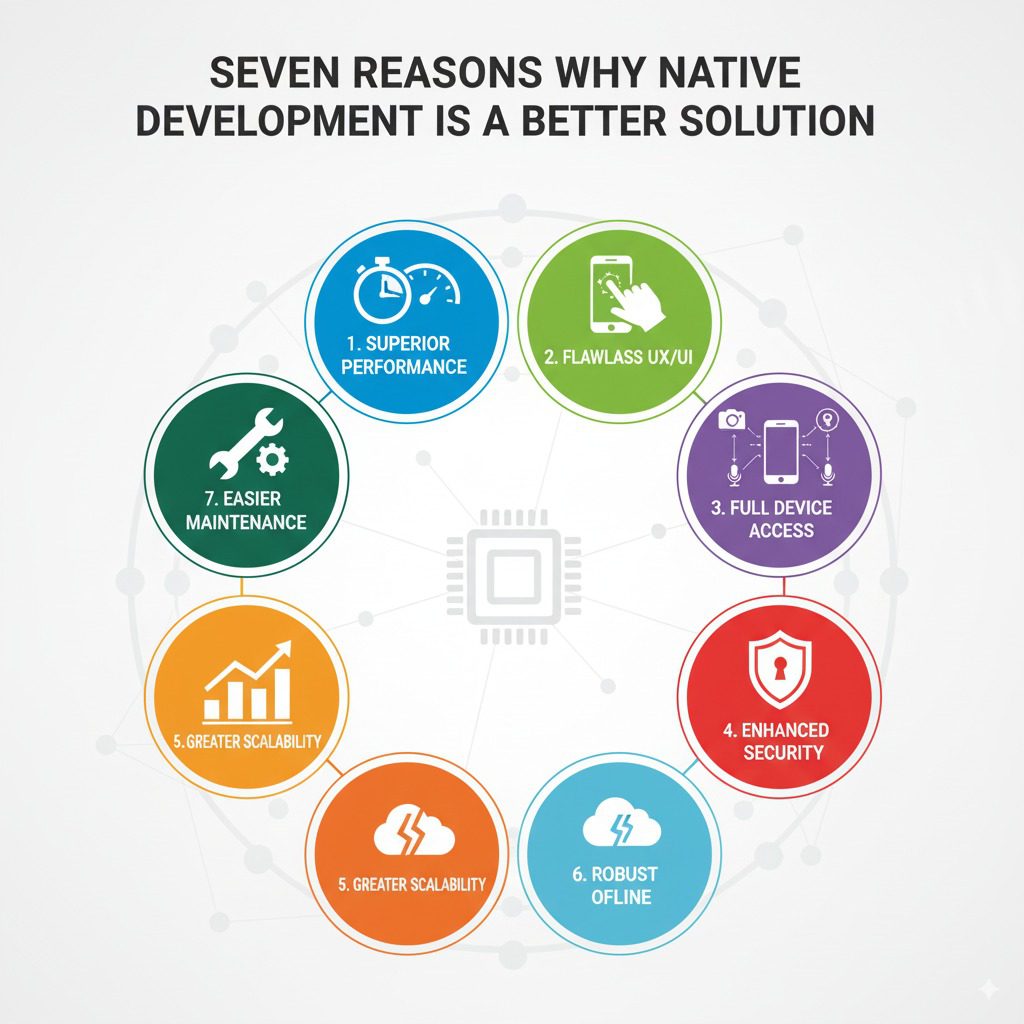
Seven Reasons Why Native Development is a Better Solution

Introduction As the mobile app ecosystem continues to evolve, businesses face a critical decision when choosing app development approaches. Among the various methodologies—native, hybrid, cross-platform—native app development remains the gold standard for delivering superior performance, user experience, and long-term scalability. Native development focuses on building apps specifically for a particular operating system (iOS or Android) using platform-specific languages and tools. This in-depth blog explores seven compelling reasons why native development is the better choice for businesses aiming to create impactful, resilient mobile applications. It integrates insights on AI integration, blockchain, and emerging technologies from TechOTD AI Services, along with best practices and strategic guidance drawn from TechOTD’s vast repository of technology leadership content. Reason 1: Superior Performance and Responsiveness Native apps benefit from direct access to device-specific hardware and OS features, resulting in high-performance apps with smooth animations and quick responsiveness. Native code executes faster than cross-platform or hybrid frameworks that rely on webviews or interpreters. Real-time processing of graphics, gestures, and touch inputs offers a fluid user experience critical for gaming, multimedia, and complex enterprise apps. Explore AI-powered performance optimizations within native applications at TechOTD AI Blog. Reason 2: Access to Device Features and Latest APIs Native development provides full access to device capabilities such as cameras, GPS, biometric sensors, and advanced APIs updated regularly by Apple and Google. This ensures apps leverage new hardware innovations like Face ID, LiDAR, or motion controls immediately without waiting for third-party framework updates. Native apps can utilize platform-specific SDKs and tools for push notifications, payment integration, and security enhancements. Learn about seamless multi-technology integration, including blockchain, at TechOTD Blockchain Integration. Reason 3: Enhanced Security and Compliance Native apps benefit from robust security implementations underpinning mobile operating systems, ensuring compliance with stringent data protection regulations. Developers can implement platform-specific encryption, secure key storage, and biometric authentication. Native apps are less vulnerable to common web-based security threats impacting hybrid apps. For advanced AI-driven security and data privacy, visit TechOTD AI Services. Reason 4: Better User Experience (UX) Alignment Native development ensures adherence to design guidelines and UX principles specific to each platform, enhancing user familiarity and satisfaction. App navigation, gestures, interface elements, and typography are optimized for iOS or Android standards. Native app experiences feel more intuitive and seamless, directly affecting user retention and engagement. Discover how predictive analytics can further tailor UX at TechOTD Predictive Analytics. Reason 5: Scalability and Maintainability While cross-platform tools promise faster initial development, native apps provide long-term scalability, maintainability, and stability. Native codebases facilitate easier debugging, upgrades, and integration of complex features evolving with business needs. Platform-specific updates, SDKs, and emerging technologies can be incorporated without compatibility issues. Understand structured software development approaches from TechOTD How We Work. Reason 6: Superior Offline Capabilities and Connectivity Native apps handle offline scenarios and incremental sync with greater precision using local data storage and background processing capabilities. This is crucial for industries like banking, healthcare, and travel where connectivity may be intermittent. Native apps can better manage push notifications, background tasks, and real-time updates with optimized battery consumption. AI-powered backend optimizations enhancing connectivity experiences are explored on TechOTD AI Blog. Reason 7: Future-Proofing with Emerging Technologies Native platforms serve as primary environments for rapid innovations involving 5G, AR/VR, machine learning, blockchain, and IoT integrations. Early access and native SDK support ensure apps capitalize on new tech leaps for competitive differentiation. Examples include AI-based real-time voice assistants, blockchain-secured transactions, and AR-powered customer experiences. Stay updated with cutting-edge developments at TechOTD Blog. Comparative Insights: Native vs Cross-Platform Aspect Native Cross-Platform/Hybrid Performance High, optimized for platform Moderate, especially for graphics Access to Device Features Full Limited or delayed support Security Platform-grade Increased vulnerabilities UX Quality Platform-consistent, polished Sometimes generic or inconsistent Development Speed Longer per platform Faster for multi-platform Maintenance Easier long-term Can become complex over time Emerging Tech Support Immediate Often delayed Real-World Case Studies and Success Stories Globally recognized enterprises including banks, manufacturers, and retailers choose native development to power critical apps, mitigate risks, and innovate rapidly. AI integrations in native apps have delivered breakthrough improvements in operational efficiency and customer engagement. Explore comprehensive AI and blockchain implementations at TechOTD AI and Blockchain Services. Implementation Best Practices for Native Development Define clear platform-specific requirements and target demographics. Embrace Agile development cycles with continuous testing and feedback. Leverage native performance profiling and analytics tools for iterative improvements. Ensure cross-functional collaboration among UX/UI, developers, and business teams. Plan for ongoing updates to support OS evolution and emerging technologies. Conclusion Choosing native app development is a strategic investment in superior performance, security, and long-term innovation potential. It aligns closely with platform advancements and emerging technologies, helping enterprises deliver exceptional mobile experiences that stand the test of time.

React native doveploment

A Comprehensive Guide on React Native for Mobile App Development

Introduction In today’s digital-first world, mobile applications are no longer a luxury—they’re a necessity for businesses to connect with their customers. Choosing the right framework for mobile app development can determine the success of your app in terms of performance, scalability, and user experience. Among the many frameworks available, React Native has emerged as one of the most popular and powerful tools for building cross-platform apps with native-like performance. This guide will take you through everything you need to know about React Native, from what it is and why it’s popular, to its benefits, use cases, challenges, and the future of the framework. What is React Native? React Native is an open-source mobile app development framework created by Meta (Facebook) in 2015. It allows developers to build cross-platform mobile apps using JavaScript and React, while rendering user interfaces with native components. This means that a single codebase can be used to build apps for both iOS and Android, significantly reducing development time and cost. Why React Native is Popular Cross-Platform Development – Write once, run on both iOS and Android. Native Performance – Uses native components for smooth performance. Strong Community Support – Backed by Meta and an active developer community. Faster Time-to-Market – Saves time with reusable components and pre-built libraries. Hot Reloading – Developers can instantly see the impact of code changes. Key Features of React Native Cross-Platform Compatibility Hot Reloading and Fast Refresh Third-Party Plugin Support Large Ecosystem of Libraries Reusable UI Components Integration with Native Code (Java, Swift, Objective-C, Kotlin) Benefits of Using React Native for Mobile App Development Benefit Description Cost Efficiency One codebase for two platforms saves resources. Faster Development Shared code reduces development time. Strong Community Large developer community ensures constant updates and support. Native Performance Uses real native components for high performance. Scalability Suitable for small startups and large enterprises. Easy Maintenance Updates and bug fixes are easier with a shared codebase. Use Cases of React Native React Native is versatile and is used by both startups and global enterprises. Some popular companies that use React Native include: Facebook (Marketplace, Ads Manager) Instagram Uber Eats Airbnb (initially) Tesla Walmart Discord Real-World Use Cases E-Commerce Apps – Faster shopping experiences with cross-platform functionality. On-Demand Delivery Apps – Food delivery, taxi booking apps benefit from native-like performance. Social Media Apps – High responsiveness and seamless integration with device features. Business Apps – Helps companies manage users and clients across platforms. Educational Apps – Gamified learning platforms and video-based e-learning solutions. React Native vs Other Frameworks Feature React Native Flutter Xamarin Language JavaScript + React Dart C# Performance Near-native High (Skia engine) Moderate Community Very large Growing fast Limited UI Flexibility High Very High Moderate Learning Curve Easy for React devs Moderate Higher Challenges of React Native Performance Gaps in highly complex apps. Dependency on Third-Party Libraries (sometimes outdated). Native Modules Required for advanced functionalities. UI Consistency Issues between iOS and Android. Best Practices for React Native Development Use TypeScript for type safety. Optimize Images and Assets for performance. Break Components into Smaller Units for reusability. Follow Modular Architecture to manage large projects. Keep Dependencies Updated to avoid security risks. Future of React Native React Native continues to evolve with regular updates from Meta and the community. Upcoming improvements include: Better performance with Hermes Engine (lightweight JavaScript engine). New Architecture (Fabric, TurboModules, JSI) for faster rendering. Integration with AI and Machine Learning SDKs. Stronger community-driven ecosystem. FAQs on React Native Q1: Is React Native good for startups?Yes, it reduces cost and time-to-market, making it ideal for startups. Q2: Can React Native handle large-scale apps?Yes, companies like Walmart and Tesla use it for enterprise-scale apps. Q3: Does React Native support offline apps?Yes, with the help of libraries like Redux-Persist and SQLite. Q4: What skills do developers need?JavaScript, React, and some native development knowledge (Swift, Java, Kotlin). Q5: Is React Native better than Flutter?Both have pros and cons—React Native is easier for React/JS developers, while Flutter offers better UI flexibility. Key Takeaways React Native allows businesses to develop cost-effective, cross-platform mobile apps. It provides near-native performance, faster development cycles, and a strong ecosystem. Best suited for startups, SMEs, and enterprises across industries. Despite minor limitations, its future looks strong with ongoing improvements. Conclusion React Native has established itself as a powerful framework for building modern, cross-platform mobile applications. By combining the ease of JavaScript with native component rendering, it offers the perfect balance between cost efficiency, scalability, and performance. Whether you’re a startup aiming for faster market entry or an enterprise looking to streamline development, React Native is an investment worth considering.

How would you like me to respond?

Select a personality for your AI assistant

Normal
Happy
Sad
Angry

Your selection will affect how the AI assistant responds to your messages

Chat Assistant

Let's discuss your project!

Hear from our clients and why 3000+ businesses trust TechOTD

Tell us what you need, and we'll get back with a cost and timeline estimate

Scroll to Top