
December 2025

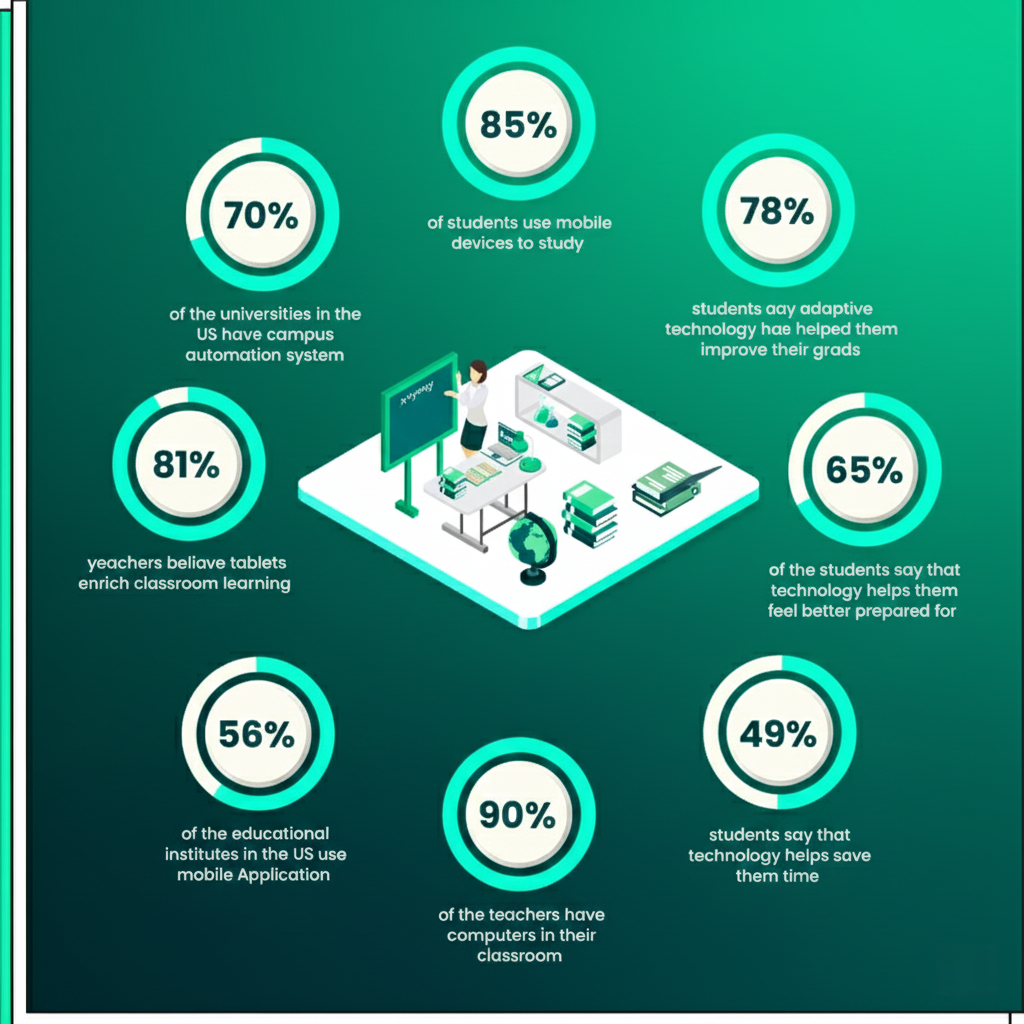
Technology transforming modern education and learning
Education & Learning

The Role of Technology in Modern Education and Learning

Introduction Technology has revolutionized nearly every aspect of modern life, and education is no exception. From digital classrooms to online learning platforms, technology has transformed how knowledge is delivered, accessed, and consumed. The integration of technology into education has expanded learning opportunities and enhanced teaching effectiveness. This blog explores the role of technology in education, its benefits, challenges, applications, and future potential. Evolution of Technology in Education Education has evolved from chalkboards to smartboards, from textbooks to digital content. This transformation has been driven by advancements in computing, internet connectivity, and mobile devices. Key Technologies Used in Education 1. Online Learning Platforms Platforms provide virtual classrooms, assessments, and collaboration tools. 2. Learning Management Systems (LMS) LMS platforms help manage courses, track progress, and deliver content. 3. Mobile Learning Smartphones and tablets enable learning anytime, anywhere. 4. Artificial Intelligence AI personalizes learning experiences and automates assessments. Benefits of Technology in Education Improved Accessibility Learners from remote areas can access quality education. Personalized Learning Technology adapts content to individual learning needs. Enhanced Engagement Interactive multimedia improves student engagement. Efficient Administration Automation reduces administrative workload. Challenges of Technology in Education Digital divide Data privacy concerns Teacher training requirements Addressing these challenges is essential for effective implementation. Technology in Classroom Learning Smart classrooms integrate: Interactive boards Digital resources Collaborative tools This enhances student participation and understanding. Impact on Teachers and Educators Technology empowers teachers by: Providing analytics Enhancing lesson delivery Supporting remote instruction Future Trends in Educational Technology AI-powered tutoring Virtual and augmented reality Gamified learning Role of Technology in Skill-Based Education Technology supports practical skill development through simulations, virtual labs, and project-based learning. Conclusion Technology plays a vital role in modern education by improving accessibility, engagement, and personalization. When implemented thoughtfully, it can significantly enhance learning outcomes. Frequently Asked Questions (FAQs) 1. How does technology improve education? It enhances accessibility, personalization, and engagement. 2. What are examples of educational technology? LMS, online platforms, AI tools, and smart classrooms. 3. Does technology replace teachers? No, it supports and enhances teaching. 4. What challenges does EdTech face? Digital divide and data privacy concerns. 5. Is technology suitable for all learners? Yes, when designed inclusively. 6. What is the future of EdTech? AI, VR, and immersive learning experiences. Connect with us: https://www.facebook.com/profile.php?id=61555452386126  

Lifelong learning for personal and professional growth
Education & Learning

The Importance of Lifelong Learning for Personal and Professional Growth

Introduction Learning does not end with formal education. In today’s fast-changing world, knowledge becomes outdated quickly, and skills must evolve continuously. This reality has made lifelong learning an essential component of both personal and professional success. Lifelong learning refers to the ongoing process of acquiring new knowledge, skills, and competencies throughout life. It helps individuals stay relevant in their careers, adapt to change, and achieve personal fulfillment. In this blog, we explore the importance of lifelong learning, its benefits, types, challenges, and strategies for cultivating a lifelong learning mindset. What Is Lifelong Learning? Lifelong learning is the continuous pursuit of knowledge beyond traditional schooling. It includes formal education, self-directed learning, workplace training, and experiential learning. Forms of Lifelong Learning Formal education (degrees, certifications) Informal learning (reading, podcasts) Non-formal learning (workshops, online courses) Lifelong learning occurs at every stage of life. Why Lifelong Learning Is Important 1. Adapting to Change Technology and industries evolve rapidly. Continuous learning helps individuals adapt to new tools and practices. 2. Career Growth Lifelong learners are more likely to advance professionally. 3. Personal Fulfillment Learning enhances creativity, confidence, and curiosity. 4. Cognitive Health Continuous learning improves memory and mental agility. Lifelong Learning and Career Development Employers value professionals who continuously update their skills. Benefits for Professionals Increased employability Better job security Higher earning potential Lifelong learning supports career transitions and leadership development. Types of Lifelong Learning Self-Directed Learning Independent learning through books, videos, and online resources. Professional Development Training programs and certifications. Experiential Learning Learning through real-world experiences. Challenges in Lifelong Learning Time constraints Lack of motivation Financial barriers Overcoming these challenges requires planning and commitment. How to Develop a Lifelong Learning Mindset Set learning goals Stay curious Use digital learning platforms Reflect on learning experiences Role of Technology in Lifelong Learning Technology enables: Online courses Mobile learning AI-driven recommendations Digital tools make learning accessible and personalized. Lifelong Learning in Education Systems Modern education systems emphasize lifelong learning skills such as critical thinking, adaptability, and digital literacy. Conclusion Lifelong learning is essential for personal fulfillment and professional success. By embracing continuous learning, individuals can adapt to change, enhance their skills, and achieve long-term growth. Frequently Asked Questions (FAQs) 1. What is lifelong learning? It is the continuous pursuit of knowledge throughout life. 2. Why is lifelong learning important? It helps individuals stay relevant and adaptable. 3. Can lifelong learning improve career prospects? Yes, it enhances employability and growth. 4. Is lifelong learning only for professionals? No, it benefits individuals of all ages. 5. How can I start lifelong learning? Start with small goals and use online resources. 6. What role does technology play? Technology makes learning accessible and flexible. Connect With Us: https://www.facebook.com/profile.php?id=61555452386126
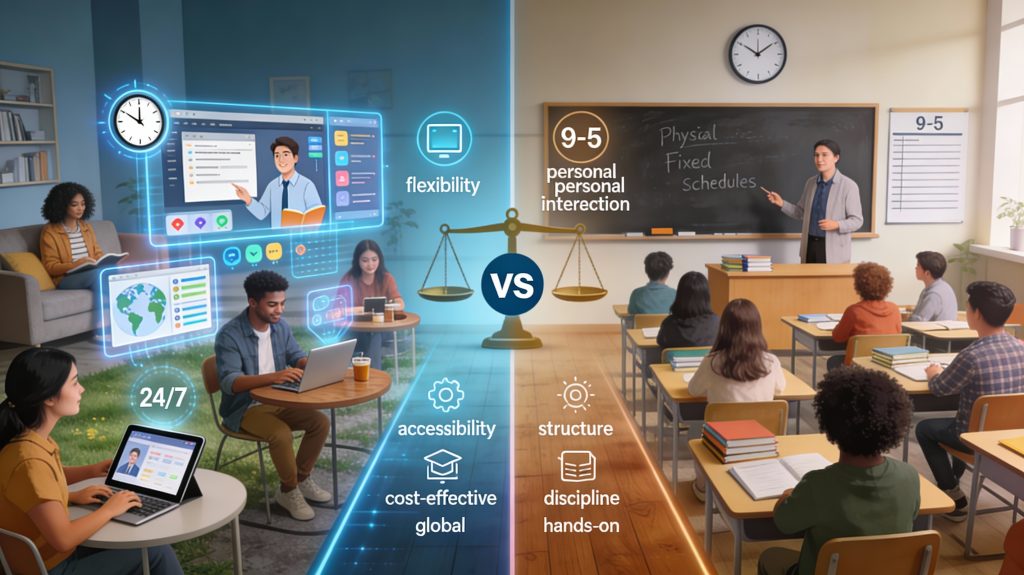
Online learning vs traditional classroom education comparison
Education & Learning

Online Learning vs Traditional Education: A Complete Comparison

Introduction Education has evolved significantly over the past few decades. While traditional classroom education has been the standard for centuries, online learning has rapidly emerged as a powerful alternative. The advancement of digital technology, widespread internet access, and the demand for flexible learning have driven this shift. Both online learning and traditional education aim to provide knowledge and skills, but they differ in delivery methods, learning experiences, and accessibility. Understanding these differences helps students, parents, educators, and professionals make informed decisions. In this blog, we will explore online learning vs traditional education, comparing their advantages, limitations, costs, and effectiveness. What Is Online Learning? Online learning, also known as e-learning or distance education, involves delivering educational content through digital platforms. Students can attend virtual classes, watch recorded lectures, complete assignments, and interact with instructors online. Key Features of Online Learning Internet-based access Flexible schedules Self-paced learning Digital resources Online learning is widely used in academic education, professional training, and skill development. What Is Traditional Education? Traditional education takes place in physical classrooms where students and teachers interact face-to-face. It follows a structured schedule and curriculum set by educational institutions. Key Features of Traditional Education In-person instruction Fixed schedules Classroom-based interaction Physical learning materials Traditional education remains a preferred choice for many learners, especially at the early education level. Online Learning vs Traditional Education: Key Differences Aspect Online Learning Traditional Education Flexibility High Low Accessibility Global Location-based Cost Often lower Higher Interaction Virtual Face-to-face Learning Pace Self-paced Fixed Advantages of Online Learning 1. Flexibility and Convenience Students can learn anytime and anywhere. 2. Cost-Effective Online courses reduce travel and accommodation costs. 3. Wide Course Availability Access to global courses and instructors. 4. Personalized Learning Learners can progress at their own pace. Disadvantages of Online Learning Requires self-discipline Limited face-to-face interaction Dependence on technology Advantages of Traditional Education 1. Structured Learning Environment Provides routine and discipline. 2. Social Interaction Encourages teamwork and communication skills. 3. Immediate Feedback Students can interact directly with teachers. Disadvantages of Traditional Education Less flexible Higher costs Limited accessibility Which Learning Method Is More Effective? Effectiveness depends on: Learning style Age group Subject matter Personal goals Many learners benefit from a hybrid approach combining both methods. Role of Hybrid Learning Hybrid learning blends online and traditional education, offering flexibility while maintaining personal interaction. It is becoming increasingly popular in schools and universities. Impact on Career and Skill Development Online learning supports: Skill-based education Career transitions Lifelong learning Traditional education provides: Foundational knowledge Networking opportunities Future of Learning Methods The future will focus on: Hybrid education models AI-driven personalization Skill-based learning Conclusion Online learning and traditional education both have unique advantages and limitations. The right choice depends on individual learning needs, goals, and circumstances. As education continues to evolve, flexible and blended learning models will play a crucial role. Frequently Asked Questions (FAQs) 1. Is online learning better than traditional education? It depends on individual learning preferences and goals. 2. Can online learning replace traditional education? Online learning complements but does not fully replace traditional education. 3. Are online degrees recognized? Many online degrees are recognized if offered by accredited institutions. 4. What is hybrid learning? Hybrid learning combines online and in-person education. 5. Is online learning suitable for children? Yes, with proper guidance and supervision. 6. Which is more cost-effective? Online learning is generally more affordable. Connect With Us: https://www.facebook.com/profile.php?id=61555452386126  

Education and learning through digital platforms and online tools
Education & Learning

Education and Learning in the Digital Age: Transforming How We Gain Knowledge

Introduction Education and learning are the foundations of personal growth, social development, and economic progress. For centuries, education followed a traditional classroom-based approach, relying on physical schools, textbooks, and face-to-face instruction. However, the digital revolution has transformed how people learn, access knowledge, and develop skills. Today, education extends far beyond classrooms. Online courses, digital libraries, virtual classrooms, and learning apps have made education more flexible, inclusive, and accessible. This transformation has reshaped teaching methodologies and learning experiences across the globe. In this blog, we explore education and learning in the digital age, examining how technology has changed learning methods, the benefits of modern education, challenges, and what the future holds. What Is Education and Learning? Education is a structured process of acquiring knowledge, skills, values, and attitudes through teaching, training, or research. Learning is a lifelong process that occurs formally through institutions and informally through experiences. Types of Learning Formal learning (schools, colleges, universities) Informal learning (self-study, experiences) Non-formal learning (workshops, online courses) Modern education blends all these approaches to create holistic learning experiences. The Evolution of Education Traditional Education Traditional education focused on: Teacher-centered instruction Memorization Fixed curricula While effective in many ways, it often lacked flexibility and personalization. Digital and Modern Education Modern education emphasizes: Student-centered learning Skill development Critical thinking Technology integration Digital tools have revolutionized how students learn and interact with information. Role of Technology in Education and Learning Technology plays a vital role in modern education. Key Technologies in Education Learning Management Systems (LMS) Video conferencing tools Artificial Intelligence Virtual and Augmented Reality These tools enhance engagement and improve learning outcomes. Online Learning and E-Learning Platforms Online learning platforms have become a cornerstone of modern education. Benefits of Online Learning Learn anytime, anywhere Cost-effective education Access to global resources Personalized learning paths Popular e-learning platforms offer courses in academics, professional skills, and personal development. Benefits of Modern Education and Learning 1. Accessibility Education is no longer limited by geography. 2. Flexibility Learners can study at their own pace. 3. Skill-Oriented Learning Modern education focuses on real-world skills. 4. Lifelong Learning Continuous learning supports career growth. Challenges in Modern Education Despite its advantages, modern education faces challenges: Digital divide Lack of infrastructure Quality assurance Screen fatigue Addressing these challenges is crucial for inclusive education. Importance of Education in Personal and Professional Growth Education empowers individuals by: Enhancing critical thinking Improving career opportunities Promoting social equality Learning is essential for adapting to a rapidly changing world. Future of Education and Learning The future of education will focus on: AI-driven personalization Hybrid learning models Skills-based education Lifelong learning ecosystems Education systems will continue to evolve with technological advancements. Conclusion Education and learning are undergoing a significant transformation in the digital age. Technology has expanded access to knowledge, personalized learning experiences, and made education more inclusive. By embracing modern learning methods, individuals and institutions can unlock new opportunities and build a knowledge-driven future. Frequently Asked Questions (FAQs) 1. What is modern education? Modern education integrates technology, flexibility, and skill-based learning methods. 2. How has technology changed learning? Technology enables online learning, personalization, and global access to education. 3. Is online learning effective? Yes, when structured properly, online learning can be highly effective. 4. What is lifelong learning? Lifelong learning is the continuous pursuit of knowledge throughout life. 5. What skills are important in modern education? Critical thinking, digital literacy, communication, and adaptability. 6. What is the future of education? The future includes AI-powered learning, hybrid education, and personalized learning paths. Connect With Us: https://www.facebook.com/profile.php?id=61555452386126  
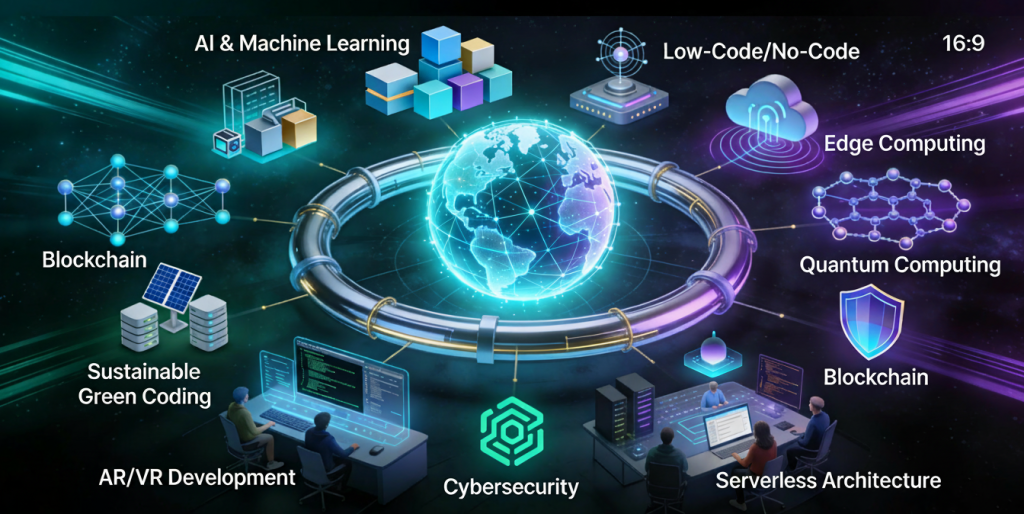
Future trends shaping the software development industry
Software development

Future Trends in Software Development: What to Expect in the Coming Years

Introduction Software development is evolving at an unprecedented pace. Rapid advancements in artificial intelligence, cloud computing, automation, and development tools are reshaping how applications are built, deployed, and maintained. Organizations that fail to adapt risk falling behind in an increasingly competitive digital world. Understanding future trends in software development helps developers, businesses, and technology leaders prepare for upcoming challenges and opportunities. In this blog, we explore key trends that will define the future of software development and how they will impact the industry. Artificial Intelligence in Software Development AI is transforming every stage of the software development lifecycle. Key Applications AI-powered code generation Intelligent debugging Automated testing AI tools improve productivity and reduce human error. Low-Code and No-Code Development Low-code and no-code platforms enable faster application development with minimal coding. Benefits Faster time to market Reduced development costs Empowered non-technical users These platforms are ideal for rapid prototyping and internal tools. Cloud-Native Development Cloud-native applications are designed specifically for cloud environments. Key Technologies Containers Microservices Serverless computing Cloud-native development improves scalability and resilience. DevOps and Automation Automation continues to play a vital role in software development. Trends AI-driven CI/CD pipelines Automated infrastructure Continuous monitoring Automation enhances efficiency and reliability. Cybersecurity-First Development Security is becoming a core development priority. Emerging Practices Zero trust architecture DevSecOps Continuous security testing Security-first development protects applications from evolving threats. Microservices Architecture Microservices allow applications to be built as independent, scalable services. Advantages Better scalability Faster updates Improved fault isolation Microservices support modern, distributed systems. Edge Computing Edge computing processes data closer to the source. Use Cases IoT devices Real-time analytics Autonomous systems Edge computing reduces latency and improves performance. Remote and Distributed Development Teams Remote work is becoming the norm in software development. Benefits Access to global talent Improved flexibility Reduced operational costs Collaboration tools enable seamless teamwork. Sustainable Software Development Green software engineering focuses on energy-efficient applications. Key Goals Reduced carbon footprint Efficient resource usage Sustainability is becoming a strategic priority. Continuous Learning and Skill Evolution Developers must continuously update their skills to remain competitive. In-Demand Skills Cloud platforms AI and ML Cybersecurity Lifelong learning is essential in modern software development. Conclusion The future of software development is shaped by innovation, automation, and continuous improvement. AI, cloud-native technologies, security-first practices, and sustainability will define the next generation of applications. By embracing these trends, organizations and developers can stay competitive and build software that meets future demands. Frequently Asked Questions (FAQs) 1. What is the biggest trend in software development? AI and automation are the most impactful trends. 2. Will low-code platforms replace developers? No, they will complement developers by improving productivity. 3. Is cloud-native development the future? Yes, cloud-native approaches are becoming the industry standard. 4. How important is cybersecurity in future development? Cybersecurity is critical and must be integrated from the start. 5. Will DevOps continue to grow? Yes, DevOps will remain essential for modern software delivery. 6. How can developers prepare for the future? By continuously learning new technologies and adapting to change. Connect With Us:https://www.facebook.com/profile.php?id=61555452386126
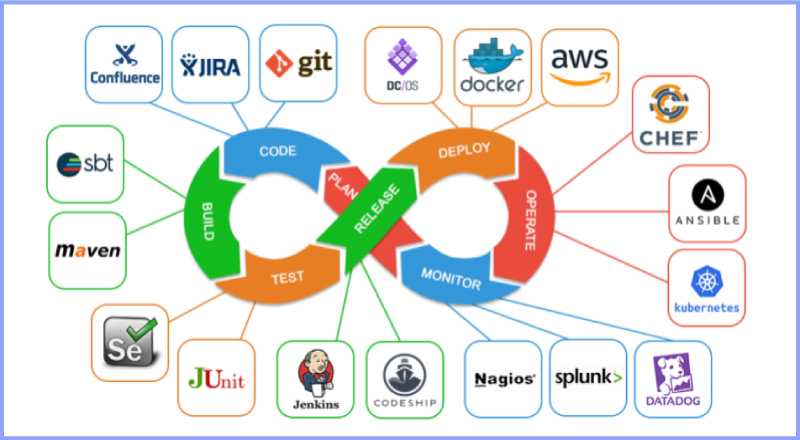
DevOps and CI/CD pipeline in software development.
Software development

DevOps and CI/CD in Software Development: Accelerating Delivery and Quality

Introduction Modern software development demands speed, reliability, and continuous improvement. Traditional development approaches often struggled with slow releases, manual deployments, and communication gaps between development and operations teams. To overcome these challenges, organizations adopted DevOps and Continuous Integration/Continuous Deployment (CI/CD) practices. DevOps and CI/CD aim to automate workflows, improve collaboration, and deliver high-quality software faster. Together, they form the backbone of modern software engineering and cloud-native development. In this blog, we will explore DevOps and CI/CD, understand their importance, key concepts, tools, benefits, and how they transform software development. What Is DevOps? DevOps is a cultural and technical approach that integrates software development (Dev) and IT operations (Ops). It focuses on collaboration, automation, and continuous feedback. Core Principles of DevOps Collaboration between teams Automation of workflows Continuous monitoring and feedback Rapid delivery DevOps breaks down silos and improves efficiency across the development lifecycle. What Is CI/CD? CI/CD stands for Continuous Integration and Continuous Deployment (or Delivery). Continuous Integration (CI) CI involves frequently merging code changes into a shared repository and automatically testing them. Continuous Deployment (CD) CD automates the release of tested code into production. Together, CI/CD ensures faster and safer software releases. DevOps Lifecycle The DevOps lifecycle consists of several stages: Planning Development Integration Testing Deployment Monitoring Each stage is automated and continuously improved. Benefits of DevOps and CI/CD 1. Faster Time to Market Automation reduces manual work and accelerates releases. 2. Improved Software Quality Continuous testing detects issues early. 3. Enhanced Collaboration DevOps fosters teamwork across departments. 4. Reliable Deployments Automated pipelines reduce human errors. Popular DevOps and CI/CD Tools Version Control Git GitHub GitLab CI/CD Tools Jenkins GitHub Actions GitLab CI/CD Containerization Docker Kubernetes Monitoring Prometheus Grafana DevOps and Agile Relationship DevOps complements Agile by extending continuous delivery beyond development into operations. Together, they enable faster feedback loops and continuous improvement. Security in DevOps (DevSecOps) DevSecOps integrates security into the DevOps pipeline. Automated security testing ensures vulnerabilities are identified early. Challenges in Implementing DevOps Cultural resistance Tool complexity Skill gaps Overcoming these challenges requires training, leadership support, and gradual adoption. Future of DevOps DevOps continues to evolve with AI-driven automation, cloud-native technologies, and serverless computing. Conclusion DevOps and CI/CD are essential for modern software development. By automating workflows, improving collaboration, and enabling continuous delivery, organizations can build reliable and scalable applications faster than ever. Frequently Asked Questions (FAQs) 1. What is DevOps in simple terms? DevOps is a practice that improves collaboration between development and operations teams. 2. What is the difference between CI and CD? CI focuses on code integration, while CD focuses on deployment. 3. Is DevOps only for large companies? No, DevOps benefits organizations of all sizes. 4. Can DevOps be used without CI/CD? CI/CD is a core component of DevOps. 5. What skills are needed for DevOps? Automation, cloud computing, and scripting skills. 6. Is DevOps a tool or a methodology? DevOps is a culture supported by tools and practices. Connect with us: https://www.facebook.com/profile.php?id=61555452386126
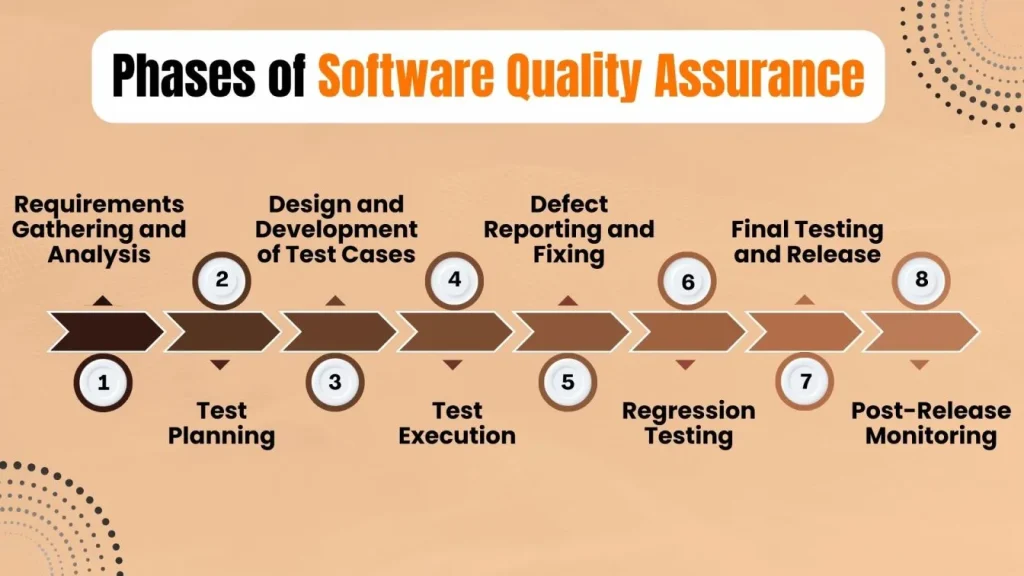
Software testing and quality assurance process in software development
Software development

Software Testing and Quality Assurance: Ensuring Reliable Software Development

Introduction In software development, writing code is only half the journey. Ensuring that the software works correctly, securely, and efficiently is equally important. This is where software testing and quality assurance (QA) play a critical role. Software testing identifies defects, verifies functionality, and ensures applications meet business requirements. Quality assurance focuses on improving development processes to prevent issues before they occur. Together, testing and QA help deliver reliable and high-quality software products. In this blog, we will explore software testing and quality assurance, their importance, types of testing, QA best practices, and their role in modern software development. What Is Software Testing? Software testing is the process of evaluating an application to detect bugs, errors, or missing requirements. The goal is to ensure that the software behaves as expected under various conditions. Objectives of Software Testing Identify defects early Ensure functional correctness Validate performance and security Improve user experience Testing helps prevent costly failures in production. What Is Quality Assurance (QA)? Quality assurance is a process-oriented approach that focuses on improving development workflows to ensure consistent quality. Unlike testing, QA is proactive rather than reactive. Key QA Activities Defining quality standards Process improvement Auditing development practices Continuous monitoring QA ensures quality is built into the product from the start. Difference Between Software Testing and Quality Assurance Aspect Software Testing Quality Assurance Focus Detecting bugs Preventing defects Approach Product-oriented Process-oriented Timing After development Throughout SDLC Responsibility Testers Entire team Both are essential for successful software development. Types of Software Testing 1. Manual Testing Manual testing involves executing test cases without automation tools. Advantages Human judgment Ideal for exploratory testing Easy to perform Disadvantages Time-consuming Prone to human error 2. Automation Testing Automation testing uses scripts and tools to execute test cases automatically. Advantages Faster execution High accuracy Ideal for regression testing Common Tools Selenium Cypress Playwright 3. Unit Testing Unit testing verifies individual components or functions. 4. Integration Testing Integration testing ensures components work together. 5. System Testing System testing validates the complete application. 6. User Acceptance Testing (UAT) UAT confirms the software meets user expectations. Non-Functional Testing Performance Testing Evaluates speed, scalability, and stability. Security Testing Identifies vulnerabilities and risks. Usability Testing Ensures ease of use. QA Best Practices in Software Development Define clear requirements Implement test automation Perform continuous testing Integrate testing with CI/CD Maintain test documentation Testing in Agile and DevOps Modern methodologies emphasize continuous testing and rapid feedback. QA teams collaborate closely with developers to ensure quality at every stage. Benefits of Software Testing and QA Reduced development costs Improved reliability Enhanced customer satisfaction Faster releases Conclusion Software testing and quality assurance are critical components of the software development lifecycle. They ensure applications are reliable, secure, and meet user expectations. By adopting strong QA practices, organizations can deliver high-quality software consistently. Frequently Asked Questions (FAQs) 1. Why is software testing important? It ensures software reliability, security, and performance. 2. What is the role of QA in software development? QA improves processes to prevent defects and maintain quality. 3. What is automation testing? Automation testing uses tools to execute test cases automatically. 4. Can testing be fully automated? No, some testing requires human judgment. 5. Is QA part of Agile development? Yes, QA is integrated throughout Agile workflows. 6. What skills are required for a QA engineer? Analytical thinking, testing tools knowledge, and communication skills. Connect With Us: https://www.facebook.com/profile.php?id=61555452386126  
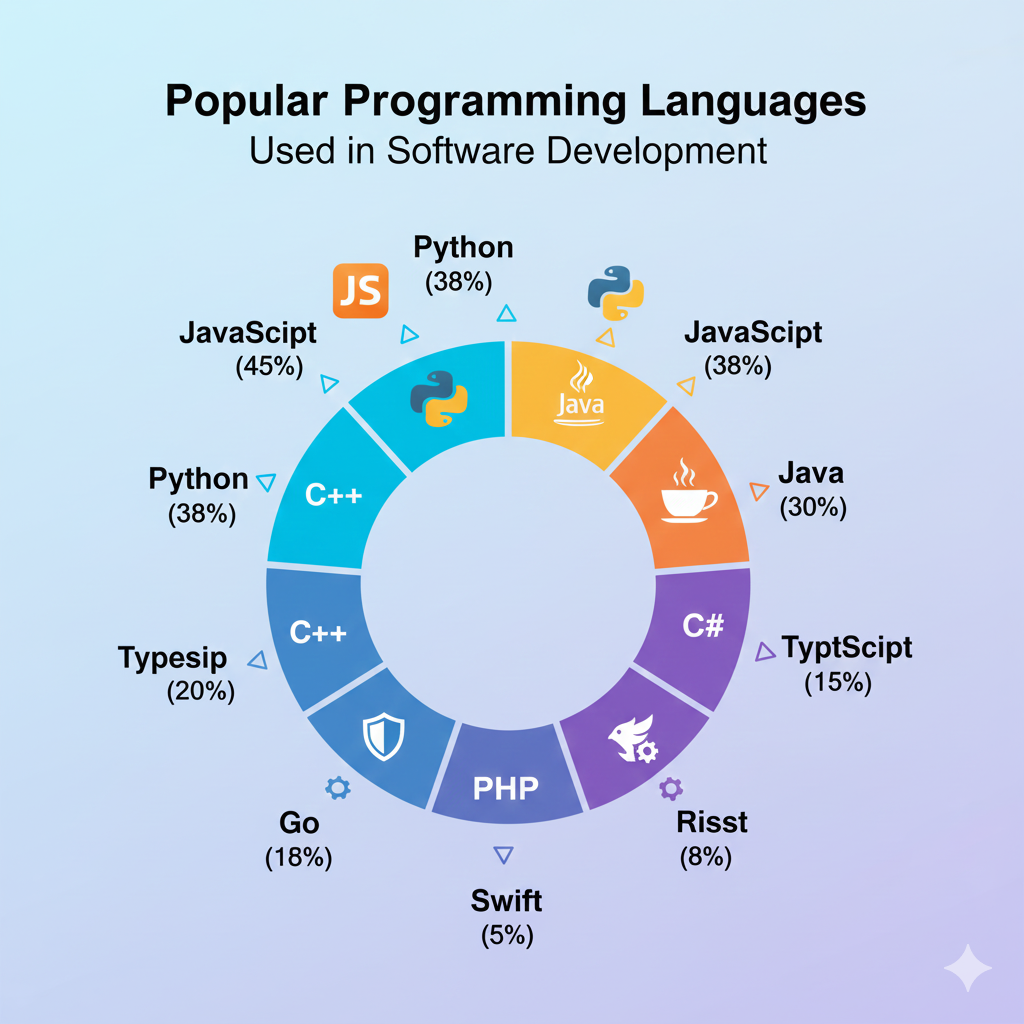
Popular programming languages used in software development
Software development

Top Programming Languages Used in Software Development in 2025

Introduction Programming languages form the backbone of software development. Every application, website, or system relies on one or more programming languages to function. Choosing the right programming language can significantly impact performance, scalability, security, and development speed. With rapid advancements in technology, programming languages continue to evolve to meet modern software development demands. In 2025, developers must consider factors such as cross-platform compatibility, cloud support, performance, and community adoption when selecting a language. In this blog, we explore the top programming languages used in software development, their strengths, use cases, and how to choose the best language for your project or career. Why Programming Languages Matter in Software Development Programming languages define how developers communicate with machines. Each language has unique syntax, paradigms, and capabilities that make it suitable for specific tasks. Key benefits of choosing the right language include: Faster development cycles Better maintainability Improved performance Enhanced security 1. Python Overview Python is one of the most popular programming languages due to its simplicity and versatility. Key Features Easy-to-read syntax Extensive libraries and frameworks Strong community support Use Cases Web development Data science Machine learning Automation Python is ideal for beginners and professionals alike. 2. JavaScript Overview JavaScript is the core language of web development and plays a vital role in both frontend and backend development. Key Features Event-driven programming Cross-platform support Rich ecosystem Use Cases Web applications Mobile app development Server-side development JavaScript enables full stack development using a single language. 3. Java Overview Java remains a dominant language in enterprise software development. Key Features Platform independence Strong security Scalability Use Cases Enterprise applications Android development Backend systems Java is widely used in large-scale systems. 4. C++ Overview C++ is known for high performance and system-level programming. Key Features Low-level memory control High efficiency Object-oriented support Use Cases Game development Operating systems Embedded systems C++ is ideal for performance-critical applications. 5. C# Overview C# is a modern language developed by Microsoft, commonly used with the .NET framework. Key Features Strong typing Rich libraries Cross-platform with .NET Core Use Cases Desktop applications Web APIs Game development 6. Go (Golang) Overview Go is designed for simplicity and scalability. Key Features Fast compilation Built-in concurrency Cloud-native support Use Cases Microservices Cloud applications Networking tools How to Choose the Right Programming Language Consider these factors: Project requirements Performance needs Community and ecosystem Learning curve Programming Languages and Career Growth Learning in-demand programming languages increases job opportunities and earning potential. Conclusion Programming languages are essential to software development. Each language serves different purposes, and choosing the right one ensures successful project outcomes. Staying updated with modern languages prepares developers for future challenges. Frequently Asked Questions (FAQs) 1. Which programming language is best for beginners? Python and JavaScript are beginner-friendly. 2. Can one programming language do everything? No, different languages excel at different tasks. 3. Is Java still relevant in 2025? Yes, Java remains widely used in enterprise systems. 4. Which language is best for web development? JavaScript is essential for web development. 5. Should I learn multiple languages? Yes, learning multiple languages enhances versatility. 6. How often should developers update their skills? Continuously, as technology evolves rapidly. Connect with us: https://www.facebook.com/profile.php?id=61555452386126
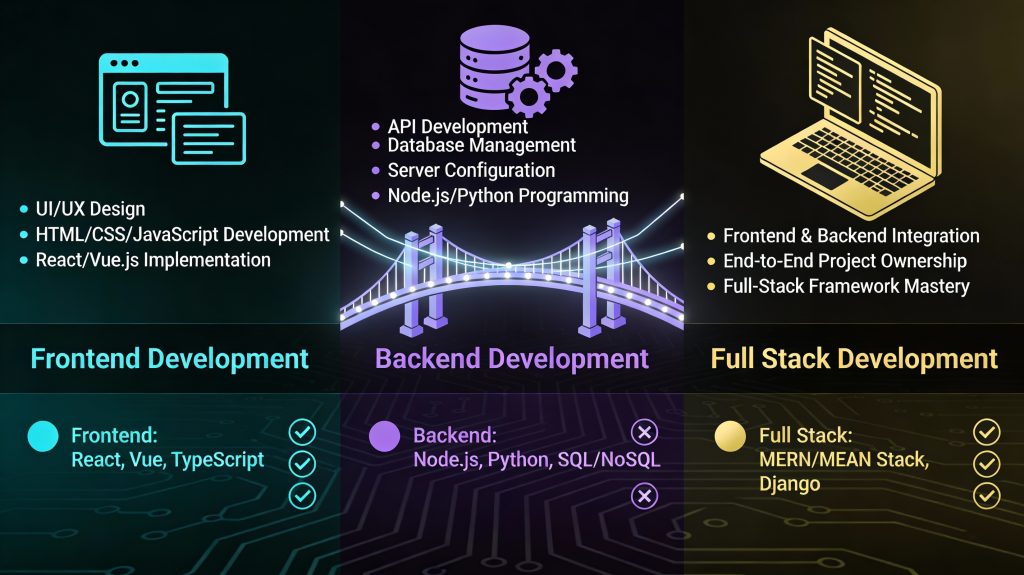
Frontend vs backend vs full stack software development comparison
Software development

Frontend vs Backend vs Full Stack Development: A Complete Software Development Guide

Introduction Modern software applications are built using multiple layers of technology, each responsible for a specific part of the system. To manage this complexity, software development roles are commonly divided into frontend, backend, and full stack development. Understanding these roles is essential for businesses planning projects and individuals choosing a career in software development. Each role requires different skills, tools, and responsibilities but works together to create functional, user-friendly applications. In this blog, we’ll explore frontend vs backend vs full stack development, compare their responsibilities, technologies, career paths, and help you decide which role best fits your goals. What Is Frontend Development? Frontend development focuses on the user interface (UI) and user experience (UX) of an application. It involves everything users see and interact with in a browser or mobile app. Key Responsibilities Designing layouts and user interfaces Implementing responsive designs Optimizing performance Ensuring cross-browser compatibility Frontend Technologies HTML, CSS, JavaScript Frameworks: React, Angular, Vue Styling tools: Tailwind, Bootstrap Build tools: Webpack, Vite Skills Required UI/UX principles Responsive design Performance optimization Frontend developers ensure that applications are visually appealing, intuitive, and fast. What Is Backend Development? Backend development handles the server-side logic that powers an application. It ensures data is processed, stored, and delivered securely. Key Responsibilities Building APIs Managing databases Handling authentication and authorization Ensuring scalability and security Backend Technologies Programming languages: Java, Python, Node.js, PHP Databases: MySQL, PostgreSQL, MongoDB Frameworks: Spring Boot, Django, Express Skills Required Data modeling API design Security practices Backend developers ensure applications function correctly behind the scenes. What Is Full Stack Development? Full stack development combines both frontend and backend responsibilities. A full stack developer can work across the entire application stack. Key Responsibilities Designing user interfaces Developing APIs Managing databases Deploying applications Popular Full Stack Stacks MERN (MongoDB, Express, React, Node.js) MEAN (MongoDB, Express, Angular, Node.js) LAMP (Linux, Apache, MySQL, PHP) Skills Required Frontend and backend expertise System design DevOps basics Full stack developers offer versatility and efficiency. Frontend vs Backend vs Full Stack: Comparison Aspect Frontend Backend Full Stack Focus UI/UX Server & data End-to-end Skills Design, JS Logic, databases Both Tools React, CSS APIs, databases Full stack tools Career Flexibility Moderate Moderate High Which Role Should You Choose? Choose Frontend If You enjoy design and visuals You like user interaction Choose Backend If You enjoy logic and data You prefer system performance Choose Full Stack If You want versatility You enjoy problem-solving across layers Career Opportunities Frontend Developer Backend Developer Full Stack Developer Software Engineer Each role offers strong career growth and demand. Conclusion Frontend, backend, and full stack development are all essential to software development. Each role offers unique challenges and opportunities. Understanding these roles helps teams collaborate effectively and individuals choose the right career path. Frequently Asked Questions (FAQs) 1. Is full stack development harder than frontend or backend? Full stack development requires broader knowledge but offers greater flexibility. 2. Can a frontend developer become full stack? Yes, many developers transition to full stack roles. 3. Which role pays more? Pay depends on skills and experience, not just the role. 4. Do full stack developers replace specialists? No, specialists are still essential for complex projects. 5. Which role is best for beginners? Frontend is often considered beginner-friendly. 6. Are full stack developers in demand? Yes, full stack developers are highly sought after. Connect with us:https://www.facebook.com/profile.php?id=61555452386126  
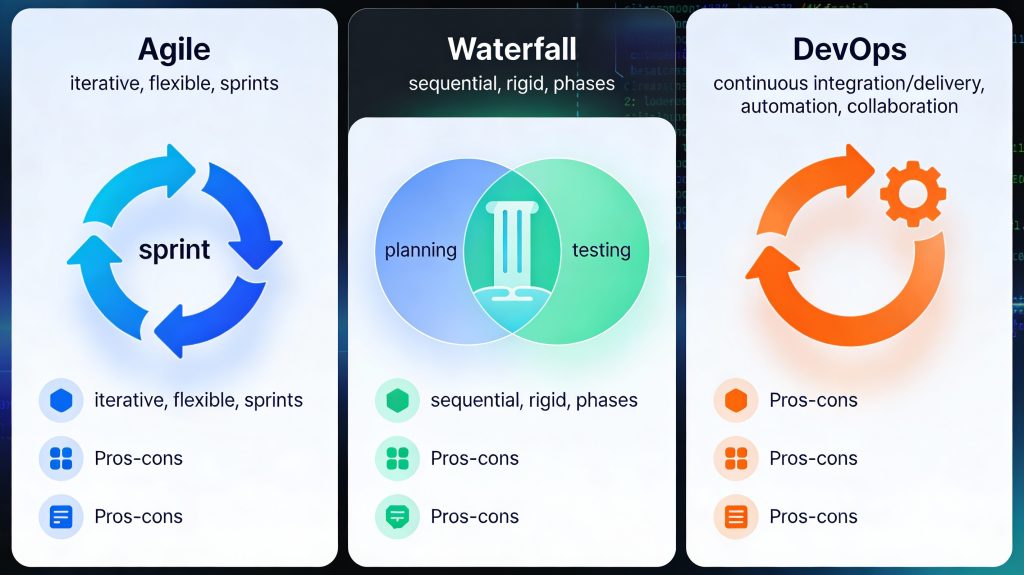
Agile vs Waterfall vs DevOps software development methodologies
Software development

Agile vs Waterfall vs DevOps: Choosing the Right Software Development Methodology

Introduction Choosing the right software development methodology is one of the most important decisions for any development project. The methodology you select determines how your team plans, builds, tests, and delivers software. Among the many approaches available today, Agile, Waterfall, and DevOps are the most widely used and debated. Each methodology has its strengths, weaknesses, and ideal use cases. While some teams prefer the structure of Waterfall, others thrive on the flexibility of Agile or the speed of DevOps. Understanding these models helps organizations align their development strategy with business goals. In this blog, we will compare Agile vs Waterfall vs DevOps, explore how each model works, and help you choose the right approach for your software development needs. What Are Software Development Methodologies? Software development methodologies are structured frameworks that define how software projects are planned, executed, and delivered. They provide guidelines for collaboration, workflow, documentation, and quality assurance. The right methodology improves efficiency, reduces risk, and ensures consistent delivery of high-quality software. Waterfall Methodology Overview The Waterfall model is one of the earliest software development methodologies. It follows a linear and sequential approach, where each phase must be completed before moving to the next. Phases of Waterfall Requirement analysis System design Development Testing Deployment Maintenance Advantages of Waterfall Clear structure and documentation Easy to manage and understand Ideal for projects with fixed requirements Disadvantages of Waterfall Limited flexibility Changes are costly Late testing increases risk Best Use Cases Government projects Regulatory-compliant systems Projects with well-defined requirements Agile Software Development Overview Agile is an iterative and incremental approach focused on flexibility, collaboration, and customer feedback. Instead of delivering the entire product at once, Agile teams work in short cycles called iterations or sprints. Key Principles of Agile Customer collaboration over contracts Responding to change over following a plan Continuous delivery of working software Popular Agile Frameworks Scrum Kanban Extreme Programming (XP) Advantages of Agile Faster delivery High adaptability to change Continuous user feedback Improved team collaboration Disadvantages of Agile Less predictability Requires experienced teams Documentation may be limited Best Use Cases Startups Mobile and web applications Projects with evolving requirements DevOps Methodology Overview DevOps is a cultural and technical approach that combines development and operations to improve collaboration, automation, and deployment speed. It focuses on continuous integration, continuous delivery, and continuous monitoring. Key DevOps Practices CI/CD pipelines Infrastructure as code Automated testing Continuous monitoring Advantages of DevOps Faster release cycles Improved software quality Better system reliability Reduced deployment failures Disadvantages of DevOps Requires cultural change Initial setup complexity Tooling and automation costs Best Use Cases Large-scale systems Cloud-native applications High-availability platforms Agile vs Waterfall vs DevOps: Key Differences Feature Waterfall Agile DevOps Flexibility Low High Very High Delivery One-time Incremental Continuous Customer Feedback Late Continuous Continuous Automation Minimal Moderate Extensive Speed Slow Fast Very Fast How to Choose the Right Methodology Consider the following factors: 1. Project Requirements Stable requirements favor Waterfall, while changing requirements favor Agile or DevOps. 2. Team Experience Agile and DevOps require skilled, self-managed teams. 3. Time-to-Market DevOps and Agile enable faster releases. 4. Compliance and Documentation Waterfall suits heavily regulated industries. Modern Hybrid Approaches Many organizations adopt hybrid models, such as Agile-DevOps or Waterfall-Agile hybrids, to balance structure and flexibility. These approaches leverage the strengths of multiple methodologies. Conclusion There is no one-size-fits-all software development methodology. Waterfall offers structure, Agile provides flexibility, and DevOps delivers speed and automation. The right choice depends on your project goals, team capabilities, and business needs. By understanding Agile, Waterfall, and DevOps, organizations can build software that is reliable, scalable, and aligned with modern development demands. Frequently Asked Questions (FAQs) 1. Which software development methodology is best? The best methodology depends on project requirements, team experience, and delivery timelines. 2. Is Agile better than Waterfall? Agile is better for flexible projects, while Waterfall works well for fixed-scope projects. 3. Can Agile and DevOps be used together? Yes, Agile and DevOps complement each other and are commonly used together. 4. Is DevOps only for large companies? No, DevOps can benefit organizations of all sizes. 5. Does Waterfall still exist today? Yes, Waterfall is still used in regulated and documentation-heavy industries. 6. Can one project use multiple methodologies? Yes, hybrid approaches are common in modern software development. Connect With Us: https://www.facebook.com/profile.php?id=61555452386126

How would you like me to respond?

Select a personality for your AI assistant

Normal
Happy
Sad
Angry

Your selection will affect how the AI assistant responds to your messages

Chat Assistant

Let's discuss your project!

Hear from our clients and why 3000+ businesses trust TechOTD

Tell us what you need, and we'll get back with a cost and timeline estimate

Scroll to Top