Data Center Energy Management Software Development Guide
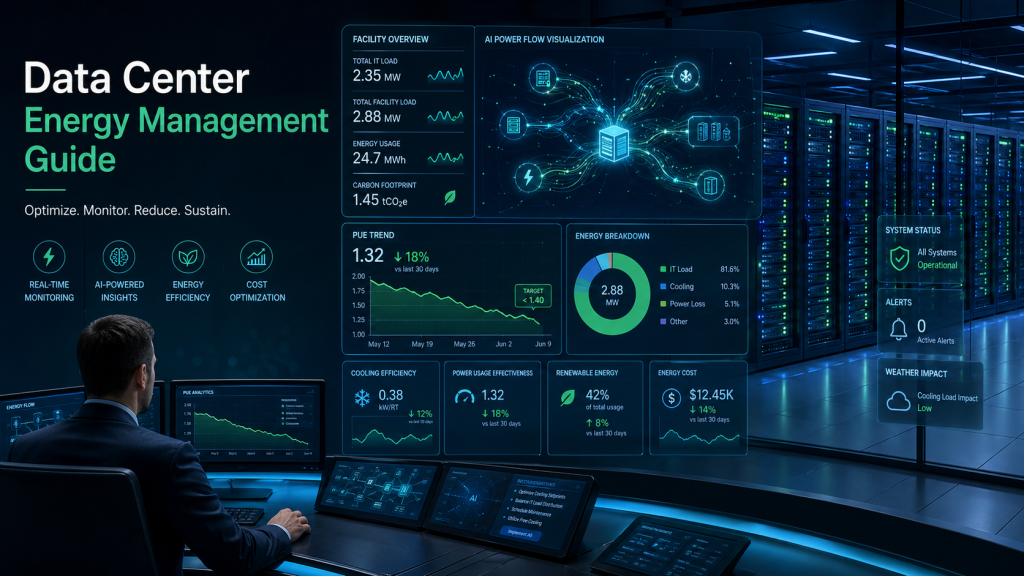
Introduction Data centers consume massive energy, accounting for up to 4.4% of U.S. electricity today and projected to reach 6.7–12% by 2028, driven by AI and cloud growth. Developing custom energy management software addresses this by enabling real-time monitoring, AI optimization, and cost control. This guide explores architecture, key benefits, and development costs to help enterprises build efficient, scalable solutions amid rising demands and sustainability pressures. Software Architecture Overview Modern data center energy management software follows a phased, modular architecture for reliability and scalability. Discovery & Audit: Map infrastructure, identify inefficiencies via sensors and PDUs. Core Layers: Real-time data ingestion (IoT/Kafka), backend analytics (Spark), AI forecasting, and automated controls for cooling/power. Frontend & Integration: Intuitive dashboards with UI/UX for PUE tracking; APIs link BMS, HVAC, servers. Scalability Features: Cloud/hybrid setup, digital twins for simulation, anomaly detection. This microservices-based design handles high-throughput data, ensuring 99.9% uptime in dynamic AI workloads. This futuristic dashboard visualizes real-time energy flows, PUE metrics, and AI predictions in a clean, professional interface. Key Development Phases Development spans 3–12 months, starting with prototyping to minimize risks. Planning & Design: Define requirements, prototype data pipelines. Build & Integrate: Develop backend/AI modules, connect IoT devices. Test & Deploy: Load testing, phased rollout; continuous optimization post-launch. Advanced Tech: Incorporate ML for load forecasting, physics-aware thermal models. Phased execution allows mid-scale platforms in 6 months, enterprise solutions longer. Major Benefits Custom software delivers measurable ROI through efficiency and compliance. Cost Reduction: Optimizes loads, cuts cooling energy by 15–30%; ROI in 12–18 months. Sustainability: Tracks carbon footprint, supports net-zero via renewable integration. Reliability: Predictive maintenance extends hardware life, boosts uptime. Compliance: Automates ISO 50001/ESG reports. Hyperscalers like Google use AI cooling for 30% savings. Data shows PUE drops from 1.7+ to 1.1–1.3. Cost Breakdown Total costs range $80K–$800K+, varying by scope. Component Cost Range Key Factors IoT/Data Integration $10K–$50K Sensors, APIs Backend/Analytics $40K–$150K Processing, optimization AI Modules $50K–$200K Forecasting, automation UI/Testing/Deploy $50K–$200K Dashboards, QA Enterprise multi-site: $400K+; save via modular builds, existing frameworks. Ongoing maintenance: $1.5K–$4K/month. Real-World Use Cases Google DeepMind: AI cooling automation cut energy 30%, fully hands-free. HPC Supercomputers: Physics-ML reclaimed 85 MWh/year via setpoint tweaks. Hyperscalers: Real-time PUE tracking avoids overages. These prove software outperforms hardware alone for dynamic loads. Conclusion Data center energy management software architecture enables real-time control, delivering 15–30% savings, extended uptime, and ESG compliance. Enterprises gain scalability for AI growth while cutting costs from $80K investments. Start your development journey today—audit your infrastructure and request a custom quote for optimized, future-proof efficiency. FAQ What is data center energy management software? Specialized platforms monitor/optimize power, cooling via AI for efficiency. How much does development cost? $80K–$800K based on features like AI/multi-site support. What are key benefits? Reduced costs (15–30%), predictive maintenance, sustainability reporting. How long to develop? 3–12 months; simple monitoring faster than enterprise AI systems. Why custom over off-the-shelf? Tailored integrations, scalability beat generic tools.