Introduction
As mobile applications continue to grow in complexity and scale, developers must focus not only on building features but also on maintaining performance, scalability, and code quality. React Native development makes cross-platform mobile app creation faster and more efficient, but long-term success depends heavily on following proven best practices.
Without proper architecture and optimization, React Native apps can become difficult to maintain, slow to scale, and prone to performance issues. On the other hand, applications built with best practices in mind remain stable, secure, and adaptable to future requirements.
In this blog, we’ll explore the best practices for scalable and high-performance React Native app development, covering architecture, performance optimization, state management, security, and maintainability.
1. Use a Clean and Scalable Project Architecture
A well-structured architecture is the foundation of any successful React Native application.
Best practices include:
-
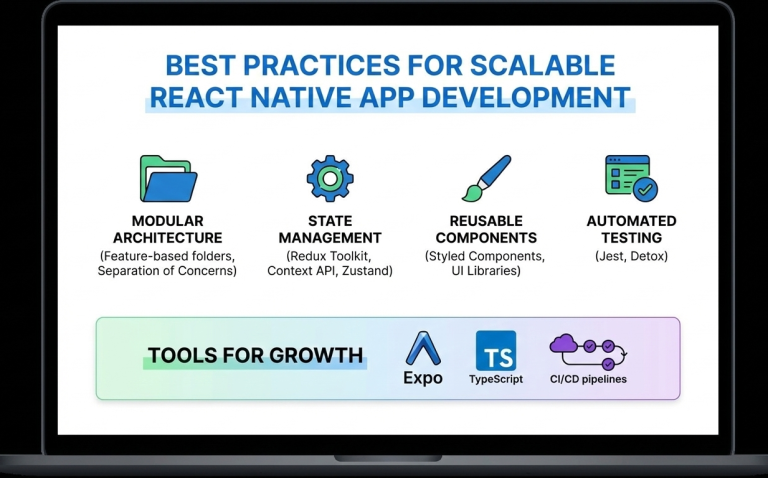
Organizing code by features instead of file types
-
Separating UI, business logic, and services
-
Keeping reusable components in a shared directory
A clean architecture improves collaboration, simplifies debugging, and makes scaling easier.
2. Break UI into Reusable Components
React Native is built around a component-based architecture. Reusable components:
-
Reduce code duplication
-
Improve readability
-
Speed up development
Components should be small, focused, and reusable across the application.
3. Optimize Performance from the Start
Performance optimization should not be an afterthought.
Key techniques include:
-
Using
FlatListinstead ofScrollViewfor long lists -
Avoiding unnecessary re-renders with
React.memo -
Minimizing heavy computations on the UI thread
-
Optimizing images and assets
Using the Hermes engine also improves startup time and memory usage.
4. Choose the Right State Management Strategy
State management plays a crucial role in scalability.
Options include:
-
Context API for small apps
-
Redux for large and complex applications
-
Zustand for lightweight and modern state handling
Choosing the right approach prevents unnecessary complexity.
5. Handle API Calls and Data Caching Efficiently
Efficient data handling improves performance and user experience.
Best practices:
-
Use Axios or Fetch consistently
-
Implement error handling and retries
-
Cache data when possible
-
Avoid unnecessary API calls
Libraries like React Query can simplify data fetching and caching.
6. Follow Platform-Specific Design Guidelines
While React Native is cross-platform, Android and iOS users have different design expectations.
Best practices include:
-
Using platform-specific components when needed
-
Handling gestures and navigation appropriately
-
Testing UI on multiple screen sizes
Respecting platform guidelines improves user satisfaction.
7. Secure Your React Native Application
Security is critical in mobile app development.
Best practices include:
-
Avoid storing sensitive data in plain text
-
Use secure storage solutions
-
Implement authentication and authorization properly
-
Use HTTPS and encrypted APIs
Security should be integrated into every stage of development.
8. Write Tests and Automate Quality Assurance
Testing ensures long-term stability.
Important testing methods:
-
Unit testing with Jest
-
Component testing with React Native Testing Library
-
End-to-end testing for critical flows
Automated testing reduces bugs and improves release confidence.
9. Monitor Performance and Errors
Monitoring helps identify issues before they affect users.
Tools such as:
-
Flipper
-
Sentry
-
Firebase Performance Monitoring
These tools provide insights into crashes, performance bottlenecks, and user behavior.
10. Keep Dependencies Updated
Outdated dependencies can cause security vulnerabilities and compatibility issues.
Best practices:
-
Regularly update React Native versions
-
Remove unused libraries
-
Review changelogs before upgrades
Keeping dependencies updated ensures stability and security.
Future-Ready React Native Development
React Native continues to evolve with improved architecture, better performance, and stronger community support. Following best practices ensures your application remains adaptable to future updates and scaling requirements.
Conclusion
React Native development offers immense potential for building scalable and high-performance mobile applications. However, success depends on following best practices related to architecture, performance, security, and maintainability.
By implementing these best practices from the beginning, developers can build robust React Native apps that deliver excellent user experiences and stand the test of time.
Frequently Asked Questions (FAQs)
1. Why are best practices important in React Native development?
Best practices ensure scalability, performance, maintainability, and long-term success of React Native applications.
2. How can I improve React Native app performance?
Optimizing lists, avoiding unnecessary re-renders, using Hermes, and monitoring performance tools can significantly improve performance.
3. Which state management is best for React Native apps?
It depends on app complexity. Context API works for small apps, while Redux or Zustand suits larger applications.
4. Is React Native secure for enterprise apps?
Yes, when proper security measures like encrypted storage, secure APIs, and authentication are implemented.
5. How do I scale a React Native app efficiently?
Using clean architecture, modular components, proper state management, and performance optimization ensures smooth scalability.
6. Are React Native apps future-proof?
Yes, with continuous updates, strong community support, and best practices, React Native apps are future-ready.
Connect with us: https://www.facebook.com/profile.php?id=61555452386126