automation

Artificial Intelligence, Technology & Innovation

Architects of Autonomy: The Complete Guide to Deploying Agentic AI in Enterprise Infrastructure

Introduction:- The landscape of artificial intelligence has shifted dramatically. For the past few years, organizations focused heavily on Generative AI—using Large Language Models (LLMs) primarily as sophisticated chatbots, creative writing assistants, or static data summarizers. While these applications delivered clear productivity gains, they remained fundamentally reactive. A human had to prompt the system, evaluate the output, copy-paste the result into another tool, and decide on the next course of action. The AI was a tool, not a teammate. Today, we are witnessing the dawn of the Agentic AI era. This paradigm shift moves us away from passive text generation and toward autonomous execution. Agentic AI refers to systems powered by advanced foundation models that can perceive their environment, reason through complex objectives, formulate multi-step plans, utilize external tools, collaborate with other digital entities, and execute actions to achieve specific business goals with minimal human intervention. For enterprise leaders and technology architects, this transition represents both an unprecedented opportunity and a massive infrastructure challenge. Transitioning from a single prompt-and-response model to a continuously running ecosystem of autonomous agents requires a fundamental rethinking of data pipelines, compute allocation, security frameworks, and software architecture. This guide provides a definitive roadmap for understanding, designing, and deploying enterprise-grade Agentic AI within modern technical ecosystems. Understanding the Anatomy of an AI Agent To build an effective agentic architecture, we must first break down what an AI agent actually is. Unlike a standard software program that follows rigid if/then logic, or a baseline LLM that predicts the next token in a vacuum, an autonomous agent functions as a dynamic loop of perception, reasoning, and action. An enterprise-grade agent consists of four core pillars. The Reasoning Core (The Brain) At the center of every agent is a foundation model, typically an LLM or a multimodal model. The core model acts as the central processing unit. It accepts a high-level goal from a user—such as “Audit our quarterly cloud expenditure and automatically resolve any misallocated billing codes”—and breaks it down into a logical sequence of sub-tasks. The reasoning engine utilizes sophisticated cognitive frameworks like Chain-of-Thought (CoT) or ReAct (Reason and Act) to evaluate its own progress, spot mistakes in its thinking, and pivot its approach when encountering obstacles. Memory Systems (The Context Engine) An agent cannot function effectively if it forgets what it did two minutes ago or lacks historical context about the enterprise. Agent architectures employ two primary types of memory: Short-Term Memory: This captures the immediate, in-flight context of the current task. It tracks what sub-tasks have been completed, what data has been gathered, and what the immediate next step is within a single session. Long-Term Memory: Powered by vector databases and semantic indexing, long-term memory allows an agent to retain knowledge across weeks, months, or thousands of distinct interactions. It stores user preferences, historical corporate data, past mistakes, and successful resolution patterns, allowing the agent to get smarter over time. Tool Integration (The Extremities) An LLM trapped in a sandbox can only talk. To turn talk into action, agents must be equipped with tools. Tools are APIs, database connectors, software development kits (SDKs), web scrapers, or even legacy terminal interfaces that allow the agent to interact with the external digital world. Through a process called function calling, the reasoning core determines when it needs external data or actions, selects the appropriate tool, formats the payload correctly, executes the call, and consumes the resulting data back into its reasoning loop. The Execution and Planning Layer (The Controller) This layer acts as the orchestrator that manages the state machine of the agent. It enforces constraints, manages token budgets, sets timeouts, and dictates how the agent should handle errors. If an API call fails, the planning layer prompts the reasoning core to find an alternative route rather than letting the system crash or enter an infinite loop. Infrastructure Requirements for Enterprise Agentic AI Deploying an application that hits an OpenAI or Anthropic API occasionally is relatively straightforward. Deploying thousands of autonomous agents that run continuously, polling systems, analyzing data streams, and modifying databases requires a robust, scalable, and highly resilient underlying infrastructure. Organizations looking to adopt agentic workflows must invest heavily in three distinct areas of their tech stack. Compute Optimization and Inference Scalability Agentic workflows are compute-intensive. A single user request to an agent might trigger twenty sequential calls to an LLM as the agent reasons, checks a database, refines its query, calls an API, validates the output, and finalizes the result. This creates a massive compounding effect on inference costs and latency. To mitigate this, enterprises are moving away from relying solely on commercial, one-size-fits-all API endpoints. Instead, they are adopting hybrid architectures. High-level planning and critical decision-making are routed to frontier models. Meanwhile, specialized, smaller open-source models (such as Llama-3 or Mistral variants fine-tuned for specific tasks like SQL generation or API interaction) are hosted locally on private cloud infrastructure. Utilizing advanced inference frameworks like vLLM or TensorRT-LLM, combined with dynamic batching, allows enterprises to maintain low latencies and manage predictable compute expenditures. High-Velocity and Graph-Based Data Pipelines Traditional Retrieval-Augmented Generation (RAG) relies on chunking documents and turning them into flat vector embeddings. While this works well for basic question-answering, it falls short for agentic workflows that require understanding complex corporate hierarchies, relational dependencies, and fast-changing operational data. Next-generation agent infrastructure requires a shift toward Knowledge Graphs integrated with vector spaces (GraphRAG). By representing corporate data as nodes (e.g., projects, employees, servers, clients) and edges (e.g., owns, reports to, depends on), agents can perform vastly superior semantic reasoning. If an agent is tasked with diagnosing a system outage, a knowledge graph allows it to instantly trace how a failure in a specific microservice impacts a downstream billing database, giving it the holistic perspective needed to take accurate corrective action. LLM Orchestration and Agent Frameworks Building an agent from scratch using raw API calls is akin to writing a web application in assembly language. Development teams require structured frameworks to manage agent lifecycles, states, and communications.

Artificial Intelligence, cybersecurity, Technology

The Future of Cybersecurity in the Age of Generative AI

The Future of Cybersecurity in the Age of Generative AI The cybersecurity landscape is undergoing a dramatic transformation. As organizations continue to embrace digital technologies, cloud computing, remote work, and interconnected systems, cyber threats are becoming increasingly sophisticated. At the same time, a new technological revolution is reshaping how businesses defend themselves against these threats: Generative Artificial Intelligence (Generative AI). Generative AI has rapidly evolved from a fascinating innovation into a powerful business tool capable of creating content, analyzing data, automating processes, and assisting with complex decision-making. While much of the public attention has focused on AI-generated text, images, and videos, one of its most significant impacts is emerging in the field of cybersecurity. Generative AI is creating both opportunities and challenges. On one hand, it enables organizations to detect threats faster, automate security operations, and strengthen defenses against cybercriminals. On the other hand, malicious actors are leveraging the same technology to launch more convincing phishing attacks, develop advanced malware, and exploit vulnerabilities at unprecedented speeds. As businesses prepare for the future, understanding the relationship between generative AI and cybersecurity has become essential. The future of digital security will be defined by how effectively organizations can harness AI while managing the risks it introduces. Understanding Generative AI in Cybersecurity Generative AI refers to artificial intelligence systems capable of creating new content, generating responses, producing code, and learning patterns from massive datasets. Unlike traditional AI systems that primarily analyze information, generative AI can actively create solutions, recommendations, and predictions based on its training. In cybersecurity, this capability opens new possibilities for threat detection, incident response, vulnerability management, and security automation. AI systems can analyze vast amounts of security data, identify suspicious activities, and provide actionable insights in real time. Security teams are increasingly overwhelmed by the volume of alerts generated by modern networks. Generative AI helps reduce this burden by filtering irrelevant alerts, prioritizing threats, and assisting analysts in understanding complex attack patterns. This shift allows security professionals to focus on strategic decision-making rather than spending valuable time on repetitive tasks. The Growing Complexity of Cyber Threats Cybercriminals continue to evolve their methods as organizations strengthen their defenses. Traditional cybersecurity approaches often struggle to keep pace with the scale and speed of modern attacks. Attack surfaces have expanded significantly due to cloud adoption, Internet of Things (IoT) devices, remote work environments, and digital transformation initiatives. Every connected device and application introduces potential vulnerabilities that attackers can exploit. Modern threats include: Advanced phishing campaigns Ransomware attacks Supply chain compromises Zero-day vulnerabilities Insider threats Credential theft Social engineering attacks The increasing sophistication of these threats requires equally advanced defense mechanisms. Generative AI provides organizations with the ability to analyze complex environments continuously and identify emerging risks before they become major incidents. AI-Powered Threat Detection and Prevention One of the most promising applications of generative AI in cybersecurity is threat detection. Traditional security systems often rely on predefined rules and known attack signatures. While effective against familiar threats, these systems may struggle to identify new or evolving attack techniques. Generative AI can analyze patterns across networks, endpoints, user behavior, and application activity to detect anomalies that may indicate malicious activity. For example, if an employee suddenly accesses sensitive data from an unusual location or begins transferring large volumes of information, AI systems can recognize the abnormal behavior and trigger alerts. The benefits include: Faster threat identification Reduced false positives Improved accuracy Real-time monitoring Continuous learning capabilities By identifying threats earlier in the attack lifecycle, organizations can minimize damage and reduce recovery costs. Automating Security Operations Security operations centers (SOCs) face significant challenges due to staffing shortages and increasing workloads. Many organizations struggle to hire enough cybersecurity professionals to manage growing security demands. Generative AI can help bridge this gap by automating routine tasks and supporting security teams. AI-driven automation can assist with: Log analysis Incident classification Threat intelligence gathering Vulnerability assessment Security reporting Compliance monitoring Instead of manually reviewing thousands of alerts each day, analysts can rely on AI-powered systems to summarize incidents, recommend actions, and prioritize critical threats. This automation improves efficiency while enabling security teams to respond more quickly to potential attacks. The Role of Generative AI in Incident Response When a cyberattack occurs, rapid response is critical. Every minute of delay can increase financial losses, operational disruptions, and reputational damage. Generative AI can significantly accelerate incident response processes. AI systems can analyze attack data, identify affected systems, determine the likely attack path, and generate recommended remediation steps. Security teams can use AI-generated insights to: Investigate incidents faster Contain threats more effectively Reduce downtime Improve recovery processes Document incidents automatically As AI technologies continue to mature, organizations may increasingly rely on autonomous response systems capable of taking immediate defensive actions without human intervention. Predictive Cybersecurity and Risk Assessment One of the most exciting developments in AI-driven security is predictive threat analysis. Rather than simply reacting to attacks after they occur, organizations can use generative AI to anticipate future threats. By analyzing historical attack data, vulnerability trends, industry intelligence, and global threat activity, AI systems can identify potential risks before they are exploited. Predictive cybersecurity enables businesses to: Prioritize security investments Patch vulnerabilities proactively Strengthen high-risk systems Improve risk management strategies Reduce attack exposure This proactive approach represents a significant shift from traditional reactive security models. How Cybercriminals Are Using Generative AI While generative AI offers powerful defensive capabilities, it also provides new tools for cybercriminals. Attackers are increasingly using AI technologies to enhance their operations and improve attack success rates. Some malicious applications include: AI-Generated Phishing Attacks Traditional phishing emails often contain grammatical errors and suspicious language. Generative AI can produce highly convincing messages that closely resemble legitimate communications. These personalized attacks can be tailored to specific individuals, making them significantly harder to detect. Advanced Social Engineering AI can generate realistic conversations, fake identities, and persuasive messages designed to manipulate victims into revealing sensitive information. Automated Malware Development Cybercriminals may use AI-assisted coding tools to create malware variants more quickly and

Artificial Intelligence, Software development, Technology

How Generative AI Is Reshaping Software Development

How Generative AI Is Reshaping Software Development Software development has always evolved alongside technological innovation. From the early days of manual coding to the rise of integrated development environments (IDEs), cloud computing, and DevOps practices, every advancement has aimed to make building software faster, more efficient, and less error-prone. Today, another major transformation is underway, driven by Generative Artificial Intelligence (AI). Generative AI is no longer a futuristic concept limited to research labs or tech giants. It has become a practical tool that developers, businesses, and organizations are actively using to accelerate software creation, automate repetitive tasks, improve code quality, and streamline entire development lifecycles. What once required hours of manual effort can now be accomplished in minutes with the assistance of AI-powered tools. As businesses continue their digital transformation journeys, Generative AI is emerging as one of the most influential technologies reshaping how software is designed, developed, tested, and maintained. Understanding Generative AI in Software Development Generative AI refers to artificial intelligence systems capable of creating new content based on patterns learned from large datasets. While many people associate Generative AI with text, images, and videos, its impact on software development is equally significant. Modern AI coding assistants can understand natural language instructions and generate functional code snippets, entire functions, documentation, test cases, and even complete applications. Developers can describe what they want in plain English, and AI tools can suggest code that accomplishes the task. Rather than replacing developers, Generative AI acts as an intelligent collaborator that helps teams work faster and focus on higher-value problem-solving activities. Accelerating Code Generation One of the most visible impacts of Generative AI is its ability to generate code quickly. Developers often spend a significant portion of their time writing repetitive code structures, configuring frameworks, or implementing common functionalities. AI-powered coding assistants can automate these tasks by generating code suggestions in real time. For example, instead of manually creating API endpoints, authentication modules, or database queries, developers can provide a prompt and receive ready-to-use code within seconds. This dramatically reduces development time and allows teams to focus on innovation rather than repetitive implementation work. The result is increased productivity, shorter development cycles, and faster delivery of software products. Enhancing Developer Productivity Software engineers frequently switch between coding, researching solutions, reviewing documentation, and troubleshooting issues. These context switches can impact efficiency and slow progress. Generative AI helps reduce these interruptions by providing instant assistance directly within development environments. Developers can ask questions, request code explanations, generate examples, or seek alternative implementation approaches without leaving their workflow. This immediate access to information enables developers to spend more time building solutions and less time searching for answers. For junior developers, AI also serves as a valuable learning companion, helping them understand complex concepts and best practices while coding. Improving Code Quality and Consistency Maintaining code quality is essential for building reliable and scalable software applications. Poor coding practices can lead to technical debt, security vulnerabilities, and maintenance challenges. Generative AI contributes to better software quality by identifying potential issues, suggesting improvements, and promoting coding standards. AI tools can analyze existing codebases and recommend cleaner, more efficient implementations. Organizations can also use AI to enforce coding guidelines across development teams, ensuring consistency in naming conventions, architecture patterns, and documentation practices. By reducing human errors and encouraging best practices, AI helps create more maintainable and robust software systems. Revolutionizing Software Testing Testing remains one of the most time-consuming phases of software development. Writing test cases, identifying edge cases, and validating application behavior often require extensive effort. Generative AI is transforming this process by automatically generating test scenarios, unit tests, integration tests, and regression testing scripts. AI can analyze application logic and identify areas that require testing, reducing the likelihood of overlooked bugs. Furthermore, AI-powered testing tools can predict potential failure points and suggest additional test coverage based on historical data and code changes. This leads to faster testing cycles, improved software reliability, and reduced quality assurance costs. Simplifying Debugging and Error Resolution Debugging can consume countless hours, especially when dealing with large and complex applications. Generative AI helps developers identify the root causes of errors more efficiently. By analyzing logs, error messages, and source code, AI systems can suggest likely solutions and explain why issues are occurring. Instead of manually searching through documentation or forums, developers can receive contextual recommendations tailored to their specific problem. This capability significantly reduces troubleshooting time and accelerates software maintenance activities. Streamlining Documentation Creation Documentation is critical for software success, yet it is often neglected due to time constraints. Generative AI can automatically create technical documentation, API references, user guides, code comments, and onboarding materials. As developers write code, AI tools can generate accompanying explanations and documentation in real time. This ensures that projects remain well-documented throughout their lifecycle rather than requiring documentation efforts at the end of development. Better documentation improves collaboration, simplifies maintenance, and accelerates knowledge transfer within teams. Supporting Low-Code and No-Code Development Generative AI is also contributing to the growth of low-code and no-code development platforms. Business users who may not have extensive programming expertise can describe application requirements using natural language. AI-powered systems can then generate workflows, interfaces, databases, and business logic automatically. This democratization of software development enables organizations to build applications faster while reducing dependency on specialized development resources. Although professional developers remain essential for complex projects, Generative AI is making software creation more accessible than ever before. Strengthening DevOps and Deployment Processes Modern software development extends beyond writing code. Continuous integration, deployment, monitoring, and infrastructure management are equally important. Generative AI is helping DevOps teams automate configuration management, deployment scripts, infrastructure provisioning, and incident response workflows. AI can analyze deployment patterns, predict infrastructure requirements, and recommend optimizations for cloud environments. It can also identify anomalies before they become critical issues, improving system reliability and performance. By automating operational tasks, organizations can achieve faster releases and more resilient software systems. Enhancing Cybersecurity in Development Security has become a top priority as cyber threats continue

Software development

Low-Code vs No-Code vs Traditional Development: Which One Should Businesses Choose?

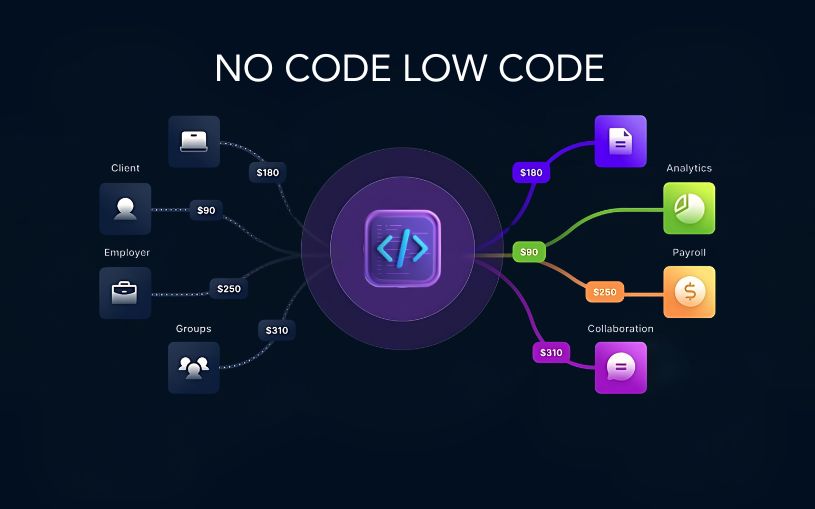
Low-Code vs No-Code vs Traditional Development: Which One Should Businesses Choose? Technology is evolving faster than ever, and businesses today have more options than ever when it comes to building software. Not long ago, developing an application meant hiring a team of developers and spending months writing code from scratch. Today, organizations can choose between traditional development, low-code platforms, and no-code solutions depending on their goals, budget, and technical expertise. As companies accelerate their digital transformation efforts in 2026, understanding these three development approaches has become essential. Each offers unique advantages, and selecting the right one can directly impact project success, operational efficiency, and long-term growth. Understanding Traditional Development Traditional software development remains the most powerful and flexible way to build applications. In this approach, developers write code manually using programming languages such as Python, Java, JavaScript, or C#. This method gives businesses complete control over every aspect of an application, from user experience and functionality to security and scalability. Organizations that require highly customized solutions, advanced integrations, or enterprise-grade systems often rely on traditional development because it can handle virtually any business requirement. However, this flexibility comes at a cost. Traditional development typically requires larger budgets, experienced developers, longer project timelines, and ongoing maintenance efforts. What is Low-Code Development? Low-code development bridges the gap between traditional coding and visual application building. Instead of writing every feature manually, developers can use drag-and-drop components, pre-built modules, and automated workflows to speed up the development process. The biggest advantage of low-code platforms is efficiency. Businesses can launch applications significantly faster while still retaining the ability to customize features through code whenever necessary. Many organizations use low-code platforms to create internal business applications, workflow automation systems, customer portals, and operational dashboards. This approach allows development teams to focus on solving business challenges rather than spending time on repetitive coding tasks. What is No-Code Development? No-code development takes simplicity to the next level by allowing users to create applications without writing any code at all. These platforms are designed for business users, entrepreneurs, marketers, and department managers who may have little or no programming experience. Through visual interfaces, templates, and drag-and-drop tools, users can create websites, mobile applications, forms, databases, and automated workflows. The growing popularity of no-code platforms reflects a larger trend toward democratizing technology. Businesses no longer need to depend entirely on software developers for every digital solution. For startups and small businesses, no-code tools offer an affordable and fast way to turn ideas into functional products. Comparing Speed and Development Time When speed is the primary concern, no-code platforms often come out on top. Applications can sometimes be built within days instead of months. Low-code platforms also provide impressive development speed by reducing the amount of manual coding required. Teams can quickly build prototypes, test ideas, and deploy solutions without lengthy development cycles. Traditional development generally requires more time because every feature must be designed, coded, tested, and optimized from the ground up. While slower, it provides unmatched flexibility and customization. Cost Considerations for Businesses Budget plays a major role in choosing a development approach. No-code solutions usually have the lowest initial costs because they eliminate the need for large development teams. Businesses can often create and manage applications using existing staff members. Low-code development offers a balance between affordability and flexibility. Organizations can reduce development costs while still creating sophisticated applications. Traditional development tends to involve the highest investment due to developer salaries, infrastructure requirements, quality assurance processes, and long-term maintenance expenses. Customization and Flexibility Customization is where traditional development shines. Businesses can create exactly what they need without being limited by platform restrictions. Whether it’s advanced analytics, complex integrations, or unique customer experiences, traditional coding provides complete freedom. Low-code platforms offer substantial customization capabilities and can handle many complex business requirements. Developers can extend functionality whenever needed through custom code. No-code platforms, while highly convenient, often have limitations. Users must work within the framework and capabilities provided by the platform, which can become challenging for more advanced projects. Scalability and Long-Term Growth As businesses grow, scalability becomes increasingly important. Traditional applications can be designed to handle large user bases, complex workflows, and significant data volumes. This makes them ideal for enterprises expecting substantial growth. Modern low-code platforms also support scalability and are increasingly being adopted by large organizations for mission-critical applications. No-code solutions can support growth to a certain extent, but highly complex or large-scale requirements may eventually require migration to more flexible platforms. The Impact of AI on Software Development Artificial intelligence is reshaping all three development approaches. Low-code and no-code platforms now include AI-powered features that can generate workflows, recommend automation processes, and simplify application design. These capabilities allow businesses to build solutions even faster than before. Traditional development is also benefiting from AI-assisted coding tools that help developers write cleaner code, identify errors, and accelerate project delivery. As AI technology continues to mature, the boundaries between traditional, low-code, and no-code development are becoming increasingly blurred. Which Option Should Your Business Choose? There is no universal answer because every organization has different needs. If your goal is rapid deployment with minimal technical involvement, no-code platforms may be the best choice. If you need a balance between speed, flexibility, and customization, low-code development can deliver excellent results. For businesses requiring complete control, advanced functionality, and enterprise-level scalability, traditional development remains the strongest option. Many successful organizations are now adopting a hybrid approach, using no-code tools for simple workflows, low-code platforms for internal applications, and traditional development for customer-facing products and mission-critical systems. Conclusion The debate between low-code, no-code, and traditional development is not about finding a single winner. Instead, it is about selecting the right tool for the right business challenge. As digital transformation continues to accelerate in 2026, organizations that understand the strengths and limitations of each approach will be better positioned to innovate faster, reduce costs, and remain competitive in an increasingly technology-driven world. The future of software development will not belong exclusively to traditional

DEVOPs, Software development

Infrastructure as Code (IaC) Guide

The Infrastructure as Code (IaC) Guide: Automating Your Cloud Ecosystem There is an old, painful way of managing IT infrastructure that many sysadmins still remember with a shudder. If you needed a new staging environment, you had to log into a cloud console, click dozens of buttons, configure virtual networks manually, spin up virtual machines, and manually run terminal commands to install packages. If you needed five identical environments for different engineering teams, you had to repeat that exact manual process five times. And inevitably, a human typo would slip in, causing a subtle, hidden variance between environments that took days of debugging to find. This nightmare is known as Configuration Drift. Infrastructure as Code (IaC) fundamentally changes the game. It is the practice of managing and provisioning your entire cloud infrastructure—servers, load balancers, databases, networks, and firewalls—using machine-readable definition files rather than manual interactive configuration tools. In short: You treat your hardware exactly like your software code. You write your infrastructure in descriptive configuration files, store them in Git version control, run automated testing against them, and deploy them through continuous delivery pipelines. Whether you are looking to migrate your first app to the cloud or scaling a multi-cloud enterprise architecture, this guide breaks down everything you need to master Infrastructure as Code. 1. Declarative vs. Imperative IaC: Choosing Your Approach When diving into the IaC landscape, you will immediately encounter two competing structural philosophies: Declarative and Imperative. Understanding the difference is crucial for designing a clean automation framework. +—————————————————————–+ | DECLARATIVE APPROACH (The Destination) | | “I want an environment with 3 web servers and 1 load balancer.” | | -> Tool figures out the steps automatically. | +—————————————————————–+ VS +—————————————————————–+ | IMPERATIVE APPROACH (The Journey) | | “Step 1: Create a VPC. Step 2: Spin up VM 1. Step 3: Run script.”| | -> Tool executes explicit, sequential commands. | +—————————————————————–+ The Declarative Approach (The Industry Standard) In a declarative model, you define the desired end-state of your infrastructure. You write a configuration file specifying exactly what assets you want to exist, and the IaC tool handles the rest. It calculates the current state of your cloud, compares it to your file, and automatically applies only the changes necessary to reach that target end-state. Analogy: Ordering a pizza. You tell the restaurant what toppings you want, and they deliver the final product. Primary Tools: Terraform, AWS CloudFormation, OpenToFu. The Imperative Approach In an imperative model, you define the explicit, sequential steps required to provision the infrastructure. You write scripts detailing exactly how to build the environment step-by-step. Analogy: Baking a pizza from scratch using a detailed, rigid recipe. If you mess up step three, the whole process breaks down. Primary Tools: Ansible, Chef, Puppet, or custom Bash/Python cloud-CLI scripts. For modern cloud provisioning, the Declarative approach has decisively won the industry standard because it is inherently idempotent—meaning you can run the exact same script a thousand times safely, and it will only modify infrastructure if the desired state deviates from reality. 2. Core Pillars of a Mature IaC Framework To implement Infrastructure as Code successfully, your architecture must rest upon four foundational DevOps pillars. 1. Immutability Over Mutation In a traditional Mutable Infrastructure model, servers are updated live in production. If a software patch is released, you log into the running machine and install it. Over time, your fleet becomes a collection of unique, snowflake servers, each configured slightly differently. IaC enables Immutable Infrastructure. You never update a live server. If an operating system patch or application update is required, you update your IaC script, destroy the old server instance entirely, and spin up a pristine, brand-new instance from the updated blueprint. This guarantees that your environments remain completely clean and identical at all times. 2. Idempotency An IaC pipeline must be idempotent. This means that executing your configuration code multiple times will yield the exact same result without unintended side effects. If your code declares that you need an Amazon S3 bucket named my-media-vault, running that script twice should verify the bucket exists on the second run, rather than throwing an error or creating a duplicate bucket. 3. Git as the Single Source of Truth (GitOps) Your infrastructure code should live inside your Git repositories right next to your application source code. Want to change a firewall rule? You don’t log into the cloud console. You open a Pull Request (PR) mutating the IaC file. Your peers review the infrastructure change line-by-line via code review. Once approved and merged, an automated CI/CD pipeline executes the change across your live environment. 4. State Management Declarative IaC tools maintain a crucial asset known as a State File. This file acts as a map, tracking the exact relationship between the configuration code you wrote and the actual real-world resources currently running inside your cloud provider (AWS, Azure, Google Cloud). Managing this state file securely in a centralized, encrypted remote storage vault (like an S3 bucket with state locking enabled) prevents multiple engineers from accidentally overwriting or executing conflicting infrastructure updates simultaneously. 3. The Modern IaC Toolchain The automation landscape is rich with specialized tools. High-performing teams typically combine a provisioning tool with a configuration management tool to manage the complete infrastructure lifecycle. [ Provisioning Layer: Terraform ] ──► Spins up physical Networks, Routers, & VMs. │ ▼ [ Configuration Layer: Ansible ] ──► Installs App dependencies, packages, & users. Provisioning Tools (Building the Skeleton) Terraform / OpenToFu: The dominant cloud-agnostic platform. It uses a declarative language called HCL (HashiCorp Configuration Language) to map out complex infrastructure across multiple cloud providers simultaneously. AWS CloudFormation / Azure ARM Templates: Native, proprietary provisioning engines built directly into specific cloud ecosystems. They work exceptionally well within their respective clouds but lock you into that single vendor. Pulumi: A modern alternative that allows you to write declarative infrastructure layouts using real software programming languages like TypeScript, Python, or Go, instead of custom configuration syntaxes. Configuration Management (Fleshing Out the Bones) Ansible: An open-source,

Digital Transformation, Software development, Technology

Cloud Cost Optimization Strategies

Cloud Cost Optimization Strategies: The Ultimate Guide to Reclaiming Your Cloud Spend There is a running joke in the engineering world: the fastest way to burn through a million dollars isn’t a luxury yacht or a bad investment—it’s leaving an unmanaged AWS or Azure environment running over the weekend. In the early days of cloud migration, the narrative was simple: Move to the cloud, save money. But as organizations scale, reality sets in. Cloud bills grow organically, mysteriously, and rapidly. Suddenly, finance teams are asking why the monthly infrastructure bill looks like a phone number, and engineering leads are scrambling to figure out which microservice is draining the budget. The truth is, the cloud makes provisioning resources so effortless that it invites waste. Left unchecked, you wind up paying for oversized servers, forgotten storage volumes, and idle staging environments. Cloud cost optimization isn’t about ruthlessly cutting services until your application breaks; it’s about efficiency. It’s the art of matching your actual infrastructure needs with the most cost-effective cloud resources available. This comprehensive guide breaks down the definitive strategies to help you eliminate cloud waste, engineer predictable budgets, and optimize your architecture without sacrificing performance. 1. Where Does the Money Go? Mapping Cloud Waste To fix a massive cloud bill, you first need to know what you are actually paying for. Cloud waste typically hides in plain sight across a few common areas: +—————————————————————+ | THE 4 DEADLY CLOUD WASTES | +—————————————————————+ | 1. Zombie Resources ──► Idle, orphaned, or unattached disks | | 2. Over-Provisioning ──► Paying for 8 Cores, using only 5% | | 3. Misconfigured Tiers──► Storing backup logs on Premium SSD | | 4. Rogue Environments ──► Staging clusters running 24/7/365 | +—————————————————————+ Before changing a single line of infrastructure code, set up a strict tagging policy. Resource Tagging is your single source of truth. Every single virtual machine, database, and storage bucket should be tagged by: Environment (Production, Staging, Dev) Owner/Team (Frontend, Data Science, Billing) Cost Center (Project Alpha, Core Product) Without proper tags, your cloud bill is just a wall of numbers. With them, you can pinpoint exactly which team or project is driving up costs. 2. Strategy 1: Hunt Down Zombie Resources The easiest way to drop your cloud bill immediately is to stop paying for things you aren’t using. These are known as Zombie Resources. Unattached Block Storage (EBS Volumes / Managed Disks) When an engineer terminates a virtual machine (like an AWS EC2 instance), the cloud provider doesn’t always automatically delete the virtual hard drive (EBS volume) attached to it. Over months, your account accumulates hundreds of “available” but unattached storage volumes. They do absolutely nothing, yet you are billed for every gigabyte. The Strategy: Run automated scripts or use cloud native tools to scan for disks with an available status. Snapshot them for safety if necessary, and then ruthlessly delete them. Orphaned Load Balancers and Idle Elastic IPs Engineers spin up load balancers for testing and then delete the backend servers, leaving the load balancer active. Similarly, static public IP addresses are free while attached to a running server, but cloud providers charge an hourly penalty rate if they sit unattached to prevent IP hoarding. The Strategy: Set up automated alerts to flag any load balancer receiving zero traffic over a 7-day period. 3. Strategy 2: Right-Sizing (Stop Buying More Than You Need) Right-sizing is the process of matching instance sizes and types to your actual workload performance requirements. A common developer habit is to provision a massive server instance because “we might get a traffic spike” or “I want to ensure it runs fast.” If you check your cloud metrics dashboard, you’ll frequently find servers running at an average of 5% to 10% CPU utilization. You are essentially paying for 90% headroom that you never touch. Traditional Over-Provisioned Model: [ Server Capacity: 16 vCPU / 64GB RAM (Cost: $$$$) ] └── [ Actual Application Load: ■■ (Using 5%) ] <– Massive Waste! Optimized Right-Sized Model: [ Server Capacity: 4 vCPU / 16GB RAM (Cost: $) ] └── [ Actual Application Load: ■■■■■■■ (Using 50%) ] <– Highly Efficient! How to Right-Size Safely Analyze Historical Metrics: Look at CPU, memory, Network I/O, and disk performance over a 30-day window. Downsize Downward: If CPU usage never peaks above 20%, drop the instance down one tier (e.g., from an m5.2xlarge to an m5.xlarge). This instantly cuts the cost of that resource by 50%. Change Instance Families: Cloud providers regularly release new generations of hardware (e.g., moving from AWS m5 instances to m6g Graviton instances). Newer generations are almost always cheaper and offer better performance per watt. 4. Strategy 3: Implement Automated Scheduling for Non-Prod Environments Your production environment needs to be available 24 hours a day, 7 days a week, 365 days a year. But your development, testing, and staging environments absolutely do not. If your developers work from 9 AM to 6 PM, Monday through Friday, your non-production environments are sitting completely idle for roughly 70% of the week (including nights and weekends). Leaving them running is pure waste. [ Mon – Fri: 9 AM – 6 PM ] ──► Environments ACTIVE (Engineers Working) [ Nights & Weekends ] ──► Automated Script SHUTS DOWN Infrastructure (Instantly saves ~70% on non-prod compute!) Put the Cloud to Sleep Implement automated scheduling tools (like AWS Instance Scheduler or custom cron jobs via Lambda functions) to automatically stop EC2 instances, RDS databases, and container clusters at 7:00 PM every evening and turn them back on at 7:00 AM every morning. Even better, configure them to stay offline entirely on Saturdays and Sundays. 5. Strategy 4: Commit to Committed Use Discounts (RI vs. Savings Plans) If you know you have baseline infrastructure that will be running continuously for the next year or two, paying the standard “On-Demand” hourly rate is financial malpractice. Cloud providers offer massive discounts (up to 72%) if you commit to a consistent amount of usage over a 1-year or 3-year term. Reserved

Software development, Technology & Innovation

CI/CD Pipeline Best Practices

CI/CD Pipeline Best Practices: The Definitive Guide to Building Bulletproof Automation If you’ve ever hit the “deploy” button with your eyes closed, holding your breath and praying to the software gods that nothing breaks, you’re not alone. We’ve all been there. In the early days of development, moving code from a local machine to a live server was a high-stakes gamble. It involved chaotic manual file transfers, brittle scripts, and an overwhelming amount of guesswork. The introduction of Continuous Integration and Continuous Deployment (CI/CD) promised to fix all of that. It offered a world where every code change travels safely down a pristine, automated assembly line straight into production. But here’s the harsh reality: simply having a CI/CD pipeline isn’t enough. A poorly designed pipeline is worse than manual deployment. It acts as a force multiplier for bad habits, automatically pushing broken code, security vulnerabilities, and configuration errors to production at supersonic speeds. If your build times are stretching past 45 minutes, your automated tests are flaky, or your developers are constantly bypassing the system, your pipeline is a bottleneck, not an accelerator. To transform your delivery workflow into an enterprise-grade engine, you need to move past basic automation and embrace architectural excellence. This comprehensive guide breaks down the definitive CI/CD pipeline best practices to help your engineering team ship stable, secure code multiple times a day with absolute confidence. 1. The Blueprint of a World-Class CI/CD Pipeline Before diving into specific best practices, let’s map out what a mature, modern CI/CD architecture actually looks like. Think of your pipeline as a series of progressive quality gates. Code enters as raw, unverified text and emerges as a fully monitored, production-ready application container. [ DEVELOPER ] Pushes Code / Opens Pull Request │ ▼ ┌────────────────────────────────────────────────────────┐ │ 1. THE COMMIT GATE (Continuous Integration) │ │ • Code Linting & Static Analysis (SAST) │ │ • High-Speed Unit Testing │ │ • Dependency Vulnerability Scanning │ └───────────┬────────────────────────────────────────────┘ │ (Passes) ▼ ┌────────────────────────────────────────────────────────┐ │ 2. THE ARTIFACT GATE (Build & Package) │ │ • Deterministic Container Compilation (Docker) │ │ • Container Image Security Scanning │ │ • Push to Secure Immutable Image Registry │ └───────────┬────────────────────────────────────────────┘ │ (Passes) ▼ ┌────────────────────────────────────────────────────────┐ │ 3. THE VALIDATION GATE (Continuous Delivery) │ │ • Automated IaC Environment Provisioning │ │ • Integration & End-to-End User Testing │ │ • Performance & Load Profiling │ └───────────┬────────────────────────────────────────────┘ │ (Passes) ▼ ┌────────────────────────────────────────────────────────┐ │ 4. THE DEPLOYMENT GATE (Continuous Deployment) │ │ • Canary Release / Blue-Green Progression │ │ • Automated Drift Detection & Observability Rollback│ └────────────────────────────────────────────────────────┘ Every stage of this blueprint must be optimized for speed, clarity, and isolation. If a failure occurs at the Commit Gate, the pipeline should abort immediately, giving the developer instant feedback before expensive cloud infrastructure is spun up down the line. 2. Commit and Integration Practices (The CI Foundation) The foundational philosophy of Continuous Integration is simple: integrate early and integrate often. The longer code sits isolated on a developer’s branch, the more painful the eventual merger will be. Shift to Trunk-Based Development For years, long-lived feature branches and complex merging strategies (like traditional GitFlow) were the industry norm. However, these models inherently create massive integration bottlenecks. Developers work in isolation for weeks, resulting in epic code review sessions and devastating “merge conflicts” that derail entire release schedules. Modern high-performing teams utilize Trunk-Based Development. In this workflow: Developers commit their changes to a single, central branch (usually named main or trunk) frequently, often multiple times a day. Feature branches are short-lived, lasting no more than 24 to 48 hours. This constant integration ensures that the entire engineering team is always working on top of the latest single source of truth. If a code conflict occurs, it’s tiny and easily resolved in minutes, rather than days. Treat Build Failures as Production Outages A CI pipeline is completely useless if developers get into the habit of ignoring broken builds. If your pipeline notification channel is filled with red error marks that everyone ignores because “Oh, that test always fails on Fridays,” your automated safety net has collapsed. Adopt a strict team culture where fixing a broken build is the highest priority task. If a commit breaks the pipeline, all engineering focus shifts to either fixing the underlying issue immediately or reverting the breaking commit. A broken main branch stops the assembly line; keeping it pristine ensures that the path to production remains open for everyone at all times. Commit Once, Build Once A terrifyingly common anti-pattern is compiling code or rebuilding application binaries multiple times as they progress through different pipeline environments. For example, building a Docker image for staging, and then building an entirely separate Docker image from the same source code when moving to production. This completely invalidates your testing. How do you prove that a subtle dependency change or compiler variance didn’t slip into the production build that wasn’t present during staging validation? The rule is absolute: Build your binaries, packages, or container images exactly once early in the pipeline. Package that build as an immutable asset, tag it with a unique cryptographic identifier (like a Git commit SHA), and store it in an artifact repository. That exact identical asset must be promoted through staging, pre-production, and production without ever being recompiled. 3. Optimizing for Speed: The 10-Minute Rule Speed is the lifeblood of software delivery automation. If a developer has to wait an hour to see if their code change passed automated validation, they will switch context. They’ll grab coffee, check social media, or start writing entirely new features. By the time the pipeline notifies them of an error, they’ve lost their train of thought, and fixing the bug takes twice as long. The gold standard for engineering organizations is the 10-Minute Rule: Your commit pipeline (from pushing code to receiving an integration pass/fail notification) should take less than ten minutes. Here is how you engineer a lightning-fast pipeline: Parallelize Test Execution Don’t run your test suites sequentially on a single runner

App Development, DEVOPs, Software development

DevOps Automation Explained

DevOps Automation Explained: The Ultimate Guide to Accelerating Software Delivery In the fast-paced world of modern software development, speed, agility, and reliability are no longer optional—they are critical to survival. If your team is still manually deploying code, configuring servers by hand, or running test scripts line by line, you are falling behind. Enter DevOps Automation. It’s the engine that powers high-performing engineering teams, transforming chaotic, siloed workflows into streamlined, automated delivery pipelines. But automation isn’t just about replacing human effort with scripts; it’s about shifting culture, breaking down traditional silos between developers and operations, and building a resilient ecosystem where software can be built, tested, and shipped at scale with minimal friction. Whether you are an engineering lead looking to scale your infrastructure, a developer tired of dealing with “it works on my machine” bugs, or a business leader aiming to outpace the competition, this comprehensive guide will break down everything you need to know about DevOps automation. 1. What is DevOps Automation? (Beyond the Buzzwords) To truly understand DevOps automation, we first need to strip away the marketing jargon. At its core, DevOps is a cultural and technical philosophy aimed at unifying software development (Dev) and IT operations (Ops). Historically, these two teams operated in complete isolation: Developers were incentivized to move fast, ship new features, and push boundaries. Operations teams were incentivized to maintain system stability, minimize downtime, and resist risky changes. This inherent tension created a massive bottleneck. Code would sit waiting for manual security reviews, server setups took weeks, and deployments were high-stress, late-night events prone to human error. +———————————–+ | Traditional Siloed Model | | [Dev Team] ——> [Ops Team] | | (Move Fast) Wall (Maintain) | | of Chaos | +———————————–+ VS +———————————–+ | DevOps Loop Model | | (Plan -> Build -> Test -> | | Deploy -> Monitor -> Feedback) | | Continuous & Automated | +———————————–+ DevOps automation is the practice of injecting technology across this entire lifecycle to automate repetitive, manual tasks. It bridges the gap between these teams, allowing software to flow from a developer’s laptop to production seamlessly, safely, and predictably. Why Automation is the Heart of DevOps Without automation, DevOps is just a nice idea. You can tell your teams to collaborate more, but if their tools and processes don’t support that collaboration, they will default to old habits. Automation provides the shared framework—the “single source of truth”—that allows both development and operations to achieve their goals simultaneously: speed and stability. 2. The Core Pillars of a DevOps Automation Framework A mature DevOps automation strategy isn’t built overnight. It spans across several distinct but interconnected phases, often referred to as the continuous delivery pipeline. Let’s break down these essential pillars. Continuous Integration (CI) Continuous Integration is the practice of automating the integration of code changes from multiple contributors into a single software project. Instead of developers working in isolation on massive feature branches for weeks, they merge their code back into a central repository (like GitHub or GitLab) frequently—often multiple times a day. Every time code is pushed, an automated CI server takes over. It automatically triggers: Code Compilation: Building the application to ensure there are no syntax or structural compilation errors. Automated Testing: Running unit tests and code linters to verify that the new changes don’t break existing functionality or violate code quality standards. By catching bugs early in the development cycle, CI prevents the dreaded “integration hell” that happens when teams try to merge massive amounts of conflicting code right before a major release. Continuous Delivery (CD) & Continuous Deployment While CI handles getting code into a stable, buildable state, Continuous Delivery and Continuous Deployment (often collectively called CD) handle getting that code into production. Continuous Delivery: In a CD workflow, every successful code change that passes the CI pipeline is automatically built and packaged. It is then automatically deployed to a staging or testing environment. However, the final push to the live production environment requires a manual human trigger (e.g., clicking a “Deploy” button). Continuous Deployment: This takes automation a step further. There is no manual intervention. If a code change passes every single automated test in the pipeline, it is automatically deployed directly to production. [ Code Change ] │ ▼ ┌────────────────────────┐ │ Continuous Integration │ -> Code Merged, Built, & Unit Tested └──────────┬─────────────┘ │ (Passes) ▼ ┌────────────────────────┐ │ Continuous Delivery │ -> Staging Deployment & Advanced Testing └──────────┬─────────────┘ │ ├─► (Manual Approval) ──► [ Production ] (Continuous Delivery) │ └─► (Automated Push) ──► [ Production ] (Continuous Deployment) Infrastructure as Code (IaC) Traditionally, provisioning servers, configuring networks, and setting up databases required operations teams to manually click through cloud consoles or run terminal commands on individual machines. This approach is slow, unscalable, and heavily prone to configuration drift (where environments that are supposed to be identical slowly become different over time). Infrastructure as Code solves this by treating your infrastructure exactly like software code. You define your servers, storage, networks, and configurations in descriptive configuration files (using formats like YAML or JSON). These files are stored in version control alongside your application code. When you need to spin up a new environment, an IaC tool reads the configuration and provisions the exact infrastructure automatically. This guarantees that your development, staging, and production environments are identical replicas, eliminating environment-specific bugs entirely. Continuous Monitoring and Logging Automation doesn’t stop once code is live in production. In fact, that’s where some of the most critical automation begins. Automated monitoring and logging tools constantly track the health, performance, and security of your applications and infrastructure in real-time. Instead of waiting for users to tweet about a crash or submit a support ticket, automated monitoring systems use predictive alerts to notify engineering teams the moment performance begins to degrade—such as spikes in CPU usage, memory leaks, or an unusual rise in 500 error codes. Advanced monitoring systems can even trigger automated remediation scripts, like spinning up additional cloud servers to handle unexpected traffic spikes or

Future trends shaping the software development industry
Software development

Future Trends in Software Development: What to Expect in the Coming Years

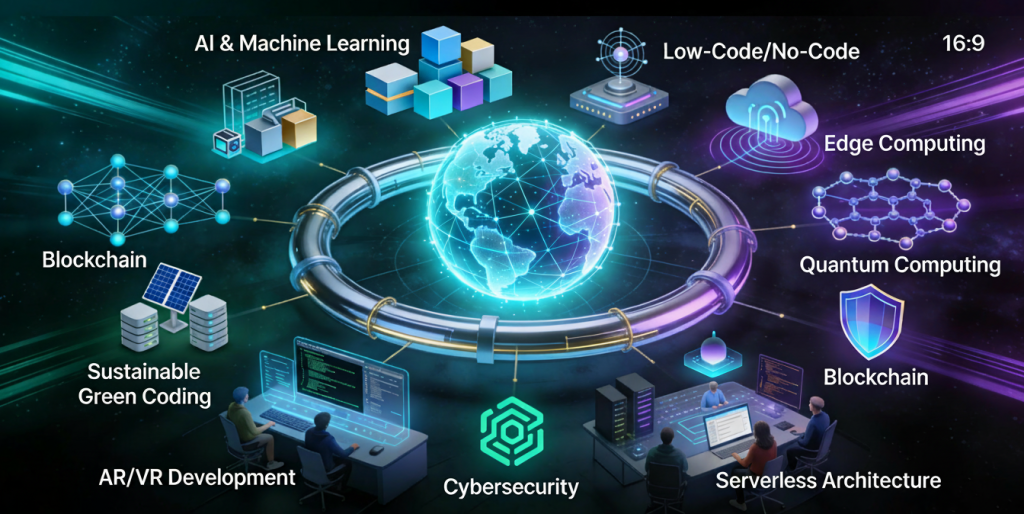
Introduction Software development is evolving at an unprecedented pace. Rapid advancements in artificial intelligence, cloud computing, automation, and development tools are reshaping how applications are built, deployed, and maintained. Organizations that fail to adapt risk falling behind in an increasingly competitive digital world. Understanding future trends in software development helps developers, businesses, and technology leaders prepare for upcoming challenges and opportunities. In this blog, we explore key trends that will define the future of software development and how they will impact the industry. Artificial Intelligence in Software Development AI is transforming every stage of the software development lifecycle. Key Applications AI-powered code generation Intelligent debugging Automated testing AI tools improve productivity and reduce human error. Low-Code and No-Code Development Low-code and no-code platforms enable faster application development with minimal coding. Benefits Faster time to market Reduced development costs Empowered non-technical users These platforms are ideal for rapid prototyping and internal tools. Cloud-Native Development Cloud-native applications are designed specifically for cloud environments. Key Technologies Containers Microservices Serverless computing Cloud-native development improves scalability and resilience. DevOps and Automation Automation continues to play a vital role in software development. Trends AI-driven CI/CD pipelines Automated infrastructure Continuous monitoring Automation enhances efficiency and reliability. Cybersecurity-First Development Security is becoming a core development priority. Emerging Practices Zero trust architecture DevSecOps Continuous security testing Security-first development protects applications from evolving threats. Microservices Architecture Microservices allow applications to be built as independent, scalable services. Advantages Better scalability Faster updates Improved fault isolation Microservices support modern, distributed systems. Edge Computing Edge computing processes data closer to the source. Use Cases IoT devices Real-time analytics Autonomous systems Edge computing reduces latency and improves performance. Remote and Distributed Development Teams Remote work is becoming the norm in software development. Benefits Access to global talent Improved flexibility Reduced operational costs Collaboration tools enable seamless teamwork. Sustainable Software Development Green software engineering focuses on energy-efficient applications. Key Goals Reduced carbon footprint Efficient resource usage Sustainability is becoming a strategic priority. Continuous Learning and Skill Evolution Developers must continuously update their skills to remain competitive. In-Demand Skills Cloud platforms AI and ML Cybersecurity Lifelong learning is essential in modern software development. Conclusion The future of software development is shaped by innovation, automation, and continuous improvement. AI, cloud-native technologies, security-first practices, and sustainability will define the next generation of applications. By embracing these trends, organizations and developers can stay competitive and build software that meets future demands. Frequently Asked Questions (FAQs) 1. What is the biggest trend in software development? AI and automation are the most impactful trends. 2. Will low-code platforms replace developers? No, they will complement developers by improving productivity. 3. Is cloud-native development the future? Yes, cloud-native approaches are becoming the industry standard. 4. How important is cybersecurity in future development? Cybersecurity is critical and must be integrated from the start. 5. Will DevOps continue to grow? Yes, DevOps will remain essential for modern software delivery. 6. How can developers prepare for the future? By continuously learning new technologies and adapting to change. Connect With Us:https://www.facebook.com/profile.php?id=61555452386126

DevOps and CI/CD pipeline in software development.
Software development

DevOps and CI/CD in Software Development: Accelerating Delivery and Quality

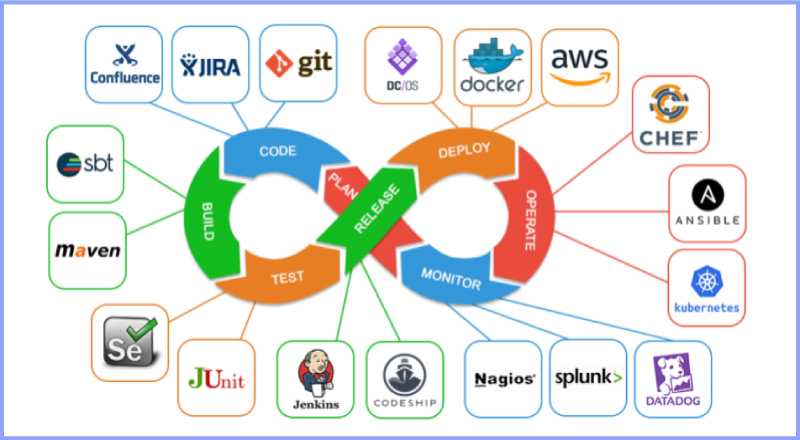
Introduction Modern software development demands speed, reliability, and continuous improvement. Traditional development approaches often struggled with slow releases, manual deployments, and communication gaps between development and operations teams. To overcome these challenges, organizations adopted DevOps and Continuous Integration/Continuous Deployment (CI/CD) practices. DevOps and CI/CD aim to automate workflows, improve collaboration, and deliver high-quality software faster. Together, they form the backbone of modern software engineering and cloud-native development. In this blog, we will explore DevOps and CI/CD, understand their importance, key concepts, tools, benefits, and how they transform software development. What Is DevOps? DevOps is a cultural and technical approach that integrates software development (Dev) and IT operations (Ops). It focuses on collaboration, automation, and continuous feedback. Core Principles of DevOps Collaboration between teams Automation of workflows Continuous monitoring and feedback Rapid delivery DevOps breaks down silos and improves efficiency across the development lifecycle. What Is CI/CD? CI/CD stands for Continuous Integration and Continuous Deployment (or Delivery). Continuous Integration (CI) CI involves frequently merging code changes into a shared repository and automatically testing them. Continuous Deployment (CD) CD automates the release of tested code into production. Together, CI/CD ensures faster and safer software releases. DevOps Lifecycle The DevOps lifecycle consists of several stages: Planning Development Integration Testing Deployment Monitoring Each stage is automated and continuously improved. Benefits of DevOps and CI/CD 1. Faster Time to Market Automation reduces manual work and accelerates releases. 2. Improved Software Quality Continuous testing detects issues early. 3. Enhanced Collaboration DevOps fosters teamwork across departments. 4. Reliable Deployments Automated pipelines reduce human errors. Popular DevOps and CI/CD Tools Version Control Git GitHub GitLab CI/CD Tools Jenkins GitHub Actions GitLab CI/CD Containerization Docker Kubernetes Monitoring Prometheus Grafana DevOps and Agile Relationship DevOps complements Agile by extending continuous delivery beyond development into operations. Together, they enable faster feedback loops and continuous improvement. Security in DevOps (DevSecOps) DevSecOps integrates security into the DevOps pipeline. Automated security testing ensures vulnerabilities are identified early. Challenges in Implementing DevOps Cultural resistance Tool complexity Skill gaps Overcoming these challenges requires training, leadership support, and gradual adoption. Future of DevOps DevOps continues to evolve with AI-driven automation, cloud-native technologies, and serverless computing. Conclusion DevOps and CI/CD are essential for modern software development. By automating workflows, improving collaboration, and enabling continuous delivery, organizations can build reliable and scalable applications faster than ever. Frequently Asked Questions (FAQs) 1. What is DevOps in simple terms? DevOps is a practice that improves collaboration between development and operations teams. 2. What is the difference between CI and CD? CI focuses on code integration, while CD focuses on deployment. 3. Is DevOps only for large companies? No, DevOps benefits organizations of all sizes. 4. Can DevOps be used without CI/CD? CI/CD is a core component of DevOps. 5. What skills are needed for DevOps? Automation, cloud computing, and scripting skills. 6. Is DevOps a tool or a methodology? DevOps is a culture supported by tools and practices. Connect with us: https://www.facebook.com/profile.php?id=61555452386126

Scroll to Top