Author name: Kirti Sharma

Educational Technology

7 Reasons Why Education Startups Fail & Ways to Avoid Them

Introduction The EdTech industry promises to transform education through technology, offering innovative learning experiences and scalable solutions. However, despite rapid growth and significant investment inflows, many education startups fail within the first few years. Understanding the common reasons for failure and how to overcome them is crucial for entrepreneurs aiming for long-term success and impact. This blog explores 7 key reasons why education startups often struggle, supported by market insights, and offers actionable strategies for thriving in this competitive sector. For deeper understanding of AI-powered education technology and digital transformation, explore TechOTD’s AI Services and their technology blog. 1. Poor Market Research Many education startups jump into product development without a solid grasp of the market dynamics, user needs, and ecosystem realities. They often mistake excitement for demand, leading to products that don’t solve real educational challenges or fit into school environments. How to avoid: Conduct thorough market and competitor analysis. Engage educators, learners, and administrators early for feedback. Validate product ideas with pilot studies or MVPs to ensure real-world applicability. 2. Lack of Patience Education adoption cycles are significantly slower than in other industries. Schools and institutions require time to trial, accept, and integrate new tools into rigid curriculums and budgets. Many startups fail because they expect rapid growth and give up prematurely. How to avoid: Set realistic expectations about timelines (often 5-10 years for widespread adoption). Focus on steady user engagement milestones rather than quick scaling. 3. Unclear Distinction Between Users and Buyers Confusing the end-users (students, teachers) with paying customers (schools, parents, districts) often leads to misaligned marketing, pricing, and product design strategies. Solutions must cater to the needs of all stakeholder groups in education. How to avoid: Map out all stakeholders and their specific requirements. Design your product and outreach strategies accordingly. 4. Overuse of Technology Without Educational Value EdTech startups sometimes focus on trendy technologies—AR, VR, AI—without ensuring these add tangible learning benefits. This increases costs and complexity, alienating users if technology does not improve outcomes. How to avoid: Prioritize pedagogical effectiveness over novelty. Pilot technology features to prove value before wide release. 5. Lack of Transparency and Collaboration with Educators Failing to involve teachers and educational institutions in development leads to lack of buy-in and resistance. Attempts to replace educators or disregard classroom realities often doom products. How to avoid: Collaborate with educators throughout development cycles. Create transparent, teacher-friendly products that complement teaching. 6. Too Many Features Leading to Complexity Feature overload makes platforms confusing and hampers usability. Startups with cluttered apps or platforms struggle with adoption and retention. How to avoid: Develop a minimal viable product (MVP) focusing on a core problem. Use data analytics to guide gradual feature expansion based on user needs. 7. Insufficient User Training and Support Lack of onboarding, training, and responsive support leads users to abandon even the best platforms. Many EdTech startups underestimate the training needs of educators and learners. How to avoid: Invest in comprehensive training resources and support systems. Continuously collect user feedback to improve usability and support. Conclusion Success in education technology requires more than innovative ideas or strong funding. It demands deep market knowledge, collaboration with educators, simple yet powerful product design, and long-term commitment. By avoiding these common pitfalls and leveraging strategic partnerships, EdTech startups can create impactful and sustainable solutions that transform learning. For expert guidance, explore how TechOTD combines AI, product development, and education insights to support startups in the education sector. Discover more tips and digital trends on the TechOTD Blog. FAQs Q1: Why do many EdTech startups fail within the first 5 years? Lack of proper market research and misunderstanding the slow adoption cycles in education are major reasons. Q2: How important is teacher collaboration? Critical. Products must align with educators’ needs and workflows to gain acceptance. Q3: Should startups always use the latest technology? No. Technology should be adopted only when it adds educational value. Q4: How can startups sustain long-term growth? By focusing on core user needs, iterative development, and investing in user training. Q5: What initial steps should EdTech startups take for product development? Conduct thorough market validation, develop an MVP, and engage educators from the start


data science

The Business Opportunities and Challenges of Implementing Analytics in Sport

Introduction In the digital age, analytics is changing the game in sports—powering smarter strategies, unlocking new revenue streams, and delivering richer fan engagement. From wearable tech on athletes to sophisticated data-driven marketing for fans, analytics enables teams, leagues, and organizations to optimize both performance and business operations. However, turning numbers into insights and ROI brings its own set of hurdles. Explore the core business opportunities and essential challenges of sports analytics, and learn how to embark on your analytics transformation with trusted partners. For end-to-end AI and analytics consultation, see TechOTD’s AI Solutions. Key Business Opportunities of Sports Analytics Performance Optimization: Teams leverage real-time data and AI-powered insights to design custom training, maximize athlete output, and guide in-game decision-making. Over 75% of professional sports teams use real-time analytics to gain a strategic advantage and reduce injuries. Talent Scouting and Recruitment: Advanced analytics driven by machine learning helps objectively identify top prospects and predict potential, far outpacing traditional scouting methods. Revenue Optimization: Data analytics enables dynamic ticket and merchandise pricing, smarter fan segmentation, and improved stadium resource allocation. Teams analyze fan data to increase profitability and optimize event operations. Fan Engagement and Monetization: Analytics creates personalized fan experiences, targeted marketing, and interactive digital content using live stats and preferences. This increases sponsorship value and crosses over into new digital markets like fantasy and e-sports (see AI’s role in predictive analytics). Business Intelligence for Operations: Sports organizations and leagues use analytics to make data-driven decisions on resource management, recruitment, and business expansion for sustained growth. For methodologies, see How TechOTD Works. Core Challenges in Sports Analytics Implementation Data Quality and Integration Issues: Data comes from multiple sources—wearable sensors, CRM systems, social feeds—often in inconsistent formats. Integrating and cleaning data for accurate insights is a major challenge. Resistance to Change: Coaches, staff, and even players may hesitate to trust algorithmic models over hard-won experience. This calls for robust change management and meaningful collaboration between analysts and sports professionals. High Implementation and Talent Costs: Building scalable sports analytics solutions demands significant tech investment and skilled data scientists. Costs for basic analytics can range from $40,000 to $200,000 for a small team, scaling up to $5M+ for enterprise setups (see full breakdown on Appinventiv). Communication Gaps: Translating technical findings into actionable insights for coaches and executives often requires dedicated communication bridges and training. Privacy, Security, and Regulation: Managing large quantities of sensitive player or fan data requires strict GDPR compliance, robust cybersecurity, and clear data governance strategies. Future Trends and Technology Stack Sports analytics is set to benefit from advances in AI and cloud computing—real-time analytics, blockchain data tracking, and advanced fan segmentation will offer new revenue streams and fan experiences. Read more about blockchain’s impact and LLMs in sports and finance. For a deeper dive into these digital trends and their influence on the sports industry, see TechOTD Blog. Conclusion Sports analytics is transforming the business of sports—from athlete development to stadium profitability and personalized marketing. While the payoff is high, success requires careful planning, seamless data integration, stakeholder buy-in, and a strong, secure technology stack. With the right analytics partner, such as TechOTD, you can harness data for peak performance and ROI. Start your journey with AI-powered consulting and explore more strategies for success on the TechOTD Blog. FAQs Q1: What’s the most profitable application of analytics in sports? Personalized fan engagement and data-driven revenue optimization offer the highest ROI, closely followed by AI-aided performance improvement. Q2: What are the top technical challenges for sports analytics? Data integration, quality control, and developing scalable infrastructure are significant barriers—AI and cloud solutions are key to overcoming them. Q3: Is analytics in sports only for big leagues? No. Even amateur teams and local leagues use basic analytics for talent scouting, performance tracking, and operations. Q4: How do you manage privacy in analytics projects? Implement GDPR-ready policies, secure infrastructure, and transparent data protocols. More on AI security best practices. Q5: What’s the investment range for sports analytics? Projects range from $40,000 to $200,000 for small teams to enterprise investments exceeding $1 million.

Artificial Intelligence

Creating Hyper-Personalized Banking with AI: Cost, ROI, and Use Cases

Introduction Artificial Intelligence (AI) is revolutionizing the banking industry by enabling hyper-personalized customer experiences that were previously unimaginable. Banks can now leverage AI-driven data analytics, machine learning models, and natural language processing to tailor services, products, and interactions uniquely to each customer’s preferences and behaviors. This shift enhances customer satisfaction, loyalty, and operational efficiency, making AI-powered personalization a powerful competitive differentiator. This blog explores how banks can create hyper-personalized experiences using AI, including typical costs involved, potential Return on Investment (ROI), and compelling use cases transforming the sector. For insights on AI in finance and predictive analytics, explore TechOTD’s AI services and their technology blog. What is Hyper-Personalized Banking? Hyper-personalization uses AI to analyze vast datasets encompassing transactional history, demographics, social media, and behavioral signals, delivering real-time, individualized banking experiences. This goes beyond segment-based marketing to dynamic, one-to-one customer engagement. Key Use Cases of AI-Driven Hyper-Personalization 1. Personalized Financial Product Recommendations AI models analyze spending patterns, credit scores, and life events to suggest tailored loans, credit cards, or investment products. 2. Intelligent Virtual Assistants and Chatbots AI-powered chatbots offer 24/7 personalized customer support, resolve queries, and proactively alert customers about offers or account anomalies. 3. Customized Credit Risk Assessment Machine learning algorithms refine credit scoring individually based on expanded datasets, enabling more accurate risk evaluation and inclusive lending. 4. Dynamic Pricing and Offers Banks can customize interest rates, fees, and promotions in real time based on customer behavior and market conditions. 5. Fraud Detection and Prevention AI analyzes transaction patterns to identify unusual activities, instantly protecting customers from fraud and identity theft. Costs of Implementing AI for Hyper-Personalization Technology Investment: Procuring AI platforms, cloud infrastructure, and data storage solutions. Data Management: Cleaning, integrating, and maintaining quality datasets. Talent Acquisition: Hiring data scientists, AI engineers, and financial analysts. Development and Integration: Building, testing, and deploying AI models with existing banking systems. Compliance and Security: Ensuring data privacy and meeting regulatory standards (GDPR, PCI-DSS). Typical budgets vary based on scope: Small-scale pilots: $100,000 – $250,000 Mid-size implementations: $250,000 – $1 million Large enterprise-wide AI initiatives: $1 million+ Return on Investment (ROI) from AI-Powered Personalization Increased Customer Retention: Personalized services improve satisfaction and reduce churn by up to 30%. Boosted Revenue: Targeted product recommendations and dynamic pricing can increase sales by 10-20%. Cost Savings: AI automation reduces customer service costs and fraud losses significantly. Faster Decision-Making: Accelerated loan approvals with AI-driven credit assessment improve conversion rates. A well-executed AI personalization project typically sees ROI within 12-24 months. How to Get Started with AI-Powered Personalization Assess Data Readiness: Evaluate data quality and integration capabilities. Identify Use Cases: Prioritize high-impact personalization areas aligned with business goals. Choose AI Partners: Collaborate with AI vendors or development experts like TechOTD for custom solutions. Pilot and Scale: Implement pilot projects, analyze results, and expand capabilities iteratively. Ensure Compliance: Embed privacy and governance frameworks. Explore how TechOTD supports AI-enabled banking innovations: TechOTD AI Banking Solutions. Conclusion AI-driven hyper-personalization is transforming banking by creating seamless, tailored customer journeys that drive business growth and operational excellence. While initial investments can be substantial, the long-term ROI through enhanced loyalty, revenue, and efficiency justifies the commitment. With expert partners and a clear strategy, banks can harness AI to redefine customer relationships and competitive positioning in the digital age. Stay updated on AI and banking innovations through TechOTD Blog. FAQs Q1: What distinguishes hyper-personalization from traditional personalization? It uses real-time AI-driven insights for individual customer experiences versus broad segmentation. Q2: How much does AI personalization cost for banks? Costs range from $100,000 for pilots to over $1 million for enterprise projects. Q3: What are the biggest ROI drivers? Customer retention, revenue growth from targeted offers, fraud reduction, and operational efficiency. Q4: How quickly can banks implement AI personalization? Pilots can launch within 3-6 months, with scaling taking 1-2 years. Q5: Is data privacy a concern with AI in banking? Yes, compliance with regulations like GDPR is critical when handling sensitive financial data.

Software development

How to Build Utility Billing Software: Features, Process, and Costs

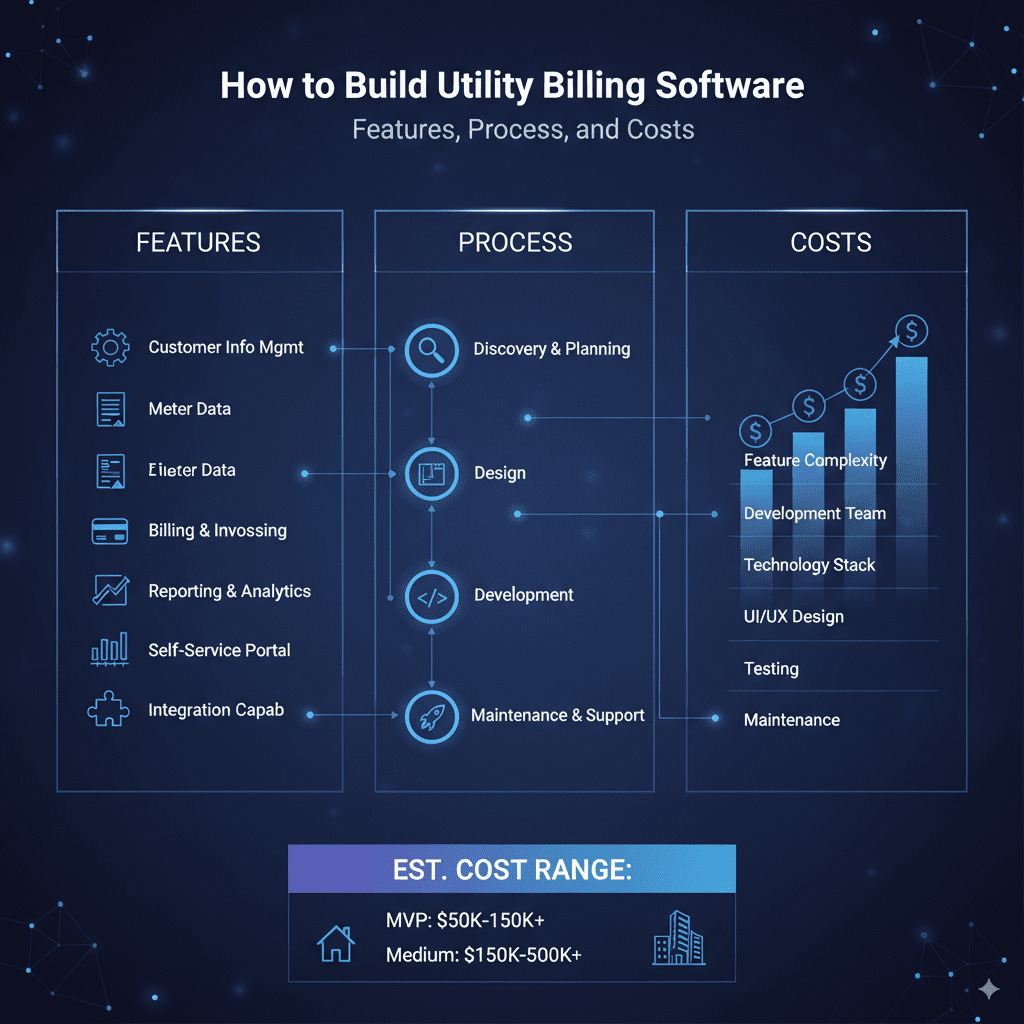
Introduction Utility billing software plays a critical role in managing and automating billing processes for services like electricity, water, gas, and telecom. With the increasing demand for efficient, accurate, and user-friendly billing systems, businesses and utility providers are looking to build tailored software solutions that streamline operations, reduce errors, and enhance customer satisfaction. This blog offers a comprehensive guide on how to build utility billing software, detailing essential features, the development process, and approximate costs. For leveraging AI and advanced analytics in billing systems, explore TechOTD’s AI solutions and their technology blog. Essential Features of Utility Billing Software 1. Meter Data Management Integration with smart meters and IoT devices Automated or manual meter reading inputs Real-time data capture and monitoring 2. Billing and Invoice Generation Usage-based billing with flexible tariff plans Automated invoice generation and delivery (email, SMS, print) Multi-utility and multi-rate support 3. Payment Processing Support for multiple payment gateways and methods Online payment portals and mobile payment integration Automatic payment reconciliation 4. Customer Account Management User profiles and service history tracking Customized billing notifications and alerts Self-service portals for bill viewing and payment 5. Usage Analytics and Reporting Detailed consumption reports and trends Revenue analytics and forecasting Exportable reports for audits and compliance 6. Integration Capabilities ERP and CRM software integration Taxation and regulatory compliance modules APIs for third-party services and partner systems 7. Security and Compliance Data encryption and secure user authentication Compliance with local regulations and standards (e.g., GDPR, PCI-DSS) The Development Process 1. Requirement Analysis Engage stakeholders to gather business needs and regulatory requirements. 2. System Design Architect the software with scalability, security, and usability in focus. 3. Technology Stack Selection Choose technologies aligned with project scope (e.g., cloud platforms, databases, front-end frameworks). 4. Development and Integration Develop modules for meter data, billing algorithms, payment gateways, and customer portals. Integrate with hardware devices and legacy systems. 5. Testing Conduct rigorous unit, integration, security, and user acceptance testing (UAT). 6. Deployment and Training Deploy on-premises or cloud-based environments. Train users and administrators for smooth adoption. 7. Maintenance and Support Provide continuous updates, bug fixes, and improvement features. Cost Factors and Estimates Software Complexity: More utilities supported and features increase cost. Technology Choices: Cloud vs on-premises, choice of databases and frameworks affects budget. Integration Needs: Costs rise with custom hardware and third-party system integrations. Security Requirements: Higher security standards require specialized investments. Development Team Location: Offshore teams may reduce costs but require effective management. Estimated costs vary widely: Basic utility billing software: $50,000 to $150,000 Mid-range solutions with integrations: $150,000 to $500,000 Enterprise-grade, scalable platforms: $500,000+ Leveraging AI and Analytics AI-driven predictive analytics enhances billing accuracy, fraud detection, and customer personalization. Automation powered by AI reduces manual errors and accelerates billing cycles. Explore how predictive analytics reshapes business software: Predictive Analytics Software Development. Why Partner with Experts Like TechOTD TechOTD offers end-to-end software development expertize in building secure, scalable utility billing systems integrated with AI and cloud technologies. They follow agile methodologies ensuring rapid delivery aligned with business needs. Discover their services: TechOTD Software Development Services. Conclusion Building utility billing software requires a harmonious blend of domain understanding, technical expertise, and regulatory compliance. Clear requirement gathering, incorporating key features, and partnering with experienced developers help ensure that the final solution is efficient, scalable, and user-friendly. Investing in AI, cloud, and secure integrations will future-proof your billing system and enhance customer experience. Start planning your utility billing software journey today with professional guidance and innovative technology partners. FAQs Q1: What are must-have features for utility billing software? Meter data management, billing automation, payment processing, customer portals, and reporting. Q2: How long does it take to develop utility billing software? Typically 6 to 12 months depending on complexity and integrations. Q3: Can AI improve utility billing systems? Yes, for predictive analytics, fraud detection, and workflow automation. Q4: What are cost drivers for utility billing software? Features, integration needs, technology stack, and security compliance. Q5: Is cloud deployment suitable for utility billing? Yes, cloud offers scalability, availability, and easier updates for billing systems.

news & events

Microsoft is Turning Outlook into a Progressive Web App (PWA)

Introduction Microsoft is making a significant shift by transforming Outlook into a Progressive Web App (PWA), signaling a new era in how users will access one of the world’s most widely used email and productivity platforms. PWAs merge the best of web and mobile apps, offering faster loading times, offline access, and enhanced responsiveness, all while maintaining the ease of use of a web browser. This blog explores what the transformation of Outlook into a PWA means for users and businesses, the benefits of PWAs, and how this evolution reflects broader trends in cloud-based software and cross-platform accessibility. For deeper insights into cloud computing, AI integrations, and modern app development strategies, visit TechOTD’s AI and cloud services and their technology blog. What is a Progressive Web App (PWA)? A PWA is essentially a web application that offers a native app-like experience through modern web technologies. It works in any browser but can be installed on desktops or mobile devices, features offline functionality, push notifications, fast load times, and responsive design. Why Is Microsoft Turning Outlook into a PWA? Cross-Platform Consistency: The Outlook PWA provides a uniform experience across Windows, macOS, Linux, Android, and iOS, simplifying maintenance and updates. Instant Access and Offline Use: PWAs load quickly, even on slow connections, and can be used offline with cached data, ensuring continuous productivity. Reduced Disk Space Usage: Unlike traditional native apps, PWAs have smaller footprints since they run through browsers but still offer app-like features. Faster Updates and Deployment: Updates can be rolled out centrally on the web, bypassing app store approval delays and ensuring users always have the latest features. Key Benefits for Users and Businesses Improved Performance and Reliability: The Outlook PWA loads quickly and handles network fluctuations gracefully. Seamless Integration with Microsoft 365: The app works smoothly with Microsoft’s suite of productivity tools in the cloud. Enhanced Security: PWAs benefit from browser-level security enhancements and centralized update management. Simplified IT Management: Easier deployment and management for businesses reducing support overhead. Broader Implications for Cloud and App Development Microsoft’s move underscores a growing industry trend toward cloud-native, browser-first applications that prioritize accessibility, speed, and security. This approach aligns with the increasing adoption of cloud platforms powered by AI and continuous integration/deployment pipelines. Learn how cloud computing and AI are shaping modern business applications: Cloud Computing in Banking and Finance. How TechOTD Can Help TechOTD offers expert consulting and development services to help businesses leverage PWAs, cloud computing, and AI-driven digital transformation strategies that align with their operational goals. Explore TechOTD’s cloud and mobile app development services: TechOTD Services. Conclusion Microsoft turning Outlook into a Progressive Web App represents a pivotal step toward more accessible, agile, and user-friendly productivity tools. PWAs offer promise in delivering fast, reliable experiences without sacrificing features or security, paving the way for the future of enterprise software. Businesses and users alike stand to benefit from this innovative approach as cloud-first strategies continue to dominate. Stay informed about evolving app technologies and cloud trends with expert insights from TechOTD Blog. FAQs Q1: What platforms will Outlook PWA support? It will support Windows, macOS, Linux, Android, and iOS. Q2: Can Outlook PWA be used offline? Yes, it supports offline access through cached data. Q3: How does PWA improve update cycles? Updates are deployed on the web instantly without app store delays. Q4: Is Outlook PWA secure? Yes, it benefits from browser security and centralized update control. Q5: How does this affect IT management? Simplifies deployment, reduces update overhead, and eases support efforts.

news & events

Google Acquires AppSheet: A Leap Forward in No-Code Mobile App Development

Introduction In a significant move advancing the no-code development landscape, Google has officially acquired AppSheet, a leading no-code mobile app development platform. This acquisition marks a strategic step by Google to empower businesses and citizen developers to create powerful mobile and web applications without writing traditional code. By integrating AppSheet’s capabilities with Google Cloud’s robust infrastructure and AI tools, Google aims to revolutionize application development and accelerate digital transformation across industries. This blog explores the details of Google’s acquisition of AppSheet, its implications for the no-code market, how it benefits enterprises, and the future of app development powered by AI and cloud. For deeper insights on AI-enhanced software development and cloud solutions, explore TechOTD’s AI services and their technology blog. What is AppSheet? AppSheet is a no-code development platform that enables users to build customized mobile and web applications using data sources like Google Sheets, Excel, and cloud databases. It offers an intuitive drag-and-drop interface, automation capabilities, and integration with various SaaS tools, allowing business users and developers to rapidly prototype and deploy apps tailored to specific workflows without writing code. Why Google Acquired AppSheet? 1. Democratizing App Development Google’s acquisition endorses its philosophy of making technology accessible to everyone, enabling “citizen developers” to innovate independently within organizations. 2. Enhancing Google Cloud Offerings AppSheet enriches Google Cloud’s ecosystem by adding powerful no-code tools, facilitating faster digital transformation and adoption of cloud-native application models. 3. Accelerating AI Integration Combined with Google’s AI and machine learning technologies, AppSheet apps can incorporate intelligent automation, predictive analytics, and personalized experiences seamlessly. Benefits to Businesses and Developers Fast, Cost-Effective Development: Business teams can deploy apps to address operational needs without lengthy coding cycles. Reduced Dependence on IT: Non-technical users gain autonomy to build and modify apps, lightening IT burdens. Integration with Google Workspace: Smooth workflows with Google Sheets, Drive, BigQuery, and other cloud services. Scalable and Secure: Deployed on Google Cloud infrastructure with enterprise-grade security and compliance. Learn how predictive analytics and AI enhance such app solutions: Predictive Analytics Software Development. The Future of No-Code and Low-Code Development The acquisition underscores a broader industry trend toward no-code/low-code platforms, which are revolutionizing software development by: Expanding developer ecosystems and speeding innovation Enabling rapid response to business process changes Reducing software development backlogs and costs At the same time, challenges remain around governance, integration, and scaling no-code applications securely. How TechOTD Supports No-Code Innovation TechOTD helps businesses leverage no-code and low-code platforms alongside traditional development to build hybrid solutions tailored for scalability and performance. Their AI-powered tools assist rapid prototyping, integration, and process automation for digital success. Discover their mobile and AI solutions here: TechOTD Mobile and AI Services. Conclusion Google’s acquisition of AppSheet is a game-changer, making no-code app development more accessible, scalable, and intelligent. By blending AppSheet’s ease of use with Google Cloud’s powerful AI and infrastructure, businesses can accelerate digital transformation while empowering non-technical users to innovate rapidly. This milestone signals a future where software creation is a collaborative, inclusive process supported by AI-driven tools. Stay updated on the latest in app development and AI technologies with TechOTD’s expert insights at TechOTD Blog. FAQs Q1: What is AppSheet’s core offering? A no-code platform for building mobile and web apps using existing data sources and drag-and-drop tools. Q2: How does Google benefit from acquiring AppSheet? It enhances Google Cloud’s portfolio with powerful no-code development capabilities and AI integration. Q3: Who can benefit from AppSheet? Both business users without coding skills and professional developers streamline app development. Q4: What industries can leverage no-code platforms? Virtually all, including healthcare, finance, retail, manufacturing, and logistics. Q5: Does AppSheet integrate with AI and analytics? Yes, especially post-acquisition, it is increasingly integrated with Google’s AI and predictive analytics services.

news & events

iOS 13.2 Is Here: Unlocking Hidden Features for iPhone and iPad

Introduction Apple continues to refine its iOS ecosystem, and the release of iOS 13.2 brings a host of exciting features and enhancements specifically designed for iPhones and iPads. Beyond the usual performance improvements and bug fixes, this update unlocks several hidden functionalities that elevate user experience, privacy, and device capabilities. Whether you’re an everyday user or a tech enthusiast, understanding these lesser-known features is key to getting the most out of your Apple devices. This blog delves into the standout hidden features of iOS 13.2 for iPhones and iPads, how to access them, and why they matter. Discover the cutting-edge innovations Apple integrates subtly but powerfully, further enriching the user experience. Explore more technology insights and software updates at TechOTD Blog with expert analyses and tips. What’s New in iOS 13.2? While Apple lists headline features in its release notes, iOS 13.2 includes several hidden or underappreciated enhancements: 1. Advanced Deep Fusion for Better Photos Deep Fusion is Apple’s new AI-driven imaging technique improving detail and reducing noise in medium to low-light photos. Available on iPhone 11, 11 Pro, and 11 Pro Max, it processes multiple exposures pixel by pixel to deliver studio-quality imagery. 2. Enhanced Siri Privacy Controls Users can now opt out of sharing Siri and Dictation audio recordings with Apple, enhancing user privacy and data control. This shift reflects growing concerns over voice assistant data security. 3. HomeKit Secure Video and HomeKit-enabled Routers iOS 13.2 introduces HomeKit Secure Video support, allowing secure surveillance video storage with iCloud, while HomeKit-enabled routers provide segmented network security to better protect smart home devices. 4. New Emojis and Unicode 12 Support Over 70 new emojis, including animals, food, and accessibility symbols, bring more expressive options to messaging and social media. 5. Improved Multitasking Gestures on iPad Hidden improvements in gesture responsiveness and multiwindow management make multitasking on iPad smoother and more intuitive. 6. AirPods Pro Support and Spatial Audio With iOS 13.2, Apple introduces AirPods Pro support featuring active noise cancellation and spatial audio, enhancing immersive sound experiences. How to Access and Use These Hidden Features Deep Fusion: Automatically enabled on supported iPhone models, capturing optimized photos in the background. Siri Privacy: Go to Settings > Siri & Search > Siri & Dictation History to control audio sharing preferences. HomeKit Secure Video: Requires a compatible HomeKit camera and iCloud storage plan; configure via Home app. iPad Multitasking: Try new gestures such as dragging apps into split view more fluidly with updated system responsiveness. AirPods Pro: Pair your AirPods Pro with an iPhone running iOS 13.2 or later to unlock exclusive audio features. Why These Features Matter These lesser-known enhancements reveal Apple’s commitment to user privacy (Siri controls), superior multimedia experiences (Deep Fusion, AirPods Pro), and smarter smart-home security (HomeKit features). For iPad users, improved multitasking gestures elevate productivity, emphasizing the device’s role as a powerful mobile workstation. TechOTD’s Role in Apple Ecosystem Innovation TechOTD leverages emerging Apple technologies in its app development and AI-driven solutions, ensuring clients harness the latest iOS capabilities to build next-generation applications. Stay informed about evolving Apple trends and related software development insights through TechOTD’s blogs. Conclusion iOS 13.2 is not just about visible new features but also packed with subtle yet powerful updates that refine privacy, photography, audio, and productivity on iPhones and iPads. Users and developers should explore these hidden gems to fully leverage their devices’ capabilities amid Apple’s continuing innovation trajectory. Keep your devices updated to enjoy these benefits seamlessly. FAQs Q1: Which iPhone models support Deep Fusion? iPhone 11, 11 Pro, and 11 Pro Max. Q2: How do I disable Siri audio sharing? Navigate to Settings > Siri & Search > Siri & Dictation History and opt-out. Q3: What is HomeKit Secure Video? A feature that securely stores video from HomeKit-enabled cameras in iCloud. Q4: Does iOS 13.2 improve iPad multitasking? Yes, with enhanced gestures and multiwindow responsiveness. Q5: What audio experience does iOS 13.2 add for AirPods? It introduces support for AirPods Pro with active noise cancellation and spatial audio.

React native doveploment

Less Talked About React Native App Development Considerations

Introduction React Native has surged in popularity as a preferred framework for building cross-platform mobile apps that deliver near-native performance. It offers developers the advantage of writing code once and deploying it on both iOS and Android, dramatically reducing time and cost. However, beyond the widely discussed benefits, there are several less-talked-about considerations that can impact the success and maintainability of React Native projects. This blog highlights underrated yet pivotal factors to consider when developing apps with React Native. Understanding these will help businesses and developers avoid common pitfalls, optimize performance, and build scalable applications. For insights on choosing the right development approach and leveraging AI-powered tools to enhance apps, explore TechOTD’s mobile app services and their technology blog. Less Talked About Considerations in React Native Development 1. Native Module Bridging Complexity While React Native covers most UI and logic needs, some features require native modules. Bridging custom native components between JavaScript and platform-specific code (Swift/Objective-C for iOS, Java/Kotlin for Android) can be complex and error-prone. Early planning of native module requirements prevents integration bottlenecks. 2. Platform-Specific UI/UX Nuances Cross-platform code sometimes overlooks subtle UI differences and behaviors expected by users on iOS or Android. Tailoring components and animations to respect platform conventions enhances user satisfaction but requires additional effort. 3. Debugging and Performance Profiling Challenges React Native debugging can be trickier compared to pure native apps. Certain performance issues stem from JavaScript thread bottlenecks and asynchronous bridge communication. Leveraging specialized profiling tools early helps identify and mitigate these problems. 4. Library and Dependency Maturity Not all React Native third-party libraries maintain parity between platforms or keep pace with the latest RN versions. Thorough vetting and maintenance planning for dependencies is critical to ensuring long-term app stability. 5. Handling Large App Sizes and Startup Times React Native apps tend to have larger binary sizes and longer cold start durations compared to native apps. Optimizing assets, code splitting, and lazy loading can mitigate user experience impacts but require strategic development approaches. 6. Security Considerations in JavaScript Environment JavaScript bundles can be reverse-engineered, posing risks of exposing app logic or sensitive data. Employing code obfuscation, secure storage, and adhering to best practices is essential to safeguard apps. How AI and Modern Tools Can Help AI-powered development assistants and predictive analytics tools can optimize performance tuning, automate testing, and suggest code improvements in React Native projects, reducing manual effort and error rates. TechOTD’s AI-driven solutions accelerate React Native development with proven frameworks and agile methodologies: React Native Development Services. Conclusion While React Native offers substantial advantages for rapid, cost-effective cross-platform app development, success requires attention to less obvious nuances—native module integration, platform-specific UX, debugging complexities, and security considerations. Addressing these early with the support of AI tools and expert development teams like TechOTD ensures scalable, high-performance apps that delight users across platforms. Stay updated on React Native trends and technology innovations at TechOTD Blog. FAQs Q1: Why is native module bridging necessary? Some hardware features or optimizations require platform-specific native code not supported directly by React Native. Q2: How do I ensure the app feels native on each platform? Design UI/UX specifically tailored for Android and iOS conventions with conditional rendering and styling. Q3: What tools help with React Native performance profiling? Tools like Flipper, Android Profiler, and Xcode Instruments assist in diagnosing performance bottlenecks. Q4: How do I manage third-party dependencies in React Native? Regularly audit and update libraries, favor well-maintained packages, and prepare for migration during React Native upgrades. Q5: How can I protect my app’s JavaScript code? Use obfuscation techniques, secure API keys, and follow secure coding guidelines to reduce vulnerabilities.

startup

16 Innovative Startup Business Ideas to Launch in UAE

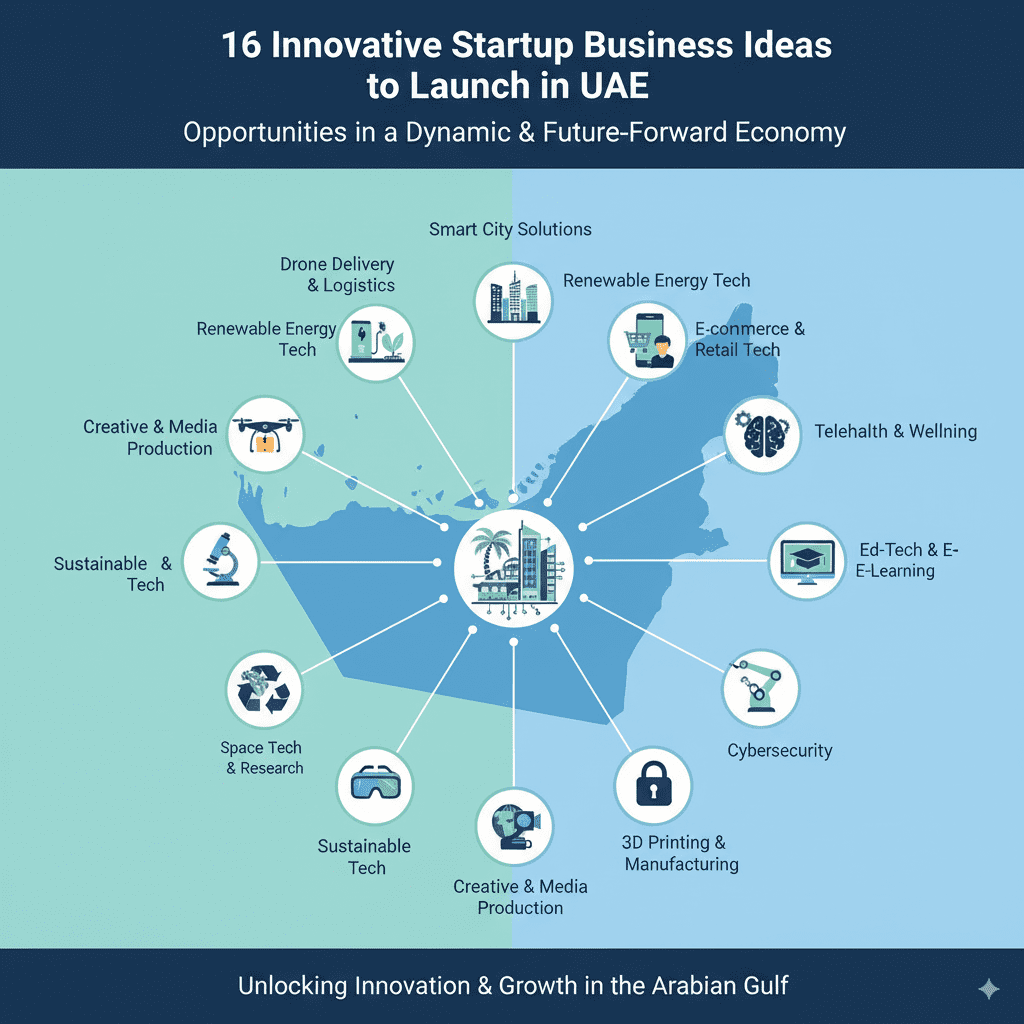
Introduction The United Arab Emirates (UAE) continues to cement its position as a global innovation hub, attracting entrepreneurs and investors keen on capitalizing on its strategic location, business-friendly policies, and rapidly evolving digital economy. With Expo 2020 and Vision 2030 initiatives accelerating economic diversification, the UAE presents fertile ground for startups across multiple sectors. This blog explores 16 innovative startup business ideas that are primed for success in the UAE’s vibrant market. These ideas span technology, healthcare, retail, and sustainable development, aligning with local market needs and global trends. For cutting-edge technological insights and startup strategies, explore TechOTD’s AI-driven services at TechOTD AI Solutions and their comprehensive technology blog. Top 16 Innovative Startup Ideas to Launch in UAE 1. AI-Powered Healthcare Solutions Leverage AI to develop telehealth platforms, predictive diagnostics, and personalized treatment plans. The UAE’s healthcare modernization opens significant opportunities. 2. Sustainable Technologies Create startups focused on renewable energy, waste management, and water conservation aligning with UAE’s sustainable development goals. 3. Fintech Innovations Disrupt banking with blockchain payments, AI-based credit scoring, and personalized financial management tools adapted to the region’s regulatory landscape. 4. E-commerce Marketplaces Develop niche or localized marketplaces offering curated products, integrating AI-driven recommendations and advanced logistics services. 5. Smart City Solutions Launch services that enable IoT-enabled public infrastructure management, traffic monitoring, and smart utilities in metro hubs like Dubai and Abu Dhabi. 6. Digital Education Platforms Create EdTech apps incorporating AR/VR, AI tutors, and personalized learning paths to meet growing demand from students and professionals. 7. FoodTech and Cloud Kitchens Innovate in food delivery with cloud kitchen models combined with AI-based demand forecasting and efficient order management. 8. Real Estate Tech Simplify property buying and rental with virtual tours, AI-driven pricing tools, and blockchain-powered transaction transparency. 9. Logistics and Supply Chain Tech Optimize last-mile delivery and warehouse management through AI analytics and automation tailored for the UAE market. 10. Cybersecurity Services Offer managed security services and AI-driven threat detection for businesses adopting cloud and digital technologies. 11. Renewable Energy Consulting Help companies and governments meet sustainability targets with specialized renewable energy system design and deployment. 12. Virtual and Augmented Reality Experiences Develop immersive VR/AR content for tourism, education, and retail sectors capturing UAE’s innovative spirit. 13. Personalized Fitness and Wellness Apps Capitalize on growing health consciousness by offering AI-personalized workout plans, nutrition tracking, and virtual coaching. 14. Green Finance Startups Provide sustainable investment platforms and green bonds focusing on environmentally responsible projects and businesses. 15. AI-Driven Customer Experience Solutions Design AI chatbots, sentiment analysis, and predictive service platforms for UAE businesses enhancing consumer engagement. 16. Blockchain-Based Supply Chain Transparency Develop blockchain applications to create tamper-proof records for industries like food, pharmaceuticals, and luxury goods. Discover Blockchain’s transformative potential here: How Blockchain Integration Is Optimizing Business Processes in Dubai. Why Startups Thrive in the UAE Access to a world-class digital infrastructure and smart city initiatives. Government support through funding, incubators, and regulatory frameworks. Strategic position bridging Asia, Europe, and Africa. Diverse multicultural population fostering innovation and market variety. Leveraging Technology and AI for Startup Growth Startups succeed faster by harnessing AI, data analytics, cloud services, and modern development frameworks. Partnering with technology providers such as TechOTD enables rapid prototyping, agile development, and market deployment. Explore more: TechOTD’s AI and Mobile App Services. Conclusion The UAE’s dynamic business ecosystem rewards innovation and agility. Entrepreneurs ready to launch startups in emerging technology and sustainable development sectors will find a supportive environment with immense growth potential. Evaluating market needs, leveraging cutting-edge technology, and aligning with national strategies like UAE Vision 2021 and Expo 2020 are keys to unlocking startup success. Get inspired and prepared by exploring TechOTD’s insights and services as you embark on your entrepreneurial journey. Visit TechOTD Blog for the latest trends and expert advice. FAQs Q1: What sectors show the most potential for startups in UAE? Healthcare, fintech, sustainable technologies, education tech, and smart city solutions. Q2: How important is government support for startups in UAE? Very important; numerous grants, accelerators, and regulatory support are available. Q3: Can AI help startups succeed faster? Yes, AI enables better market analysis, product personalization, and operational efficiency. Q4: What challenges do startups face in UAE? Market competition, cultural adaptation, and regulatory compliance are common challenges. Q5: How can TechOTD support startups? TechOTD offers AI-driven analytics, agile software development, and custom mobile app solutions tailored to your needs.

startup

How to Create a Mobile App Startup: Analyzing Strategies for Success

Introduction The mobile app industry continues to grow exponentially, offering unprecedented opportunities for entrepreneurs to launch startups that disrupt traditional markets and create new value. However, building a successful mobile app startup requires more than a great idea—it demands strategic planning, deep market understanding, agile development, and effective user acquisition tactics. This blog explores critical strategies for launching a profitable mobile app startup, drawing from industry best practices, real-world examples, and technology trends. For comprehensive guidance on app development technologies and market adoption, discover TechOTD’s AI-driven mobile solutions and browse their latest tech blog. Key Strategies for Creating a Successful Mobile App Startup 1. Conduct Thorough Market Research Identify target customer segments, pain points, and gaps in existing app offerings. Analyze competitors to differentiate your solution with unique value propositions. Validate your app idea using surveys, focus groups, or MVP testing. 2. Define a Clear Business Model Decide on revenue streams such as subscriptions, in-app purchases, advertising, or freemium features. Ensure your value delivery aligns with profitable monetization methods. 3. Focus on User Experience (UX) and Design Prioritize intuitive navigation, fast load times, and responsive design across devices. Use data-driven UX improvements and personalization powered by AI. Explore design best practices here: React Native vs Swift for App Development. 4. Build an MVP Quickly and Iterate Develop a minimum viable product (MVP) with essential features to launch early and gather user feedback. Use agile development cycles to refine functionality and fix bugs based on real data. 5. Assemble a Skilled Development & Marketing Team Hire or partner with experienced developers, UI/UX designers, and marketers who understand mobile platforms and customer acquisition. Collaborate with partners like TechOTD for expert technology consulting and development: TechOTD Mobile Apps Services. 6. Plan an Effective Marketing and User Acquisition Strategy Leverage digital marketing, influencer partnerships, app store optimization (ASO), and social campaigns. Focus on building a loyal user base with retention strategies like rewards or community features. 7. Leverage Analytics and AI for Growth Utilize predictive analytics and AI models to understand user behavior and personalize experiences. Continuously analyze engagement metrics to inform product and marketing decisions. Learn more about predictive analytics benefits: Predictive Analytics Software Development. 8. Ensure Scalability and Security Build on scalable cloud architectures to handle rapid growth. Implement stringent security protocols to protect user data and build trust. Challenges Commonly Faced by Mobile App Startups Intense market competition requiring continuous innovation. Balancing time-to-market with product quality. Retaining users in a highly saturated app ecosystem. Managing costs while sustaining growth and customer support. Real-Life Examples of Mobile App Startup Success Startups that focused on niche markets and personalized experiences tend to outperform broad-spectrum apps. Agile iteration based on user data accelerates product-market fit and scaling. Using AI to automate workflows and enhance user personalization is a proven growth accelerator. Conclusion Launching a successful mobile app startup involves a mix of strategic market understanding, targeted product development, savvy marketing, and data-driven optimizations. Partnering with technology experts and leveraging AI-powered solutions can shorten time to market and increase your chances of success. Begin your startup journey with trusted technology partners like TechOTD and stay updated with evolving best practices from their innovation-packed technology blog. FAQs Q1: What is an MVP and why is it important? A minimal viable product with key features enables quick market entry and user feedback collection. Q2: How do AI and analytics support startup growth? They personalize user experiences, optimize marketing, and predict trends to inform business decisions. Q3: How critical is user acquisition strategy? Effective user acquisition drives early traction, essential for startup sustainability. Q4: Should startups build native or cross-platform apps? It depends on budget and target audience; cross-platform reduces costs, native offers better performance. Q5: How to ensure app security from the start? Implement encryption, secure authentication, and comply with privacy regulations to protect users.

How would you like me to respond?

Select a personality for your AI assistant

Normal
Happy
Sad
Angry

Your selection will affect how the AI assistant responds to your messages

Chat Assistant

Let's discuss your project!

Hear from our clients and why 3000+ businesses trust TechOTD

Tell us what you need, and we'll get back with a cost and timeline estimate

Scroll to Top