DevOps

Cloud Computing and Technology, Digital Transformation

How Cloud-Native Technologies Are Accelerating Digital Transformation

How Cloud-Native Technologies Are Accelerating Digital Transformation Digital transformation is no longer just a strategic initiative—it has become a necessity for businesses that want to remain competitive in a rapidly evolving digital landscape. Organizations across industries are continuously seeking ways to improve efficiency, deliver better customer experiences, and adapt quickly to changing market demands. At the center of this transformation lies a powerful approach known as cloud-native technology. Cloud-native technologies are fundamentally changing how businesses develop, deploy, and manage applications. Unlike traditional IT infrastructures that often struggle with scalability and flexibility, cloud-native solutions are designed specifically for modern cloud environments. They allow organizations to innovate faster, respond to customer needs more effectively, and create digital experiences that drive business growth. As companies continue their digital transformation journeys, cloud-native technologies are becoming one of the most important enablers of innovation, agility, and long-term success. Understanding Cloud-Native Technologies Cloud-native technologies refer to a collection of practices, architectures, and tools that enable organizations to build and run applications optimized for cloud environments. Instead of relying on large, monolithic systems, cloud-native applications are built using smaller, independent components that can be developed, deployed, and updated separately. Key cloud-native principles include: Microservices architecture Containerization DevOps practices Continuous Integration and Continuous Deployment (CI/CD) Automation and orchestration Dynamic scalability Resilience and fault tolerance By leveraging these principles, organizations can create highly flexible systems capable of adapting to changing business requirements without disrupting operations. Why Digital Transformation Requires Cloud-Native Approaches Traditional technology infrastructures often create challenges for organizations attempting to modernize their operations. Legacy systems can be expensive to maintain, difficult to scale, and slow to adapt to new opportunities. Digital transformation demands speed, flexibility, and innovation. Businesses need technology environments that support rapid development cycles, seamless integration, and real-time responsiveness. Cloud-native technologies provide these capabilities by enabling organizations to move beyond the limitations of traditional infrastructure. Whether launching a new digital service, expanding into new markets, or improving customer experiences, cloud-native platforms allow businesses to respond faster and more efficiently. Faster Application Development and Deployment One of the most significant advantages of cloud-native technologies is the ability to accelerate software development and deployment. In traditional development environments, releasing new features or updates often requires extensive testing, infrastructure preparation, and lengthy deployment processes. This can delay innovation and reduce an organization’s ability to compete effectively. Cloud-native environments support automated development pipelines through CI/CD practices. Developers can write code, test applications, and deploy updates quickly and reliably. Automated workflows reduce manual effort while minimizing errors. As a result, businesses can: Deliver new features faster Respond quickly to market demands Improve product quality Reduce development bottlenecks Accelerate innovation cycles This speed enables organizations to maintain a competitive advantage in fast-moving industries. Enhanced Scalability for Growing Businesses Modern businesses often experience fluctuating workloads. Traffic spikes during promotional campaigns, seasonal events, or product launches can place enormous pressure on IT infrastructure. Cloud-native technologies address this challenge through dynamic scalability. Resources can automatically scale up or down based on demand, ensuring optimal performance without overprovisioning infrastructure. For example, an e-commerce platform experiencing a surge in online shoppers during a major sale can automatically allocate additional computing resources. Once demand decreases, resources can be scaled back to reduce costs. This flexibility provides several benefits: Improved application performance Better customer experiences Reduced infrastructure costs Efficient resource utilization Support for business growth Scalability becomes a strategic advantage rather than a technical challenge. Improved Business Agility In today’s business environment, agility is critical. Organizations must quickly adapt to changing customer expectations, market conditions, and technological advancements. Cloud-native architectures support agility by enabling independent development and deployment of services. Teams can update specific components without affecting the entire application. This modular approach allows businesses to: Experiment with new ideas faster Launch products more quickly Implement changes with minimal risk Respond rapidly to customer feedback Adapt to market opportunities Greater agility empowers organizations to innovate continuously rather than relying on lengthy development cycles. The Role of Microservices in Digital Transformation Microservices have become a cornerstone of cloud-native development. Instead of building a single large application, organizations divide applications into smaller, specialized services. Each service performs a specific function and operates independently. This architecture offers numerous advantages: Easier maintenance Faster development Better scalability Improved fault isolation Greater flexibility For example, an online banking application may have separate microservices for account management, payments, authentication, and customer support. Updates to one service can occur independently without impacting the others. This approach significantly enhances an organization’s ability to innovate and evolve digital services. Containerization Simplifies Modern Application Management Containers are another key component of cloud-native technology. Containerization packages applications along with their dependencies into lightweight, portable units that can run consistently across different environments. Benefits of containerization include: Faster deployment Consistent performance Improved portability Efficient resource usage Simplified infrastructure management Containers eliminate many of the compatibility issues that traditionally occur when moving applications between development, testing, and production environments. Popular orchestration platforms help organizations manage large numbers of containers efficiently, enabling reliable operation at scale. Strengthening DevOps Culture Digital transformation is not only about technology—it also involves organizational culture and processes. Cloud-native technologies strongly support DevOps practices by encouraging collaboration between development and operations teams. This collaborative approach improves communication, automation, and overall efficiency. Organizations adopting DevOps often experience: Faster release cycles Improved software quality Reduced operational costs Better incident response Higher customer satisfaction By integrating development and operational workflows, businesses can accelerate innovation while maintaining reliability and security. Enhancing Customer Experiences Customer expectations continue to rise in the digital era. Users demand fast, reliable, and personalized experiences across websites, mobile applications, and digital services. Cloud-native technologies help organizations meet these expectations by providing: Faster application performance Higher availability Improved reliability Real-time updates Personalized digital experiences Because cloud-native applications can be updated frequently without significant downtime, businesses can continuously improve user experiences based on customer feedback and analytics. Enhanced customer experiences often lead to greater engagement, loyalty, and revenue growth. Supporting Innovation Through Automation Automation is one of the most powerful drivers
Artificial Intelligence, Software development, Technology

How Generative AI Is Reshaping Software Development

How Generative AI Is Reshaping Software Development Software development has always evolved alongside technological innovation. From the early days of manual coding to the rise of integrated development environments (IDEs), cloud computing, and DevOps practices, every advancement has aimed to make building software faster, more efficient, and less error-prone. Today, another major transformation is underway, driven by Generative Artificial Intelligence (AI). Generative AI is no longer a futuristic concept limited to research labs or tech giants. It has become a practical tool that developers, businesses, and organizations are actively using to accelerate software creation, automate repetitive tasks, improve code quality, and streamline entire development lifecycles. What once required hours of manual effort can now be accomplished in minutes with the assistance of AI-powered tools. As businesses continue their digital transformation journeys, Generative AI is emerging as one of the most influential technologies reshaping how software is designed, developed, tested, and maintained. Understanding Generative AI in Software Development Generative AI refers to artificial intelligence systems capable of creating new content based on patterns learned from large datasets. While many people associate Generative AI with text, images, and videos, its impact on software development is equally significant. Modern AI coding assistants can understand natural language instructions and generate functional code snippets, entire functions, documentation, test cases, and even complete applications. Developers can describe what they want in plain English, and AI tools can suggest code that accomplishes the task. Rather than replacing developers, Generative AI acts as an intelligent collaborator that helps teams work faster and focus on higher-value problem-solving activities. Accelerating Code Generation One of the most visible impacts of Generative AI is its ability to generate code quickly. Developers often spend a significant portion of their time writing repetitive code structures, configuring frameworks, or implementing common functionalities. AI-powered coding assistants can automate these tasks by generating code suggestions in real time. For example, instead of manually creating API endpoints, authentication modules, or database queries, developers can provide a prompt and receive ready-to-use code within seconds. This dramatically reduces development time and allows teams to focus on innovation rather than repetitive implementation work. The result is increased productivity, shorter development cycles, and faster delivery of software products. Enhancing Developer Productivity Software engineers frequently switch between coding, researching solutions, reviewing documentation, and troubleshooting issues. These context switches can impact efficiency and slow progress. Generative AI helps reduce these interruptions by providing instant assistance directly within development environments. Developers can ask questions, request code explanations, generate examples, or seek alternative implementation approaches without leaving their workflow. This immediate access to information enables developers to spend more time building solutions and less time searching for answers. For junior developers, AI also serves as a valuable learning companion, helping them understand complex concepts and best practices while coding. Improving Code Quality and Consistency Maintaining code quality is essential for building reliable and scalable software applications. Poor coding practices can lead to technical debt, security vulnerabilities, and maintenance challenges. Generative AI contributes to better software quality by identifying potential issues, suggesting improvements, and promoting coding standards. AI tools can analyze existing codebases and recommend cleaner, more efficient implementations. Organizations can also use AI to enforce coding guidelines across development teams, ensuring consistency in naming conventions, architecture patterns, and documentation practices. By reducing human errors and encouraging best practices, AI helps create more maintainable and robust software systems. Revolutionizing Software Testing Testing remains one of the most time-consuming phases of software development. Writing test cases, identifying edge cases, and validating application behavior often require extensive effort. Generative AI is transforming this process by automatically generating test scenarios, unit tests, integration tests, and regression testing scripts. AI can analyze application logic and identify areas that require testing, reducing the likelihood of overlooked bugs. Furthermore, AI-powered testing tools can predict potential failure points and suggest additional test coverage based on historical data and code changes. This leads to faster testing cycles, improved software reliability, and reduced quality assurance costs. Simplifying Debugging and Error Resolution Debugging can consume countless hours, especially when dealing with large and complex applications. Generative AI helps developers identify the root causes of errors more efficiently. By analyzing logs, error messages, and source code, AI systems can suggest likely solutions and explain why issues are occurring. Instead of manually searching through documentation or forums, developers can receive contextual recommendations tailored to their specific problem. This capability significantly reduces troubleshooting time and accelerates software maintenance activities. Streamlining Documentation Creation Documentation is critical for software success, yet it is often neglected due to time constraints. Generative AI can automatically create technical documentation, API references, user guides, code comments, and onboarding materials. As developers write code, AI tools can generate accompanying explanations and documentation in real time. This ensures that projects remain well-documented throughout their lifecycle rather than requiring documentation efforts at the end of development. Better documentation improves collaboration, simplifies maintenance, and accelerates knowledge transfer within teams. Supporting Low-Code and No-Code Development Generative AI is also contributing to the growth of low-code and no-code development platforms. Business users who may not have extensive programming expertise can describe application requirements using natural language. AI-powered systems can then generate workflows, interfaces, databases, and business logic automatically. This democratization of software development enables organizations to build applications faster while reducing dependency on specialized development resources. Although professional developers remain essential for complex projects, Generative AI is making software creation more accessible than ever before. Strengthening DevOps and Deployment Processes Modern software development extends beyond writing code. Continuous integration, deployment, monitoring, and infrastructure management are equally important. Generative AI is helping DevOps teams automate configuration management, deployment scripts, infrastructure provisioning, and incident response workflows. AI can analyze deployment patterns, predict infrastructure requirements, and recommend optimizations for cloud environments. It can also identify anomalies before they become critical issues, improving system reliability and performance. By automating operational tasks, organizations can achieve faster releases and more resilient software systems. Enhancing Cybersecurity in Development Security has become a top priority as cyber threats continue

cybersecurity, DEVOPs

DevSecOps Best Practices

DevSecOps Best Practices: The Ultimate Blueprint for Secure, High-Velocity Software Delivery In the traditional software development lifecycle, security was often treated as the “final gate.” Developers would spend months building a product, operations would prepare the infrastructure, and just before launch, the security team would sweep in to perform a vulnerability audit. The result? A massive bottleneck. Security teams were viewed as the “Department of No,” pushing deadlines back by weeks or months to fix critical flaws discovered at the eleventh hour. In today’s hyper-accelerated digital landscape—where organizations deploy updates multiple times a day—this siloed approach is no longer sustainable. Enter DevSecOps. By embedding security directly into every stage of the continuous integration and continuous delivery (CI/CD) pipeline, DevSecOps ensures that software is not just fast, but inherently secure from the very first line of code. This comprehensive guide breaks down the core pillars, essential phases, actionable best practices, and real-world implementation strategies required to build a mature, human-centric DevSecOps culture. 1. Demystifying DevSecOps: Shift-Left and Shift-Right To successfully implement DevSecOps, it is critical to understand its two defining operational philosophies: Shifting Left and Shifting Right. [ Plan ] ──> [ Code ] ──> [ Build ] ──> [ Test ] ──> [ Deploy ] ──> [ Monitor ] │ │ │ │ │ │ └────────────┴────────────┴─────────────┴────────────┴───────────────┴──────── Security Focus Shifting Left: Proactive Security Shifting left means moving security practices earlier in the development lifecycle. Instead of waiting for a compiled build or a staged environment to run security scans, shift-left introduces security during the Planning, Coding, and Building phases. Why it matters: Fixing a software vulnerability during the design or coding phase can be up to 60 times cheaper than fixing it after it has been deployed to production. Core activities: Threat modeling, secure code reviews, IDE-integrated linting, and Static Application Security Testing (STAST). Shifting Right: Continuous Resilience While shifting left prevents bugs from reaching production, shifting right focuses on security during the Deployment, Operation, and Monitoring phases. It acknowledges that no system is entirely impenetrable and that runtime threats require continuous vigilance. Why it matters: Real-world exploits, zero-day vulnerabilities, and configuration drifts only happen in live environments. Shifting right ensures you spot and contain breaches instantly. Core activities: Runtime Application Self-Protection (RASP), penetration testing, chaos engineering, and continuous compliance monitoring. 2. The Cultural Pillar: Fostering a Shared-Responsibility Mindset The greatest misconception about DevSecOps is that it is purely a tooling problem. You can purchase the most expensive scanning software on the market, but if your organizational culture remains siloed, your DevSecOps initiative will fail. Breaking Down the Silos Historically, developers were incentivized purely by speed and functionality, while security teams were incentivized by risk mitigation. This created conflicting goals. DevSecOps requires a cultural alignment where security becomes a shared responsibility. Developers must accept ownership of the code’s security posture. Security Teams must transition from “gatekeepers” to “enablers,” providing the tools, automation, and guidance that developers need to work securely without losing velocity. Implementing a Security Champions Program A highly effective way to bridge the gap between engineering and security is by appointing Security Champions. What they are: Security Champions are regular software engineers, QA testers, or product managers who possess a keen interest in security. They remain embedded within their respective product teams. Their role: They act as the primary point of contact for security matters, help scale security knowledge across the engineering department, and ensure that security considerations are brought up during initial sprint planning sessions. 3. The DevSecOps Lifecycle: Step-by-Step Integration Integrating security into the CI/CD workflow requires tailored security gates at every single phase of the delivery pipeline. Let’s look at how to embed security seamlessly from planning to production. Phase 1: Plan (Threat Modeling & Risk Assessment) Security starts before a single line of code is written. During the planning phase, product teams map out features alongside potential attack vectors. Threat Modeling: Use frameworks like STRIDE (Spoofing, Tampering, Repudiation, Information Disclosure, Denial of Service, and Elevation of Privilege) to visually map out application architecture and discover architectural flaws early. Defining Security Requirements: Establish clear cryptographic standards, data classification rules, and compliance mandates (e.g., GDPR, HIPAA, PCI-DSS) during user story creation. Phase 2: Code (Secure Coding & IDE Assistance) When developers begin writing code, immediate feedback loops prevent vulnerable patterns from ever leaving their local workstations. Pre-Commit Hooks: Use lightweight scripts (like Git hooks) to prevent developers from accidentally committing sensitive data, such as plain-text API keys, AWS tokens, or private certificates, to version control. IDE Plugins: Equip developers with tools like SonarLint or Snyk extensions directly within VS Code or IntelliJ. These operate like spell-checkers for security, highlighting risky functions or outdated packages in real time. Phase 3: Build (Automated Code & Dependency Analysis) Once code is pushed to a shared repository, automated CI servers (like Jenkins, GitHub Actions, or GitLab CI) take over to build the application and trigger deeper security analyses. Static Application Security Testing (SAST): SAST tools analyze the source code or compiled binaries without executing the program. They look for classic vulnerabilities like SQL injection, Cross-Site Scripting (XSS), and buffer overflows. Software Composition Analysis (SCA): Modern applications are heavily built on open-source libraries. SCA tools scan your package.json, pom.xml, or requirements.txt files against databases of known public vulnerabilities (CVEs) to ensure you aren’t inheriting compromised third-party code. Phase 4: Test (Dynamic Evaluation & Testing) In the testing phase, the application is deployed into a staging or QA environment, allowing security tools to interact with it dynamically. Dynamic Application Security Testing (DAST): Unlike SAST, DAST tests the application from the outside-in by simulating a malicious hacker. It probes active endpoints, forms, and APIs to find vulnerabilities that only manifest when the application is running (e.g., authentication flaws or session management issues). Interactive Application Security Testing (IAST): IAST combines the benefits of both SAST and DAST. By deploying an agent within the application runtime, it monitors code execution while simultaneously running functional automated testing suites, yielding incredibly accurate results with fewer false positives.

DEVOPs, Software development

Infrastructure as Code (IaC) Guide

The Infrastructure as Code (IaC) Guide: Automating Your Cloud Ecosystem There is an old, painful way of managing IT infrastructure that many sysadmins still remember with a shudder. If you needed a new staging environment, you had to log into a cloud console, click dozens of buttons, configure virtual networks manually, spin up virtual machines, and manually run terminal commands to install packages. If you needed five identical environments for different engineering teams, you had to repeat that exact manual process five times. And inevitably, a human typo would slip in, causing a subtle, hidden variance between environments that took days of debugging to find. This nightmare is known as Configuration Drift. Infrastructure as Code (IaC) fundamentally changes the game. It is the practice of managing and provisioning your entire cloud infrastructure—servers, load balancers, databases, networks, and firewalls—using machine-readable definition files rather than manual interactive configuration tools. In short: You treat your hardware exactly like your software code. You write your infrastructure in descriptive configuration files, store them in Git version control, run automated testing against them, and deploy them through continuous delivery pipelines. Whether you are looking to migrate your first app to the cloud or scaling a multi-cloud enterprise architecture, this guide breaks down everything you need to master Infrastructure as Code. 1. Declarative vs. Imperative IaC: Choosing Your Approach When diving into the IaC landscape, you will immediately encounter two competing structural philosophies: Declarative and Imperative. Understanding the difference is crucial for designing a clean automation framework. +—————————————————————–+ | DECLARATIVE APPROACH (The Destination) | | “I want an environment with 3 web servers and 1 load balancer.” | | -> Tool figures out the steps automatically. | +—————————————————————–+ VS +—————————————————————–+ | IMPERATIVE APPROACH (The Journey) | | “Step 1: Create a VPC. Step 2: Spin up VM 1. Step 3: Run script.”| | -> Tool executes explicit, sequential commands. | +—————————————————————–+ The Declarative Approach (The Industry Standard) In a declarative model, you define the desired end-state of your infrastructure. You write a configuration file specifying exactly what assets you want to exist, and the IaC tool handles the rest. It calculates the current state of your cloud, compares it to your file, and automatically applies only the changes necessary to reach that target end-state. Analogy: Ordering a pizza. You tell the restaurant what toppings you want, and they deliver the final product. Primary Tools: Terraform, AWS CloudFormation, OpenToFu. The Imperative Approach In an imperative model, you define the explicit, sequential steps required to provision the infrastructure. You write scripts detailing exactly how to build the environment step-by-step. Analogy: Baking a pizza from scratch using a detailed, rigid recipe. If you mess up step three, the whole process breaks down. Primary Tools: Ansible, Chef, Puppet, or custom Bash/Python cloud-CLI scripts. For modern cloud provisioning, the Declarative approach has decisively won the industry standard because it is inherently idempotent—meaning you can run the exact same script a thousand times safely, and it will only modify infrastructure if the desired state deviates from reality. 2. Core Pillars of a Mature IaC Framework To implement Infrastructure as Code successfully, your architecture must rest upon four foundational DevOps pillars. 1. Immutability Over Mutation In a traditional Mutable Infrastructure model, servers are updated live in production. If a software patch is released, you log into the running machine and install it. Over time, your fleet becomes a collection of unique, snowflake servers, each configured slightly differently. IaC enables Immutable Infrastructure. You never update a live server. If an operating system patch or application update is required, you update your IaC script, destroy the old server instance entirely, and spin up a pristine, brand-new instance from the updated blueprint. This guarantees that your environments remain completely clean and identical at all times. 2. Idempotency An IaC pipeline must be idempotent. This means that executing your configuration code multiple times will yield the exact same result without unintended side effects. If your code declares that you need an Amazon S3 bucket named my-media-vault, running that script twice should verify the bucket exists on the second run, rather than throwing an error or creating a duplicate bucket. 3. Git as the Single Source of Truth (GitOps) Your infrastructure code should live inside your Git repositories right next to your application source code. Want to change a firewall rule? You don’t log into the cloud console. You open a Pull Request (PR) mutating the IaC file. Your peers review the infrastructure change line-by-line via code review. Once approved and merged, an automated CI/CD pipeline executes the change across your live environment. 4. State Management Declarative IaC tools maintain a crucial asset known as a State File. This file acts as a map, tracking the exact relationship between the configuration code you wrote and the actual real-world resources currently running inside your cloud provider (AWS, Azure, Google Cloud). Managing this state file securely in a centralized, encrypted remote storage vault (like an S3 bucket with state locking enabled) prevents multiple engineers from accidentally overwriting or executing conflicting infrastructure updates simultaneously. 3. The Modern IaC Toolchain The automation landscape is rich with specialized tools. High-performing teams typically combine a provisioning tool with a configuration management tool to manage the complete infrastructure lifecycle. [ Provisioning Layer: Terraform ] ──► Spins up physical Networks, Routers, & VMs. │ ▼ [ Configuration Layer: Ansible ] ──► Installs App dependencies, packages, & users. Provisioning Tools (Building the Skeleton) Terraform / OpenToFu: The dominant cloud-agnostic platform. It uses a declarative language called HCL (HashiCorp Configuration Language) to map out complex infrastructure across multiple cloud providers simultaneously. AWS CloudFormation / Azure ARM Templates: Native, proprietary provisioning engines built directly into specific cloud ecosystems. They work exceptionally well within their respective clouds but lock you into that single vendor. Pulumi: A modern alternative that allows you to write declarative infrastructure layouts using real software programming languages like TypeScript, Python, or Go, instead of custom configuration syntaxes. Configuration Management (Fleshing Out the Bones) Ansible: An open-source,

DEVOPs, Digital Transformation, Software development

Docker vs Kubernetes

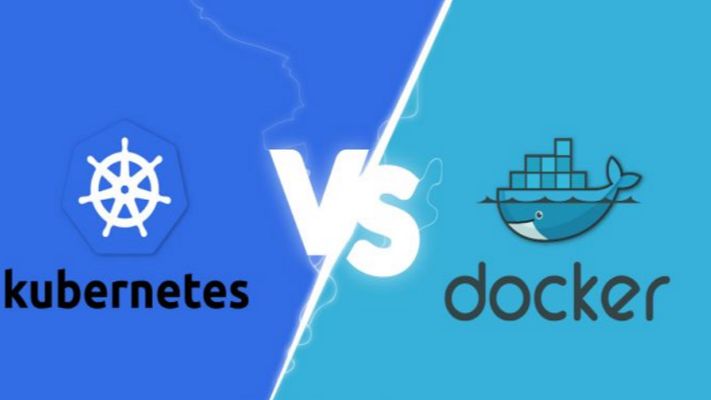
Docker vs Kubernetes: The Ultimate Guide to Containerization and Orchestration If you’ve spent any time around modern software development, you’ve undoubtedly heard the names Docker and Kubernetes thrown around—often in the exact same sentence. For newcomers and seasoned developers alike, this pairing creates an immediate cloud of confusion. You see debates online framed as a heavyweight boxing match: Docker vs. Kubernetes. Which one should you choose? Which one is better? But here is the industry secret that clears up the confusion right away: They are not rivals. Comparing Docker to Kubernetes is like comparing an individual engine to an entire commercial airline fleet. They operate at completely different layers of the software delivery stack. In fact, in the vast majority of enterprise enterprise-grade environments, they aren’t competing at all—they are working together on the exact same team. Whether you are looking to modernise your application architecture, scale your cloud infrastructure, or simply ace your next engineering interview, this comprehensive guide will break down the real differences, use cases, and mechanics of Docker and Kubernetes in a human, practical way. 1. The Core Concepts: Understanding Containers To understand the relationship between Docker and Kubernetes, we first have to understand the fundamental problem they were both built to solve: Environment Consistency. Every developer has experienced the dreaded “It works on my machine” dilemma. Code runs beautifully on a developer’s high-spec laptop but completely crashes when deployed to a staging server or production cloud environment. This happens because of micro-variations in operating systems, missing background libraries, conflicting framework versions, or hidden environment variables. What is a Container? A container solves this by packaging your application’s source code together with the exact runtime, system tools, libraries, and configurations it needs to execute. Unlike a traditional Virtual Machine (VM), which requires an entire heavy guest operating system to run, containers share the host machine’s underlying OS kernel. This makes them incredibly lightweight, lightning-fast to start (seconds instead of minutes), and highly resource-efficient. +—————————–+ +—————————–+ | VIRTUAL MACHINES | | CONTAINERS | | +———–+ +———–+ | | +———–+ +———–+ | | | App v1 | | App v2 | | | | App v1 | | App v2 | | | +———–+ +———–+ | | +———–+ +———–+ | | | Guest OS | | Guest OS | | | | Bin/Libs | | Bin/Libs | | | +———–+ +———–+ | | +———–+ +———–+ | | | Hypervisor/Host OS | | | | Container Engine (Docker) | | | +————————-+ | | +————————-+ | | | Physical Hardware | | | | Host OS / Hardware | | +—————————–+ +—————————–+ 2. What is Docker? (The Container Creator) Docker is an open-source platform designed to create, deploy, and run applications inside containers. It popularised the container revolution by making the underlying, complex Linux isolation technologies incredibly user-friendly. If you want to containerise an application using Docker, your workflow follows a clean three-step process: The Dockerfile: You write a plain-text configuration file that acts as a recipe. It specifies the base operating system, the dependencies to install, the environment variables to set, and the command to run your code. The Docker Image: Docker reads your Dockerfile and compiles it into an immutable, static blueprint called an Image. This image can be shared easily via registries like Docker Hub. The Docker Container: When you tell Docker to run that image, it spins up a live, isolated, executable instance. This is your running container. Where Docker Excels Docker is absolutely brilliant for single-node management. It gives an individual developer the power to spin up complex development environments—like a Node.js backend, a React frontend, and a PostgreSQL database—locally on their machine in a matter of seconds using a tool called Docker Compose. 3. What is Kubernetes? (The Fleet Commander) Now, let’s scale up. Imagine your business grows rapidly. Your simple application is no longer running as a single container on a laptop; it is now running across hundreds of cloud servers to handle millions of concurrent user requests. Suddenly, managing containers manually via Docker becomes a logistical nightmare: What happens if a server crashes in the middle of the night and kills fifty of your containers? How do you evenly distribute incoming web traffic across hundreds of duplicate containers? How do you upgrade your application to Version 2 without taking down the website? Docker alone cannot solve these problems because it only cares about managing individual containers on a single machine. It doesn’t see the bigger infrastructure picture. This is where Kubernetes (often abbreviated as K8s, representing the eight letters between ‘K’ and ‘s’) comes into play. Developed originally by Google, Kubernetes is a container orchestration engine. It doesn’t create containers; instead, it hooks into container runtimes to automate the deployment, scaling, management, and networking of containerized applications across a massive cluster of machines. [ Incoming Web Traffic ] │ ▼ ┌────────────────────────────────────────────────────────┐ │ KUBERNETES CONTROL PLANE │ │ (Monitors traffic, server health, and load balancing) │ └──────────┬───────────────────┬───────────────────┬─────┘ │ │ │ ▼ ▼ ▼ ┌───────────────┐ ┌───────────────┐ ┌───────────────┐ │ Cloud Node 1 │ │ Cloud Node 2 │ │ Cloud Node 3 │ │ [Docker] │ │ [Docker] │ │ [Docker] │ │ [Container] │ │ [Container] │ │ [Container] │ └───────────────┘ └───────────────┘ └───────────────┘ The Superpowers of Kubernetes Self-Healing: If a container crashes or a hardware node goes offline, Kubernetes instantly detects the failure and automatically spins up an identical replacement container to maintain your desired state. Auto-Scaling: If your web traffic suddenly spikes during a flash sale, Kubernetes can automatically scale up the number of running containers to handle the load, scaling them back down when traffic subsides to save cloud spend. Service Discovery & Load Balancing: Kubernetes automatically assigns containers their own IP addresses and groups them under a single DNS name, evenly distributing incoming traffic so no single server gets overwhelmed. 4. Key Differences: Side-by-Side Comparison To clearly draw the boundaries between these two tech giants, let’s look at how they handle core operational challenges side-by-side: Operational Feature Docker Kubernetes

Software development, Technology & Innovation

CI/CD Pipeline Best Practices

CI/CD Pipeline Best Practices: The Definitive Guide to Building Bulletproof Automation If you’ve ever hit the “deploy” button with your eyes closed, holding your breath and praying to the software gods that nothing breaks, you’re not alone. We’ve all been there. In the early days of development, moving code from a local machine to a live server was a high-stakes gamble. It involved chaotic manual file transfers, brittle scripts, and an overwhelming amount of guesswork. The introduction of Continuous Integration and Continuous Deployment (CI/CD) promised to fix all of that. It offered a world where every code change travels safely down a pristine, automated assembly line straight into production. But here’s the harsh reality: simply having a CI/CD pipeline isn’t enough. A poorly designed pipeline is worse than manual deployment. It acts as a force multiplier for bad habits, automatically pushing broken code, security vulnerabilities, and configuration errors to production at supersonic speeds. If your build times are stretching past 45 minutes, your automated tests are flaky, or your developers are constantly bypassing the system, your pipeline is a bottleneck, not an accelerator. To transform your delivery workflow into an enterprise-grade engine, you need to move past basic automation and embrace architectural excellence. This comprehensive guide breaks down the definitive CI/CD pipeline best practices to help your engineering team ship stable, secure code multiple times a day with absolute confidence. 1. The Blueprint of a World-Class CI/CD Pipeline Before diving into specific best practices, let’s map out what a mature, modern CI/CD architecture actually looks like. Think of your pipeline as a series of progressive quality gates. Code enters as raw, unverified text and emerges as a fully monitored, production-ready application container. [ DEVELOPER ] Pushes Code / Opens Pull Request │ ▼ ┌────────────────────────────────────────────────────────┐ │ 1. THE COMMIT GATE (Continuous Integration) │ │ • Code Linting & Static Analysis (SAST) │ │ • High-Speed Unit Testing │ │ • Dependency Vulnerability Scanning │ └───────────┬────────────────────────────────────────────┘ │ (Passes) ▼ ┌────────────────────────────────────────────────────────┐ │ 2. THE ARTIFACT GATE (Build & Package) │ │ • Deterministic Container Compilation (Docker) │ │ • Container Image Security Scanning │ │ • Push to Secure Immutable Image Registry │ └───────────┬────────────────────────────────────────────┘ │ (Passes) ▼ ┌────────────────────────────────────────────────────────┐ │ 3. THE VALIDATION GATE (Continuous Delivery) │ │ • Automated IaC Environment Provisioning │ │ • Integration & End-to-End User Testing │ │ • Performance & Load Profiling │ └───────────┬────────────────────────────────────────────┘ │ (Passes) ▼ ┌────────────────────────────────────────────────────────┐ │ 4. THE DEPLOYMENT GATE (Continuous Deployment) │ │ • Canary Release / Blue-Green Progression │ │ • Automated Drift Detection & Observability Rollback│ └────────────────────────────────────────────────────────┘ Every stage of this blueprint must be optimized for speed, clarity, and isolation. If a failure occurs at the Commit Gate, the pipeline should abort immediately, giving the developer instant feedback before expensive cloud infrastructure is spun up down the line. 2. Commit and Integration Practices (The CI Foundation) The foundational philosophy of Continuous Integration is simple: integrate early and integrate often. The longer code sits isolated on a developer’s branch, the more painful the eventual merger will be. Shift to Trunk-Based Development For years, long-lived feature branches and complex merging strategies (like traditional GitFlow) were the industry norm. However, these models inherently create massive integration bottlenecks. Developers work in isolation for weeks, resulting in epic code review sessions and devastating “merge conflicts” that derail entire release schedules. Modern high-performing teams utilize Trunk-Based Development. In this workflow: Developers commit their changes to a single, central branch (usually named main or trunk) frequently, often multiple times a day. Feature branches are short-lived, lasting no more than 24 to 48 hours. This constant integration ensures that the entire engineering team is always working on top of the latest single source of truth. If a code conflict occurs, it’s tiny and easily resolved in minutes, rather than days. Treat Build Failures as Production Outages A CI pipeline is completely useless if developers get into the habit of ignoring broken builds. If your pipeline notification channel is filled with red error marks that everyone ignores because “Oh, that test always fails on Fridays,” your automated safety net has collapsed. Adopt a strict team culture where fixing a broken build is the highest priority task. If a commit breaks the pipeline, all engineering focus shifts to either fixing the underlying issue immediately or reverting the breaking commit. A broken main branch stops the assembly line; keeping it pristine ensures that the path to production remains open for everyone at all times. Commit Once, Build Once A terrifyingly common anti-pattern is compiling code or rebuilding application binaries multiple times as they progress through different pipeline environments. For example, building a Docker image for staging, and then building an entirely separate Docker image from the same source code when moving to production. This completely invalidates your testing. How do you prove that a subtle dependency change or compiler variance didn’t slip into the production build that wasn’t present during staging validation? The rule is absolute: Build your binaries, packages, or container images exactly once early in the pipeline. Package that build as an immutable asset, tag it with a unique cryptographic identifier (like a Git commit SHA), and store it in an artifact repository. That exact identical asset must be promoted through staging, pre-production, and production without ever being recompiled. 3. Optimizing for Speed: The 10-Minute Rule Speed is the lifeblood of software delivery automation. If a developer has to wait an hour to see if their code change passed automated validation, they will switch context. They’ll grab coffee, check social media, or start writing entirely new features. By the time the pipeline notifies them of an error, they’ve lost their train of thought, and fixing the bug takes twice as long. The gold standard for engineering organizations is the 10-Minute Rule: Your commit pipeline (from pushing code to receiving an integration pass/fail notification) should take less than ten minutes. Here is how you engineer a lightning-fast pipeline: Parallelize Test Execution Don’t run your test suites sequentially on a single runner

App Development, DEVOPs, Software development

DevOps Automation Explained

DevOps Automation Explained: The Ultimate Guide to Accelerating Software Delivery In the fast-paced world of modern software development, speed, agility, and reliability are no longer optional—they are critical to survival. If your team is still manually deploying code, configuring servers by hand, or running test scripts line by line, you are falling behind. Enter DevOps Automation. It’s the engine that powers high-performing engineering teams, transforming chaotic, siloed workflows into streamlined, automated delivery pipelines. But automation isn’t just about replacing human effort with scripts; it’s about shifting culture, breaking down traditional silos between developers and operations, and building a resilient ecosystem where software can be built, tested, and shipped at scale with minimal friction. Whether you are an engineering lead looking to scale your infrastructure, a developer tired of dealing with “it works on my machine” bugs, or a business leader aiming to outpace the competition, this comprehensive guide will break down everything you need to know about DevOps automation. 1. What is DevOps Automation? (Beyond the Buzzwords) To truly understand DevOps automation, we first need to strip away the marketing jargon. At its core, DevOps is a cultural and technical philosophy aimed at unifying software development (Dev) and IT operations (Ops). Historically, these two teams operated in complete isolation: Developers were incentivized to move fast, ship new features, and push boundaries. Operations teams were incentivized to maintain system stability, minimize downtime, and resist risky changes. This inherent tension created a massive bottleneck. Code would sit waiting for manual security reviews, server setups took weeks, and deployments were high-stress, late-night events prone to human error. +———————————–+ | Traditional Siloed Model | | [Dev Team] ——> [Ops Team] | | (Move Fast) Wall (Maintain) | | of Chaos | +———————————–+ VS +———————————–+ | DevOps Loop Model | | (Plan -> Build -> Test -> | | Deploy -> Monitor -> Feedback) | | Continuous & Automated | +———————————–+ DevOps automation is the practice of injecting technology across this entire lifecycle to automate repetitive, manual tasks. It bridges the gap between these teams, allowing software to flow from a developer’s laptop to production seamlessly, safely, and predictably. Why Automation is the Heart of DevOps Without automation, DevOps is just a nice idea. You can tell your teams to collaborate more, but if their tools and processes don’t support that collaboration, they will default to old habits. Automation provides the shared framework—the “single source of truth”—that allows both development and operations to achieve their goals simultaneously: speed and stability. 2. The Core Pillars of a DevOps Automation Framework A mature DevOps automation strategy isn’t built overnight. It spans across several distinct but interconnected phases, often referred to as the continuous delivery pipeline. Let’s break down these essential pillars. Continuous Integration (CI) Continuous Integration is the practice of automating the integration of code changes from multiple contributors into a single software project. Instead of developers working in isolation on massive feature branches for weeks, they merge their code back into a central repository (like GitHub or GitLab) frequently—often multiple times a day. Every time code is pushed, an automated CI server takes over. It automatically triggers: Code Compilation: Building the application to ensure there are no syntax or structural compilation errors. Automated Testing: Running unit tests and code linters to verify that the new changes don’t break existing functionality or violate code quality standards. By catching bugs early in the development cycle, CI prevents the dreaded “integration hell” that happens when teams try to merge massive amounts of conflicting code right before a major release. Continuous Delivery (CD) & Continuous Deployment While CI handles getting code into a stable, buildable state, Continuous Delivery and Continuous Deployment (often collectively called CD) handle getting that code into production. Continuous Delivery: In a CD workflow, every successful code change that passes the CI pipeline is automatically built and packaged. It is then automatically deployed to a staging or testing environment. However, the final push to the live production environment requires a manual human trigger (e.g., clicking a “Deploy” button). Continuous Deployment: This takes automation a step further. There is no manual intervention. If a code change passes every single automated test in the pipeline, it is automatically deployed directly to production. [ Code Change ] │ ▼ ┌────────────────────────┐ │ Continuous Integration │ -> Code Merged, Built, & Unit Tested └──────────┬─────────────┘ │ (Passes) ▼ ┌────────────────────────┐ │ Continuous Delivery │ -> Staging Deployment & Advanced Testing └──────────┬─────────────┘ │ ├─► (Manual Approval) ──► [ Production ] (Continuous Delivery) │ └─► (Automated Push) ──► [ Production ] (Continuous Deployment) Infrastructure as Code (IaC) Traditionally, provisioning servers, configuring networks, and setting up databases required operations teams to manually click through cloud consoles or run terminal commands on individual machines. This approach is slow, unscalable, and heavily prone to configuration drift (where environments that are supposed to be identical slowly become different over time). Infrastructure as Code solves this by treating your infrastructure exactly like software code. You define your servers, storage, networks, and configurations in descriptive configuration files (using formats like YAML or JSON). These files are stored in version control alongside your application code. When you need to spin up a new environment, an IaC tool reads the configuration and provisions the exact infrastructure automatically. This guarantees that your development, staging, and production environments are identical replicas, eliminating environment-specific bugs entirely. Continuous Monitoring and Logging Automation doesn’t stop once code is live in production. In fact, that’s where some of the most critical automation begins. Automated monitoring and logging tools constantly track the health, performance, and security of your applications and infrastructure in real-time. Instead of waiting for users to tweet about a crash or submit a support ticket, automated monitoring systems use predictive alerts to notify engineering teams the moment performance begins to degrade—such as spikes in CPU usage, memory leaks, or an unusual rise in 500 error codes. Advanced monitoring systems can even trigger automated remediation scripts, like spinning up additional cloud servers to handle unexpected traffic spikes or

DevOps and CI/CD pipeline in software development.
Software development

DevOps and CI/CD in Software Development: Accelerating Delivery and Quality

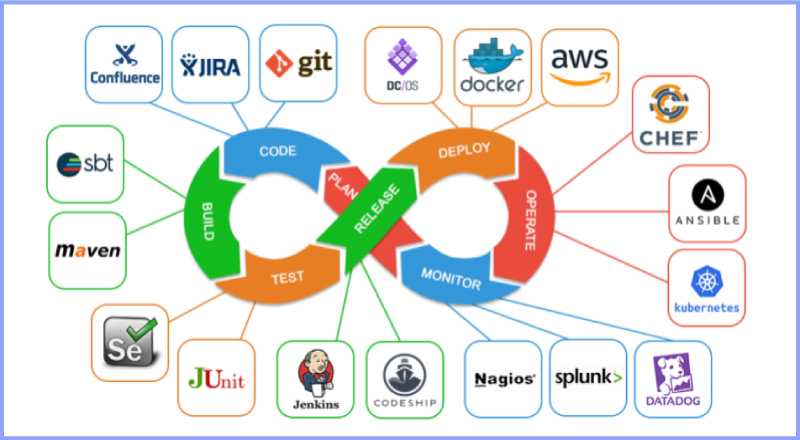
Introduction Modern software development demands speed, reliability, and continuous improvement. Traditional development approaches often struggled with slow releases, manual deployments, and communication gaps between development and operations teams. To overcome these challenges, organizations adopted DevOps and Continuous Integration/Continuous Deployment (CI/CD) practices. DevOps and CI/CD aim to automate workflows, improve collaboration, and deliver high-quality software faster. Together, they form the backbone of modern software engineering and cloud-native development. In this blog, we will explore DevOps and CI/CD, understand their importance, key concepts, tools, benefits, and how they transform software development. What Is DevOps? DevOps is a cultural and technical approach that integrates software development (Dev) and IT operations (Ops). It focuses on collaboration, automation, and continuous feedback. Core Principles of DevOps Collaboration between teams Automation of workflows Continuous monitoring and feedback Rapid delivery DevOps breaks down silos and improves efficiency across the development lifecycle. What Is CI/CD? CI/CD stands for Continuous Integration and Continuous Deployment (or Delivery). Continuous Integration (CI) CI involves frequently merging code changes into a shared repository and automatically testing them. Continuous Deployment (CD) CD automates the release of tested code into production. Together, CI/CD ensures faster and safer software releases. DevOps Lifecycle The DevOps lifecycle consists of several stages: Planning Development Integration Testing Deployment Monitoring Each stage is automated and continuously improved. Benefits of DevOps and CI/CD 1. Faster Time to Market Automation reduces manual work and accelerates releases. 2. Improved Software Quality Continuous testing detects issues early. 3. Enhanced Collaboration DevOps fosters teamwork across departments. 4. Reliable Deployments Automated pipelines reduce human errors. Popular DevOps and CI/CD Tools Version Control Git GitHub GitLab CI/CD Tools Jenkins GitHub Actions GitLab CI/CD Containerization Docker Kubernetes Monitoring Prometheus Grafana DevOps and Agile Relationship DevOps complements Agile by extending continuous delivery beyond development into operations. Together, they enable faster feedback loops and continuous improvement. Security in DevOps (DevSecOps) DevSecOps integrates security into the DevOps pipeline. Automated security testing ensures vulnerabilities are identified early. Challenges in Implementing DevOps Cultural resistance Tool complexity Skill gaps Overcoming these challenges requires training, leadership support, and gradual adoption. Future of DevOps DevOps continues to evolve with AI-driven automation, cloud-native technologies, and serverless computing. Conclusion DevOps and CI/CD are essential for modern software development. By automating workflows, improving collaboration, and enabling continuous delivery, organizations can build reliable and scalable applications faster than ever. Frequently Asked Questions (FAQs) 1. What is DevOps in simple terms? DevOps is a practice that improves collaboration between development and operations teams. 2. What is the difference between CI and CD? CI focuses on code integration, while CD focuses on deployment. 3. Is DevOps only for large companies? No, DevOps benefits organizations of all sizes. 4. Can DevOps be used without CI/CD? CI/CD is a core component of DevOps. 5. What skills are needed for DevOps? Automation, cloud computing, and scripting skills. 6. Is DevOps a tool or a methodology? DevOps is a culture supported by tools and practices. Connect with us: https://www.facebook.com/profile.php?id=61555452386126

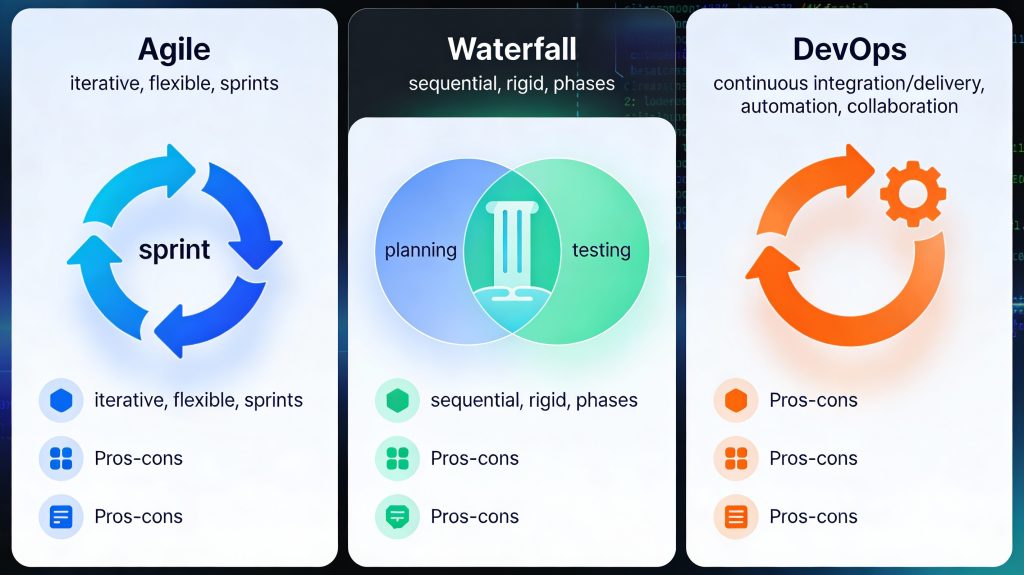
Agile vs Waterfall vs DevOps software development methodologies
Software development

Agile vs Waterfall vs DevOps: Choosing the Right Software Development Methodology

Introduction Choosing the right software development methodology is one of the most important decisions for any development project. The methodology you select determines how your team plans, builds, tests, and delivers software. Among the many approaches available today, Agile, Waterfall, and DevOps are the most widely used and debated. Each methodology has its strengths, weaknesses, and ideal use cases. While some teams prefer the structure of Waterfall, others thrive on the flexibility of Agile or the speed of DevOps. Understanding these models helps organizations align their development strategy with business goals. In this blog, we will compare Agile vs Waterfall vs DevOps, explore how each model works, and help you choose the right approach for your software development needs. What Are Software Development Methodologies? Software development methodologies are structured frameworks that define how software projects are planned, executed, and delivered. They provide guidelines for collaboration, workflow, documentation, and quality assurance. The right methodology improves efficiency, reduces risk, and ensures consistent delivery of high-quality software. Waterfall Methodology Overview The Waterfall model is one of the earliest software development methodologies. It follows a linear and sequential approach, where each phase must be completed before moving to the next. Phases of Waterfall Requirement analysis System design Development Testing Deployment Maintenance Advantages of Waterfall Clear structure and documentation Easy to manage and understand Ideal for projects with fixed requirements Disadvantages of Waterfall Limited flexibility Changes are costly Late testing increases risk Best Use Cases Government projects Regulatory-compliant systems Projects with well-defined requirements Agile Software Development Overview Agile is an iterative and incremental approach focused on flexibility, collaboration, and customer feedback. Instead of delivering the entire product at once, Agile teams work in short cycles called iterations or sprints. Key Principles of Agile Customer collaboration over contracts Responding to change over following a plan Continuous delivery of working software Popular Agile Frameworks Scrum Kanban Extreme Programming (XP) Advantages of Agile Faster delivery High adaptability to change Continuous user feedback Improved team collaboration Disadvantages of Agile Less predictability Requires experienced teams Documentation may be limited Best Use Cases Startups Mobile and web applications Projects with evolving requirements DevOps Methodology Overview DevOps is a cultural and technical approach that combines development and operations to improve collaboration, automation, and deployment speed. It focuses on continuous integration, continuous delivery, and continuous monitoring. Key DevOps Practices CI/CD pipelines Infrastructure as code Automated testing Continuous monitoring Advantages of DevOps Faster release cycles Improved software quality Better system reliability Reduced deployment failures Disadvantages of DevOps Requires cultural change Initial setup complexity Tooling and automation costs Best Use Cases Large-scale systems Cloud-native applications High-availability platforms Agile vs Waterfall vs DevOps: Key Differences Feature Waterfall Agile DevOps Flexibility Low High Very High Delivery One-time Incremental Continuous Customer Feedback Late Continuous Continuous Automation Minimal Moderate Extensive Speed Slow Fast Very Fast How to Choose the Right Methodology Consider the following factors: 1. Project Requirements Stable requirements favor Waterfall, while changing requirements favor Agile or DevOps. 2. Team Experience Agile and DevOps require skilled, self-managed teams. 3. Time-to-Market DevOps and Agile enable faster releases. 4. Compliance and Documentation Waterfall suits heavily regulated industries. Modern Hybrid Approaches Many organizations adopt hybrid models, such as Agile-DevOps or Waterfall-Agile hybrids, to balance structure and flexibility. These approaches leverage the strengths of multiple methodologies. Conclusion There is no one-size-fits-all software development methodology. Waterfall offers structure, Agile provides flexibility, and DevOps delivers speed and automation. The right choice depends on your project goals, team capabilities, and business needs. By understanding Agile, Waterfall, and DevOps, organizations can build software that is reliable, scalable, and aligned with modern development demands. Frequently Asked Questions (FAQs) 1. Which software development methodology is best? The best methodology depends on project requirements, team experience, and delivery timelines. 2. Is Agile better than Waterfall? Agile is better for flexible projects, while Waterfall works well for fixed-scope projects. 3. Can Agile and DevOps be used together? Yes, Agile and DevOps complement each other and are commonly used together. 4. Is DevOps only for large companies? No, DevOps can benefit organizations of all sizes. 5. Does Waterfall still exist today? Yes, Waterfall is still used in regulated and documentation-heavy industries. 6. Can one project use multiple methodologies? Yes, hybrid approaches are common in modern software development. Connect With Us: https://www.facebook.com/profile.php?id=61555452386126

Software development lifecycle phases from planning to maintenance
Uncategorized

Software Development Lifecycle (SDLC): A Step-by-Step Guide to Building Reliable Software

Introduction Building high-quality software requires more than just writing code. Successful applications are the result of a structured and disciplined approach that ensures efficiency, reliability, and scalability. This structured approach is known as the Software Development Lifecycle (SDLC). The SDLC defines a series of phases that guide software teams from the initial idea to final deployment and ongoing maintenance. By following a well-defined lifecycle, organizations can reduce risks, control costs, improve quality, and deliver software that meets user expectations. In this blog, we will explore the software development lifecycle in detail, understand each phase, examine popular SDLC models, and learn why SDLC is essential for modern software development. What Is the Software Development Lifecycle (SDLC)? The Software Development Lifecycle is a systematic process used to develop software applications. It outlines the steps required to design, build, test, deploy, and maintain software efficiently. The main goals of SDLC are to: Deliver high-quality software Meet customer requirements Reduce project risks Ensure predictable timelines and budgets SDLC provides a clear roadmap for developers, designers, testers, and stakeholders. Why Is SDLC Important? Following the SDLC helps organizations: Improve project planning and management Detect issues early in development Enhance communication among teams Deliver consistent and reliable software Without a structured lifecycle, projects are more likely to face delays, budget overruns, and quality issues. Phases of the Software Development Lifecycle The SDLC typically consists of six to seven key phases. 1. Requirement Analysis This is the foundation of the entire development process. Key Activities Gathering business requirements Understanding user needs Defining functional and non-functional requirements Documenting requirements Clear and accurate requirements prevent costly changes later in the project. 2. Planning In the planning phase, teams define how the project will be executed. Key Activities Estimating timelines and costs Allocating resources Defining milestones and deliverables Risk assessment Effective planning ensures smooth project execution. 3. System Design The design phase focuses on how the software will work. Types of Design High-Level Design (HLD): Overall architecture and system components Low-Level Design (LLD): Detailed logic, data structures, and workflows This phase translates requirements into a technical blueprint. 4. Development (Implementation) This is where actual coding takes place. Key Activities Writing source code Code reviews Integrating components Developers follow coding standards and best practices to ensure maintainability and performance. 5. Testing Testing ensures the software works as intended. Types of Testing Unit testing Integration testing System testing User acceptance testing (UAT) Testing identifies bugs, security vulnerabilities, and performance issues before release. 6. Deployment In this phase, the software is released to users. Deployment Methods Manual deployment Continuous integration and continuous deployment (CI/CD) Proper deployment strategies minimize downtime and risks. 7. Maintenance and Support After deployment, the software enters the maintenance phase. Key Activities Bug fixes Performance optimization Feature enhancements Security updates Maintenance ensures long-term software reliability. Popular SDLC Models Different projects use different SDLC models based on requirements. 1. Waterfall Model A linear and sequential approach suitable for projects with fixed requirements. 2. Agile Model An iterative approach that emphasizes flexibility, collaboration, and continuous delivery. 3. Scrum A popular Agile framework using short development cycles called sprints. 4. DevOps Model Combines development and operations to enable faster and more reliable releases. Choosing the Right SDLC Model The right SDLC model depends on: Project size and complexity Requirement stability Team structure Timeline and budget Choosing the correct model improves project outcomes. SDLC in Modern Software Development Modern development practices often blend SDLC with Agile and DevOps principles. Automation, cloud platforms, and continuous testing have transformed traditional lifecycle models into more flexible and efficient processes. Conclusion The Software Development Lifecycle is a critical framework that ensures software projects are delivered successfully. By understanding and following SDLC phases, organizations can build reliable, scalable, and secure applications. Whether you are developing a small application or a large enterprise system, SDLC provides the structure needed to achieve consistent results. Frequently Asked Questions (FAQs) 1. What is SDLC in software development? SDLC is a structured process that defines the stages involved in building, deploying, and maintaining software. 2. How many phases are in the SDLC? Typically, SDLC consists of six to seven phases, including requirements, design, development, testing, deployment, and maintenance. 3. Which SDLC model is best? There is no single best model. Agile is best for flexible projects, while Waterfall suits projects with fixed requirements. 4. Why is testing important in SDLC? Testing ensures software quality, reliability, and security before release. 5. Can SDLC be combined with Agile? Yes, modern development often integrates SDLC principles with Agile and DevOps practices. 6. Does SDLC apply to all software projects? Yes, SDLC can be adapted to projects of all sizes and complexities. Contact with us: https://www.facebook.com/profile.php?id=61555452386126

How would you like me to respond?

Select a personality for your AI assistant

Normal
Happy
Sad
Angry

Your selection will affect how the AI assistant responds to your messages

Chat Assistant

Let's discuss your project!

Hear from our clients and why 3000+ businesses trust TechOTD

Tell us what you need, and we'll get back with a cost and timeline estimate

Scroll to Top