CI/CD

DevOps and CI/CD pipeline in software development.
Software development

DevOps and CI/CD in Software Development: Accelerating Delivery and Quality

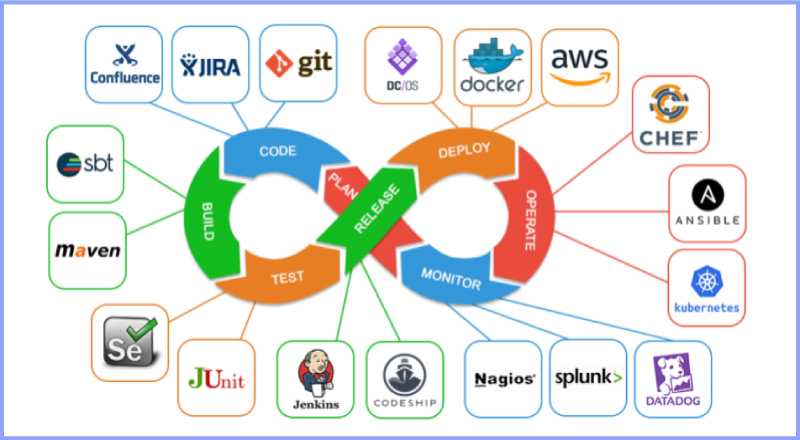
Introduction Modern software development demands speed, reliability, and continuous improvement. Traditional development approaches often struggled with slow releases, manual deployments, and communication gaps between development and operations teams. To overcome these challenges, organizations adopted DevOps and Continuous Integration/Continuous Deployment (CI/CD) practices. DevOps and CI/CD aim to automate workflows, improve collaboration, and deliver high-quality software faster. Together, they form the backbone of modern software engineering and cloud-native development. In this blog, we will explore DevOps and CI/CD, understand their importance, key concepts, tools, benefits, and how they transform software development. What Is DevOps? DevOps is a cultural and technical approach that integrates software development (Dev) and IT operations (Ops). It focuses on collaboration, automation, and continuous feedback. Core Principles of DevOps Collaboration between teams Automation of workflows Continuous monitoring and feedback Rapid delivery DevOps breaks down silos and improves efficiency across the development lifecycle. What Is CI/CD? CI/CD stands for Continuous Integration and Continuous Deployment (or Delivery). Continuous Integration (CI) CI involves frequently merging code changes into a shared repository and automatically testing them. Continuous Deployment (CD) CD automates the release of tested code into production. Together, CI/CD ensures faster and safer software releases. DevOps Lifecycle The DevOps lifecycle consists of several stages: Planning Development Integration Testing Deployment Monitoring Each stage is automated and continuously improved. Benefits of DevOps and CI/CD 1. Faster Time to Market Automation reduces manual work and accelerates releases. 2. Improved Software Quality Continuous testing detects issues early. 3. Enhanced Collaboration DevOps fosters teamwork across departments. 4. Reliable Deployments Automated pipelines reduce human errors. Popular DevOps and CI/CD Tools Version Control Git GitHub GitLab CI/CD Tools Jenkins GitHub Actions GitLab CI/CD Containerization Docker Kubernetes Monitoring Prometheus Grafana DevOps and Agile Relationship DevOps complements Agile by extending continuous delivery beyond development into operations. Together, they enable faster feedback loops and continuous improvement. Security in DevOps (DevSecOps) DevSecOps integrates security into the DevOps pipeline. Automated security testing ensures vulnerabilities are identified early. Challenges in Implementing DevOps Cultural resistance Tool complexity Skill gaps Overcoming these challenges requires training, leadership support, and gradual adoption. Future of DevOps DevOps continues to evolve with AI-driven automation, cloud-native technologies, and serverless computing. Conclusion DevOps and CI/CD are essential for modern software development. By automating workflows, improving collaboration, and enabling continuous delivery, organizations can build reliable and scalable applications faster than ever. Frequently Asked Questions (FAQs) 1. What is DevOps in simple terms? DevOps is a practice that improves collaboration between development and operations teams. 2. What is the difference between CI and CD? CI focuses on code integration, while CD focuses on deployment. 3. Is DevOps only for large companies? No, DevOps benefits organizations of all sizes. 4. Can DevOps be used without CI/CD? CI/CD is a core component of DevOps. 5. What skills are needed for DevOps? Automation, cloud computing, and scripting skills. 6. Is DevOps a tool or a methodology? DevOps is a culture supported by tools and practices. Connect with us: https://www.facebook.com/profile.php?id=61555452386126

Futuristic business-themed illustration showing interconnected DevOps icons, cloud symbols, and automation gears around a central laptop dashboard, with the title text 'How to Choose the Right DevOps Automation Tools for Your Business' displayed prominently on a clean, dark-blue 16:9 background
DEVOPs

Choosing the Right DevOps Tools

Introduction Selecting the right DevOps automation tools can make or break your organization’s digital transformation journey. With the proliferation of options, each designed for specific use cases—ranging from cloud management to deployment pipelines and monitoring—choosing tools that align with your business size, infrastructure, and goals is crucial. The right choices help businesses accelerate delivery, drive efficiency, and scale operations without losing reliability or security. Below is a practical guide to identifying, evaluating, and implementing the best-fit DevOps automation tools for your company.​ Top 10 Graphic Design Tools Every Designer Should Master in 2025 Key Considerations When Choosing DevOps Automation Tools Define your business goals and DevOps maturity level. Assess the current tech stack: Identify cloud providers, operating systems, and existing DevOps practices. List the core areas to automate (e.g., CI/CD, infrastructure, monitoring, configuration management). Evaluate integration requirements: Prefer tools that work seamlessly with your other platforms and workflows. Prioritize scalability: Opt for solutions that grow with your team and adapt to multi-cloud or hybrid environments. Check ease of use and learning curve to shorten onboarding for new team members. Consider total cost of ownership: Factor in licensing, support, customization, and training. Analyze vendor support, community backing, and regular updates for long-term dependability.​ Benefits and Examples of Essential DevOps Automation Tools DevOps automation tools streamline every stage of software delivery, offering benefits such as: Faster time to market and frequent, reliable deployments. Reduced errors and increased consistency through automation. Greater team collaboration via real-time feedback and centralized dashboards. Scalability across cloud and hybrid infrastructures, supporting rapid business growth. Lower operational costs and simplified resource management. Common tool categories and top options include: CI/CD Automation: Jenkins, GitHub Actions, CircleCI, GitLab CI/CD. Infrastructure as Code: Terraform, Ansible, AWS CloudFormation, Pulumi. Monitoring and Alerting: Prometheus, Grafana, Datadog, Dynatrace. Containerization & Orchestration: Docker, Kubernetes, Portainer. Collaboration & Visibility: Slack, Jira, Confluence, Bamboo.​ Conclusion Choosing the right DevOps automation tools is about more than simply following trends—it requires a thoughtful alignment between your business needs, technical environment, budget, and long-term strategy. Prioritize tools that promote automation, collaboration, and flexibility to maximize efficiency and keep your organization agile in the face of rapid change. Start by auditing your current workflows and invest in scalable, well-supported solutions that future-proof your DevOps pipeline.​ Ready to elevate your DevOps practice? Review your goals, map your tool requirements, and start your automation journey today!   FAQ Q1: What is the first step in choosing a DevOps automation tool? A1: Begin by defining your business objectives and understanding your team’s current capabilities and processes.​ Q2: Why is integration important in DevOps tool selection? A2: Integration minimizes context-switching and workflow disruptions, resulting in smoother and more efficient operations.​ Q3: Are open-source tools better than commercial ones? A3: It depends on your support needs, budget, and control preferences—open-source tools offer flexibility, while commercial tools may provide stronger support and easier adoption.​ Q4: How do DevOps automation tools reduce operational costs? A4: By automating repetitive tasks and optimizing resource use, these tools help organizations save time and minimize manual errors.​ Q5: What features are essential in a DevOps automation tool? A5: Look for scalability, integration options, security, ease of use, automation capabilities, and strong community or vendor support

DevOps workflows for faster and reliable delivery
DEVOPs

The Importance of Automation in DevOps Workflows: Boosting Efficiency and Reliability

Introduction In the fast-paced world of software development, automation is the engine that powers DevOps. It’s the secret ingredient that allows teams to move quickly, deliver consistently, and maintain reliability across the entire software lifecycle. Without automation, DevOps would be incomplete — manual interventions would slow processes and introduce human errors. From code integration to testing, deployment, and monitoring, automation ensures that every stage of development runs smoothly and predictably. What is DevOps Automation? DevOps automation refers to the use of technology and tools to perform repetitive, time-consuming tasks without manual intervention. The goal is to increase efficiency, consistency, and reliability in the software development and deployment process. Automation enables teams to focus on innovation and problem-solving instead of manual operations, while also ensuring that software updates are delivered faster and with higher quality. Why Automation Matters in DevOps 1. Faster Software Delivery Manual processes slow down the delivery pipeline. Automation eliminates delays by executing build, test, and deployment tasks continuously and without human intervention. 2. Fewer Human Errors Even experienced developers can make mistakes during manual deployments. Automation reduces this risk by applying consistent, repeatable scripts and configurations. 3. Better Collaboration Between Teams Automation bridges the gap between development and operations. When tasks are automated, developers and IT teams can work in harmony — leading to smoother deployments and fewer misunderstandings. 4. Improved Scalability Automation allows organizations to handle multiple deployments simultaneously. Whether it’s deploying across multiple regions or environments, automation makes scaling easy and error-free. 5. Consistent Results Automated workflows ensure that every build and deployment follows the same process, producing predictable outcomes every time. Key Areas of Automation in DevOps Continuous Integration and Continuous Delivery (CI/CD) CI/CD pipelines automate the process of integrating code, testing, and deploying it to production. Tools like Jenkins, GitLab CI, and CircleCI handle these steps automatically, reducing turnaround times. Infrastructure as Code (IaC) IaC tools like Terraform, Ansible, and AWS CloudFormation enable developers to create and manage infrastructure using code, ensuring consistency across environments. Automated Testing Testing is one of the most critical areas to automate. With tools like Selenium, JUnit, and TestNG, teams can automatically verify new code, reducing bugs before deployment. Configuration Management Configuration automation ensures that servers and environments are set up correctly every time. Tools like Chef, Puppet, and Ansible make this process fast and reliable. Monitoring and Alerts Automation in monitoring tools like Prometheus, Grafana, and ELK Stack helps track performance metrics and send real-time alerts to detect and fix issues early. Benefits of DevOps Automation Accelerated Delivery: Automating repetitive tasks speeds up releases. Enhanced Quality: Automated testing ensures each release meets quality standards. Reduced Downtime: Quick detection and rollback mechanisms prevent long outages. Cost Savings: Less manual work means reduced operational costs. Increased Productivity: Developers spend more time coding and innovating instead of handling repetitive tasks. Challenges in Implementing Automation Despite its advantages, implementing automation in DevOps can be challenging: Tool Overload: Choosing the right tools can be confusing with so many options. Initial Setup Costs: Automation requires time and resources to implement correctly. Skill Gaps: Teams may lack the technical expertise for advanced automation. Security Concerns: Automated scripts, if misconfigured, can expose vulnerabilities. To overcome these, businesses should start small, train teams, and gradually scale automation. Best Practices for DevOps Automation Automate Incrementally: Begin with the most repetitive and error-prone tasks. Use Version Control: Store all automation scripts in repositories like Git. Monitor Continuously: Track automation performance and fix issues proactively. Integrate Security Early: Combine automation with DevSecOps principles for secure pipelines. Keep Documentation Updated: Ensure that automated workflows are well-documented for easy maintenance. Real-World Example: Amazon’s DevOps Automation Amazon uses advanced automation in its DevOps pipelines to deploy thousands of updates daily. Through continuous delivery and infrastructure automation, the company achieves near-zero downtime and rapid innovation. This example proves that with proper automation, large-scale operations can maintain speed and reliability simultaneously. Conclusion Automation is the lifeblood of DevOps. It reduces human dependency, accelerates release cycles, and ensures that every deployment is consistent and reliable. By automating infrastructure, testing, and delivery, organizations can achieve the full potential of DevOps — delivering faster, smarter, and better-quality software to users around the world. In 2025 and beyond, automation will continue to evolve with AI, machine learning, and predictive analytics, making DevOps even more intelligent and efficient. FAQs 1. What is DevOps automation?It’s the use of tools and scripts to automate repetitive DevOps tasks like building, testing, and deploying software. 2. How does automation help in DevOps?Automation reduces manual work, speeds up deployment, and ensures consistency across environments. 3. What are the best tools for DevOps automation?Jenkins, Ansible, Terraform, Docker, and GitLab CI are some of the most popular automation tools. 4. Is automation suitable for small teams?Yes, small teams benefit greatly from automation because it saves time and reduces errors. 5. What is the difference between DevOps and automation?DevOps is a culture and methodology, while automation is a key practice that enables DevOps efficiency. 6. What is the future of automation in DevOps?The future lies in AI-driven automation (AIOps), where systems can self-correct and optimize without human intervention. Connect with us.

Continuous Integration and Continuous Delivery in DevOps
DEVOPs

Continuous Integration and Continuous Delivery (CI/CD): The Heart of DevOps Success

Introduction The core of any successful DevOps implementation lies in Continuous Integration (CI) and Continuous Delivery (CD) — collectively known as CI/CD. These practices automate the software lifecycle from code development to deployment, ensuring that new features reach users faster and with fewer errors. In today’s world, where software updates are expected weekly or even daily, CI/CD pipelines make it possible to release stable, high-quality applications continuously. What is Continuous Integration (CI)? Continuous Integration is the practice of merging all developers’ working copies to a shared mainline several times a day. It ensures that every code change is automatically built, tested, and verified before integration. This process helps detect bugs early, prevents integration conflicts, and maintains a high level of code quality. Key goals of CI include: Detecting integration issues early Automating build and testing Maintaining a consistent codebase Reducing manual testing time Popular CI tools include Jenkins, GitHub Actions, GitLab CI/CD, CircleCI, and Travis CI. What is Continuous Delivery (CD)? Continuous Delivery extends CI by automating the release process, ensuring that applications can be deployed to production at any time. Once code passes testing in CI, CD pipelines handle staging, deployment, and post-deployment verification. This makes deployment faster, more reliable, and less risky. Key goals of CD include: Automating deployment processes Maintaining a ready-to-release codebase Reducing manual intervention Ensuring smooth rollbacks when issues occur How CI/CD Works in a DevOps Pipeline Code Commit: Developers write and push code to a shared repository (like Git). Build Stage: The CI system automatically builds the code to check for errors. Automated Testing: The pipeline runs unit, integration, and regression tests. Artifact Creation: If the build and tests pass, the application artifact (Docker image, binary, etc.) is generated. Deployment Stage: The artifact is deployed to staging or production environments using CD tools. Monitoring: Logs and metrics are analyzed post-deployment to ensure stability. Benefits of CI/CD in DevOps Faster Development Cycles: Automated builds and tests reduce release times. Early Bug Detection: Problems are caught before they reach production. Improved Collaboration: Developers, testers, and operations work in sync. Consistent Quality: Automated testing ensures stability across releases. Reduced Deployment Risks: Incremental updates minimize large-scale failures. CI/CD Tools That Power DevOps Jenkins: Open-source automation server with thousands of plugins. GitLab CI/CD: Built-in CI/CD feature for GitLab users. CircleCI: Known for performance and scalability. Travis CI: Great for open-source projects. Azure DevOps: Microsoft’s end-to-end DevOps suite. AWS CodePipeline: Automates build, test, and deploy for AWS applications. Challenges in Implementing CI/CD While CI/CD improves speed and reliability, it also introduces challenges: Complex pipeline setup and maintenance Integration with legacy systems Security concerns during automated deployments Insufficient test coverage causing false positives or missed bugs To overcome these, teams must adopt proper automation strategies, security testing, and continuous monitoring practices. Best Practices for Successful CI/CD Implementation Start Small: Begin with automating builds and unit tests before full deployment automation. Use Version Control: Ensure all configurations and scripts are versioned. Automate Everything: From code commit to release validation. Integrate Security Early: Adopt “DevSecOps” for secure CI/CD pipelines. Monitor Continuously: Use dashboards and alerts for real-time insights. Real-World Example: Spotify’s CI/CD Culture Spotify’s engineering teams use CI/CD to deploy updates frequently — sometimes multiple times per day. The automation ensures that new features roll out seamlessly without affecting user experience. This DevOps-driven agility has been a key factor behind Spotify’s continuous innovation and reliability. Conclusion Continuous Integration and Continuous Delivery form the foundation of modern DevOps. They eliminate manual bottlenecks, ensure code quality, and enable rapid deployment — turning software delivery into a smooth, automated process. As businesses continue to evolve, mastering CI/CD will be crucial for maintaining agility, reliability, and innovation in 2025 and beyond. FAQs 1. What is the main difference between CI and CD?CI automates code integration and testing, while CD automates deployment and release to production. 2. Why is CI/CD important in DevOps?It ensures faster, reliable, and more frequent releases, improving collaboration and product quality. 3. Which CI/CD tool is best for beginners?Jenkins and GitHub Actions are ideal for beginners due to community support and easy setup. 4. What challenges can arise with CI/CD?Pipeline complexity, security risks, and maintenance overhead are common challenges. 5. Can small businesses implement CI/CD?Yes, cloud platforms like GitHub and GitLab provide affordable CI/CD solutions. 6. What’s next for CI/CD in the future?Integration with AI-driven DevOps (AIOps) will automate failure detection, optimize testing, and improve deployment accuracy. Connect with us.

Computer screen showing code and DevOps automation tools
DEVOPs, Uncategorized

Top 10 DevOps Tools Every Developer Should Know.

Introduction The DevOps revolution continues to transform the software industry in 2025. Businesses across the world are shifting from traditional development methods to agile, automated, and collaborative DevOps workflows. At the heart of this transformation lie DevOps tools — powerful solutions that automate tasks, enhance collaboration, and streamline software delivery. Whether you’re a developer, tester, or system administrator, mastering these tools can significantly improve your efficiency and project outcomes. Let’s explore the top 10 DevOps tools that are shaping the future of modern software development. Jenkins – The Automation Powerhouse Jenkins remains one of the most widely used open-source automation servers for building, testing, and deploying software. With over 1,800 plugins, Jenkins integrates seamlessly with various technologies, making it perfect for continuous integration (CI) and continuous delivery (CD). Developers can automate everything—from code compilation to deployment—without manual intervention. Why it’s essential: Jenkins provides flexibility, scalability, and complete pipeline automation for DevOps teams. Docker – Simplifying Containerization Docker revolutionized software development by introducing lightweight, portable containers that work across different environments. With Docker, developers can package applications and dependencies into containers that run consistently across development, testing, and production environments. This ensures reliability and faster deployment cycles. Why it’s essential: Docker minimizes compatibility issues, improves scalability, and simplifies deployment processes. Kubernetes – The Container Orchestrator While Docker manages containers, Kubernetes (K8s) orchestrates them. It automates deployment, scaling, and management of containerized applications. Kubernetes ensures high availability by distributing workloads across clusters and automatically recovering failed containers. Why it’s essential: Kubernetes helps businesses manage complex, large-scale applications effortlessly in cloud and hybrid environments. Git and GitHub – Version Control and Collaboration No DevOps workflow is complete without Git and GitHub. Git provides a version control system that tracks code changes, while GitHub offers a collaborative platform for developers to manage projects and pull requests. Why it’s essential: These tools improve teamwork, maintain code quality, and make collaboration across distributed teams seamless. Terraform – Infrastructure as Code (IaC) Terraform, developed by HashiCorp, is a popular Infrastructure as Code (IaC) tool that allows developers to define infrastructure using configuration files. It supports multiple cloud providers like AWS, Azure, and Google Cloud, enabling consistent infrastructure setup across environments. Why it’s essential: Terraform simplifies cloud resource management and automates infrastructure provisioning efficiently. Ansible – Configuration Management Simplified Ansible, an open-source automation tool by Red Hat, is used for configuration management, application deployment, and task automation. It’s agentless, meaning it doesn’t require software to be installed on target nodes, making it simple and secure to manage large environments. Why it’s essential: Ansible improves deployment speed and ensures consistent configurations across multiple servers. Prometheus – Monitoring and Alerting Prometheus is a leading open-source monitoring tool that collects metrics, stores time-series data, and generates alerts for performance issues. It integrates easily with Grafana to visualize metrics through interactive dashboards. Why it’s essential: Prometheus helps DevOps teams track application health, performance, and uptime in real time. Nagios – System Monitoring and Incident Detection Nagios is a robust tool for monitoring networks, servers, and applications. It provides detailed reports on uptime, response time, and security vulnerabilities. Why it’s essential: Nagios ensures proactive incident detection and quick issue resolution, minimizing downtime. ELK Stack (Elasticsearch, Logstash, Kibana) – Centralized Logging The ELK Stack is a powerful combination of tools for log management. Elasticsearch stores and searches large volumes of data. Logstash processes and collects logs from multiple sources. Kibana visualizes the data through dashboards. Why it’s essential: ELK helps organizations gain real-time insights and troubleshoot system issues efficiently. Chef – Automating Infrastructure Management Chef uses code to manage and automate infrastructure. It helps DevOps teams define server configurations and ensure consistent deployment across environments. Why it’s essential: Chef enables continuous delivery of infrastructure, reducing manual effort and configuration drift. Benefits of Using DevOps Tools Adopting the right DevOps tools provides immense benefits: Automation: Reduces repetitive tasks and increases productivity. Speed: Enables faster delivery through CI/CD pipelines. Reliability: Ensures consistent environments and fewer deployment failures. Scalability: Supports dynamic scaling in cloud environments. Collaboration: Enhances communication between developers and operations teams. These tools empower businesses to innovate quickly while maintaining stability and efficiency. Choosing the Right Tool for Your Business There’s no one-size-fits-all approach to DevOps tools. The best combination depends on your project’s complexity, infrastructure, and team expertise. Start with essential tools like Git, Jenkins, and Docker. Gradually integrate advanced solutions such as Kubernetes, Terraform, and Prometheus to optimize automation and scalability. Conclusion The DevOps ecosystem is vast, but mastering the top 10 tools listed above can drastically improve your team’s agility, speed, and collaboration. In 2025, automation, cloud-native development, and continuous delivery are no longer luxuries—they are business necessities. By adopting these DevOps tools, developers and organizations can stay ahead of the curve and deliver reliable, scalable, and high-performing applications faster than ever. DevOps isn’t just a methodology; it’s a mindset. And these tools are the engines that power it. FAQs 1. What are DevOps tools used for?They help automate, monitor, and streamline the software development and deployment process. 2. Which DevOps tool is best for automation?Jenkins and Ansible are top choices for automation in DevOps workflows. 3. What is the difference between Docker and Kubernetes?Docker creates containers, while Kubernetes manages and orchestrates them. 4. Can small companies use DevOps tools?Yes, most tools like Git, Jenkins, and Docker are open source and ideal for startups too. 5. What is Infrastructure as Code (IaC)?IaC tools like Terraform manage infrastructure using code, ensuring consistent and automated setup. 6. Are DevOps tools difficult to learn?Some have a learning curve, but extensive documentation and community support make them beginner-friendly. Connect with us.

Team collaborating on DevOps workflow with automation tools
DEVOPs

What Is DevOps and Why It Matters in 2025

Introduction In the fast-paced world of software development, agility and reliability are critical for success. As businesses race to deliver software faster without compromising quality, a modern methodology called DevOps has become the cornerstone of innovation. DevOps combines “Development” and “Operations” — breaking the traditional silos between software engineers and IT teams. This collaboration allows organizations to deliver updates quickly, respond to user needs faster, and maintain high performance across systems. But what exactly is DevOps, and why has it become essential in 2025? Let’s explore. What Is DevOps? DevOps is a cultural and technical approach that unites software development and IT operations to achieve continuous integration, delivery, and improvement. The goal is simple: shorten the software development lifecycle while maintaining quality and stability. Instead of working separately, developers, testers, and system administrators collaborate using automation tools, shared metrics, and continuous feedback loops. This promotes faster releases, fewer bugs, and better customer satisfaction. In short, DevOps isn’t just about tools—it’s about teamwork, automation, and a culture of continuous improvement. The Core Principles of DevOps DevOps is built on a few key principles that guide how teams work together: Collaboration and Communication – DevOps breaks down barriers between developers and operations teams, promoting transparency and shared responsibility. Automation – From testing to deployment, automation reduces manual errors and speeds up delivery. Continuous Integration and Continuous Deployment (CI/CD) – Regularly merging and deploying code ensures faster releases and immediate bug detection. Monitoring and Feedback – Constant monitoring allows teams to detect issues early and improve system performance. Security Integration (DevSecOps) – Security is embedded into every stage of development rather than being added at the end. These principles enable organizations to innovate faster while maintaining system reliability and security. The DevOps Lifecycle The DevOps lifecycle represents the continuous loop of development, integration, deployment, and monitoring. It typically includes the following stages: Plan – Teams collaborate to define requirements and goals. Code – Developers write and review code collaboratively. Build – Code is compiled, tested, and packaged for deployment. Test – Automated testing ensures code quality and reliability. Release – Approved builds are deployed to production environments. Deploy – Software is automatically deployed using pipelines. Operate – Systems are monitored for performance and availability. Monitor – Real-time feedback is collected for continuous improvement. This cyclical process ensures faster delivery and consistent software quality. Benefits of Adopting DevOps Implementing DevOps brings a wide range of business and technical advantages: Faster Software Delivery – Automated workflows and CI/CD pipelines speed up deployment cycles. Improved Collaboration – Cross-functional teams communicate better, reducing bottlenecks. Higher Quality Software – Continuous testing ensures fewer bugs and more stable releases. Greater Customer Satisfaction – Quick updates and reliable performance improve user experience. Increased Efficiency – Automation reduces repetitive manual tasks. Scalability – DevOps practices enable businesses to scale applications quickly as demand grows. For modern organizations, these benefits translate into innovation, cost efficiency, and competitive advantage. Common DevOps Tools DevOps thrives on the right set of tools that support integration, automation, and monitoring. Some of the most popular tools include: Jenkins – Automates CI/CD pipelines. Docker – Simplifies containerization and application deployment. Kubernetes – Manages container orchestration. Git & GitHub – Enables version control and team collaboration. Ansible & Puppet – Automate infrastructure configuration. Prometheus & Grafana – Provide system monitoring and alerting. These tools empower teams to build, test, and deploy faster while maintaining reliability and visibility. DevOps in 2025: Emerging Trends As technology evolves, DevOps continues to adapt. Here are the top trends shaping DevOps in 2025: AI-Driven DevOps (AIOps) – Artificial intelligence helps automate decision-making, detect anomalies, and predict failures. GitOps – Managing infrastructure through Git repositories for versioned and auditable automation. Serverless Architectures – Enabling faster, cost-effective deployment without server management. DevSecOps Expansion – Integrating security into every step of development. Cloud-Native Development – Leveraging multi-cloud strategies for scalability and flexibility. These trends are transforming DevOps into a more intelligent, automated, and secure approach to software delivery. Challenges in Implementing DevOps While DevOps offers immense benefits, implementation isn’t without challenges: Cultural Resistance – Teams may struggle to adapt to new collaborative models. Tool Overload – Choosing and managing too many tools can cause confusion. Skill Gaps – DevOps requires multidisciplinary expertise. Security Concerns – Faster deployments can introduce vulnerabilities if not managed properly. Organizations overcome these challenges through training, leadership support, and adopting DevOps gradually across teams. Conclusion DevOps is more than just a buzzword—it’s a fundamental shift in how software is built and delivered. By merging development, operations, and automation, organizations achieve agility, reliability, and continuous innovation. In 2025 and beyond, DevOps remains the foundation of digital success. Businesses that embrace it gain the agility to deliver faster, adapt to market changes, and meet customer expectations effortlessly. Whether you’re a startup or an enterprise, adopting DevOps today ensures you’re prepared for the digital challenges of tomorrow. FAQs 1. What is the main purpose of DevOps?To improve collaboration between development and operations teams and speed up software delivery cycles. 2. What are the key stages of the DevOps lifecycle?Planning, coding, building, testing, releasing, deploying, operating, and monitoring. 3. How does DevOps improve efficiency?Automation and CI/CD pipelines reduce manual effort, minimize errors, and accelerate deployments. 4. What is the difference between Agile and DevOps?Agile focuses on iterative software development, while DevOps extends it to include deployment and operations. 5. What are common DevOps tools?Jenkins, Docker, Kubernetes, Git, Ansible, and Prometheus. 6. Is DevOps relevant for non-tech companies?Yes, any organization that develops or uses software can benefit from DevOps to improve delivery and performance. Connect with us.

DevOps process showing collaboration, automation, and CI/CD pipelines in modern software development.
DEVOPs

DevOps in 2025: Bridging Development and Operations for Smarter Software Delivery

Introduction In the fast-paced world of software, speed and reliability define success. That’s where DevOps comes in — a powerful approach that unites Development (Dev) and Operations (Ops) to deliver high-quality applications faster and more efficiently. By 2025, DevOps isn’t just a methodology; it’s a culture of collaboration, automation, and continuous improvement that drives digital transformation across industries. What Is DevOps? DevOps is a software engineering practice that integrates development and IT operations teams to shorten the software development lifecycle and ensure continuous delivery with high quality. It focuses on: Collaboration: Breaking silos between teams. Automation: Streamlining repetitive tasks. Continuous Integration/Continuous Deployment (CI/CD): Delivering updates frequently and reliably. Why DevOps Matters in 2025 As organizations scale digitally, agility and efficiency are more important than ever. Faster Releases: Frequent and automated deployments. Improved Quality: Automated testing reduces errors. Greater Collaboration: Developers and operations share responsibility. Business Agility: Quick adaptation to user feedback and market trends. Key Principles of DevOps Collaboration and Communication: Shared ownership between teams. Automation: From code integration to deployment. Continuous Testing: Detect bugs early with automated QA. Monitoring and Feedback: Real-time tracking of performance and issues. Security Integration (DevSecOps): Embedding security into every stage. Popular DevOps Tools in 2025 Category Tools Description Version Control Git, GitHub, GitLab Manage and track code versions CI/CD Jenkins, CircleCI, GitHub Actions Automate build, test, and deploy Containerization Docker, Kubernetes Deploy apps consistently across environments Monitoring Prometheus, Grafana Real-time tracking of app performance Infrastructure as Code (IaC) Terraform, Ansible Automate infrastructure management Cloud Integration AWS, Azure DevOps Host, scale, and manage pipelines The Future of DevOps The future of DevOps is powered by AI, automation, and cloud-native development. AI-Driven Monitoring: Predict system failures before they occur. Serverless Architecture: Deploy apps without managing servers. ChatOps: Real-time collaboration through chat platforms like Slack. Sustainable DevOps: Optimizing infrastructure for lower energy use. Conclusion DevOps represents the perfect balance between innovation and reliability. By combining collaboration, automation, and continuous feedback, it empowers teams to build, test, and deploy faster than ever before. In 2025 and beyond, DevOps will remain the foundation of agile, scalable, and secure software delivery — the key to digital success. “DevOps isn’t a tool or a team — it’s a mindset that builds better software, together.” FAQ Section Q1. What is DevOps in simple terms?It’s a collaboration between developers and operations teams to deliver software faster and more reliably. Q2. What tools are used in DevOps?Popular tools include Git, Jenkins, Docker, Kubernetes, and Terraform. Q3. How does DevOps differ from Agile?Agile focuses on development cycles; DevOps extends that to deployment and operations. Q4. What is CI/CD in DevOps?It’s a process of continuously integrating code and deploying updates automatically. Q5. Why is DevOps important?It enhances efficiency, reduces downtime, and improves product quality.

How would you like me to respond?

Select a personality for your AI assistant

Normal
Happy
Sad
Angry

Your selection will affect how the AI assistant responds to your messages

Chat Assistant

Let's discuss your project!

Hear from our clients and why 3000+ businesses trust TechOTD

Tell us what you need, and we'll get back with a cost and timeline estimate

Scroll to Top