
Android

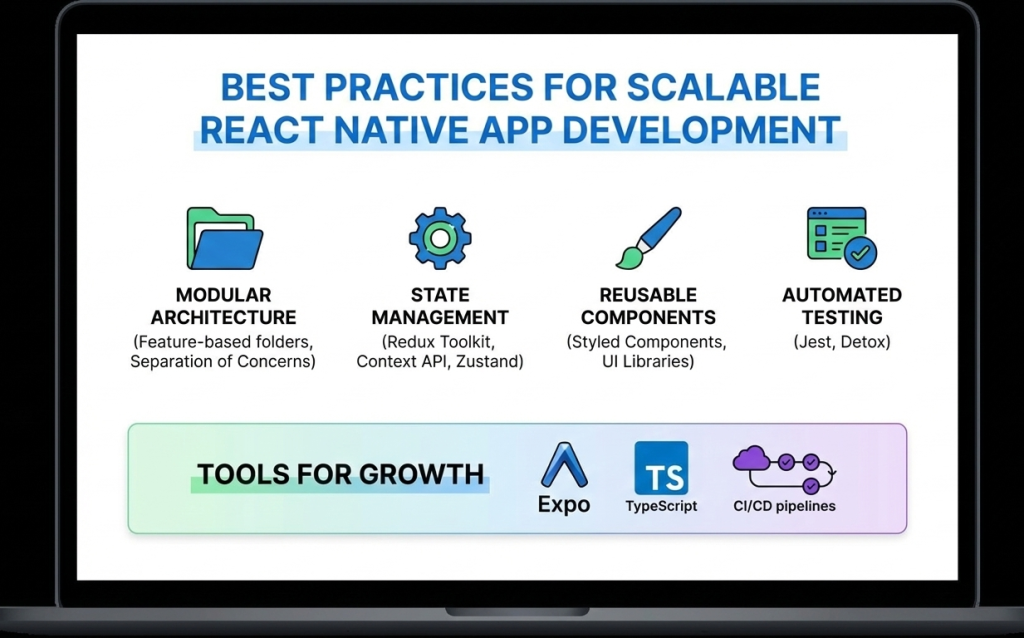
Best practices for scalable React Native app development
React native doveploment

Best Practices for Scalable and High-Performance React Native App Development

Introduction As mobile applications continue to grow in complexity and scale, developers must focus not only on building features but also on maintaining performance, scalability, and code quality. React Native development makes cross-platform mobile app creation faster and more efficient, but long-term success depends heavily on following proven best practices. Without proper architecture and optimization, React Native apps can become difficult to maintain, slow to scale, and prone to performance issues. On the other hand, applications built with best practices in mind remain stable, secure, and adaptable to future requirements. In this blog, we’ll explore the best practices for scalable and high-performance React Native app development, covering architecture, performance optimization, state management, security, and maintainability. 1. Use a Clean and Scalable Project Architecture A well-structured architecture is the foundation of any successful React Native application. Best practices include: Organizing code by features instead of file types Separating UI, business logic, and services Keeping reusable components in a shared directory A clean architecture improves collaboration, simplifies debugging, and makes scaling easier. 2. Break UI into Reusable Components React Native is built around a component-based architecture. Reusable components: Reduce code duplication Improve readability Speed up development Components should be small, focused, and reusable across the application. 3. Optimize Performance from the Start Performance optimization should not be an afterthought. Key techniques include: Using FlatList instead of ScrollView for long lists Avoiding unnecessary re-renders with React.memo Minimizing heavy computations on the UI thread Optimizing images and assets Using the Hermes engine also improves startup time and memory usage. 4. Choose the Right State Management Strategy State management plays a crucial role in scalability. Options include: Context API for small apps Redux for large and complex applications Zustand for lightweight and modern state handling Choosing the right approach prevents unnecessary complexity. 5. Handle API Calls and Data Caching Efficiently Efficient data handling improves performance and user experience. Best practices: Use Axios or Fetch consistently Implement error handling and retries Cache data when possible Avoid unnecessary API calls Libraries like React Query can simplify data fetching and caching. 6. Follow Platform-Specific Design Guidelines While React Native is cross-platform, Android and iOS users have different design expectations. Best practices include: Using platform-specific components when needed Handling gestures and navigation appropriately Testing UI on multiple screen sizes Respecting platform guidelines improves user satisfaction. 7. Secure Your React Native Application Security is critical in mobile app development. Best practices include: Avoid storing sensitive data in plain text Use secure storage solutions Implement authentication and authorization properly Use HTTPS and encrypted APIs Security should be integrated into every stage of development. 8. Write Tests and Automate Quality Assurance Testing ensures long-term stability. Important testing methods: Unit testing with Jest Component testing with React Native Testing Library End-to-end testing for critical flows Automated testing reduces bugs and improves release confidence. 9. Monitor Performance and Errors Monitoring helps identify issues before they affect users. Tools such as: Flipper Sentry Firebase Performance Monitoring These tools provide insights into crashes, performance bottlenecks, and user behavior. 10. Keep Dependencies Updated Outdated dependencies can cause security vulnerabilities and compatibility issues. Best practices: Regularly update React Native versions Remove unused libraries Review changelogs before upgrades Keeping dependencies updated ensures stability and security. Future-Ready React Native Development React Native continues to evolve with improved architecture, better performance, and stronger community support. Following best practices ensures your application remains adaptable to future updates and scaling requirements. Conclusion React Native development offers immense potential for building scalable and high-performance mobile applications. However, success depends on following best practices related to architecture, performance, security, and maintainability. By implementing these best practices from the beginning, developers can build robust React Native apps that deliver excellent user experiences and stand the test of time. Frequently Asked Questions (FAQs) 1. Why are best practices important in React Native development? Best practices ensure scalability, performance, maintainability, and long-term success of React Native applications. 2. How can I improve React Native app performance? Optimizing lists, avoiding unnecessary re-renders, using Hermes, and monitoring performance tools can significantly improve performance. 3. Which state management is best for React Native apps? It depends on app complexity. Context API works for small apps, while Redux or Zustand suits larger applications. 4. Is React Native secure for enterprise apps? Yes, when proper security measures like encrypted storage, secure APIs, and authentication are implemented. 5. How do I scale a React Native app efficiently? Using clean architecture, modular components, proper state management, and performance optimization ensures smooth scalability. 6. Are React Native apps future-proof? Yes, with continuous updates, strong community support, and best practices, React Native apps are future-ready. Connect with us: https://www.facebook.com/profile.php?id=61555452386126  
Essential tools and libraries for React Native development
React native doveploment

Essential Tools and Libraries for React Native Development

Introduction React Native development has gained massive popularity due to its ability to build cross-platform mobile applications using a single JavaScript codebase. However, the real strength of React Native lies not only in the framework itself but also in its rich ecosystem of tools and libraries that enhance productivity, performance, and scalability. From UI components and navigation to state management and testing, React Native offers a wide range of tools that help developers build high-quality applications efficiently. Choosing the right tools and libraries is crucial for maintaining clean code, improving performance, and ensuring long-term scalability. In this blog, we’ll explore the essential tools and libraries for React Native development, explain their use cases, and help you select the best stack for your next mobile app project. Why Tools and Libraries Matter in React Native React Native provides the foundation for building mobile apps, but real-world applications require much more than basic components. Tools and libraries help developers: Speed up development Maintain clean and modular code Improve UI and user experience Handle complex state and data flow Debug and test applications efficiently Using well-maintained and community-supported tools reduces technical debt and ensures better app stability. Core Development Tools for React Native 1. Node.js and Package Managers Node.js is required to run React Native projects. Developers typically use: npm Yarn These package managers help install dependencies, manage versions, and run scripts efficiently. 2. React Native CLI The React Native CLI provides full control over native code and project configuration. It is ideal for developers building production-ready apps that require custom native modules or advanced configurations. 3. Expo Expo simplifies React Native development by providing preconfigured tools and APIs. It is excellent for beginners and rapid prototyping. Key benefits of Expo include: Minimal setup Built-in APIs for camera, sensors, and notifications Fast development and testing UI Component Libraries UI libraries save time by offering ready-made, customizable components. 1. React Native Paper A Material Design-based UI library that provides consistent and visually appealing components. 2. NativeBase A flexible UI library that supports both Android and iOS with customizable components. 3. React Native Elements A cross-platform UI toolkit with reusable components and simple theming. Navigation Libraries Navigation is a core feature of mobile applications. React Navigation The most popular navigation library for React Native, supporting: Stack navigation Tab navigation Drawer navigation It is flexible, well-documented, and widely adopted. State Management Libraries As applications grow, managing state becomes complex. 1. Redux A predictable state container ideal for large-scale applications. 2. Zustand A lightweight and modern alternative to Redux with minimal boilerplate. 3. Context API Built-in solution suitable for small to medium-sized apps. Networking and API Handling Efficient API communication is critical for modern apps. Axios – Simplifies HTTP requests and error handling Fetch API – Built-in but less feature-rich than Axios Axios is widely preferred for React Native development. Testing Tools for React Native Testing ensures app reliability and stability. 1. Jest Used for unit testing JavaScript logic and components. 2. React Native Testing Library Helps test UI components from a user’s perspective. Debugging Tools Debugging tools help identify and fix issues quickly. 1. Flipper A powerful debugging tool supported by Meta for inspecting layout, network requests, and logs. 2. React DevTools Helps inspect component hierarchy and props. Performance Optimization Tools To ensure smooth performance: Why Did You Render – Detects unnecessary re-renders Hermes Engine – Improves app startup time and memory usage Best Practices for Choosing Tools Prefer well-maintained libraries Check community adoption Avoid overloading the project with unnecessary dependencies Ensure compatibility with the latest React Native version Conclusion React Native development becomes significantly more powerful when paired with the right tools and libraries. From UI components and navigation to testing and debugging, the React Native ecosystem offers everything needed to build scalable, high-performance mobile applications. Choosing the right combination of tools not only speeds up development but also ensures better code quality, maintainability, and long-term success. Frequently Asked Questions (FAQs) 1. What are the most important tools for React Native development? Essential tools include Node.js, React Native CLI or Expo, React Navigation, state management libraries, and testing tools like Jest. 2. Is Expo better than React Native CLI? Expo is great for rapid development and beginners, while React Native CLI offers more control for advanced and production-level apps. 3. Which UI library is best for React Native? Popular choices include React Native Paper, NativeBase, and React Native Elements, depending on design needs. 4. Do I need Redux for every React Native app? No, Redux is best for complex apps. Smaller apps can use Context API or Zustand. 5. How can I debug React Native apps effectively? Using Flipper, React DevTools, and proper logging practices helps debug apps efficiently. 6. Are third-party libraries safe to use in React Native? Yes, as long as they are actively maintained, well-documented, and widely adopted. Connect with us: https://www.facebook.com/profile.php?id=61555452386126
React native doveploment

React Native vs Flutter: Which Framework Is Better for Cross-Platform Mobile App Development?

Introduction Cross-platform mobile app development has transformed the way applications are built, allowing businesses to reach users on multiple platforms with reduced effort. Instead of creating separate apps for Android and iOS, developers can now rely on frameworks that support both platforms using a single codebase. Among the many options available, React Native and Flutter have emerged as the two most popular and powerful frameworks. Both are backed by major tech companies—React Native by Meta (Facebook) and Flutter by Google—and both promise fast development and high performance. However, choosing between React Native and Flutter can be challenging. Each framework has its strengths, limitations, and ideal use cases. In this blog, we provide an in-depth comparison of React Native vs Flutter, covering performance, development experience, ecosystem, cost, and long-term scalability to help you make an informed decision. Overview of React Native React Native is an open-source framework that allows developers to build mobile applications using JavaScript and React. It uses native components under the hood, ensuring that apps feel and perform like native applications. Key characteristics of React Native include: Component-based architecture Reusable UI components Near-native performance Strong community support React Native is widely adopted and trusted by companies such as Facebook, Instagram, Shopify, and Tesla. Overview of Flutter Flutter is a UI toolkit developed by Google that allows developers to build natively compiled applications using the Dart programming language. Instead of relying on native components, Flutter renders everything using its own high-performance rendering engine. Key characteristics of Flutter include: Single codebase for mobile, web, and desktop Highly customizable UI High performance due to direct compilation Rich widget library Flutter is gaining popularity for its visually rich and consistent user interfaces. Programming Language Comparison One of the most noticeable differences between React Native and Flutter is the programming language. React Native: JavaScript (widely used, large talent pool) Flutter: Dart (less common, steeper learning curve) JavaScript’s popularity gives React Native an advantage in terms of hiring, learning resources, and community support. Performance Comparison Flutter often has a slight edge in raw performance because it compiles directly to native code and uses its own rendering engine. This allows for smooth animations and consistent UI performance. React Native, on the other hand, uses a bridge to communicate between JavaScript and native components. While this can introduce slight overhead, modern improvements in React Native have significantly narrowed the performance gap. For most business applications, both frameworks offer excellent performance. Development Speed and Productivity React Native allows developers to reuse code between web and mobile applications if they are already using React. Features like Hot Reloading and reusable components enhance productivity. Flutter also offers Hot Reload and fast development, but learning Dart and Flutter’s widget system may take additional time for beginners. Overall, React Native offers a faster onboarding experience for teams familiar with JavaScript. UI and Customization Flutter excels in UI customization. Its widget-based system gives developers full control over design and animations, making it ideal for visually complex applications. React Native relies on native UI components, which ensures platform consistency but may require additional effort for deep customization. If design consistency across platforms is critical, Flutter may be the better choice. Community and Ecosystem React Native has been around longer and has a more mature ecosystem. It offers: Thousands of third-party libraries Extensive documentation Large developer community Flutter’s ecosystem is growing rapidly but is still smaller compared to React Native. Cost and Maintenance React Native’s single codebase and JavaScript-based development reduce both development and maintenance costs. The availability of developers also helps keep costs lower. Flutter can be cost-effective as well, but finding experienced Dart developers may be more challenging. Use Case Comparison Choose React Native if: Your team already uses JavaScript or React You want faster development and easier hiring You are building business-focused apps Choose Flutter if: You need highly customized UI You want consistent design across platforms Performance and animations are a top priority Long-Term Scalability Both frameworks are backed by strong organizations and active communities. React Native benefits from its long history and massive adoption, while Flutter is evolving rapidly with support for web and desktop platforms. Both are safe choices for long-term projects. Conclusion The choice between React Native and Flutter depends on your project requirements, team expertise, and long-term goals. React Native offers faster development, a larger ecosystem, and easier onboarding, while Flutter shines in UI customization and performance. For most startups and business applications, React Native development remains a highly practical and reliable choice. Frequently Asked Questions (FAQs) 1. Which is better: React Native or Flutter? Neither is universally better. React Native is ideal for JavaScript developers and faster development, while Flutter excels in UI customization and performance. 2. Is React Native easier to learn than Flutter? Yes, React Native is generally easier to learn for developers familiar with JavaScript and React. 3. Does Flutter perform better than React Native? Flutter can offer slightly better performance in animation-heavy apps, but the difference is minimal for most use cases. 4. Which framework is more cost-effective? React Native is often more cost-effective due to a larger developer pool and easier maintenance. 5. Can both frameworks be used for large apps? Yes, both React Native and Flutter are suitable for large-scale and enterprise applications. 6. Which framework has better community support? React Native currently has a larger and more mature community compared to Flutter. Connect with us: https://www.facebook.com/profile.php?id=61555452386126

How would you like me to respond?

Select a personality for your AI assistant

Normal
Happy
Sad
Angry

Your selection will affect how the AI assistant responds to your messages

Chat Assistant

Let's discuss your project!

Hear from our clients and why 3000+ businesses trust TechOTD

Tell us what you need, and we'll get back with a cost and timeline estimate

Scroll to Top